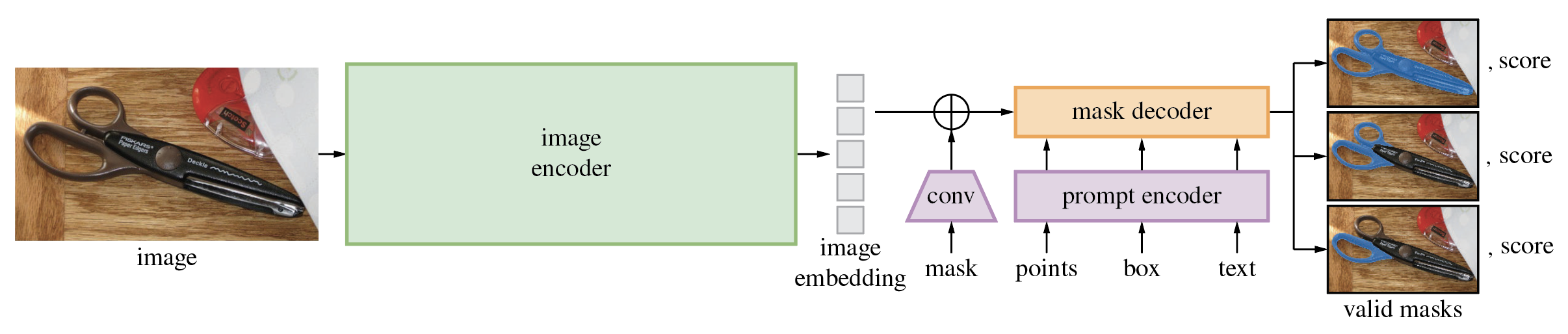
{
  "id": 413159,
  "title": "Fine-tuning SAM",
  "url": "/competitions/vesuvius-challenge-ink-detection/discussion/413159",
  "author_name": "",
  "post_date": "2023-05-27T09:00:05.723875100Z",
  "votes": 7,
  "comment_count": 4,
  "views": 0,
  "content": "<p><img src=\"https://raw.githubusercontent.com/facebookresearch/segment-anything/main/assets/model_diagram.png\" alt=\"SAM Archi\"></p>\n<p>It is possible to fine-tune SAM using the following workflow:</p>\n<ol>\n<li>Use an annotation tool. For example, you can use <a href=\"https://labelstud.io/\" target=\"_blank\">LabelStudio</a>. I highly recommend using the Docker way, i.e. </li>\n</ol>\n<pre><code>docker run -it -p 8080:8080 -v ``/mydata:/label-studio/data heartexlabs/label-studio:latest\n</code></pre>\n<ol>\n<li><p>Next, once you have an annotation tool, create masks for a few images you want to use as a fine-tuning dataset and export them from the tool.</p></li>\n<li><p>You can use the following <a href=\"https://colab.research.google.com/drive/1F6uRommb3GswcRlPZWpkAQRMVNdVH7Ww?usp=sharing.\" target=\"_blank\">notebook</a> for example. You will need to adapt your data to the code in the notebook.</p></li>\n</ol>\n<p><img src=\"https://raw.githubusercontent.com/ZrrSkywalker/Personalize-SAM/main/figs/fig_persam.png\" alt=\"PerSAM workflow\"></p>\n<p>There is also a new variant of <strong>SAM</strong>, <strong>PerSAM</strong> that works with one-shot learning (so no need to fine-tune!) or <strong>PerSAM-F</strong> that can be fine-tuned using very limited data.</p>\n<p>You can find more details in the <a href=\"https://github.com/ZrrSkywalker/Personalize-SAM\" target=\"_blank\">original repo</a> or in the following <a href=\"https://github.com/NielsRogge/Transformers-Tutorials/tree/master/PerSAM\" target=\"_blank\">notebooks</a>. </p>\n<p>Thanks to <a href=\"https://github.com/NielsRogge\" target=\"_blank\">Niels Rogge</a> for his great repo!</p>\n<p>I will share more details once I have finished trying the procedure on this competition's data, stay tuned!</p>",
  "messages": [
    {
      "id": "2276851",
      "postDate": "05/27/2023 09:00:05",
      "content": "<p><img src=\"https://raw.githubusercontent.com/facebookresearch/segment-anything/main/assets/model_diagram.png\" alt=\"SAM Archi\"></p>\n<p>It is possible to fine-tune SAM using the following workflow:</p>\n<ol>\n<li>Use an annotation tool. For example, you can use <a href=\"https://labelstud.io/\" target=\"_blank\">LabelStudio</a>. I highly recommend using the Docker way, i.e. </li>\n</ol>\n<pre><code>docker run -it -p 8080:8080 -v ``/mydata:/label-studio/data heartexlabs/label-studio:latest\n</code></pre>\n<ol>\n<li><p>Next, once you have an annotation tool, create masks for a few images you want to use as a fine-tuning dataset and export them from the tool.</p></li>\n<li><p>You can use the following <a href=\"https://colab.research.google.com/drive/1F6uRommb3GswcRlPZWpkAQRMVNdVH7Ww?usp=sharing.\" target=\"_blank\">notebook</a> for example. You will need to adapt your data to the code in the notebook.</p></li>\n</ol>\n<p><img src=\"https://raw.githubusercontent.com/ZrrSkywalker/Personalize-SAM/main/figs/fig_persam.png\" alt=\"PerSAM workflow\"></p>\n<p>There is also a new variant of <strong>SAM</strong>, <strong>PerSAM</strong> that works with one-shot learning (so no need to fine-tune!) or <strong>PerSAM-F</strong> that can be fine-tuned using very limited data.</p>\n<p>You can find more details in the <a href=\"https://github.com/ZrrSkywalker/Personalize-SAM\" target=\"_blank\">original repo</a> or in the following <a href=\"https://github.com/NielsRogge/Transformers-Tutorials/tree/master/PerSAM\" target=\"_blank\">notebooks</a>. </p>\n<p>Thanks to <a href=\"https://github.com/NielsRogge\" target=\"_blank\">Niels Rogge</a> for his great repo!</p>\n<p>I will share more details once I have finished trying the procedure on this competition's data, stay tuned!</p>",
      "rawMarkdown": "![SAM Archi](https://raw.githubusercontent.com/facebookresearch/segment-anything/main/assets/model_diagram.png)\n\nIt is possible to fine-tune SAM using the following workflow:\n\n1. Use an annotation tool. For example, you can use [LabelStudio](https://labelstud.io/). I highly recommend using the Docker way, i.e. \n\n```bash\ndocker run -it -p 8080:8080 -v `pwd`/mydata:/label-studio/data heartexlabs/label-studio:latest\n```\n\n2. Next, once you have an annotation tool, create masks for a few images you want to use as a fine-tuning dataset and export them from the tool.\n\n3. You can use the following [notebook](https://colab.research.google.com/drive/1F6uRommb3GswcRlPZWpkAQRMVNdVH7Ww?usp=sharing.) for example. You will need to adapt your data to the code in the notebook.\n\n![PerSAM workflow](https://raw.githubusercontent.com/ZrrSkywalker/Personalize-SAM/main/figs/fig_persam.png)\n\n\nThere is also a new variant of **SAM**, **PerSAM** that works with one-shot learning (so no need to fine-tune!) or **PerSAM-F** that can be fine-tuned using very limited data.\n\nYou can find more details in the [original repo](https://github.com/ZrrSkywalker/Personalize-SAM) or in the following [notebooks](https://github.com/NielsRogge/Transformers-Tutorials/tree/master/PerSAM). \n\nThanks to [Niels Rogge](https://github.com/NielsRogge) for his great repo!\n\n\nI will share more details once I have finished trying the procedure on this competition's data, stay tuned!",
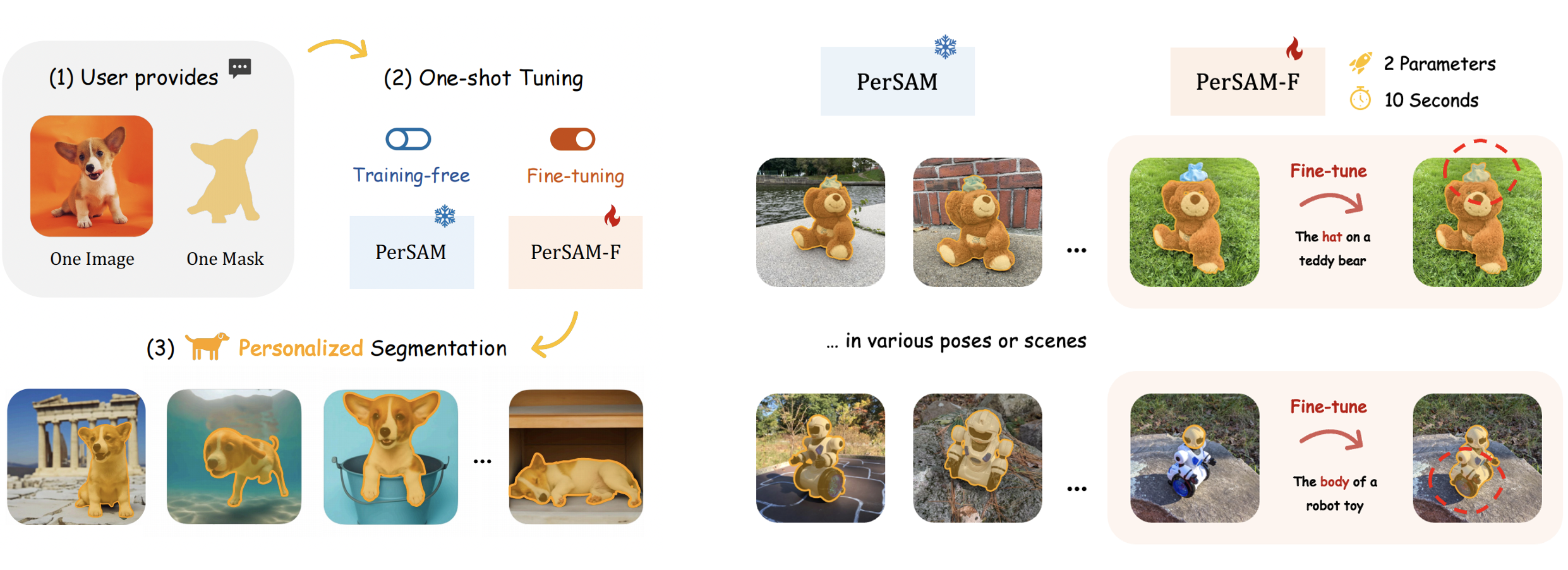
      "votes": null
    },
    {
      "id": "2277383",
      "postDate": "05/27/2023 17:10:03",
      "content": "<p>[<strong>UPDATE</strong>] For LabelStudio running the Docker command, you might need to give the data folder permissions for it to work:</p>\n<p><code>chmod -R 777 mydata/</code></p>\n<p>Or you can run the command as your user id. </p>\n<p>More details here: <a href=\"https://github.com/heartexlabs/label-studio/issues/3465\" target=\"_blank\">https://github.com/heartexlabs/label-studio/issues/3465</a></p>",
      "rawMarkdown": "[**UPDATE**] For LabelStudio running the Docker command, you might need to give the data folder permissions for it to work:\n\n`chmod -R 777 mydata/`\n\nOr you can run the command as your user id. \n\nMore details here: https://github.com/heartexlabs/label-studio/issues/3465",
      "votes": null
    },
    {
      "id": "2277395",
      "postDate": "05/27/2023 17:23:26",
      "content": "<p>Here is how an annotation might look like in LabelStudio: </p>\n<p><img src=\"https://www.googleapis.com/download/storage/v1/b/kaggle-forum-message-attachments/o/inbox%2F172860%2F84a723a1db45e027fd0acadb0c3aab71%2FScreenshot%20from%202023-05-27%2019-22-02.png?generation=1685208133328851&amp;alt=media\" alt=\"sample ink mask\"></p>\n<p>Notice that the mask is very badly drawn here and far from the quality of the given mask. It is just an illustration of the process, so keep that in mind. 👌</p>",
      "rawMarkdown": "Here is how an annotation might look like in LabelStudio: \n\n![sample ink mask](https://www.googleapis.com/download/storage/v1/b/kaggle-forum-message-attachments/o/inbox%2F172860%2F84a723a1db45e027fd0acadb0c3aab71%2FScreenshot%20from%202023-05-27%2019-22-02.png?generation=1685208133328851&alt=media)\n\nNotice that the mask is very badly drawn here and far from the quality of the given mask. It is just an illustration of the process, so keep that in mind. 👌",
      "votes": null
    },
    {
      "id": "2277401",
      "postDate": "05/27/2023 17:28:19",
      "content": "<p>Next, you can export the annotated ink mask as a mask image:</p>\n<p><img src=\"https://www.googleapis.com/download/storage/v1/b/kaggle-forum-message-attachments/o/inbox%2F172860%2Fc9e6d3d272a13300d94fd007cb0f32ba%2FScreenshot%20from%202023-05-27%2019-27-27.png?generation=1685208477342291&amp;alt=media\" alt=\"export mask\"></p>",
      "rawMarkdown": "Next, you can export the annotated ink mask as a mask image:\n\n![export mask](https://www.googleapis.com/download/storage/v1/b/kaggle-forum-message-attachments/o/inbox%2F172860%2Fc9e6d3d272a13300d94fd007cb0f32ba%2FScreenshot%20from%202023-05-27%2019-27-27.png?generation=1685208477342291&alt=media)",
      "votes": null
    },
    {
      "id": "2277499",
      "postDate": "05/27/2023 20:19:34",
      "content": "<p>Then, you can run: <code>python persam.fy --outdir outputs</code> for a one-shot.</p>\n<p>(you will need to create the directory if it isn't there)</p>\n<p>You should get something like this:</p>\n<p><img src=\"https://www.googleapis.com/download/storage/v1/b/kaggle-forum-message-attachments/o/inbox%2F172860%2Fb98896bda4cfc028179d4c77fa1831c2%2FScreenshot%20from%202023-05-27%2022-15-15.png?generation=1685218665715965&amp;alt=media\" alt=\"persam one-shot\"></p>\n<p>and the result something like this:</p>\n<p><img src=\"https://www.googleapis.com/download/storage/v1/b/kaggle-forum-message-attachments/o/inbox%2F172860%2F1c5530125fd513357a2e9d03d969237b%2FScreenshot%20from%202023-05-27%2022-19-04.png?generation=1685218763675231&amp;alt=media\" alt=\"persam generated mask\"></p>",
      "rawMarkdown": "Then, you can run: `python persam.fy --outdir outputs` for a one-shot.\n\n(you will need to create the directory if it isn't there)\n\nYou should get something like this:\n\n![persam one-shot](https://www.googleapis.com/download/storage/v1/b/kaggle-forum-message-attachments/o/inbox%2F172860%2Fb98896bda4cfc028179d4c77fa1831c2%2FScreenshot%20from%202023-05-27%2022-15-15.png?generation=1685218665715965&alt=media)\n\nand the result something like this:\n\n![persam generated mask](https://www.googleapis.com/download/storage/v1/b/kaggle-forum-message-attachments/o/inbox%2F172860%2F1c5530125fd513357a2e9d03d969237b%2FScreenshot%20from%202023-05-27%2022-19-04.png?generation=1685218763675231&alt=media)",
      "votes": null
    }
  ],
  "comments": [
    {
      "id": 2277383,
      "author_name": "yassinealouini",
      "author_url": "",
      "post_date": "05/27/2023 17:10:03",
      "content": "<p>[<strong>UPDATE</strong>] For LabelStudio running the Docker command, you might need to give the data folder permissions for it to work:</p>\n<p><code>chmod -R 777 mydata/</code></p>\n<p>Or you can run the command as your user id. </p>\n<p>More details here: <a href=\"https://github.com/heartexlabs/label-studio/issues/3465\" target=\"_blank\">https://github.com/heartexlabs/label-studio/issues/3465</a></p>",
      "votes": null,
      "replies": []
    },
    {
      "id": 2277395,
      "author_name": "yassinealouini",
      "author_url": "",
      "post_date": "05/27/2023 17:23:26",
      "content": "<p>Here is how an annotation might look like in LabelStudio: </p>\n<p><img src=\"https://www.googleapis.com/download/storage/v1/b/kaggle-forum-message-attachments/o/inbox%2F172860%2F84a723a1db45e027fd0acadb0c3aab71%2FScreenshot%20from%202023-05-27%2019-22-02.png?generation=1685208133328851&amp;alt=media\" alt=\"sample ink mask\"></p>\n<p>Notice that the mask is very badly drawn here and far from the quality of the given mask. It is just an illustration of the process, so keep that in mind. 👌</p>",
      "votes": null,
      "replies": [
        {
          "id": 2277401,
          "author_name": "yassinealouini",
          "author_url": "",
          "post_date": "05/27/2023 17:28:19",
          "content": "<p>Next, you can export the annotated ink mask as a mask image:</p>\n<p><img src=\"https://www.googleapis.com/download/storage/v1/b/kaggle-forum-message-attachments/o/inbox%2F172860%2Fc9e6d3d272a13300d94fd007cb0f32ba%2FScreenshot%20from%202023-05-27%2019-27-27.png?generation=1685208477342291&amp;alt=media\" alt=\"export mask\"></p>",
          "votes": null,
          "replies": [
            {
              "id": 2277499,
              "author_name": "yassinealouini",
              "author_url": "",
              "post_date": "05/27/2023 20:19:34",
              "content": "<p>Then, you can run: <code>python persam.fy --outdir outputs</code> for a one-shot.</p>\n<p>(you will need to create the directory if it isn't there)</p>\n<p>You should get something like this:</p>\n<p><img src=\"https://www.googleapis.com/download/storage/v1/b/kaggle-forum-message-attachments/o/inbox%2F172860%2Fb98896bda4cfc028179d4c77fa1831c2%2FScreenshot%20from%202023-05-27%2022-15-15.png?generation=1685218665715965&amp;alt=media\" alt=\"persam one-shot\"></p>\n<p>and the result something like this:</p>\n<p><img src=\"https://www.googleapis.com/download/storage/v1/b/kaggle-forum-message-attachments/o/inbox%2F172860%2F1c5530125fd513357a2e9d03d969237b%2FScreenshot%20from%202023-05-27%2022-19-04.png?generation=1685218763675231&amp;alt=media\" alt=\"persam generated mask\"></p>",
              "votes": null,
              "replies": []
            }
          ]
        }
      ]
    }
  ],
  "raw_markdown_by_id": {
    "2276851": "![SAM Archi](https://raw.githubusercontent.com/facebookresearch/segment-anything/main/assets/model_diagram.png)\n\nIt is possible to fine-tune SAM using the following workflow:\n\n1. Use an annotation tool. For example, you can use [LabelStudio](https://labelstud.io/). I highly recommend using the Docker way, i.e. \n\n```bash\ndocker run -it -p 8080:8080 -v `pwd`/mydata:/label-studio/data heartexlabs/label-studio:latest\n```\n\n2. Next, once you have an annotation tool, create masks for a few images you want to use as a fine-tuning dataset and export them from the tool.\n\n3. You can use the following [notebook](https://colab.research.google.com/drive/1F6uRommb3GswcRlPZWpkAQRMVNdVH7Ww?usp=sharing.) for example. You will need to adapt your data to the code in the notebook.\n\n![PerSAM workflow](https://raw.githubusercontent.com/ZrrSkywalker/Personalize-SAM/main/figs/fig_persam.png)\n\n\nThere is also a new variant of **SAM**, **PerSAM** that works with one-shot learning (so no need to fine-tune!) or **PerSAM-F** that can be fine-tuned using very limited data.\n\nYou can find more details in the [original repo](https://github.com/ZrrSkywalker/Personalize-SAM) or in the following [notebooks](https://github.com/NielsRogge/Transformers-Tutorials/tree/master/PerSAM). \n\nThanks to [Niels Rogge](https://github.com/NielsRogge) for his great repo!\n\n\nI will share more details once I have finished trying the procedure on this competition's data, stay tuned!",
    "2277383": "[**UPDATE**] For LabelStudio running the Docker command, you might need to give the data folder permissions for it to work:\n\n`chmod -R 777 mydata/`\n\nOr you can run the command as your user id. \n\nMore details here: https://github.com/heartexlabs/label-studio/issues/3465",
    "2277395": "Here is how an annotation might look like in LabelStudio: \n\n![sample ink mask](https://www.googleapis.com/download/storage/v1/b/kaggle-forum-message-attachments/o/inbox%2F172860%2F84a723a1db45e027fd0acadb0c3aab71%2FScreenshot%20from%202023-05-27%2019-22-02.png?generation=1685208133328851&alt=media)\n\nNotice that the mask is very badly drawn here and far from the quality of the given mask. It is just an illustration of the process, so keep that in mind. 👌",
    "2277401": "Next, you can export the annotated ink mask as a mask image:\n\n![export mask](https://www.googleapis.com/download/storage/v1/b/kaggle-forum-message-attachments/o/inbox%2F172860%2Fc9e6d3d272a13300d94fd007cb0f32ba%2FScreenshot%20from%202023-05-27%2019-27-27.png?generation=1685208477342291&alt=media)",
    "2277499": "Then, you can run: `python persam.fy --outdir outputs` for a one-shot.\n\n(you will need to create the directory if it isn't there)\n\nYou should get something like this:\n\n![persam one-shot](https://www.googleapis.com/download/storage/v1/b/kaggle-forum-message-attachments/o/inbox%2F172860%2Fb98896bda4cfc028179d4c77fa1831c2%2FScreenshot%20from%202023-05-27%2022-15-15.png?generation=1685218665715965&alt=media)\n\nand the result something like this:\n\n![persam generated mask](https://www.googleapis.com/download/storage/v1/b/kaggle-forum-message-attachments/o/inbox%2F172860%2F1c5530125fd513357a2e9d03d969237b%2FScreenshot%20from%202023-05-27%2022-19-04.png?generation=1685218763675231&alt=media)"
  },
  "source": "meta"
}