
I received the following error after 7 hours of GPU usage.
\n\n
What does this mean? How to avoid? And most importantly, how do I recover the lost 7 hours?
", "messages": [ { "id": "924643", "postDate": "07/11/2020 14:56:50", "content": "I received the following error after 7 hours of GPU usage.
\n\n
What does this mean? How to avoid? And most importantly, how do I recover the lost 7 hours?
", "rawMarkdown": "I received the following error after 7 hours of GPU usage.\n\n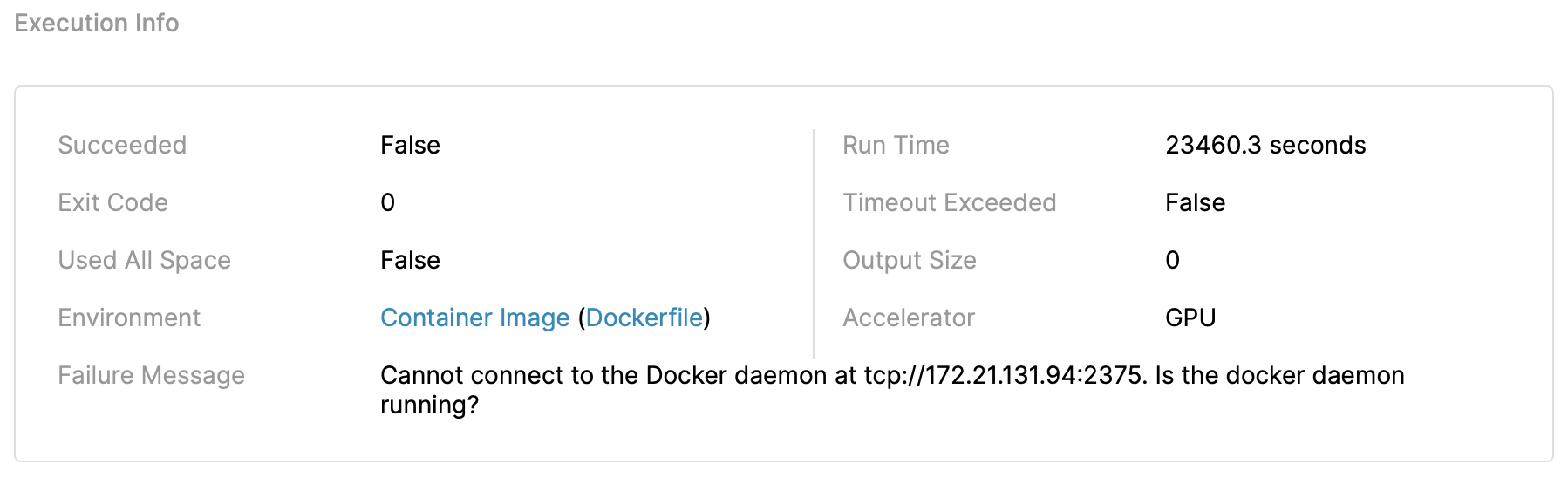\n\n\nWhat does this mean? How to avoid? And most importantly, how do I recover the lost 7 hours?", "votes": null }, { "id": "924752", "postDate": "07/11/2020 16:01:19", "content": "Others are also facing the same issue.
\n\nPerhaps open a ticket.
", "rawMarkdown": "Others are also facing the [same issue](https://www.kaggle.com/c/global-wheat-detection/discussion/153971).\n\nPerhaps open a [ticket](https://github.com/Kaggle/docker-python/issues).", "votes": null }, { "id": "925115", "postDate": "07/11/2020 20:13:35", "content": "Posted here. Hope for an early revert.
", "rawMarkdown": "Posted [here](https://github.com/Kaggle/docker-python/issues/851). Hope for an early revert.", "votes": null }, { "id": "926030", "postDate": "07/12/2020 12:59:55", "content": "I believe it’s an internal docket error. I believe Kaggle kernels are run inside rocker environment and there is not much you can do about it.
", "rawMarkdown": "I believe it’s an internal docket error. I believe Kaggle kernels are run inside rocker environment and there is not much you can do about it.", "votes": null }, { "id": "931033", "postDate": "07/15/2020 23:01:47", "content": "@rohitagarwal Sorry this affected you. This happens around 0.01% of the time, usually because the machine running your notebook was taken down for maintenance we had no control over. At some point in the future this will improve, and I keep bugging the team running that effort for when they'll fix it.
\n\nThe solution is just to try again, the chances you hit it again should be very unlikely.
", "rawMarkdown": "rohitagarwal Sorry this affected you. This happens around 0.01% of the time, usually because the machine running your notebook was taken down for maintenance we had no control over. At some point in the future this will improve, and I keep bugging the team running that effort for when they'll fix it.\n\nThe solution is just to try again, the chances you hit it again should be very unlikely.", "votes": null }, { "id": "936274", "postDate": "07/20/2020 05:46:20", "content": "I just had this issue twice in a row when committing two versions of a kernel at the same time - Even though they started at a different time, they failed with the docker daemon error message at exactly the same time after around 8 hours. I cannot test a third time, as all my GPU is gone, but could there be any other reason this is caused?
", "rawMarkdown": "I just had this issue twice in a row when committing two versions of a kernel at the same time - Even though they started at a different time, they failed with the docker daemon error message at exactly the same time after around 8 hours. I cannot test a third time, as all my GPU is gone, but could there be any other reason this is caused?", "votes": null }, { "id": "936687", "postDate": "07/20/2020 12:54:24", "content": "Please share the notebooks with me so I can look deeper.
", "rawMarkdown": "Please share the notebooks with me so I can look deeper.", "votes": null }, { "id": "949977", "postDate": "07/29/2020 05:20:27", "content": "Thanks, just shared a notebook with you - Perhaps it's because of RAM or Disk usage.
\n\nEdit: As the notebook ran for 30500 seconds (8.3 hours), I guess it's not to big of a problem, I'll just make sure to time my notebooks to finish in 8 hours, not 9.
", "rawMarkdown": "Thanks, just shared a notebook with you - Perhaps it's because of RAM or Disk usage. \n\nEdit: As the notebook ran for 30500 seconds (8.3 hours), I guess it's not to big of a problem, I'll just make sure to time my notebooks to finish in 8 hours, not 9.", "votes": null }, { "id": "950656", "postDate": "07/29/2020 14:23:18", "content": "@muennighoff The runtime isn't a problem, it looks like you likely ran into a rare VM failure that happens 0.018% of the time. Re-running your notebook should work fine.
", "rawMarkdown": "muennighoff The runtime isn't a problem, it looks like you likely ran into a rare VM failure that happens 0.018% of the time. Re-running your notebook should work fine.", "votes": null }, { "id": "950802", "postDate": "07/29/2020 16:21:00", "content": "Looks like this may also be caused by using too much non /kaggle/working disk space (like /tmp). We're looking into how to fix this, but please be aware you may not want to use more than say 60GBs of /tmp.
", "rawMarkdown": "Looks like this may also be caused by using too much non /kaggle/working disk space (like /tmp). We're looking into how to fix this, but please be aware you may not want to use more than say 60GBs of /tmp.", "votes": null }, { "id": "953895", "postDate": "08/01/2020 08:18:00", "content": "@herbison Thanks for taking a look at it. I just ran another round and it failed with the same error. If your statement is correct, the probability of that happenning twice in a row would be 0.018^2 = 0.000324%. I'm pretty sure it's related to the disk crashing when it's too full, as I'm saving 20 2.2GB checkpoints. Could you just confirm what the limit is? I think it was around 90GB.
", "rawMarkdown": "herbison Thanks for taking a look at it. I just ran another round and it failed with the same error. If your statement is correct, the probability of that happenning twice in a row would be 0.018^2 = 0.000324%. I'm pretty sure it's related to the disk crashing when it's too full, as I'm saving 20 2.2GB checkpoints. Could you just confirm what the limit is? I think it was around 90GB.", "votes": null }, { "id": "954219", "postDate": "08/01/2020 14:05:06", "content": "Right I analyzed this after I saw this issue again, the statistic I gave was because that's the rate of failure of this type I saw in our systems but I've since confirmed this is caused by filling up the temp disk.
\n\nI commented about that in this same post when we discussed it before. I've mentioned before but the 90GB is not guaranteed, it's temp space that may be consumed by system files as well. I'm surprised you're hitting the limit with only 40GB of writes though, are you sure you're not writing more?
", "rawMarkdown": "Right I analyzed this after I saw this issue again, the statistic I gave was because that's the rate of failure of this type I saw in our systems but I've since confirmed this is caused by filling up the temp disk.\n\nI commented about that in this same post when we discussed it before. I've mentioned before but the 90GB is not guaranteed, it's temp space that may be consumed by system files as well. I'm surprised you're hitting the limit with only 40GB of writes though, are you sure you're not writing more?", "votes": null }, { "id": "954236", "postDate": "08/01/2020 14:36:16", "content": "Okay great. thanks for confirming that. I have another 18GB of data which is being downloaded / used as input - I think that should add up to around 60GB, a number you also mentioned in another post. I'll make sure to pre-process my data outside of the kernel to reduce that and save less checkpoints. Thanks again for all the help!
\n\nEdit: The input data also counts towards that limit right? And deleted data during runtime will not count towards the limit right?
", "rawMarkdown": "Okay great. thanks for confirming that. I have another 18GB of data which is being downloaded / used as input - I think that should add up to around 60GB, a number you also mentioned in another post. I'll make sure to pre-process my data outside of the kernel to reduce that and save less checkpoints. Thanks again for all the help! \n\nEdit: The input data also counts towards that limit right? And deleted data during runtime will not count towards the limit right?", "votes": null }, { "id": "954258", "postDate": "08/01/2020 15:05:02", "content": "The 5GB limit in /kaggle/working only counts on finish because that's when we save it to your notebook output.
\n\nAttached datasets don't count against that space at all, so if possible it's best to put data in datasets.
\n\nThe temp space is counted real-time because if we run out of tmp space it actually crashes your container at the moment it runs out of disk. I would probably delete the extra data as soon as it's no longer used to refree space. Not sure of the value of many checkpoints since the space is temporary and only things in /kaggle/working will persist once the commit finishes.
", "rawMarkdown": "The 5GB limit in /kaggle/working only counts on finish because that's when we save it to your notebook output.\n\nAttached datasets don't count against that space at all, so if possible it's best to put data in datasets.\n\nThe temp space is counted real-time because if we run out of tmp space it actually crashes your container at the moment it runs out of disk. I would probably delete the extra data as soon as it's no longer used to refree space. Not sure of the value of many checkpoints since the space is temporary and only things in /kaggle/working will persist once the commit finishes.", "votes": null }, { "id": "954272", "postDate": "08/01/2020 15:27:00", "content": "Great thanks! Last question: Does that mean I could arbitrarily move data to the input folder & it won't count towards the space? Or is it only uploaded datasets I add?
", "rawMarkdown": "Great thanks! Last question: Does that mean I could arbitrarily move data to the input folder & it won't count towards the space? Or is it only uploaded datasets I add?", "votes": null }, { "id": "954276", "postDate": "08/01/2020 15:33:43", "content": "Only attached datasets don't count, most folders in there are read only, extra stuff written in there would count against /kaggle/working 5GB space, and wouldn't end up saved.
\n\nAttached datasets don't count because they are stored separately, and remotely attached to your filesystem.
", "rawMarkdown": "Only attached datasets don't count, most folders in there are read only, extra stuff written in there would count against /kaggle/working 5GB space, and wouldn't end up saved.\n\nAttached datasets don't count because they are stored separately, and remotely attached to your filesystem.", "votes": null }, { "id": "954310", "postDate": "08/01/2020 16:07:36", "content": "Understood, thanks for all the help!
", "rawMarkdown": "Understood, thanks for all the help!", "votes": null } ], "comments": [ { "id": 950802, "author_name": "herbison", "author_url": "", "post_date": "07/29/2020 16:21:00", "content": "Looks like this may also be caused by using too much non /kaggle/working disk space (like /tmp). We're looking into how to fix this, but please be aware you may not want to use more than say 60GBs of /tmp.
", "votes": null, "replies": [] }, { "id": 924752, "author_name": "sirishks", "author_url": "", "post_date": "07/11/2020 16:01:19", "content": "Others are also facing the same issue.
\n\nPerhaps open a ticket.
", "votes": null, "replies": [ { "id": 925115, "author_name": "rohitagarwal", "author_url": "", "post_date": "07/11/2020 20:13:35", "content": "Posted here. Hope for an early revert.
", "votes": null, "replies": [] } ] }, { "id": 926030, "author_name": "aroraaman", "author_url": "", "post_date": "07/12/2020 12:59:55", "content": "I believe it’s an internal docket error. I believe Kaggle kernels are run inside rocker environment and there is not much you can do about it.
", "votes": null, "replies": [] }, { "id": 931033, "author_name": "herbison", "author_url": "", "post_date": "07/15/2020 23:01:47", "content": "@rohitagarwal Sorry this affected you. This happens around 0.01% of the time, usually because the machine running your notebook was taken down for maintenance we had no control over. At some point in the future this will improve, and I keep bugging the team running that effort for when they'll fix it.
\n\nThe solution is just to try again, the chances you hit it again should be very unlikely.
", "votes": null, "replies": [ { "id": 936274, "author_name": "muennighoff", "author_url": "", "post_date": "07/20/2020 05:46:20", "content": "I just had this issue twice in a row when committing two versions of a kernel at the same time - Even though they started at a different time, they failed with the docker daemon error message at exactly the same time after around 8 hours. I cannot test a third time, as all my GPU is gone, but could there be any other reason this is caused?
", "votes": null, "replies": [] }, { "id": 936687, "author_name": "herbison", "author_url": "", "post_date": "07/20/2020 12:54:24", "content": "Please share the notebooks with me so I can look deeper.
", "votes": null, "replies": [] }, { "id": 949977, "author_name": "muennighoff", "author_url": "", "post_date": "07/29/2020 05:20:27", "content": "Thanks, just shared a notebook with you - Perhaps it's because of RAM or Disk usage.
\n\nEdit: As the notebook ran for 30500 seconds (8.3 hours), I guess it's not to big of a problem, I'll just make sure to time my notebooks to finish in 8 hours, not 9.
", "votes": null, "replies": [] }, { "id": 950656, "author_name": "herbison", "author_url": "", "post_date": "07/29/2020 14:23:18", "content": "@muennighoff The runtime isn't a problem, it looks like you likely ran into a rare VM failure that happens 0.018% of the time. Re-running your notebook should work fine.
", "votes": null, "replies": [] }, { "id": 953895, "author_name": "muennighoff", "author_url": "", "post_date": "08/01/2020 08:18:00", "content": "@herbison Thanks for taking a look at it. I just ran another round and it failed with the same error. If your statement is correct, the probability of that happenning twice in a row would be 0.018^2 = 0.000324%. I'm pretty sure it's related to the disk crashing when it's too full, as I'm saving 20 2.2GB checkpoints. Could you just confirm what the limit is? I think it was around 90GB.
", "votes": null, "replies": [] }, { "id": 954219, "author_name": "herbison", "author_url": "", "post_date": "08/01/2020 14:05:06", "content": "Right I analyzed this after I saw this issue again, the statistic I gave was because that's the rate of failure of this type I saw in our systems but I've since confirmed this is caused by filling up the temp disk.
\n\nI commented about that in this same post when we discussed it before. I've mentioned before but the 90GB is not guaranteed, it's temp space that may be consumed by system files as well. I'm surprised you're hitting the limit with only 40GB of writes though, are you sure you're not writing more?
", "votes": null, "replies": [] }, { "id": 954236, "author_name": "muennighoff", "author_url": "", "post_date": "08/01/2020 14:36:16", "content": "Okay great. thanks for confirming that. I have another 18GB of data which is being downloaded / used as input - I think that should add up to around 60GB, a number you also mentioned in another post. I'll make sure to pre-process my data outside of the kernel to reduce that and save less checkpoints. Thanks again for all the help!
\n\nEdit: The input data also counts towards that limit right? And deleted data during runtime will not count towards the limit right?
", "votes": null, "replies": [] }, { "id": 954258, "author_name": "herbison", "author_url": "", "post_date": "08/01/2020 15:05:02", "content": "The 5GB limit in /kaggle/working only counts on finish because that's when we save it to your notebook output.
\n\nAttached datasets don't count against that space at all, so if possible it's best to put data in datasets.
\n\nThe temp space is counted real-time because if we run out of tmp space it actually crashes your container at the moment it runs out of disk. I would probably delete the extra data as soon as it's no longer used to refree space. Not sure of the value of many checkpoints since the space is temporary and only things in /kaggle/working will persist once the commit finishes.
", "votes": null, "replies": [] }, { "id": 954272, "author_name": "muennighoff", "author_url": "", "post_date": "08/01/2020 15:27:00", "content": "Great thanks! Last question: Does that mean I could arbitrarily move data to the input folder & it won't count towards the space? Or is it only uploaded datasets I add?
", "votes": null, "replies": [] }, { "id": 954276, "author_name": "herbison", "author_url": "", "post_date": "08/01/2020 15:33:43", "content": "Only attached datasets don't count, most folders in there are read only, extra stuff written in there would count against /kaggle/working 5GB space, and wouldn't end up saved.
\n\nAttached datasets don't count because they are stored separately, and remotely attached to your filesystem.
", "votes": null, "replies": [] }, { "id": 954310, "author_name": "muennighoff", "author_url": "", "post_date": "08/01/2020 16:07:36", "content": "Understood, thanks for all the help!
", "votes": null, "replies": [] } ] } ], "raw_markdown_by_id": { "924643": "I received the following error after 7 hours of GPU usage.\n\n\n\n\nWhat does this mean? How to avoid? And most importantly, how do I recover the lost 7 hours?", "924752": "Others are also facing the [same issue](https://www.kaggle.com/c/global-wheat-detection/discussion/153971).\n\nPerhaps open a [ticket](https://github.com/Kaggle/docker-python/issues).", "925115": "Posted [here](https://github.com/Kaggle/docker-python/issues/851). Hope for an early revert.", "926030": "I believe it’s an internal docket error. I believe Kaggle kernels are run inside rocker environment and there is not much you can do about it.", "931033": "rohitagarwal Sorry this affected you. This happens around 0.01% of the time, usually because the machine running your notebook was taken down for maintenance we had no control over. At some point in the future this will improve, and I keep bugging the team running that effort for when they'll fix it.\n\nThe solution is just to try again, the chances you hit it again should be very unlikely.", "936274": "I just had this issue twice in a row when committing two versions of a kernel at the same time - Even though they started at a different time, they failed with the docker daemon error message at exactly the same time after around 8 hours. I cannot test a third time, as all my GPU is gone, but could there be any other reason this is caused?", "936687": "Please share the notebooks with me so I can look deeper.", "949977": "Thanks, just shared a notebook with you - Perhaps it's because of RAM or Disk usage. \n\nEdit: As the notebook ran for 30500 seconds (8.3 hours), I guess it's not to big of a problem, I'll just make sure to time my notebooks to finish in 8 hours, not 9.", "950656": "muennighoff The runtime isn't a problem, it looks like you likely ran into a rare VM failure that happens 0.018% of the time. Re-running your notebook should work fine.", "950802": "Looks like this may also be caused by using too much non /kaggle/working disk space (like /tmp). We're looking into how to fix this, but please be aware you may not want to use more than say 60GBs of /tmp.", "953895": "herbison Thanks for taking a look at it. I just ran another round and it failed with the same error. If your statement is correct, the probability of that happenning twice in a row would be 0.018^2 = 0.000324%. I'm pretty sure it's related to the disk crashing when it's too full, as I'm saving 20 2.2GB checkpoints. Could you just confirm what the limit is? I think it was around 90GB.", "954219": "Right I analyzed this after I saw this issue again, the statistic I gave was because that's the rate of failure of this type I saw in our systems but I've since confirmed this is caused by filling up the temp disk.\n\nI commented about that in this same post when we discussed it before. I've mentioned before but the 90GB is not guaranteed, it's temp space that may be consumed by system files as well. I'm surprised you're hitting the limit with only 40GB of writes though, are you sure you're not writing more?", "954236": "Okay great. thanks for confirming that. I have another 18GB of data which is being downloaded / used as input - I think that should add up to around 60GB, a number you also mentioned in another post. I'll make sure to pre-process my data outside of the kernel to reduce that and save less checkpoints. Thanks again for all the help! \n\nEdit: The input data also counts towards that limit right? And deleted data during runtime will not count towards the limit right?", "954258": "The 5GB limit in /kaggle/working only counts on finish because that's when we save it to your notebook output.\n\nAttached datasets don't count against that space at all, so if possible it's best to put data in datasets.\n\nThe temp space is counted real-time because if we run out of tmp space it actually crashes your container at the moment it runs out of disk. I would probably delete the extra data as soon as it's no longer used to refree space. Not sure of the value of many checkpoints since the space is temporary and only things in /kaggle/working will persist once the commit finishes.", "954272": "Great thanks! Last question: Does that mean I could arbitrarily move data to the input folder & it won't count towards the space? Or is it only uploaded datasets I add?", "954276": "Only attached datasets don't count, most folders in there are read only, extra stuff written in there would count against /kaggle/working 5GB space, and wouldn't end up saved.\n\nAttached datasets don't count because they are stored separately, and remotely attached to your filesystem.", "954310": "Understood, thanks for all the help!" }, "source": "meta" }