{
  "id": 162486,
  "title": "Feature Extraction + Grouping by Patient id + Insights +KNN and CNN+Android Deployment",
  "url": "/competitions/siim-isic-melanoma-classification/discussion/162486",
  "author_name": "",
  "post_date": "2020-06-29T05:15:43.686467200Z",
  "votes": 22,
  "comment_count": 11,
  "views": 0,
  "content": "<h1>Understanding Melanoma and Skin Related Diseases:</h1>\n\n<h2>The following factors may raise a person’s risk of developing melanoma:</h2>\n\n<p>•   Sun exposure. \n•   Moles. \n•   Previous skin cancer. cancers.\n•   Race or ethnicity. \n•   Age. </p>\n\n<h2>What do doctors look for while diagnosing Melanoma?</h2>\n\n<p>During the physical exam, your doctor will note the size, shape, color, and texture of the area(s) in question, and whether it is bleeding, oozing, or crusting. The rest of your body may be checked for moles and other spots that could be related to skin cancer (or other skin conditions).\nThe doctor may also feel the lymph nodes (small, bean-sized collections of immune cells) under the skin in the neck, underarm, or groin near the abnormal area. When melanoma spreads, it often goes to nearby lymph nodes first, making them larger.</p>\n\n<p>In short, this is what matters:</p>\n\n<ul>\n<li>Asymmetry</li>\n<li>Borders</li>\n<li>Color</li>\n<li>Diameter</li>\n<li>Elevation</li>\n<li>Evolution</li>\n</ul>\n\n<p>Whereas, the symptoms are:</p>\n\n<ul>\n<li>Bleeding</li>\n<li>Patchy skin</li>\n<li>Light eye color etc.</li>\n</ul>\n\n<h2>Main Objective Pursued in the Project:</h2>\n\n<p>The objective which we are pursuing is regarding constructing a Melanoma Classifier which will be able to distinguish between benign (non-cancerous) and malignant (cancerous) skin patches, with sufficient accuracy.</p>\n\n<p>We have implemented and experimented with various Digital Image Processing techniques to obtain desired results. </p>\n\n<p>We were provided with ‘test’ and ‘train’ sample images to display our results. There was also a .csv file which contained information regarding the different attributes of the images.</p>\n\n<h2>Train dataset:</h2>\n\n<p>Here’s how the train dataset looks like</p>\n\n<p><img src=\"https://www.googleapis.com/download/storage/v1/b/kaggle-user-content/o/inbox%2F2534874%2F370cf0e3e4dcc0f678d8a4e1744afd40%2F3.png?generation=1593406413439372&amp;alt=media\" alt=\"\"></p>\n\n<h1>VISUALIZATION</h1>\n\n<p>Tools used:\n-   Jupyter Notebook\n-   Pandas\n-   Matplotlib\n-   Statistics\n-   D3.js</p>\n\n<h2>A look at some of the images from the ‘train’ sample:</h2>\n\n<p><img src=\"https://www.googleapis.com/download/storage/v1/b/kaggle-user-content/o/inbox%2F2534874%2Fa3b433c6f076d228c65b9b6d1fa0c5d1%2F4.png?generation=1593406461497602&amp;alt=media\" alt=\"\"></p>\n\n<h2>A look at some benign training images:</h2>\n\n<p><img src=\"https://www.googleapis.com/download/storage/v1/b/kaggle-user-content/o/inbox%2F2534874%2F0d64ebbcb49749c53dd92f32d181b604%2F7.png?generation=1593406487491885&amp;alt=media\" alt=\"\"></p>\n\n<p><img src=\"https://www.googleapis.com/download/storage/v1/b/kaggle-user-content/o/inbox%2F2534874%2Fecd1d12205247e27f6766fc86e6aa8f6%2F6.png?generation=1593406488589630&amp;alt=media\" alt=\"\"></p>\n\n<p><img src=\"https://www.googleapis.com/download/storage/v1/b/kaggle-user-content/o/inbox%2F2534874%2F1f1d605f88b238f872108deb6f2faee3%2F5.png?generation=1593406489039688&amp;alt=media\" alt=\"\"></p>\n\n<p>A look at some malignant training images:</p>\n\n<p><img src=\"https://www.googleapis.com/download/storage/v1/b/kaggle-user-content/o/inbox%2F2534874%2Fe8f5e391981b2890dea0bfb047c961a2%2F8.png?generation=1593406525125104&amp;alt=media\" alt=\"\"></p>\n\n<p><img src=\"https://www.googleapis.com/download/storage/v1/b/kaggle-user-content/o/inbox%2F2534874%2F2af7248d7ebe97ec5af62baa4db4067e%2F10.png?generation=1593406525208874&amp;alt=media\" alt=\"\"></p>\n\n<p><img src=\"https://www.googleapis.com/download/storage/v1/b/kaggle-user-content/o/inbox%2F2534874%2F2487c1b8c437685247977f4a0ed8c5d6%2F9.png?generation=1593406525487014&amp;alt=media\" alt=\"\"></p>\n\n<h2>Benign to malignant ratio:</h2>\n\n<p><img src=\"https://www.googleapis.com/download/storage/v1/b/kaggle-user-content/o/inbox%2F2534874%2Fe147b077f8eebbcd3199ccda046eb77a%2F11.png?generation=1593406573205175&amp;alt=media\" alt=\"\"></p>\n\n<p>As we can see it is a highly imbalanced dataset, so augmentation is required. There are total 33,126 images out of which 584 are malignant and rest 32,542 are benign</p>\n\n<p>Age distribution:</p>\n\n<p><img src=\"https://www.googleapis.com/download/storage/v1/b/kaggle-user-content/o/inbox%2F2534874%2F4bc06d65a05951a16dca98b1feb66c0a%2F12.png?generation=1593406618581739&amp;alt=media\" alt=\"\"></p>\n\n<p>The dataset has most people in the ages from 40 to 55. Now lets take a look at the Infected people by age:</p>\n\n<p><img src=\"https://www.googleapis.com/download/storage/v1/b/kaggle-user-content/o/inbox%2F2534874%2Fdae184c11adfd2714c9b6343dc7e9b02%2F13.png?generation=1593406647623572&amp;alt=media\" alt=\"\"></p>\n\n<p><img src=\"https://www.googleapis.com/download/storage/v1/b/kaggle-user-content/o/inbox%2F2534874%2F886697249d672223f584ed3475c1776d%2F14.png?generation=1593406674139414&amp;alt=media\" alt=\"\"></p>\n\n<p>“Unknown” was the leading diagnosis type</p>\n\n<p><img src=\"https://www.googleapis.com/download/storage/v1/b/kaggle-user-content/o/inbox%2F2534874%2Fec3748235fffc392f086b4b9160d698d%2F15.png?generation=1593406705847319&amp;alt=media\" alt=\"\"></p>\n\n<p>As we can see that ratio of Males was much higher than females</p>\n\n<p><img src=\"https://www.googleapis.com/download/storage/v1/b/kaggle-user-content/o/inbox%2F2534874%2F3445ca9e16b9ce256ede5aa7e74d2635%2F16.png?generation=1593406794516848&amp;alt=media\" alt=\"\"></p>\n\n<p>Most malignant cases occur in Torso region. This is because torso has the largest surface area in the whole body.</p>\n\n<h2>Relative plots for Benign and Malignant:</h2>\n\n<p><img src=\"https://www.googleapis.com/download/storage/v1/b/kaggle-user-content/o/inbox%2F2534874%2Fd4ebdd35d6786bbe17ae8c5e68054d43%2F17.png?generation=1593406756164368&amp;alt=media\" alt=\"\"></p>\n\n<h1>PATIENT-WISE GROUPING:</h1>\n\n<p>As stated in the introduction, doctors consider “contextual” images of a patient when looking for melanoma signs. For this reasons we grouped our dataset patient wise for thorough observations:</p>\n\n<p><img src=\"https://www.googleapis.com/download/storage/v1/b/kaggle-user-content/o/inbox%2F2534874%2F88a6aceb4985cf8f04966a0e45d0804a%2F18.png?generation=1593406852588764&amp;alt=media\" alt=\"\"></p>\n\n<p>As we can see that for benign patients all images are similar in terms of size,symmetry and colour of the lesion\nNow for a patient with Melanoma i.e IP_5399626:</p>\n\n<p><img src=\"https://www.googleapis.com/download/storage/v1/b/kaggle-user-content/o/inbox%2F2534874%2F19f965748d9d59387405e3460e0bb4dc%2F19.png?generation=1593406896765019&amp;alt=media\" alt=\"\"></p>\n\n<p>As we can see the melanoma case is clearly outlier.</p>\n\n<h1>More observations:</h1>\n\n<ol>\n<li><p>In some patients if the age is same across all images (55) for example in this case. This means this person only visited the doctor once and has no historical visits. But this could also mean that he had the other visits under 5 years because the age column in the entire dataset is rounded off to 5.</p></li>\n<li><p>In most of the cases, the melanoma is identified at the second visits. For example for patient id IP_8313778, he had all benign cases at 45 age. When he revisited at 50 he had melanoma. There is certainly a relationship between the historical data and the melanoma detection.</p></li>\n</ol>\n\n<h1>STRATEGY</h1>\n\n<p>•   There are very clear unique identifiers to malignant skin patches as compared to benign ones. These differences in the two cases were used to help the tool identify Melanoma with decent accuracy. Meanwhile, Image Augmentation was implemented to artificially increment the dataset to further refine training.\n•   We SVM/KNN with 13+ hand picked features and CNN’s to generate the final output.\n•   The hand picked features were selected by grouping the data on patient id.\n•   A lot of pre processing was done for segmentation and lesion extraction which will be explained below.\n•   For CNN’s we used multiple architectures, loss functions and parameters to generate the best results.</p>\n\n<h1>PRE-PROCESSING THE DATASET</h1>\n\n<h2>Changing Image Resolutions:</h2>\n\n<ul>\n<li><p>Image resolution was changed to 256x256.</p>\n\n<p><img src=\"https://www.googleapis.com/download/storage/v1/b/kaggle-user-content/o/inbox%2F2534874%2Fc287c582010ba22d50d3208cc5a7e94b%2F20.png?generation=1593406965365275&amp;alt=media\" alt=\"\"></p></li>\n</ul>\n\n<p>Augmentations:</p>\n\n<ul>\n<li>zoom_range=0.25</li>\n<li>horizontal_flip=True</li>\n<li>vertical_flip=True</li>\n<li>brightness_range=  0.09 to 0.6</li>\n<li>channel_shift_range=0.3</li>\n<li>rotation_range=0.2</li>\n<li>height_shift_range=0.2</li>\n<li>width_shift_range=0.2</li>\n<li><p>fill_mode=\"constant”/”nearest”</p>\n\n<ol><li>Constant Fill Mode Augmentation</li></ol></li>\n</ul>\n\n<p><img src=\"https://www.googleapis.com/download/storage/v1/b/kaggle-user-content/o/inbox%2F2534874%2F42d31baba4d64c18f683ce25f99b10c4%2F22.png?generation=1593406999925632&amp;alt=media\" alt=\"\"></p>\n\n<ol>\n<li>Nearest Fill Mode Augmentation</li>\n</ol>\n\n<p><img src=\"https://www.googleapis.com/download/storage/v1/b/kaggle-user-content/o/inbox%2F2534874%2F8575bfee178efec65de818505dd7a1a4%2F21.png?generation=1593407000496011&amp;alt=media\" alt=\"\"></p>\n\n<h2>Generating Artificial Microscope Vignette:</h2>\n\n<p>As in our dataseet we had round vignette around images generated by microscope. It is present in about 15% of Test Dataset and 10% of train dataset.</p>\n\n<p><img src=\"https://www.googleapis.com/download/storage/v1/b/kaggle-user-content/o/inbox%2F2534874%2Fe8677d6f9d63df84a9ab2a9f88bbee23%2F23.png?generation=1593407059317008&amp;alt=media\" alt=\"\"></p>\n\n<p>To give a microscopic look for all images, we wrote this code to generate artificial Vignette:</p>\n\n<p><img src=\"https://www.googleapis.com/download/storage/v1/b/kaggle-user-content/o/inbox%2F2534874%2Fa4e4ca42a2f366c3ed744d72d9ceb695%2F24.png?generation=1593407058603596&amp;alt=media\" alt=\"\"></p>\n\n<p>Generating Artificial Hair In Images</p>\n\n<p><img src=\"https://www.googleapis.com/download/storage/v1/b/kaggle-user-content/o/inbox%2F2534874%2Fe6d4533e4d529f6c6a353a33e54de4ca%2F25.png?generation=1593407059953587&amp;alt=media\" alt=\"\"></p>\n\n<h1>EXTRACTING HAND PICKED FEATURES</h1>\n\n<p>•   Lesion Area, Skewness, Contrast, Symmetry, Energy, Homogeneity, Energy, Correlation etc\n•   CCA + Erosion Dilation repeatedly used for Segmentation and Legion area\n•   Applied on each patient separately by grouping\n•   KNN Algorithm applied to achieve the accuracy of 70%</p>\n\n<p><img src=\"https://www.googleapis.com/download/storage/v1/b/kaggle-user-content/o/inbox%2F2534874%2F2fc445a15757cf11b09cb23d65f17576%2F26.png?generation=1593407137343978&amp;alt=media\" alt=\"\"></p>\n\n<p><img src=\"https://www.googleapis.com/download/storage/v1/b/kaggle-user-content/o/inbox%2F2534874%2Fe0247f940e59d420cd2a4c356c23e532%2F27.png?generation=1593407138538653&amp;alt=media\" alt=\"\"></p>\n\n<h1>CONVOLUTIONAL NEURAL NETWORKS:</h1>\n\n<h2>Tool for visualizing architecture of networks</h2>\n\n<p>– Netron</p>\n\n<p>We are only displaying important parts of architecture</p>\n\n<p>I.  No oversampling and undersampling:\n-   Model : MobileNetV2\n-   Data: Not augmented\n-   Resolution: 224x224\n-   Training Accuracy: 98.23%\n-   Accuracy of Benign Images: 100%\n-   Accuracy on Malignant Images: 0%\n-   Test/Validate Accuracy: 0% on Malignant and 100% on Benign </p>\n\n<p><img src=\"https://www.googleapis.com/download/storage/v1/b/kaggle-user-content/o/inbox%2F2534874%2F5b253ee2b108eeb6e23c6627690b205e%2F28.png?generation=1593407270150972&amp;alt=media\" alt=\"\"></p>\n\n<p>Problem: Wasn’t able to detect malignant images at all</p>\n\n<ol>\n<li>Custom architecture\n<ul><li>584 images in each class</li>\n<li>Resolution: 256x256</li>\n<li>Training Accuracy: 98%</li>\n<li>Accuracy on Benign Images: 70% </li>\n<li>Accuracy on Malignant Images: 20%</li>\n<li>Test/validate Accuracy: 90% on benign and 9% on malignant</li>\n<li>Problem: Low accuracy on malignant</li></ul></li>\n</ol>\n\n<p><img src=\"https://www.googleapis.com/download/storage/v1/b/kaggle-user-content/o/inbox%2F2534874%2Fba8b76788e34d424abfc8dd9e3688e83%2F29.png?generation=1593407270195961&amp;alt=media\" alt=\"\"> </p>\n\n<ol>\n<li>Mobilenet V2 Re-train Last Four Layers\n<ul><li>Augmented Malignant Images and Benign Images are without agumentation + Constant Fill Type</li>\n<li>Resolution: 256x256</li>\n<li>Training Accuracy: 98%</li>\n<li>Accuracy on Benign Images: 90% </li>\n<li>Accuracy on Malignant Images: 20%</li>\n<li>Test/validate Accuracy: 90% on benign and 5% on malignant</li></ul></li>\n</ol>\n\n<p>Problem: Low accuracy on malignant</p>\n\n<p><img src=\"https://www.googleapis.com/download/storage/v1/b/kaggle-user-content/o/inbox%2F2534874%2F4cdfeb563b3746891917b19cbbc41126%2F30.png?generation=1593407270186677&amp;alt=media\" alt=\"\"></p>\n\n<ol>\n<li><p>Custom Architecture from Lab #14</p>\n\n<ul><li>584 Images in Total</li>\n<li>Both Classes Without Augmentation + Shuffled Data</li>\n<li>Resolution: 256x256</li>\n<li>Training Accuracy: 94%</li>\n<li>Accuracy on Benign Images: 67% </li>\n<li>Accuracy on Malignant Images: 10%</li>\n<li>Test/validate Accuracy: 40% on benign and 10% on malignant</li></ul></li>\n<li><p>Mobilenet V2 After Retraining Pyimagesearch Architecture with Dropout </p>\n\n<ul><li>AveragePooling</li>\n<li>Augmented Malignant Images and Benign Images without Augmentation + Constant Fill Type + Shuffled Data</li>\n<li>Resolution: 256x256</li>\n<li>Training Accuracy: 98%</li>\n<li>Accuracy on Benign Images: 95% </li>\n<li>Accuracy on Malignant Images: 10%</li>\n<li>Test/validate Accuracy: 90% on benign and 10% on malignant</li></ul></li>\n</ol>\n\n<p>Low accuracy on malignant</p>\n\n<p><img src=\"https://www.googleapis.com/download/storage/v1/b/kaggle-user-content/o/inbox%2F2534874%2F4f0726c374af610f54c1fe7b8b9f0e54%2F31.png?generation=1593407293184548&amp;alt=media\" alt=\"\"></p>\n\n<ol>\n<li><p>Mobilenet V2 After Re-training Pyimagesearch Architecture with Dropout + AveragePooling</p>\n\n<ul><li>Augmented Malignant Images and Benign Without Augmentation + Nearest Fill Type</li>\n<li>Resolution: 256x256</li>\n<li>Training Accuracy: 98%</li>\n<li>Accuracy on Benign Images: 91% </li>\n<li>Accuracy on Malignant Images: 10%</li>\n<li>Test/validate Accuracy: 88% on benign and 12% on malignant</li></ul></li>\n<li><p>EfficentNetB0 with Dropout + AveragePooling</p>\n\n<ul><li>Augmented Malignant Images and Benign Without Augmentation + Nearest Fill Type + Shuffled Data</li>\n<li>Resolution: 256x256</li>\n<li>Training Accuracy: 0.98</li>\n<li>Accuracy on Benign Images: 28% </li>\n<li>Accuracy on Malignant Images: 50%</li>\n<li>Test/validate Accuracy: 10% on benign and 84% on malignant</li></ul></li>\n</ol>\n\n<p>Problem: Overfitted the model</p>\n\n<p><img src=\"https://www.googleapis.com/download/storage/v1/b/kaggle-user-content/o/inbox%2F2534874%2F55fc49052022edabfbb8496ecfab4a2a%2F32.png?generation=1593407295462135&amp;alt=media\" alt=\"\"></p>\n\n<ol>\n<li>Yolo V4 Classification over Segmentation \n<ul><li>Augmented Malignant Images and Benign Without Augmentation + Nearest Fill Type + Shuffled Data</li>\n<li>Resolution: 256x256</li>\n<li>Training Accuracy: 98%</li>\n<li>Accuracy on Benign Images: 28% </li>\n<li>Accuracy on Malignant Images: 30%</li>\n<li>Test/validate Accuracy: 35% on benign and 20% on malignant</li></ul></li>\n</ol>\n\n<p>Problem: Under fitted the model</p>\n\n<ol>\n<li>EfficentNetB0 1000 Epochs with Dropout + AveragePooling\n<ul><li>584 Images and Both Classes Without Augmentation + Shuffled Data</li>\n<li>Resolution: 256x256</li>\n<li>Training Accuracy: 98%</li>\n<li>Accuracy on Benign Images: 70% </li>\n<li>Accuracy on Malignant Images: 68%</li>\n<li>Test/validate Accuracy: 60% on benign and 68% on malignant</li></ul></li>\n</ol>\n\n<p>Problem: Very small undersampled dataset. Couldn’t fetch all the required parameters needed for training</p>\n\n<ol>\n<li>EfficentNetB0 1000 Epochs with Dropout + AveragePooling\n<ul><li>1 Additional Dataset with 1.1k Malignant Augmented Images + Benign Augmented Images with Constant Fill Type + Artificial Round Borders Around the Image + Shuffled Data</li>\n<li>Resolution: 256x256</li>\n<li>Training Accuracy: 99%</li>\n<li>Test/validate Accuracy: 60% on benign and 69% on malignant</li></ul></li>\n</ol>\n\n<h1>11.    EfficentNetB0 and DenseNet169 Combined + Global Average Pooling and Leaky Relu</h1>\n\n<ul>\n<li>1 Additional Dataset with 1.1k Malignant Augmented Images + Benign Augmented Images with Constant Fill Type + Artificial Round Borders Around the Image + Shuffled Data</li>\n<li>Resolution: 256x256</li>\n<li>Training Accuracy: 99%</li>\n<li>Test/validate Accuracy: 95% on benign and 98% on malignant</li>\n<li>Kaggle Accuracy: 71.17%</li>\n</ul>\n\n<p><img src=\"https://www.googleapis.com/download/storage/v1/b/kaggle-user-content/o/inbox%2F2534874%2Ff20efae07935de543917be7836697ea8%2F33.png?generation=1593407293500107&amp;alt=media\" alt=\"\"></p>\n\n<h1>12.   Kfold Validation + EfficentNetB0 to EfficientNet B7 and DenseNet169 Combined + Global Average Pooling and Leaky Relu + ensemble learning:</h1>\n\n<ul>\n<li>1 Additional Dataset with 1.1k Malignant Augmented Images + Benign Augmented Images with Constant Fill Type + Artificial Round Borders Around the Image + Shuffled Data</li>\n<li>Resolution: 256x256</li>\n<li>Training Accuracy: 99%</li>\n<li>Test/validate Accuracy: 99% on benign and 97% on malignant</li>\n<li><p>Kaggle Accuracy: 81.12%</p>\n\n<p><img src=\"https://www.googleapis.com/download/storage/v1/b/kaggle-user-content/o/inbox%2F2534874%2F4ffb1e4c0fe2630416ad94f04e653d2e%2F34.png?generation=1593407319356259&amp;alt=media\" alt=\"\"></p></li>\n</ul>\n\n<p><img src=\"https://www.googleapis.com/download/storage/v1/b/kaggle-user-content/o/inbox%2F2534874%2F793bf38411ca7edb80a0d2fc0bbddb49%2F35.png?generation=1593407319203447&amp;alt=media\" alt=\"\"></p>\n\n<p><img src=\"https://www.googleapis.com/download/storage/v1/b/kaggle-user-content/o/inbox%2F2534874%2F83fb12ced15f3b197da2e9d411b3d568%2F36.png?generation=1593407320431560&amp;alt=media\" alt=\"\"></p>\n\n<h1>DEPLOYMENT</h1>\n\n<h1>1.    WINDOWS/LINUX/MAC</h1>\n\n<p>We have made a Tkinter based GUI in Python for windows, linux and Mac OS. This can be easily run by a simple python script and the generated Keras model.</p>\n\n<p><img src=\"https://www.googleapis.com/download/storage/v1/b/kaggle-user-content/o/inbox%2F2534874%2Fd206dfb5d96b2a010412238626981352%2F37.png?generation=1593407344696684&amp;alt=media\" alt=\"\"></p>\n\n<p><img src=\"https://www.googleapis.com/download/storage/v1/b/kaggle-user-content/o/inbox%2F2534874%2Fe7d52f49f0781446b92647e6d3fb32d5%2F38.png?generation=1593407344512893&amp;alt=media\" alt=\"\"></p>\n\n<p>The doctor enters the patient ID, Gender, Age and Location of Tumour for the patient. This is used to calliberate to the pervious history of the patient</p>\n\n<h1>2.    ANDROID APPLICATION</h1>\n\n<p>We re trained the model on MobileNetV2 224x224 and then fine tuned it to generate a TFLite file which we used in Android Application using Tensorflow Lite API.</p>\n\n<p><img src=\"https://www.googleapis.com/download/storage/v1/b/kaggle-user-content/o/inbox%2F2534874%2Ff7d38149a7fae462f7c4e6ac92f3c512%2F39.png?generation=1593407346005287&amp;alt=media\" alt=\"\"></p>\n\n<p><img src=\"https://www.googleapis.com/download/storage/v1/b/kaggle-user-content/o/inbox%2F2534874%2F8b7e903adc1e9a3df83c6875b3194090%2F40.png?generation=1593407346249626&amp;alt=media\" alt=\"\"></p>\n\n<h1>3. DEPLOYMENT ON RASPBERRY PI AND IOS</h1>\n\n<p>Once we had a TFlite version of the model generated, it became really easy to deploy it on any platform. So we also deployed it on raspberry Pi and IOS using Tensorflow Lite’s API. The files of all the deployments are uploaded on the link that we sent.\nRaspberry Pi:</p>\n\n<p><img src=\"https://www.googleapis.com/download/storage/v1/b/kaggle-user-content/o/inbox%2F2534874%2F9deda523d82311c1fe05ac0e1e4311a4%2F41.png?generation=1593407344333106&amp;alt=media\" alt=\"\"></p>\n\n<p>IOS:</p>\n\n<p><img src=\"https://www.googleapis.com/download/storage/v1/b/kaggle-user-content/o/inbox%2F2534874%2F51eeb013ee4b0a12d4c3aa7d073b100e%2F42.png?generation=1593407345642156&amp;alt=media\" alt=\"\"></p>\n\n<p>This is my first time on kaggle and I'm still a newbie but I tried my best :P let me know what you think about it</p>",
  "messages": [
    {
      "id": "906162",
      "postDate": "06/29/2020 05:15:43",
      "content": "<h1>Understanding Melanoma and Skin Related Diseases:</h1>\n\n<h2>The following factors may raise a person’s risk of developing melanoma:</h2>\n\n<p>•   Sun exposure. \n•   Moles. \n•   Previous skin cancer. cancers.\n•   Race or ethnicity. \n•   Age. </p>\n\n<h2>What do doctors look for while diagnosing Melanoma?</h2>\n\n<p>During the physical exam, your doctor will note the size, shape, color, and texture of the area(s) in question, and whether it is bleeding, oozing, or crusting. The rest of your body may be checked for moles and other spots that could be related to skin cancer (or other skin conditions).\nThe doctor may also feel the lymph nodes (small, bean-sized collections of immune cells) under the skin in the neck, underarm, or groin near the abnormal area. When melanoma spreads, it often goes to nearby lymph nodes first, making them larger.</p>\n\n<p>In short, this is what matters:</p>\n\n<ul>\n<li>Asymmetry</li>\n<li>Borders</li>\n<li>Color</li>\n<li>Diameter</li>\n<li>Elevation</li>\n<li>Evolution</li>\n</ul>\n\n<p>Whereas, the symptoms are:</p>\n\n<ul>\n<li>Bleeding</li>\n<li>Patchy skin</li>\n<li>Light eye color etc.</li>\n</ul>\n\n<h2>Main Objective Pursued in the Project:</h2>\n\n<p>The objective which we are pursuing is regarding constructing a Melanoma Classifier which will be able to distinguish between benign (non-cancerous) and malignant (cancerous) skin patches, with sufficient accuracy.</p>\n\n<p>We have implemented and experimented with various Digital Image Processing techniques to obtain desired results. </p>\n\n<p>We were provided with ‘test’ and ‘train’ sample images to display our results. There was also a .csv file which contained information regarding the different attributes of the images.</p>\n\n<h2>Train dataset:</h2>\n\n<p>Here’s how the train dataset looks like</p>\n\n<p><img src=\"https://www.googleapis.com/download/storage/v1/b/kaggle-user-content/o/inbox%2F2534874%2F370cf0e3e4dcc0f678d8a4e1744afd40%2F3.png?generation=1593406413439372&amp;alt=media\" alt=\"\"></p>\n\n<h1>VISUALIZATION</h1>\n\n<p>Tools used:\n-   Jupyter Notebook\n-   Pandas\n-   Matplotlib\n-   Statistics\n-   D3.js</p>\n\n<h2>A look at some of the images from the ‘train’ sample:</h2>\n\n<p><img src=\"https://www.googleapis.com/download/storage/v1/b/kaggle-user-content/o/inbox%2F2534874%2Fa3b433c6f076d228c65b9b6d1fa0c5d1%2F4.png?generation=1593406461497602&amp;alt=media\" alt=\"\"></p>\n\n<h2>A look at some benign training images:</h2>\n\n<p><img src=\"https://www.googleapis.com/download/storage/v1/b/kaggle-user-content/o/inbox%2F2534874%2F0d64ebbcb49749c53dd92f32d181b604%2F7.png?generation=1593406487491885&amp;alt=media\" alt=\"\"></p>\n\n<p><img src=\"https://www.googleapis.com/download/storage/v1/b/kaggle-user-content/o/inbox%2F2534874%2Fecd1d12205247e27f6766fc86e6aa8f6%2F6.png?generation=1593406488589630&amp;alt=media\" alt=\"\"></p>\n\n<p><img src=\"https://www.googleapis.com/download/storage/v1/b/kaggle-user-content/o/inbox%2F2534874%2F1f1d605f88b238f872108deb6f2faee3%2F5.png?generation=1593406489039688&amp;alt=media\" alt=\"\"></p>\n\n<p>A look at some malignant training images:</p>\n\n<p><img src=\"https://www.googleapis.com/download/storage/v1/b/kaggle-user-content/o/inbox%2F2534874%2Fe8f5e391981b2890dea0bfb047c961a2%2F8.png?generation=1593406525125104&amp;alt=media\" alt=\"\"></p>\n\n<p><img src=\"https://www.googleapis.com/download/storage/v1/b/kaggle-user-content/o/inbox%2F2534874%2F2af7248d7ebe97ec5af62baa4db4067e%2F10.png?generation=1593406525208874&amp;alt=media\" alt=\"\"></p>\n\n<p><img src=\"https://www.googleapis.com/download/storage/v1/b/kaggle-user-content/o/inbox%2F2534874%2F2487c1b8c437685247977f4a0ed8c5d6%2F9.png?generation=1593406525487014&amp;alt=media\" alt=\"\"></p>\n\n<h2>Benign to malignant ratio:</h2>\n\n<p><img src=\"https://www.googleapis.com/download/storage/v1/b/kaggle-user-content/o/inbox%2F2534874%2Fe147b077f8eebbcd3199ccda046eb77a%2F11.png?generation=1593406573205175&amp;alt=media\" alt=\"\"></p>\n\n<p>As we can see it is a highly imbalanced dataset, so augmentation is required. There are total 33,126 images out of which 584 are malignant and rest 32,542 are benign</p>\n\n<p>Age distribution:</p>\n\n<p><img src=\"https://www.googleapis.com/download/storage/v1/b/kaggle-user-content/o/inbox%2F2534874%2F4bc06d65a05951a16dca98b1feb66c0a%2F12.png?generation=1593406618581739&amp;alt=media\" alt=\"\"></p>\n\n<p>The dataset has most people in the ages from 40 to 55. Now lets take a look at the Infected people by age:</p>\n\n<p><img src=\"https://www.googleapis.com/download/storage/v1/b/kaggle-user-content/o/inbox%2F2534874%2Fdae184c11adfd2714c9b6343dc7e9b02%2F13.png?generation=1593406647623572&amp;alt=media\" alt=\"\"></p>\n\n<p><img src=\"https://www.googleapis.com/download/storage/v1/b/kaggle-user-content/o/inbox%2F2534874%2F886697249d672223f584ed3475c1776d%2F14.png?generation=1593406674139414&amp;alt=media\" alt=\"\"></p>\n\n<p>“Unknown” was the leading diagnosis type</p>\n\n<p><img src=\"https://www.googleapis.com/download/storage/v1/b/kaggle-user-content/o/inbox%2F2534874%2Fec3748235fffc392f086b4b9160d698d%2F15.png?generation=1593406705847319&amp;alt=media\" alt=\"\"></p>\n\n<p>As we can see that ratio of Males was much higher than females</p>\n\n<p><img src=\"https://www.googleapis.com/download/storage/v1/b/kaggle-user-content/o/inbox%2F2534874%2F3445ca9e16b9ce256ede5aa7e74d2635%2F16.png?generation=1593406794516848&amp;alt=media\" alt=\"\"></p>\n\n<p>Most malignant cases occur in Torso region. This is because torso has the largest surface area in the whole body.</p>\n\n<h2>Relative plots for Benign and Malignant:</h2>\n\n<p><img src=\"https://www.googleapis.com/download/storage/v1/b/kaggle-user-content/o/inbox%2F2534874%2Fd4ebdd35d6786bbe17ae8c5e68054d43%2F17.png?generation=1593406756164368&amp;alt=media\" alt=\"\"></p>\n\n<h1>PATIENT-WISE GROUPING:</h1>\n\n<p>As stated in the introduction, doctors consider “contextual” images of a patient when looking for melanoma signs. For this reasons we grouped our dataset patient wise for thorough observations:</p>\n\n<p><img src=\"https://www.googleapis.com/download/storage/v1/b/kaggle-user-content/o/inbox%2F2534874%2F88a6aceb4985cf8f04966a0e45d0804a%2F18.png?generation=1593406852588764&amp;alt=media\" alt=\"\"></p>\n\n<p>As we can see that for benign patients all images are similar in terms of size,symmetry and colour of the lesion\nNow for a patient with Melanoma i.e IP_5399626:</p>\n\n<p><img src=\"https://www.googleapis.com/download/storage/v1/b/kaggle-user-content/o/inbox%2F2534874%2F19f965748d9d59387405e3460e0bb4dc%2F19.png?generation=1593406896765019&amp;alt=media\" alt=\"\"></p>\n\n<p>As we can see the melanoma case is clearly outlier.</p>\n\n<h1>More observations:</h1>\n\n<ol>\n<li><p>In some patients if the age is same across all images (55) for example in this case. This means this person only visited the doctor once and has no historical visits. But this could also mean that he had the other visits under 5 years because the age column in the entire dataset is rounded off to 5.</p></li>\n<li><p>In most of the cases, the melanoma is identified at the second visits. For example for patient id IP_8313778, he had all benign cases at 45 age. When he revisited at 50 he had melanoma. There is certainly a relationship between the historical data and the melanoma detection.</p></li>\n</ol>\n\n<h1>STRATEGY</h1>\n\n<p>•   There are very clear unique identifiers to malignant skin patches as compared to benign ones. These differences in the two cases were used to help the tool identify Melanoma with decent accuracy. Meanwhile, Image Augmentation was implemented to artificially increment the dataset to further refine training.\n•   We SVM/KNN with 13+ hand picked features and CNN’s to generate the final output.\n•   The hand picked features were selected by grouping the data on patient id.\n•   A lot of pre processing was done for segmentation and lesion extraction which will be explained below.\n•   For CNN’s we used multiple architectures, loss functions and parameters to generate the best results.</p>\n\n<h1>PRE-PROCESSING THE DATASET</h1>\n\n<h2>Changing Image Resolutions:</h2>\n\n<ul>\n<li><p>Image resolution was changed to 256x256.</p>\n\n<p><img src=\"https://www.googleapis.com/download/storage/v1/b/kaggle-user-content/o/inbox%2F2534874%2Fc287c582010ba22d50d3208cc5a7e94b%2F20.png?generation=1593406965365275&amp;alt=media\" alt=\"\"></p></li>\n</ul>\n\n<p>Augmentations:</p>\n\n<ul>\n<li>zoom_range=0.25</li>\n<li>horizontal_flip=True</li>\n<li>vertical_flip=True</li>\n<li>brightness_range=  0.09 to 0.6</li>\n<li>channel_shift_range=0.3</li>\n<li>rotation_range=0.2</li>\n<li>height_shift_range=0.2</li>\n<li>width_shift_range=0.2</li>\n<li><p>fill_mode=\"constant”/”nearest”</p>\n\n<ol><li>Constant Fill Mode Augmentation</li></ol></li>\n</ul>\n\n<p><img src=\"https://www.googleapis.com/download/storage/v1/b/kaggle-user-content/o/inbox%2F2534874%2F42d31baba4d64c18f683ce25f99b10c4%2F22.png?generation=1593406999925632&amp;alt=media\" alt=\"\"></p>\n\n<ol>\n<li>Nearest Fill Mode Augmentation</li>\n</ol>\n\n<p><img src=\"https://www.googleapis.com/download/storage/v1/b/kaggle-user-content/o/inbox%2F2534874%2F8575bfee178efec65de818505dd7a1a4%2F21.png?generation=1593407000496011&amp;alt=media\" alt=\"\"></p>\n\n<h2>Generating Artificial Microscope Vignette:</h2>\n\n<p>As in our dataseet we had round vignette around images generated by microscope. It is present in about 15% of Test Dataset and 10% of train dataset.</p>\n\n<p><img src=\"https://www.googleapis.com/download/storage/v1/b/kaggle-user-content/o/inbox%2F2534874%2Fe8677d6f9d63df84a9ab2a9f88bbee23%2F23.png?generation=1593407059317008&amp;alt=media\" alt=\"\"></p>\n\n<p>To give a microscopic look for all images, we wrote this code to generate artificial Vignette:</p>\n\n<p><img src=\"https://www.googleapis.com/download/storage/v1/b/kaggle-user-content/o/inbox%2F2534874%2Fa4e4ca42a2f366c3ed744d72d9ceb695%2F24.png?generation=1593407058603596&amp;alt=media\" alt=\"\"></p>\n\n<p>Generating Artificial Hair In Images</p>\n\n<p><img src=\"https://www.googleapis.com/download/storage/v1/b/kaggle-user-content/o/inbox%2F2534874%2Fe6d4533e4d529f6c6a353a33e54de4ca%2F25.png?generation=1593407059953587&amp;alt=media\" alt=\"\"></p>\n\n<h1>EXTRACTING HAND PICKED FEATURES</h1>\n\n<p>•   Lesion Area, Skewness, Contrast, Symmetry, Energy, Homogeneity, Energy, Correlation etc\n•   CCA + Erosion Dilation repeatedly used for Segmentation and Legion area\n•   Applied on each patient separately by grouping\n•   KNN Algorithm applied to achieve the accuracy of 70%</p>\n\n<p><img src=\"https://www.googleapis.com/download/storage/v1/b/kaggle-user-content/o/inbox%2F2534874%2F2fc445a15757cf11b09cb23d65f17576%2F26.png?generation=1593407137343978&amp;alt=media\" alt=\"\"></p>\n\n<p><img src=\"https://www.googleapis.com/download/storage/v1/b/kaggle-user-content/o/inbox%2F2534874%2Fe0247f940e59d420cd2a4c356c23e532%2F27.png?generation=1593407138538653&amp;alt=media\" alt=\"\"></p>\n\n<h1>CONVOLUTIONAL NEURAL NETWORKS:</h1>\n\n<h2>Tool for visualizing architecture of networks</h2>\n\n<p>– Netron</p>\n\n<p>We are only displaying important parts of architecture</p>\n\n<p>I.  No oversampling and undersampling:\n-   Model : MobileNetV2\n-   Data: Not augmented\n-   Resolution: 224x224\n-   Training Accuracy: 98.23%\n-   Accuracy of Benign Images: 100%\n-   Accuracy on Malignant Images: 0%\n-   Test/Validate Accuracy: 0% on Malignant and 100% on Benign </p>\n\n<p><img src=\"https://www.googleapis.com/download/storage/v1/b/kaggle-user-content/o/inbox%2F2534874%2F5b253ee2b108eeb6e23c6627690b205e%2F28.png?generation=1593407270150972&amp;alt=media\" alt=\"\"></p>\n\n<p>Problem: Wasn’t able to detect malignant images at all</p>\n\n<ol>\n<li>Custom architecture\n<ul><li>584 images in each class</li>\n<li>Resolution: 256x256</li>\n<li>Training Accuracy: 98%</li>\n<li>Accuracy on Benign Images: 70% </li>\n<li>Accuracy on Malignant Images: 20%</li>\n<li>Test/validate Accuracy: 90% on benign and 9% on malignant</li>\n<li>Problem: Low accuracy on malignant</li></ul></li>\n</ol>\n\n<p><img src=\"https://www.googleapis.com/download/storage/v1/b/kaggle-user-content/o/inbox%2F2534874%2Fba8b76788e34d424abfc8dd9e3688e83%2F29.png?generation=1593407270195961&amp;alt=media\" alt=\"\"> </p>\n\n<ol>\n<li>Mobilenet V2 Re-train Last Four Layers\n<ul><li>Augmented Malignant Images and Benign Images are without agumentation + Constant Fill Type</li>\n<li>Resolution: 256x256</li>\n<li>Training Accuracy: 98%</li>\n<li>Accuracy on Benign Images: 90% </li>\n<li>Accuracy on Malignant Images: 20%</li>\n<li>Test/validate Accuracy: 90% on benign and 5% on malignant</li></ul></li>\n</ol>\n\n<p>Problem: Low accuracy on malignant</p>\n\n<p><img src=\"https://www.googleapis.com/download/storage/v1/b/kaggle-user-content/o/inbox%2F2534874%2F4cdfeb563b3746891917b19cbbc41126%2F30.png?generation=1593407270186677&amp;alt=media\" alt=\"\"></p>\n\n<ol>\n<li><p>Custom Architecture from Lab #14</p>\n\n<ul><li>584 Images in Total</li>\n<li>Both Classes Without Augmentation + Shuffled Data</li>\n<li>Resolution: 256x256</li>\n<li>Training Accuracy: 94%</li>\n<li>Accuracy on Benign Images: 67% </li>\n<li>Accuracy on Malignant Images: 10%</li>\n<li>Test/validate Accuracy: 40% on benign and 10% on malignant</li></ul></li>\n<li><p>Mobilenet V2 After Retraining Pyimagesearch Architecture with Dropout </p>\n\n<ul><li>AveragePooling</li>\n<li>Augmented Malignant Images and Benign Images without Augmentation + Constant Fill Type + Shuffled Data</li>\n<li>Resolution: 256x256</li>\n<li>Training Accuracy: 98%</li>\n<li>Accuracy on Benign Images: 95% </li>\n<li>Accuracy on Malignant Images: 10%</li>\n<li>Test/validate Accuracy: 90% on benign and 10% on malignant</li></ul></li>\n</ol>\n\n<p>Low accuracy on malignant</p>\n\n<p><img src=\"https://www.googleapis.com/download/storage/v1/b/kaggle-user-content/o/inbox%2F2534874%2F4f0726c374af610f54c1fe7b8b9f0e54%2F31.png?generation=1593407293184548&amp;alt=media\" alt=\"\"></p>\n\n<ol>\n<li><p>Mobilenet V2 After Re-training Pyimagesearch Architecture with Dropout + AveragePooling</p>\n\n<ul><li>Augmented Malignant Images and Benign Without Augmentation + Nearest Fill Type</li>\n<li>Resolution: 256x256</li>\n<li>Training Accuracy: 98%</li>\n<li>Accuracy on Benign Images: 91% </li>\n<li>Accuracy on Malignant Images: 10%</li>\n<li>Test/validate Accuracy: 88% on benign and 12% on malignant</li></ul></li>\n<li><p>EfficentNetB0 with Dropout + AveragePooling</p>\n\n<ul><li>Augmented Malignant Images and Benign Without Augmentation + Nearest Fill Type + Shuffled Data</li>\n<li>Resolution: 256x256</li>\n<li>Training Accuracy: 0.98</li>\n<li>Accuracy on Benign Images: 28% </li>\n<li>Accuracy on Malignant Images: 50%</li>\n<li>Test/validate Accuracy: 10% on benign and 84% on malignant</li></ul></li>\n</ol>\n\n<p>Problem: Overfitted the model</p>\n\n<p><img src=\"https://www.googleapis.com/download/storage/v1/b/kaggle-user-content/o/inbox%2F2534874%2F55fc49052022edabfbb8496ecfab4a2a%2F32.png?generation=1593407295462135&amp;alt=media\" alt=\"\"></p>\n\n<ol>\n<li>Yolo V4 Classification over Segmentation \n<ul><li>Augmented Malignant Images and Benign Without Augmentation + Nearest Fill Type + Shuffled Data</li>\n<li>Resolution: 256x256</li>\n<li>Training Accuracy: 98%</li>\n<li>Accuracy on Benign Images: 28% </li>\n<li>Accuracy on Malignant Images: 30%</li>\n<li>Test/validate Accuracy: 35% on benign and 20% on malignant</li></ul></li>\n</ol>\n\n<p>Problem: Under fitted the model</p>\n\n<ol>\n<li>EfficentNetB0 1000 Epochs with Dropout + AveragePooling\n<ul><li>584 Images and Both Classes Without Augmentation + Shuffled Data</li>\n<li>Resolution: 256x256</li>\n<li>Training Accuracy: 98%</li>\n<li>Accuracy on Benign Images: 70% </li>\n<li>Accuracy on Malignant Images: 68%</li>\n<li>Test/validate Accuracy: 60% on benign and 68% on malignant</li></ul></li>\n</ol>\n\n<p>Problem: Very small undersampled dataset. Couldn’t fetch all the required parameters needed for training</p>\n\n<ol>\n<li>EfficentNetB0 1000 Epochs with Dropout + AveragePooling\n<ul><li>1 Additional Dataset with 1.1k Malignant Augmented Images + Benign Augmented Images with Constant Fill Type + Artificial Round Borders Around the Image + Shuffled Data</li>\n<li>Resolution: 256x256</li>\n<li>Training Accuracy: 99%</li>\n<li>Test/validate Accuracy: 60% on benign and 69% on malignant</li></ul></li>\n</ol>\n\n<h1>11.    EfficentNetB0 and DenseNet169 Combined + Global Average Pooling and Leaky Relu</h1>\n\n<ul>\n<li>1 Additional Dataset with 1.1k Malignant Augmented Images + Benign Augmented Images with Constant Fill Type + Artificial Round Borders Around the Image + Shuffled Data</li>\n<li>Resolution: 256x256</li>\n<li>Training Accuracy: 99%</li>\n<li>Test/validate Accuracy: 95% on benign and 98% on malignant</li>\n<li>Kaggle Accuracy: 71.17%</li>\n</ul>\n\n<p><img src=\"https://www.googleapis.com/download/storage/v1/b/kaggle-user-content/o/inbox%2F2534874%2Ff20efae07935de543917be7836697ea8%2F33.png?generation=1593407293500107&amp;alt=media\" alt=\"\"></p>\n\n<h1>12.   Kfold Validation + EfficentNetB0 to EfficientNet B7 and DenseNet169 Combined + Global Average Pooling and Leaky Relu + ensemble learning:</h1>\n\n<ul>\n<li>1 Additional Dataset with 1.1k Malignant Augmented Images + Benign Augmented Images with Constant Fill Type + Artificial Round Borders Around the Image + Shuffled Data</li>\n<li>Resolution: 256x256</li>\n<li>Training Accuracy: 99%</li>\n<li>Test/validate Accuracy: 99% on benign and 97% on malignant</li>\n<li><p>Kaggle Accuracy: 81.12%</p>\n\n<p><img src=\"https://www.googleapis.com/download/storage/v1/b/kaggle-user-content/o/inbox%2F2534874%2F4ffb1e4c0fe2630416ad94f04e653d2e%2F34.png?generation=1593407319356259&amp;alt=media\" alt=\"\"></p></li>\n</ul>\n\n<p><img src=\"https://www.googleapis.com/download/storage/v1/b/kaggle-user-content/o/inbox%2F2534874%2F793bf38411ca7edb80a0d2fc0bbddb49%2F35.png?generation=1593407319203447&amp;alt=media\" alt=\"\"></p>\n\n<p><img src=\"https://www.googleapis.com/download/storage/v1/b/kaggle-user-content/o/inbox%2F2534874%2F83fb12ced15f3b197da2e9d411b3d568%2F36.png?generation=1593407320431560&amp;alt=media\" alt=\"\"></p>\n\n<h1>DEPLOYMENT</h1>\n\n<h1>1.    WINDOWS/LINUX/MAC</h1>\n\n<p>We have made a Tkinter based GUI in Python for windows, linux and Mac OS. This can be easily run by a simple python script and the generated Keras model.</p>\n\n<p><img src=\"https://www.googleapis.com/download/storage/v1/b/kaggle-user-content/o/inbox%2F2534874%2Fd206dfb5d96b2a010412238626981352%2F37.png?generation=1593407344696684&amp;alt=media\" alt=\"\"></p>\n\n<p><img src=\"https://www.googleapis.com/download/storage/v1/b/kaggle-user-content/o/inbox%2F2534874%2Fe7d52f49f0781446b92647e6d3fb32d5%2F38.png?generation=1593407344512893&amp;alt=media\" alt=\"\"></p>\n\n<p>The doctor enters the patient ID, Gender, Age and Location of Tumour for the patient. This is used to calliberate to the pervious history of the patient</p>\n\n<h1>2.    ANDROID APPLICATION</h1>\n\n<p>We re trained the model on MobileNetV2 224x224 and then fine tuned it to generate a TFLite file which we used in Android Application using Tensorflow Lite API.</p>\n\n<p><img src=\"https://www.googleapis.com/download/storage/v1/b/kaggle-user-content/o/inbox%2F2534874%2Ff7d38149a7fae462f7c4e6ac92f3c512%2F39.png?generation=1593407346005287&amp;alt=media\" alt=\"\"></p>\n\n<p><img src=\"https://www.googleapis.com/download/storage/v1/b/kaggle-user-content/o/inbox%2F2534874%2F8b7e903adc1e9a3df83c6875b3194090%2F40.png?generation=1593407346249626&amp;alt=media\" alt=\"\"></p>\n\n<h1>3. DEPLOYMENT ON RASPBERRY PI AND IOS</h1>\n\n<p>Once we had a TFlite version of the model generated, it became really easy to deploy it on any platform. So we also deployed it on raspberry Pi and IOS using Tensorflow Lite’s API. The files of all the deployments are uploaded on the link that we sent.\nRaspberry Pi:</p>\n\n<p><img src=\"https://www.googleapis.com/download/storage/v1/b/kaggle-user-content/o/inbox%2F2534874%2F9deda523d82311c1fe05ac0e1e4311a4%2F41.png?generation=1593407344333106&amp;alt=media\" alt=\"\"></p>\n\n<p>IOS:</p>\n\n<p><img src=\"https://www.googleapis.com/download/storage/v1/b/kaggle-user-content/o/inbox%2F2534874%2F51eeb013ee4b0a12d4c3aa7d073b100e%2F42.png?generation=1593407345642156&amp;alt=media\" alt=\"\"></p>\n\n<p>This is my first time on kaggle and I'm still a newbie but I tried my best :P let me know what you think about it</p>",
      "rawMarkdown": "# Understanding Melanoma and Skin Related Diseases:\n \n## The following factors may raise a person’s risk of developing melanoma:\n\n•\tSun exposure. \n•\tMoles. \n•\tPrevious skin cancer. cancers.\n•\tRace or ethnicity. \n•\tAge. \n\n## What do doctors look for while diagnosing Melanoma?\n\nDuring the physical exam, your doctor will note the size, shape, color, and texture of the area(s) in question, and whether it is bleeding, oozing, or crusting. The rest of your body may be checked for moles and other spots that could be related to skin cancer (or other skin conditions).\nThe doctor may also feel the lymph nodes (small, bean-sized collections of immune cells) under the skin in the neck, underarm, or groin near the abnormal area. When melanoma spreads, it often goes to nearby lymph nodes first, making them larger.\n\nIn short, this is what matters:\n\n-\tAsymmetry\n-\tBorders\n-\tColor\n-\tDiameter\n-\tElevation\n-\tEvolution\n\nWhereas, the symptoms are:\n\n-\tBleeding\n-\tPatchy skin\n-\tLight eye color etc.\n\n## Main Objective Pursued in the Project:\n\nThe objective which we are pursuing is regarding constructing a Melanoma Classifier which will be able to distinguish between benign (non-cancerous) and malignant (cancerous) skin patches, with sufficient accuracy.\n\nWe have implemented and experimented with various Digital Image Processing techniques to obtain desired results. \n\nWe were provided with ‘test’ and ‘train’ sample images to display our results. There was also a .csv file which contained information regarding the different attributes of the images.\n\n## Train dataset:\n\nHere’s how the train dataset looks like\n \n![](https://www.googleapis.com/download/storage/v1/b/kaggle-user-content/o/inbox%2F2534874%2F370cf0e3e4dcc0f678d8a4e1744afd40%2F3.png?generation=1593406413439372&amp;alt=media)\n\n\n# VISUALIZATION\nTools used:\n-\tJupyter Notebook\n-\tPandas\n-\tMatplotlib\n-\tStatistics\n-\tD3.js\n\n## A look at some of the images from the ‘train’ sample:\n \n![](https://www.googleapis.com/download/storage/v1/b/kaggle-user-content/o/inbox%2F2534874%2Fa3b433c6f076d228c65b9b6d1fa0c5d1%2F4.png?generation=1593406461497602&amp;alt=media)\n\n\n## A look at some benign training images:\n \n ![](https://www.googleapis.com/download/storage/v1/b/kaggle-user-content/o/inbox%2F2534874%2F0d64ebbcb49749c53dd92f32d181b604%2F7.png?generation=1593406487491885&amp;alt=media)\n\n![](https://www.googleapis.com/download/storage/v1/b/kaggle-user-content/o/inbox%2F2534874%2Fecd1d12205247e27f6766fc86e6aa8f6%2F6.png?generation=1593406488589630&amp;alt=media)\n\n![](https://www.googleapis.com/download/storage/v1/b/kaggle-user-content/o/inbox%2F2534874%2F1f1d605f88b238f872108deb6f2faee3%2F5.png?generation=1593406489039688&amp;alt=media)\n\n \n\nA look at some malignant training images:\n \n ![](https://www.googleapis.com/download/storage/v1/b/kaggle-user-content/o/inbox%2F2534874%2Fe8f5e391981b2890dea0bfb047c961a2%2F8.png?generation=1593406525125104&amp;alt=media)\n\n![](https://www.googleapis.com/download/storage/v1/b/kaggle-user-content/o/inbox%2F2534874%2F2af7248d7ebe97ec5af62baa4db4067e%2F10.png?generation=1593406525208874&amp;alt=media)\n\n![](https://www.googleapis.com/download/storage/v1/b/kaggle-user-content/o/inbox%2F2534874%2F2487c1b8c437685247977f4a0ed8c5d6%2F9.png?generation=1593406525487014&amp;alt=media)\n\n\n\n## Benign to malignant ratio:\n \n![](https://www.googleapis.com/download/storage/v1/b/kaggle-user-content/o/inbox%2F2534874%2Fe147b077f8eebbcd3199ccda046eb77a%2F11.png?generation=1593406573205175&amp;alt=media)\n\n\nAs we can see it is a highly imbalanced dataset, so augmentation is required. There are total 33,126 images out of which 584 are malignant and rest 32,542 are benign\n\n\nAge distribution:\n\n![](https://www.googleapis.com/download/storage/v1/b/kaggle-user-content/o/inbox%2F2534874%2F4bc06d65a05951a16dca98b1feb66c0a%2F12.png?generation=1593406618581739&amp;alt=media)\n \n\nThe dataset has most people in the ages from 40 to 55. Now lets take a look at the Infected people by age:\n \n![](https://www.googleapis.com/download/storage/v1/b/kaggle-user-content/o/inbox%2F2534874%2Fdae184c11adfd2714c9b6343dc7e9b02%2F13.png?generation=1593406647623572&amp;alt=media)\n\n![](https://www.googleapis.com/download/storage/v1/b/kaggle-user-content/o/inbox%2F2534874%2F886697249d672223f584ed3475c1776d%2F14.png?generation=1593406674139414&amp;alt=media)\n\n \n“Unknown” was the leading diagnosis type\n \n![](https://www.googleapis.com/download/storage/v1/b/kaggle-user-content/o/inbox%2F2534874%2Fec3748235fffc392f086b4b9160d698d%2F15.png?generation=1593406705847319&amp;alt=media)\n\n\nAs we can see that ratio of Males was much higher than females\n \n![](https://www.googleapis.com/download/storage/v1/b/kaggle-user-content/o/inbox%2F2534874%2F3445ca9e16b9ce256ede5aa7e74d2635%2F16.png?generation=1593406794516848&amp;alt=media)\n\nMost malignant cases occur in Torso region. This is because torso has the largest surface area in the whole body.\n\n## Relative plots for Benign and Malignant:\n\n![](https://www.googleapis.com/download/storage/v1/b/kaggle-user-content/o/inbox%2F2534874%2Fd4ebdd35d6786bbe17ae8c5e68054d43%2F17.png?generation=1593406756164368&amp;alt=media)\n\n# PATIENT-WISE GROUPING:\n\nAs stated in the introduction, doctors consider “contextual” images of a patient when looking for melanoma signs. For this reasons we grouped our dataset patient wise for thorough observations:\n    \n![](https://www.googleapis.com/download/storage/v1/b/kaggle-user-content/o/inbox%2F2534874%2F88a6aceb4985cf8f04966a0e45d0804a%2F18.png?generation=1593406852588764&amp;alt=media)\n\n\nAs we can see that for benign patients all images are similar in terms of size,symmetry and colour of the lesion\nNow for a patient with Melanoma i.e IP_5399626:\n      \n![](https://www.googleapis.com/download/storage/v1/b/kaggle-user-content/o/inbox%2F2534874%2F19f965748d9d59387405e3460e0bb4dc%2F19.png?generation=1593406896765019&amp;alt=media)\n\nAs we can see the melanoma case is clearly outlier.\n\n# More observations:\n\n1.\tIn some patients if the age is same across all images (55) for example in this case. This means this person only visited the doctor once and has no historical visits. But this could also mean that he had the other visits under 5 years because the age column in the entire dataset is rounded off to 5.\n\n2.\tIn most of the cases, the melanoma is identified at the second visits. For example for patient id IP_8313778, he had all benign cases at 45 age. When he revisited at 50 he had melanoma. There is certainly a relationship between the historical data and the melanoma detection.\n\n# STRATEGY\n\n•\tThere are very clear unique identifiers to malignant skin patches as compared to benign ones. These differences in the two cases were used to help the tool identify Melanoma with decent accuracy. Meanwhile, Image Augmentation was implemented to artificially increment the dataset to further refine training.\n•\tWe SVM/KNN with 13+ hand picked features and CNN’s to generate the final output.\n•\tThe hand picked features were selected by grouping the data on patient id.\n•\tA lot of pre processing was done for segmentation and lesion extraction which will be explained below.\n•\tFor CNN’s we used multiple architectures, loss functions and parameters to generate the best results.\n\n\n# PRE-PROCESSING THE DATASET\n\n## Changing Image Resolutions:\n\n-\tImage resolution was changed to 256x256.\n\n ![](https://www.googleapis.com/download/storage/v1/b/kaggle-user-content/o/inbox%2F2534874%2Fc287c582010ba22d50d3208cc5a7e94b%2F20.png?generation=1593406965365275&amp;alt=media)\n\n\nAugmentations:\n        \n-\tzoom_range=0.25\n-\thorizontal_flip=True\n-\tvertical_flip=True\n-\tbrightness_range=  0.09 to 0.6\n-\tchannel_shift_range=0.3\n-\trotation_range=0.2\n-\theight_shift_range=0.2\n-\twidth_shift_range=0.2\n-\tfill_mode=\"constant”/”nearest”\n\n\n1.\tConstant Fill Mode Augmentation\n \n![](https://www.googleapis.com/download/storage/v1/b/kaggle-user-content/o/inbox%2F2534874%2F42d31baba4d64c18f683ce25f99b10c4%2F22.png?generation=1593406999925632&amp;alt=media)\n\n\n2.\tNearest Fill Mode Augmentation\n \n![](https://www.googleapis.com/download/storage/v1/b/kaggle-user-content/o/inbox%2F2534874%2F8575bfee178efec65de818505dd7a1a4%2F21.png?generation=1593407000496011&amp;alt=media)\n\n\n## Generating Artificial Microscope Vignette:\n\n As in our dataseet we had round vignette around images generated by microscope. It is present in about 15% of Test Dataset and 10% of train dataset.\n\n![](https://www.googleapis.com/download/storage/v1/b/kaggle-user-content/o/inbox%2F2534874%2Fe8677d6f9d63df84a9ab2a9f88bbee23%2F23.png?generation=1593407059317008&amp;alt=media)\n \nTo give a microscopic look for all images, we wrote this code to generate artificial Vignette:\n\n![](https://www.googleapis.com/download/storage/v1/b/kaggle-user-content/o/inbox%2F2534874%2Fa4e4ca42a2f366c3ed744d72d9ceb695%2F24.png?generation=1593407058603596&amp;alt=media)\n\nGenerating Artificial Hair In Images\n \n![](https://www.googleapis.com/download/storage/v1/b/kaggle-user-content/o/inbox%2F2534874%2Fe6d4533e4d529f6c6a353a33e54de4ca%2F25.png?generation=1593407059953587&amp;alt=media)\n\n\n# EXTRACTING HAND PICKED FEATURES\n\n•\tLesion Area, Skewness, Contrast, Symmetry, Energy, Homogeneity, Energy, Correlation etc\n•\tCCA + Erosion Dilation repeatedly used for Segmentation and Legion area\n•\tApplied on each patient separately by grouping\n•\tKNN Algorithm applied to achieve the accuracy of 70%\n \n![](https://www.googleapis.com/download/storage/v1/b/kaggle-user-content/o/inbox%2F2534874%2F2fc445a15757cf11b09cb23d65f17576%2F26.png?generation=1593407137343978&amp;alt=media)\n\n![](https://www.googleapis.com/download/storage/v1/b/kaggle-user-content/o/inbox%2F2534874%2Fe0247f940e59d420cd2a4c356c23e532%2F27.png?generation=1593407138538653&amp;alt=media)\n\n \n# CONVOLUTIONAL NEURAL NETWORKS:\n\n## Tool for visualizing architecture of networks\n – Netron\n\nWe are only displaying important parts of architecture\n\nI.\tNo oversampling and undersampling:\n-\tModel : MobileNetV2\n-\tData: Not augmented\n-\tResolution: 224x224\n-\tTraining Accuracy: 98.23%\n-\tAccuracy of Benign Images: 100%\n-\tAccuracy on Malignant Images: 0%\n-\tTest/Validate Accuracy: 0% on Malignant and 100% on Benign \n\n![](https://www.googleapis.com/download/storage/v1/b/kaggle-user-content/o/inbox%2F2534874%2F5b253ee2b108eeb6e23c6627690b205e%2F28.png?generation=1593407270150972&amp;alt=media)\n\nProblem: Wasn’t able to detect malignant images at all\n \n\n2.  Custom architecture\n-\t584 images in each class\n-\tResolution: 256x256\n-\tTraining Accuracy: 98%\n-\tAccuracy on Benign Images: 70% \n-\tAccuracy on Malignant Images: 20%\n-\tTest/validate Accuracy: 90% on benign and 9% on malignant\n-\tProblem: Low accuracy on malignant\n\n![](https://www.googleapis.com/download/storage/v1/b/kaggle-user-content/o/inbox%2F2534874%2Fba8b76788e34d424abfc8dd9e3688e83%2F29.png?generation=1593407270195961&amp;alt=media) \n\n3.\tMobilenet V2 Re-train Last Four Layers\n-\tAugmented Malignant Images and Benign Images are without agumentation + Constant Fill Type\n-\tResolution: 256x256\n-\tTraining Accuracy: 98%\n-\tAccuracy on Benign Images: 90% \n-\tAccuracy on Malignant Images: 20%\n-\tTest/validate Accuracy: 90% on benign and 5% on malignant\n\nProblem: Low accuracy on malignant\n\n![](https://www.googleapis.com/download/storage/v1/b/kaggle-user-content/o/inbox%2F2534874%2F4cdfeb563b3746891917b19cbbc41126%2F30.png?generation=1593407270186677&amp;alt=media)\n\n\n4.\tCustom Architecture from Lab #14\n-\t584 Images in Total\n-\tBoth Classes Without Augmentation + Shuffled Data\n-\tResolution: 256x256\n-\tTraining Accuracy: 94%\n-\tAccuracy on Benign Images: 67% \n-\tAccuracy on Malignant Images: 10%\n-\tTest/validate Accuracy: 40% on benign and 10% on malignant\n\n\n5.\tMobilenet V2 After Retraining Pyimagesearch Architecture with Dropout \n+ AveragePooling\n-\tAugmented Malignant Images and Benign Images without Augmentation + Constant Fill Type + Shuffled Data\n-\tResolution: 256x256\n-\tTraining Accuracy: 98%\n-\tAccuracy on Benign Images: 95% \n-\tAccuracy on Malignant Images: 10%\n-\tTest/validate Accuracy: 90% on benign and 10% on malignant\n\nLow accuracy on malignant\n \n![](https://www.googleapis.com/download/storage/v1/b/kaggle-user-content/o/inbox%2F2534874%2F4f0726c374af610f54c1fe7b8b9f0e54%2F31.png?generation=1593407293184548&amp;alt=media)\n\n6.\t Mobilenet V2 After Re-training Pyimagesearch Architecture with Dropout + AveragePooling\n-\tAugmented Malignant Images and Benign Without Augmentation + Nearest Fill Type\n-\tResolution: 256x256\n-\tTraining Accuracy: 98%\n-\tAccuracy on Benign Images: 91% \n-\tAccuracy on Malignant Images: 10%\n-\tTest/validate Accuracy: 88% on benign and 12% on malignant\n\n\n\n\n7.\t EfficentNetB0 with Dropout + AveragePooling\n-\tAugmented Malignant Images and Benign Without Augmentation + Nearest Fill Type + Shuffled Data\n-\tResolution: 256x256\n-\tTraining Accuracy: 0.98\n-\tAccuracy on Benign Images: 28% \n-\tAccuracy on Malignant Images: 50%\n-\tTest/validate Accuracy: 10% on benign and 84% on malignant\n\nProblem: Overfitted the model\n \n\n![](https://www.googleapis.com/download/storage/v1/b/kaggle-user-content/o/inbox%2F2534874%2F55fc49052022edabfbb8496ecfab4a2a%2F32.png?generation=1593407295462135&amp;alt=media)\n\n8.\t Yolo V4 Classification over Segmentation \n-\tAugmented Malignant Images and Benign Without Augmentation + Nearest Fill Type + Shuffled Data\n-\tResolution: 256x256\n-\tTraining Accuracy: 98%\n-\tAccuracy on Benign Images: 28% \n-\tAccuracy on Malignant Images: 30%\n-\tTest/validate Accuracy: 35% on benign and 20% on malignant\n\nProblem: Under fitted the model\n\n9.\t EfficentNetB0 1000 Epochs with Dropout + AveragePooling\n-\t584 Images and Both Classes Without Augmentation + Shuffled Data\n-\tResolution: 256x256\n-\tTraining Accuracy: 98%\n-\tAccuracy on Benign Images: 70% \n-\tAccuracy on Malignant Images: 68%\n-\tTest/validate Accuracy: 60% on benign and 68% on malignant\n\nProblem: Very small undersampled dataset. Couldn’t fetch all the required parameters needed for training\n\n10.\t EfficentNetB0 1000 Epochs with Dropout + AveragePooling\n-\t1 Additional Dataset with 1.1k Malignant Augmented Images + Benign Augmented Images with Constant Fill Type + Artificial Round Borders Around the Image + Shuffled Data\n-\tResolution: 256x256\n-\tTraining Accuracy: 99%\n-\tTest/validate Accuracy: 60% on benign and 69% on malignant\n\n# 11.\t EfficentNetB0 and DenseNet169 Combined + Global Average Pooling and Leaky Relu\n-\t1 Additional Dataset with 1.1k Malignant Augmented Images + Benign Augmented Images with Constant Fill Type + Artificial Round Borders Around the Image + Shuffled Data\n-\tResolution: 256x256\n-\tTraining Accuracy: 99%\n-\tTest/validate Accuracy: 95% on benign and 98% on malignant\n-\tKaggle Accuracy: 71.17%\n \n\n![](https://www.googleapis.com/download/storage/v1/b/kaggle-user-content/o/inbox%2F2534874%2Ff20efae07935de543917be7836697ea8%2F33.png?generation=1593407293500107&amp;alt=media)\n\n\n# 12.\tKfold Validation + EfficentNetB0 to EfficientNet B7 and DenseNet169 Combined + Global Average Pooling and Leaky Relu + ensemble learning:\n\n-\t1 Additional Dataset with 1.1k Malignant Augmented Images + Benign Augmented Images with Constant Fill Type + Artificial Round Borders Around the Image + Shuffled Data\n-\tResolution: 256x256\n-\tTraining Accuracy: 99%\n-\tTest/validate Accuracy: 99% on benign and 97% on malignant\n-\tKaggle Accuracy: 81.12%\n\n \n \n ![](https://www.googleapis.com/download/storage/v1/b/kaggle-user-content/o/inbox%2F2534874%2F4ffb1e4c0fe2630416ad94f04e653d2e%2F34.png?generation=1593407319356259&amp;alt=media)\n\n\n![](https://www.googleapis.com/download/storage/v1/b/kaggle-user-content/o/inbox%2F2534874%2F793bf38411ca7edb80a0d2fc0bbddb49%2F35.png?generation=1593407319203447&amp;alt=media)\n\n\n\n![](https://www.googleapis.com/download/storage/v1/b/kaggle-user-content/o/inbox%2F2534874%2F83fb12ced15f3b197da2e9d411b3d568%2F36.png?generation=1593407320431560&amp;alt=media)\n\n\n\n# DEPLOYMENT\n\n# 1.\tWINDOWS/LINUX/MAC\nWe have made a Tkinter based GUI in Python for windows, linux and Mac OS. This can be easily run by a simple python script and the generated Keras model.\n \n\n![](https://www.googleapis.com/download/storage/v1/b/kaggle-user-content/o/inbox%2F2534874%2Fd206dfb5d96b2a010412238626981352%2F37.png?generation=1593407344696684&amp;alt=media)\n\n\n![](https://www.googleapis.com/download/storage/v1/b/kaggle-user-content/o/inbox%2F2534874%2Fe7d52f49f0781446b92647e6d3fb32d5%2F38.png?generation=1593407344512893&amp;alt=media)\n \nThe doctor enters the patient ID, Gender, Age and Location of Tumour for the patient. This is used to calliberate to the pervious history of the patient\n\n\n# 2.\tANDROID APPLICATION\nWe re trained the model on MobileNetV2 224x224 and then fine tuned it to generate a TFLite file which we used in Android Application using Tensorflow Lite API.\n \n\n![](https://www.googleapis.com/download/storage/v1/b/kaggle-user-content/o/inbox%2F2534874%2Ff7d38149a7fae462f7c4e6ac92f3c512%2F39.png?generation=1593407346005287&amp;alt=media)\n\n\n![](https://www.googleapis.com/download/storage/v1/b/kaggle-user-content/o/inbox%2F2534874%2F8b7e903adc1e9a3df83c6875b3194090%2F40.png?generation=1593407346249626&amp;alt=media)\n\n \n# 3. DEPLOYMENT ON RASPBERRY PI AND IOS\nOnce we had a TFlite version of the model generated, it became really easy to deploy it on any platform. So we also deployed it on raspberry Pi and IOS using Tensorflow Lite’s API. The files of all the deployments are uploaded on the link that we sent.\nRaspberry Pi:\n\n ![](https://www.googleapis.com/download/storage/v1/b/kaggle-user-content/o/inbox%2F2534874%2F9deda523d82311c1fe05ac0e1e4311a4%2F41.png?generation=1593407344333106&amp;alt=media)\n\nIOS:\n \n![](https://www.googleapis.com/download/storage/v1/b/kaggle-user-content/o/inbox%2F2534874%2F51eeb013ee4b0a12d4c3aa7d073b100e%2F42.png?generation=1593407345642156&amp;alt=media)\n\nThis is my first time on kaggle and I'm still a newbie but I tried my best :P let me know what you think about it",
      "votes": null
    },
    {
      "id": "906696",
      "postDate": "06/29/2020 13:53:03",
      "content": "<p>You didn't waste your time, one question, what platform did you use for deployment of <strong>Tensorflow Lite API</strong>?</p>",
      "rawMarkdown": "You didn't waste your time, one question, what platform did you use for deployment of **Tensorflow Lite API**?",
      "votes": null
    },
    {
      "id": "907145",
      "postDate": "06/29/2020 17:51:06",
      "content": "<p>I converted my mobilenet 224x224 model to tensorflow lite and made an android app using tensorflow's documentation examples</p>",
      "rawMarkdown": "I converted my mobilenet 224x224 model to tensorflow lite and made an android app using tensorflow's documentation examples",
      "votes": null
    },
    {
      "id": "907392",
      "postDate": "06/29/2020 23:30:32",
      "content": "<p>sounds interesting </p>",
      "rawMarkdown": "sounds interesting",
      "votes": null
    },
    {
      "id": "909491",
      "postDate": "06/30/2020 16:10:36",
      "content": "<p>thanks</p>",
      "rawMarkdown": "thanks",
      "votes": null
    },
    {
      "id": "909661",
      "postDate": "06/30/2020 18:12:33",
      "content": "<p>Welcome on Kaggle!\nGreat presentation, doesn't look like \"newbie\" work :)\nI am really surprised with LAB mode used then CLAHE and blur, can you tell more about the idea here?</p>",
      "rawMarkdown": "Welcome on Kaggle!\nGreat presentation, doesn't look like \"newbie\" work :)\nI am really surprised with LAB mode used then CLAHE and blur, can you tell more about the idea here?",
      "votes": null
    },
    {
      "id": "909714",
      "postDate": "06/30/2020 19:06:45",
      "content": "<p>Thank you :)\nActually I am using CLAHE on LAB mode to enhance the contrast between the background and the actual lesion. I found it to be the best method for the job. The other histogram equalization techniques were not giving as good results as this one. I also intend to feed LAB images to the neural network to see the results.</p>",
      "rawMarkdown": "Thank you :)\nActually I am using CLAHE on LAB mode to enhance the contrast between the background and the actual lesion. I found it to be the best method for the job. The other histogram equalization techniques were not giving as good results as this one. I also intend to feed LAB images to the neural network to see the results.",
      "votes": null
    },
    {
      "id": "909725",
      "postDate": "06/30/2020 19:16:47",
      "content": "<p>I have lots of experiences with LAB but never used it with deep learning, I hope to read about your research in close future :)</p>",
      "rawMarkdown": "I have lots of experiences with LAB but never used it with deep learning, I hope to read about your research in close future :)",
      "votes": null
    },
    {
      "id": "911338",
      "postDate": "07/01/2020 17:03:44",
      "content": "<p>Thank you, and goodluck :)</p>",
      "rawMarkdown": "Thank you, and goodluck :)",
      "votes": null
    },
    {
      "id": "943285",
      "postDate": "07/24/2020 08:58:39",
      "content": "<p>Awesome writeup , thanks for sharing , can you shed more light on what are the handmade attributes for our better understanding ,Lesion Area, Skewness, Contrast, Symmetry, Energy, Homogeneity, Correlation etc and how they were generated . Can I just take the contrast of whole image or will I have to first draw a bbox around the lesion and then observe the contrast. Also what is Enegry , correlation ,etc.</p>",
      "rawMarkdown": "Awesome writeup , thanks for sharing , can you shed more light on what are the handmade attributes for our better understanding ,Lesion Area, Skewness, Contrast, Symmetry, Energy, Homogeneity, Correlation etc and how they were generated . Can I just take the contrast of whole image or will I have to first draw a bbox around the lesion and then observe the contrast. Also what is Enegry , correlation ,etc.",
      "votes": null
    },
    {
      "id": "943714",
      "postDate": "07/24/2020 14:30:58",
      "content": "<p>Oddsome, complex topic. You could make a public Notebook based on it. It's more useful to read a Notebook that will remain in the Dataset list. (or you can create a Dataset from your own and make this Notebook too). Than  just to make that topic full of information that will be read only for a few time in NewsFeed. Notebooks stay longer.  Notebooks shared with the community are your legacy. <br>\nDoctors look at the biopsy result.(after the 1st medical appointment)</p>",
      "rawMarkdown": "Oddsome, complex topic. You could make a public Notebook based on it. It's more useful to read a Notebook that will remain in the Dataset list. (or you can create a Dataset from your own and make this Notebook too). Than  just to make that topic full of information that will be read only for a few time in NewsFeed. Notebooks stay longer.  Notebooks shared with the community are your legacy.  \nDoctors look at the biopsy result.(after the 1st medical appointment)",
      "votes": null
    },
    {
      "id": "1339510",
      "postDate": "06/07/2021 09:47:26",
      "content": "<p>Hello Khizar, <br>\nCan we have access to the notebook concerning \"Kfold Validation + EfficentNetB0 to EfficientNet B7 and DenseNet169 Combined + Global Average Pooling and Leaky Relu + ensemble learning\" ? <br>\nThank you. </p>",
      "rawMarkdown": "Hello Khizar, \nCan we have access to the notebook concerning \"Kfold Validation + EfficentNetB0 to EfficientNet B7 and DenseNet169 Combined + Global Average Pooling and Leaky Relu + ensemble learning\" ? \nThank you.",
      "votes": null
    }
  ],
  "comments": [
    {
      "id": 1339510,
      "author_name": "hugotortosa",
      "author_url": "",
      "post_date": "06/07/2021 09:47:26",
      "content": "<p>Hello Khizar, <br>\nCan we have access to the notebook concerning \"Kfold Validation + EfficentNetB0 to EfficientNet B7 and DenseNet169 Combined + Global Average Pooling and Leaky Relu + ensemble learning\" ? <br>\nThank you. </p>",
      "votes": null,
      "replies": []
    },
    {
      "id": 906696,
      "author_name": "hiramcho",
      "author_url": "",
      "post_date": "06/29/2020 13:53:03",
      "content": "<p>You didn't waste your time, one question, what platform did you use for deployment of <strong>Tensorflow Lite API</strong>?</p>",
      "votes": null,
      "replies": [
        {
          "id": 907145,
          "author_name": "khizarhussain",
          "author_url": "",
          "post_date": "06/29/2020 17:51:06",
          "content": "<p>I converted my mobilenet 224x224 model to tensorflow lite and made an android app using tensorflow's documentation examples</p>",
          "votes": null,
          "replies": []
        }
      ]
    },
    {
      "id": 907392,
      "author_name": "outmanhoummada",
      "author_url": "",
      "post_date": "06/29/2020 23:30:32",
      "content": "<p>sounds interesting </p>",
      "votes": null,
      "replies": [
        {
          "id": 909491,
          "author_name": "khizarhussain",
          "author_url": "",
          "post_date": "06/30/2020 16:10:36",
          "content": "<p>thanks</p>",
          "votes": null,
          "replies": []
        }
      ]
    },
    {
      "id": 909661,
      "author_name": "jacekpoplawski",
      "author_url": "",
      "post_date": "06/30/2020 18:12:33",
      "content": "<p>Welcome on Kaggle!\nGreat presentation, doesn't look like \"newbie\" work :)\nI am really surprised with LAB mode used then CLAHE and blur, can you tell more about the idea here?</p>",
      "votes": null,
      "replies": [
        {
          "id": 909714,
          "author_name": "khizarhussain",
          "author_url": "",
          "post_date": "06/30/2020 19:06:45",
          "content": "<p>Thank you :)\nActually I am using CLAHE on LAB mode to enhance the contrast between the background and the actual lesion. I found it to be the best method for the job. The other histogram equalization techniques were not giving as good results as this one. I also intend to feed LAB images to the neural network to see the results.</p>",
          "votes": null,
          "replies": []
        },
        {
          "id": 909725,
          "author_name": "jacekpoplawski",
          "author_url": "",
          "post_date": "06/30/2020 19:16:47",
          "content": "<p>I have lots of experiences with LAB but never used it with deep learning, I hope to read about your research in close future :)</p>",
          "votes": null,
          "replies": []
        },
        {
          "id": 911338,
          "author_name": "khizarhussain",
          "author_url": "",
          "post_date": "07/01/2020 17:03:44",
          "content": "<p>Thank you, and goodluck :)</p>",
          "votes": null,
          "replies": []
        }
      ]
    },
    {
      "id": 943285,
      "author_name": "tanulsingh077",
      "author_url": "",
      "post_date": "07/24/2020 08:58:39",
      "content": "<p>Awesome writeup , thanks for sharing , can you shed more light on what are the handmade attributes for our better understanding ,Lesion Area, Skewness, Contrast, Symmetry, Energy, Homogeneity, Correlation etc and how they were generated . Can I just take the contrast of whole image or will I have to first draw a bbox around the lesion and then observe the contrast. Also what is Enegry , correlation ,etc.</p>",
      "votes": null,
      "replies": []
    },
    {
      "id": 943714,
      "author_name": "mpwolke",
      "author_url": "",
      "post_date": "07/24/2020 14:30:58",
      "content": "<p>Oddsome, complex topic. You could make a public Notebook based on it. It's more useful to read a Notebook that will remain in the Dataset list. (or you can create a Dataset from your own and make this Notebook too). Than  just to make that topic full of information that will be read only for a few time in NewsFeed. Notebooks stay longer.  Notebooks shared with the community are your legacy. <br>\nDoctors look at the biopsy result.(after the 1st medical appointment)</p>",
      "votes": null,
      "replies": []
    }
  ],
  "raw_markdown_by_id": {
    "906162": "# Understanding Melanoma and Skin Related Diseases:\n \n## The following factors may raise a person’s risk of developing melanoma:\n\n•\tSun exposure. \n•\tMoles. \n•\tPrevious skin cancer. cancers.\n•\tRace or ethnicity. \n•\tAge. \n\n## What do doctors look for while diagnosing Melanoma?\n\nDuring the physical exam, your doctor will note the size, shape, color, and texture of the area(s) in question, and whether it is bleeding, oozing, or crusting. The rest of your body may be checked for moles and other spots that could be related to skin cancer (or other skin conditions).\nThe doctor may also feel the lymph nodes (small, bean-sized collections of immune cells) under the skin in the neck, underarm, or groin near the abnormal area. When melanoma spreads, it often goes to nearby lymph nodes first, making them larger.\n\nIn short, this is what matters:\n\n-\tAsymmetry\n-\tBorders\n-\tColor\n-\tDiameter\n-\tElevation\n-\tEvolution\n\nWhereas, the symptoms are:\n\n-\tBleeding\n-\tPatchy skin\n-\tLight eye color etc.\n\n## Main Objective Pursued in the Project:\n\nThe objective which we are pursuing is regarding constructing a Melanoma Classifier which will be able to distinguish between benign (non-cancerous) and malignant (cancerous) skin patches, with sufficient accuracy.\n\nWe have implemented and experimented with various Digital Image Processing techniques to obtain desired results. \n\nWe were provided with ‘test’ and ‘train’ sample images to display our results. There was also a .csv file which contained information regarding the different attributes of the images.\n\n## Train dataset:\n\nHere’s how the train dataset looks like\n \n![](https://www.googleapis.com/download/storage/v1/b/kaggle-user-content/o/inbox%2F2534874%2F370cf0e3e4dcc0f678d8a4e1744afd40%2F3.png?generation=1593406413439372&amp;alt=media)\n\n\n# VISUALIZATION\nTools used:\n-\tJupyter Notebook\n-\tPandas\n-\tMatplotlib\n-\tStatistics\n-\tD3.js\n\n## A look at some of the images from the ‘train’ sample:\n \n![](https://www.googleapis.com/download/storage/v1/b/kaggle-user-content/o/inbox%2F2534874%2Fa3b433c6f076d228c65b9b6d1fa0c5d1%2F4.png?generation=1593406461497602&amp;alt=media)\n\n\n## A look at some benign training images:\n \n ![](https://www.googleapis.com/download/storage/v1/b/kaggle-user-content/o/inbox%2F2534874%2F0d64ebbcb49749c53dd92f32d181b604%2F7.png?generation=1593406487491885&amp;alt=media)\n\n![](https://www.googleapis.com/download/storage/v1/b/kaggle-user-content/o/inbox%2F2534874%2Fecd1d12205247e27f6766fc86e6aa8f6%2F6.png?generation=1593406488589630&amp;alt=media)\n\n![](https://www.googleapis.com/download/storage/v1/b/kaggle-user-content/o/inbox%2F2534874%2F1f1d605f88b238f872108deb6f2faee3%2F5.png?generation=1593406489039688&amp;alt=media)\n\n \n\nA look at some malignant training images:\n \n ![](https://www.googleapis.com/download/storage/v1/b/kaggle-user-content/o/inbox%2F2534874%2Fe8f5e391981b2890dea0bfb047c961a2%2F8.png?generation=1593406525125104&amp;alt=media)\n\n![](https://www.googleapis.com/download/storage/v1/b/kaggle-user-content/o/inbox%2F2534874%2F2af7248d7ebe97ec5af62baa4db4067e%2F10.png?generation=1593406525208874&amp;alt=media)\n\n![](https://www.googleapis.com/download/storage/v1/b/kaggle-user-content/o/inbox%2F2534874%2F2487c1b8c437685247977f4a0ed8c5d6%2F9.png?generation=1593406525487014&amp;alt=media)\n\n\n\n## Benign to malignant ratio:\n \n![](https://www.googleapis.com/download/storage/v1/b/kaggle-user-content/o/inbox%2F2534874%2Fe147b077f8eebbcd3199ccda046eb77a%2F11.png?generation=1593406573205175&amp;alt=media)\n\n\nAs we can see it is a highly imbalanced dataset, so augmentation is required. There are total 33,126 images out of which 584 are malignant and rest 32,542 are benign\n\n\nAge distribution:\n\n![](https://www.googleapis.com/download/storage/v1/b/kaggle-user-content/o/inbox%2F2534874%2F4bc06d65a05951a16dca98b1feb66c0a%2F12.png?generation=1593406618581739&amp;alt=media)\n \n\nThe dataset has most people in the ages from 40 to 55. Now lets take a look at the Infected people by age:\n \n![](https://www.googleapis.com/download/storage/v1/b/kaggle-user-content/o/inbox%2F2534874%2Fdae184c11adfd2714c9b6343dc7e9b02%2F13.png?generation=1593406647623572&amp;alt=media)\n\n![](https://www.googleapis.com/download/storage/v1/b/kaggle-user-content/o/inbox%2F2534874%2F886697249d672223f584ed3475c1776d%2F14.png?generation=1593406674139414&amp;alt=media)\n\n \n“Unknown” was the leading diagnosis type\n \n![](https://www.googleapis.com/download/storage/v1/b/kaggle-user-content/o/inbox%2F2534874%2Fec3748235fffc392f086b4b9160d698d%2F15.png?generation=1593406705847319&amp;alt=media)\n\n\nAs we can see that ratio of Males was much higher than females\n \n![](https://www.googleapis.com/download/storage/v1/b/kaggle-user-content/o/inbox%2F2534874%2F3445ca9e16b9ce256ede5aa7e74d2635%2F16.png?generation=1593406794516848&amp;alt=media)\n\nMost malignant cases occur in Torso region. This is because torso has the largest surface area in the whole body.\n\n## Relative plots for Benign and Malignant:\n\n![](https://www.googleapis.com/download/storage/v1/b/kaggle-user-content/o/inbox%2F2534874%2Fd4ebdd35d6786bbe17ae8c5e68054d43%2F17.png?generation=1593406756164368&amp;alt=media)\n\n# PATIENT-WISE GROUPING:\n\nAs stated in the introduction, doctors consider “contextual” images of a patient when looking for melanoma signs. For this reasons we grouped our dataset patient wise for thorough observations:\n    \n![](https://www.googleapis.com/download/storage/v1/b/kaggle-user-content/o/inbox%2F2534874%2F88a6aceb4985cf8f04966a0e45d0804a%2F18.png?generation=1593406852588764&amp;alt=media)\n\n\nAs we can see that for benign patients all images are similar in terms of size,symmetry and colour of the lesion\nNow for a patient with Melanoma i.e IP_5399626:\n      \n![](https://www.googleapis.com/download/storage/v1/b/kaggle-user-content/o/inbox%2F2534874%2F19f965748d9d59387405e3460e0bb4dc%2F19.png?generation=1593406896765019&amp;alt=media)\n\nAs we can see the melanoma case is clearly outlier.\n\n# More observations:\n\n1.\tIn some patients if the age is same across all images (55) for example in this case. This means this person only visited the doctor once and has no historical visits. But this could also mean that he had the other visits under 5 years because the age column in the entire dataset is rounded off to 5.\n\n2.\tIn most of the cases, the melanoma is identified at the second visits. For example for patient id IP_8313778, he had all benign cases at 45 age. When he revisited at 50 he had melanoma. There is certainly a relationship between the historical data and the melanoma detection.\n\n# STRATEGY\n\n•\tThere are very clear unique identifiers to malignant skin patches as compared to benign ones. These differences in the two cases were used to help the tool identify Melanoma with decent accuracy. Meanwhile, Image Augmentation was implemented to artificially increment the dataset to further refine training.\n•\tWe SVM/KNN with 13+ hand picked features and CNN’s to generate the final output.\n•\tThe hand picked features were selected by grouping the data on patient id.\n•\tA lot of pre processing was done for segmentation and lesion extraction which will be explained below.\n•\tFor CNN’s we used multiple architectures, loss functions and parameters to generate the best results.\n\n\n# PRE-PROCESSING THE DATASET\n\n## Changing Image Resolutions:\n\n-\tImage resolution was changed to 256x256.\n\n ![](https://www.googleapis.com/download/storage/v1/b/kaggle-user-content/o/inbox%2F2534874%2Fc287c582010ba22d50d3208cc5a7e94b%2F20.png?generation=1593406965365275&amp;alt=media)\n\n\nAugmentations:\n        \n-\tzoom_range=0.25\n-\thorizontal_flip=True\n-\tvertical_flip=True\n-\tbrightness_range=  0.09 to 0.6\n-\tchannel_shift_range=0.3\n-\trotation_range=0.2\n-\theight_shift_range=0.2\n-\twidth_shift_range=0.2\n-\tfill_mode=\"constant”/”nearest”\n\n\n1.\tConstant Fill Mode Augmentation\n \n![](https://www.googleapis.com/download/storage/v1/b/kaggle-user-content/o/inbox%2F2534874%2F42d31baba4d64c18f683ce25f99b10c4%2F22.png?generation=1593406999925632&amp;alt=media)\n\n\n2.\tNearest Fill Mode Augmentation\n \n![](https://www.googleapis.com/download/storage/v1/b/kaggle-user-content/o/inbox%2F2534874%2F8575bfee178efec65de818505dd7a1a4%2F21.png?generation=1593407000496011&amp;alt=media)\n\n\n## Generating Artificial Microscope Vignette:\n\n As in our dataseet we had round vignette around images generated by microscope. It is present in about 15% of Test Dataset and 10% of train dataset.\n\n![](https://www.googleapis.com/download/storage/v1/b/kaggle-user-content/o/inbox%2F2534874%2Fe8677d6f9d63df84a9ab2a9f88bbee23%2F23.png?generation=1593407059317008&amp;alt=media)\n \nTo give a microscopic look for all images, we wrote this code to generate artificial Vignette:\n\n![](https://www.googleapis.com/download/storage/v1/b/kaggle-user-content/o/inbox%2F2534874%2Fa4e4ca42a2f366c3ed744d72d9ceb695%2F24.png?generation=1593407058603596&amp;alt=media)\n\nGenerating Artificial Hair In Images\n \n![](https://www.googleapis.com/download/storage/v1/b/kaggle-user-content/o/inbox%2F2534874%2Fe6d4533e4d529f6c6a353a33e54de4ca%2F25.png?generation=1593407059953587&amp;alt=media)\n\n\n# EXTRACTING HAND PICKED FEATURES\n\n•\tLesion Area, Skewness, Contrast, Symmetry, Energy, Homogeneity, Energy, Correlation etc\n•\tCCA + Erosion Dilation repeatedly used for Segmentation and Legion area\n•\tApplied on each patient separately by grouping\n•\tKNN Algorithm applied to achieve the accuracy of 70%\n \n![](https://www.googleapis.com/download/storage/v1/b/kaggle-user-content/o/inbox%2F2534874%2F2fc445a15757cf11b09cb23d65f17576%2F26.png?generation=1593407137343978&amp;alt=media)\n\n![](https://www.googleapis.com/download/storage/v1/b/kaggle-user-content/o/inbox%2F2534874%2Fe0247f940e59d420cd2a4c356c23e532%2F27.png?generation=1593407138538653&amp;alt=media)\n\n \n# CONVOLUTIONAL NEURAL NETWORKS:\n\n## Tool for visualizing architecture of networks\n – Netron\n\nWe are only displaying important parts of architecture\n\nI.\tNo oversampling and undersampling:\n-\tModel : MobileNetV2\n-\tData: Not augmented\n-\tResolution: 224x224\n-\tTraining Accuracy: 98.23%\n-\tAccuracy of Benign Images: 100%\n-\tAccuracy on Malignant Images: 0%\n-\tTest/Validate Accuracy: 0% on Malignant and 100% on Benign \n\n![](https://www.googleapis.com/download/storage/v1/b/kaggle-user-content/o/inbox%2F2534874%2F5b253ee2b108eeb6e23c6627690b205e%2F28.png?generation=1593407270150972&amp;alt=media)\n\nProblem: Wasn’t able to detect malignant images at all\n \n\n2.  Custom architecture\n-\t584 images in each class\n-\tResolution: 256x256\n-\tTraining Accuracy: 98%\n-\tAccuracy on Benign Images: 70% \n-\tAccuracy on Malignant Images: 20%\n-\tTest/validate Accuracy: 90% on benign and 9% on malignant\n-\tProblem: Low accuracy on malignant\n\n![](https://www.googleapis.com/download/storage/v1/b/kaggle-user-content/o/inbox%2F2534874%2Fba8b76788e34d424abfc8dd9e3688e83%2F29.png?generation=1593407270195961&amp;alt=media) \n\n3.\tMobilenet V2 Re-train Last Four Layers\n-\tAugmented Malignant Images and Benign Images are without agumentation + Constant Fill Type\n-\tResolution: 256x256\n-\tTraining Accuracy: 98%\n-\tAccuracy on Benign Images: 90% \n-\tAccuracy on Malignant Images: 20%\n-\tTest/validate Accuracy: 90% on benign and 5% on malignant\n\nProblem: Low accuracy on malignant\n\n![](https://www.googleapis.com/download/storage/v1/b/kaggle-user-content/o/inbox%2F2534874%2F4cdfeb563b3746891917b19cbbc41126%2F30.png?generation=1593407270186677&amp;alt=media)\n\n\n4.\tCustom Architecture from Lab #14\n-\t584 Images in Total\n-\tBoth Classes Without Augmentation + Shuffled Data\n-\tResolution: 256x256\n-\tTraining Accuracy: 94%\n-\tAccuracy on Benign Images: 67% \n-\tAccuracy on Malignant Images: 10%\n-\tTest/validate Accuracy: 40% on benign and 10% on malignant\n\n\n5.\tMobilenet V2 After Retraining Pyimagesearch Architecture with Dropout \n+ AveragePooling\n-\tAugmented Malignant Images and Benign Images without Augmentation + Constant Fill Type + Shuffled Data\n-\tResolution: 256x256\n-\tTraining Accuracy: 98%\n-\tAccuracy on Benign Images: 95% \n-\tAccuracy on Malignant Images: 10%\n-\tTest/validate Accuracy: 90% on benign and 10% on malignant\n\nLow accuracy on malignant\n \n![](https://www.googleapis.com/download/storage/v1/b/kaggle-user-content/o/inbox%2F2534874%2F4f0726c374af610f54c1fe7b8b9f0e54%2F31.png?generation=1593407293184548&amp;alt=media)\n\n6.\t Mobilenet V2 After Re-training Pyimagesearch Architecture with Dropout + AveragePooling\n-\tAugmented Malignant Images and Benign Without Augmentation + Nearest Fill Type\n-\tResolution: 256x256\n-\tTraining Accuracy: 98%\n-\tAccuracy on Benign Images: 91% \n-\tAccuracy on Malignant Images: 10%\n-\tTest/validate Accuracy: 88% on benign and 12% on malignant\n\n\n\n\n7.\t EfficentNetB0 with Dropout + AveragePooling\n-\tAugmented Malignant Images and Benign Without Augmentation + Nearest Fill Type + Shuffled Data\n-\tResolution: 256x256\n-\tTraining Accuracy: 0.98\n-\tAccuracy on Benign Images: 28% \n-\tAccuracy on Malignant Images: 50%\n-\tTest/validate Accuracy: 10% on benign and 84% on malignant\n\nProblem: Overfitted the model\n \n\n![](https://www.googleapis.com/download/storage/v1/b/kaggle-user-content/o/inbox%2F2534874%2F55fc49052022edabfbb8496ecfab4a2a%2F32.png?generation=1593407295462135&amp;alt=media)\n\n8.\t Yolo V4 Classification over Segmentation \n-\tAugmented Malignant Images and Benign Without Augmentation + Nearest Fill Type + Shuffled Data\n-\tResolution: 256x256\n-\tTraining Accuracy: 98%\n-\tAccuracy on Benign Images: 28% \n-\tAccuracy on Malignant Images: 30%\n-\tTest/validate Accuracy: 35% on benign and 20% on malignant\n\nProblem: Under fitted the model\n\n9.\t EfficentNetB0 1000 Epochs with Dropout + AveragePooling\n-\t584 Images and Both Classes Without Augmentation + Shuffled Data\n-\tResolution: 256x256\n-\tTraining Accuracy: 98%\n-\tAccuracy on Benign Images: 70% \n-\tAccuracy on Malignant Images: 68%\n-\tTest/validate Accuracy: 60% on benign and 68% on malignant\n\nProblem: Very small undersampled dataset. Couldn’t fetch all the required parameters needed for training\n\n10.\t EfficentNetB0 1000 Epochs with Dropout + AveragePooling\n-\t1 Additional Dataset with 1.1k Malignant Augmented Images + Benign Augmented Images with Constant Fill Type + Artificial Round Borders Around the Image + Shuffled Data\n-\tResolution: 256x256\n-\tTraining Accuracy: 99%\n-\tTest/validate Accuracy: 60% on benign and 69% on malignant\n\n# 11.\t EfficentNetB0 and DenseNet169 Combined + Global Average Pooling and Leaky Relu\n-\t1 Additional Dataset with 1.1k Malignant Augmented Images + Benign Augmented Images with Constant Fill Type + Artificial Round Borders Around the Image + Shuffled Data\n-\tResolution: 256x256\n-\tTraining Accuracy: 99%\n-\tTest/validate Accuracy: 95% on benign and 98% on malignant\n-\tKaggle Accuracy: 71.17%\n \n\n![](https://www.googleapis.com/download/storage/v1/b/kaggle-user-content/o/inbox%2F2534874%2Ff20efae07935de543917be7836697ea8%2F33.png?generation=1593407293500107&amp;alt=media)\n\n\n# 12.\tKfold Validation + EfficentNetB0 to EfficientNet B7 and DenseNet169 Combined + Global Average Pooling and Leaky Relu + ensemble learning:\n\n-\t1 Additional Dataset with 1.1k Malignant Augmented Images + Benign Augmented Images with Constant Fill Type + Artificial Round Borders Around the Image + Shuffled Data\n-\tResolution: 256x256\n-\tTraining Accuracy: 99%\n-\tTest/validate Accuracy: 99% on benign and 97% on malignant\n-\tKaggle Accuracy: 81.12%\n\n \n \n ![](https://www.googleapis.com/download/storage/v1/b/kaggle-user-content/o/inbox%2F2534874%2F4ffb1e4c0fe2630416ad94f04e653d2e%2F34.png?generation=1593407319356259&amp;alt=media)\n\n\n![](https://www.googleapis.com/download/storage/v1/b/kaggle-user-content/o/inbox%2F2534874%2F793bf38411ca7edb80a0d2fc0bbddb49%2F35.png?generation=1593407319203447&amp;alt=media)\n\n\n\n![](https://www.googleapis.com/download/storage/v1/b/kaggle-user-content/o/inbox%2F2534874%2F83fb12ced15f3b197da2e9d411b3d568%2F36.png?generation=1593407320431560&amp;alt=media)\n\n\n\n# DEPLOYMENT\n\n# 1.\tWINDOWS/LINUX/MAC\nWe have made a Tkinter based GUI in Python for windows, linux and Mac OS. This can be easily run by a simple python script and the generated Keras model.\n \n\n![](https://www.googleapis.com/download/storage/v1/b/kaggle-user-content/o/inbox%2F2534874%2Fd206dfb5d96b2a010412238626981352%2F37.png?generation=1593407344696684&amp;alt=media)\n\n\n![](https://www.googleapis.com/download/storage/v1/b/kaggle-user-content/o/inbox%2F2534874%2Fe7d52f49f0781446b92647e6d3fb32d5%2F38.png?generation=1593407344512893&amp;alt=media)\n \nThe doctor enters the patient ID, Gender, Age and Location of Tumour for the patient. This is used to calliberate to the pervious history of the patient\n\n\n# 2.\tANDROID APPLICATION\nWe re trained the model on MobileNetV2 224x224 and then fine tuned it to generate a TFLite file which we used in Android Application using Tensorflow Lite API.\n \n\n![](https://www.googleapis.com/download/storage/v1/b/kaggle-user-content/o/inbox%2F2534874%2Ff7d38149a7fae462f7c4e6ac92f3c512%2F39.png?generation=1593407346005287&amp;alt=media)\n\n\n![](https://www.googleapis.com/download/storage/v1/b/kaggle-user-content/o/inbox%2F2534874%2F8b7e903adc1e9a3df83c6875b3194090%2F40.png?generation=1593407346249626&amp;alt=media)\n\n \n# 3. DEPLOYMENT ON RASPBERRY PI AND IOS\nOnce we had a TFlite version of the model generated, it became really easy to deploy it on any platform. So we also deployed it on raspberry Pi and IOS using Tensorflow Lite’s API. The files of all the deployments are uploaded on the link that we sent.\nRaspberry Pi:\n\n ![](https://www.googleapis.com/download/storage/v1/b/kaggle-user-content/o/inbox%2F2534874%2F9deda523d82311c1fe05ac0e1e4311a4%2F41.png?generation=1593407344333106&amp;alt=media)\n\nIOS:\n \n![](https://www.googleapis.com/download/storage/v1/b/kaggle-user-content/o/inbox%2F2534874%2F51eeb013ee4b0a12d4c3aa7d073b100e%2F42.png?generation=1593407345642156&amp;alt=media)\n\nThis is my first time on kaggle and I'm still a newbie but I tried my best :P let me know what you think about it",
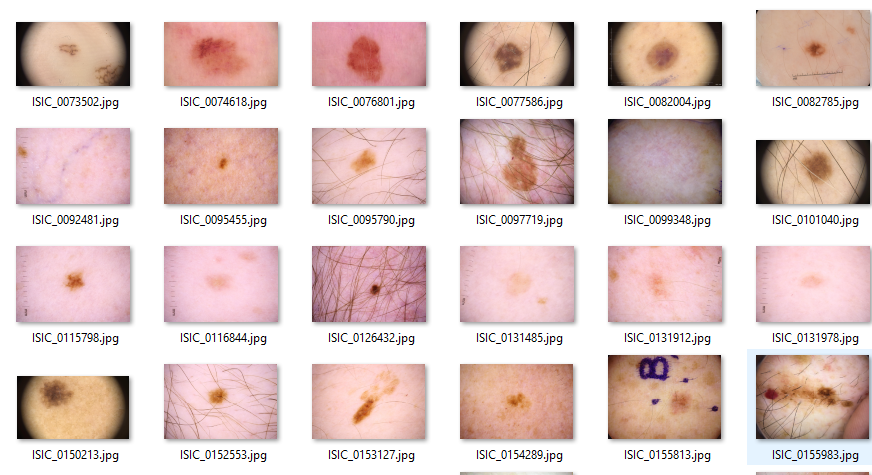
    "906696": "You didn't waste your time, one question, what platform did you use for deployment of **Tensorflow Lite API**?",
    "907145": "I converted my mobilenet 224x224 model to tensorflow lite and made an android app using tensorflow's documentation examples",
    "907392": "sounds interesting",
    "909491": "thanks",
    "909661": "Welcome on Kaggle!\nGreat presentation, doesn't look like \"newbie\" work :)\nI am really surprised with LAB mode used then CLAHE and blur, can you tell more about the idea here?",
    "909714": "Thank you :)\nActually I am using CLAHE on LAB mode to enhance the contrast between the background and the actual lesion. I found it to be the best method for the job. The other histogram equalization techniques were not giving as good results as this one. I also intend to feed LAB images to the neural network to see the results.",
    "909725": "I have lots of experiences with LAB but never used it with deep learning, I hope to read about your research in close future :)",
    "911338": "Thank you, and goodluck :)",
    "943285": "Awesome writeup , thanks for sharing , can you shed more light on what are the handmade attributes for our better understanding ,Lesion Area, Skewness, Contrast, Symmetry, Energy, Homogeneity, Correlation etc and how they were generated . Can I just take the contrast of whole image or will I have to first draw a bbox around the lesion and then observe the contrast. Also what is Enegry , correlation ,etc.",
    "943714": "Oddsome, complex topic. You could make a public Notebook based on it. It's more useful to read a Notebook that will remain in the Dataset list. (or you can create a Dataset from your own and make this Notebook too). Than  just to make that topic full of information that will be read only for a few time in NewsFeed. Notebooks stay longer.  Notebooks shared with the community are your legacy.  \nDoctors look at the biopsy result.(after the 1st medical appointment)",
    "1339510": "Hello Khizar, \nCan we have access to the notebook concerning \"Kfold Validation + EfficentNetB0 to EfficientNet B7 and DenseNet169 Combined + Global Average Pooling and Leaky Relu + ensemble learning\" ? \nThank you."
  },
  "source": "meta"
}