{
  "id": 160430,
  "title": "Summary: Some Augmentations technique",
  "url": "/competitions/siim-isic-melanoma-classification/discussion/160430",
  "author_name": "KhanhVD",
  "post_date": "2020-06-21T08:02:53.184000",
  "votes": 27,
  "comment_count": 3,
  "views": 0,
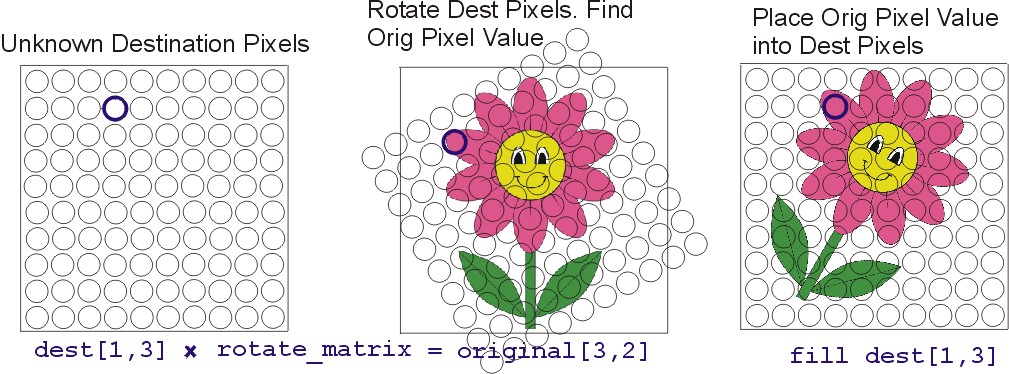
  "content": "<p>Some great augmentations techniques used in the recent Flower Classification with TPUs competition, I will summarize them in this article. It might be useful to newbies like me.</p>\n\n<p><strong>Data Augmentation</strong></p>\n\n<p>Data augmentation has repeatedly shown to improve model accuracy. Below is a list of some current literature on data augmentation techniques:</p>\n\n<p>Basic augmentation includes flipping, rotation, sheer, zoom, and shift. Starter notebook here. Next we can incorporate non-linear transformations like grid distortion and we can do color augmentation like brightness, contrast, hue, etc.</p>\n\n<p><strong>Rotation Augmentation</strong></p>\n\n<p><img src=\"https://www.googleapis.com/download/storage/v1/b/kaggle-user-content/o/inbox%2F1723677%2Fac5072f04b8e627020c439ab8326b038%2Frotate.JPG?generation=1582409737942526&amp;alt=media\" alt=\"Rotation Augmentation\"></p>\n\n<p>For each pixel in your augmented image, you must find which pixel value in the original image to use. In the example above, we wish to determine which pixel to place in location (1, 3). So we must multiply the coordinate (1, 3) by a rotation matrix to determine that we want pixel (3, 2) from the original image which is color pink. We then place a pink pixel in destination image's pixel (1, 3).</p>\n\n<p><strong>CutMix and MixUp</strong></p>\n\n<p><img src=\"https://www.googleapis.com/download/storage/v1/b/kaggle-user-content/o/inbox%2F1723677%2F999713370831a44bb5af627f96b42f76%2FScreen%20Shot%202020-02-28%20at%2012.09.49%20PM.png?generation=1582920604632237&amp;alt=media\" alt=\"CutMix and MixUp Augmentation\"></p>\n\n<p><strong>MixUp</strong></p>\n\n<p>MixUp blends two images and their one hot encoded labels to create a new image. This helps a network generalize to the space of images they lie \"between\" the existing training images.</p>\n\n<p><img src=\"https://www.googleapis.com/download/storage/v1/b/kaggle-user-content/o/inbox%2F1723677%2F0fd1c6f6c0d1b2c220748e1e8517dd42%2FScreen%20Shot%202020-02-28%20at%2012.04.14%20PM.png?generation=1582920270999369&amp;alt=media\" alt=\"MixUp\"></p>\n\n<p><strong>Auto Augment</strong></p>\n\n<p>List a variety of augmentation techniques. Use reinforcement learning to explore different combinations of augmentations and find the best.</p>\n\n<p><img src=\"https://www.googleapis.com/download/storage/v1/b/kaggle-user-content/o/inbox%2F1723677%2Fa013e63820a9f2e5751fc954bd502561%2FScreen%20Shot%202020-02-28%20at%2012.05.08%20PM.png?generation=1582920325192602&amp;alt=media\" alt=\"Auto Augment\"></p>\n\n<p><strong>CutMix</strong></p>\n\n<p>This is cutout but we fill the blank rectangular space with a portion of another image. CutMix has the benefits of cutout (described above) and it expands the the space of images by creating new images (i.e. like a dog with a cat's head)</p>\n\n<p><img src=\"https://www.googleapis.com/download/storage/v1/b/kaggle-user-content/o/inbox%2F1723677%2Fa4d6d7b6132350ac39dbe5d3ce601b55%2FScreen%20Shot%202020-02-28%20at%2012.06.24%20PM.png?generation=1582920401462775&amp;alt=media\" alt=\"CutMix\"></p>\n\n<p><strong>CAM Cutmix</strong></p>\n\n<p><img src=\"https://www.googleapis.com/download/storage/v1/b/kaggle-user-content/o/inbox%2F1723677%2F7e1dac43940801ba259535a302817ab2%2FScreen%20Shot%202020-03-16%20at%209.54.09%20PM.png?generation=1584421104555329&amp;alt=media\" alt=\"CAM Cutmix\"></p>\n\n<p><img src=\"https://www.googleapis.com/download/storage/v1/b/kaggle-user-content/o/inbox%2F1723677%2F253a777c731827a5bb5ced8cdf85558a%2FScreen%20Shot%202020-03-16%20at%207.44.42%20PM.png?generation=1584414301224112&amp;alt=media\" alt=\"CAM CutMix\"></p>\n\n<p><strong>AugMix</strong></p>\n\n<p>Randomly blend multiple images that have each been augmented themselves separately. And use a special consistency loss.</p>\n\n<p><img src=\"https://www.googleapis.com/download/storage/v1/b/kaggle-user-content/o/inbox%2F1723677%2F2b79e1180f717408930554343b007881%2FScreen%20Shot%202020-02-28%20at%2012.07.34%20PM.png?generation=1582920469116799&amp;alt=media\" alt=\"AugMix\"></p>\n\n<p><strong>Coarse Dropout and Cutout Augmentation GPU/TPU</strong>\n<img src=\"https://www.googleapis.com/download/storage/v1/b/kaggle-user-content/o/inbox%2F1723677%2F8db206436734b5f0c7b2179c2e152eb0%2FScreen%20Shot%202020-07-22%20at%201.28.49%20PM.png?generation=1595632223386869&amp;alt=media\" alt=\"Coarse Dropout and Cutout Augmentation GPU/TPU\"></p>\n\n<p>def dropout(image, DIM=256, PROBABILITY = 0.5, CT = 32, SZ = 0.125):\n    # input - one image of size [dim,dim,3] not a batch of [b,dim,dim,3]\n    # output - image with CT squares of side size SZ*DIM removed</p>\n\n<pre><code># DO DROPOUT WITH PROBABILITY DEFINED ABOVE\nP = tf.cast( tf.random.uniform([],0,1) &lt; PROBABILITY, tf.int32)\nif (P == 0)|(CT == 0)|(SZ == 0): return image\n\nfor k in range( CT ):\n    # CHOOSE RANDOM LOCATION\n    x = tf.cast( tf.random.uniform([],0,DIM),tf.int32)\n    y = tf.cast( tf.random.uniform([],0,DIM),tf.int32)\n    # COMPUTE SQUARE \n    WIDTH = tf.cast( SZ*DIM,tf.int32) * P\n    ya = tf.math.maximum(0,y-WIDTH//2)\n    yb = tf.math.minimum(DIM,y+WIDTH//2)\n    xa = tf.math.maximum(0,x-WIDTH//2)\n    xb = tf.math.minimum(DIM,x+WIDTH//2)\n    # DROPOUT IMAGE\n    one = image[ya:yb,0:xa,:]\n    two = tf.zeros([yb-ya,xb-xa,3]) \n    three = image[ya:yb,xb:DIM,:]\n    middle = tf.concat([one,two,three],axis=1)\n    image = tf.concat([image[0:ya,:,:],middle,image[yb:DIM,:,:]],axis=0)\n\n# RESHAPE HACK SO TPU COMPILER KNOWS SHAPE OF OUTPUT TENSOR \nimage = tf.reshape(image,[DIM,DIM,3])\nreturn image\n</code></pre>\n\n<p><strong>GridMask data augmentation</strong></p>\n\n<p><img src=\"https://www.googleapis.com/download/storage/v1/b/kaggle-user-content/o/inbox%2F3617078%2F5bd38f98a37535a92970b5b338e519f6%2F2020-02-29%201.32.04.png?generation=1582954461136321&amp;alt=media\" alt=\"GridMask\"></p>\n\n<p><strong>Advanced hair augmentation &amp; Microscope augmentation by Roman</strong></p>\n\n<p>Read Roman's excellent discussion <a href=\"https://www.kaggle.com/c/siim-isic-melanoma-classification/discussion/159176\"><strong>here</strong></a> and <a href=\"https://www.kaggle.com/c/siim-isic-melanoma-classification/discussion/159476\"><strong>here</strong></a></p>\n\n<p><img src=\"https://www.googleapis.com/download/storage/v1/b/kaggle-user-content/o/inbox%2F1696976%2F41a66a688b7f23aff91edc2e0b2797f4%2Faug_old.png?generation=1592326308016210&amp;alt=media\" alt=\"Pseudo hairs\"></p>\n\n<p><img src=\"https://www.googleapis.com/download/storage/v1/b/kaggle-user-content/o/inbox%2F1696976%2Fcab2acbe978d20b162ae454136c262ac%2Fmicro_aug.png?generation=1592405923559019&amp;alt=media\" alt=\"Microscope augmentation\"></p>\n\n<p><strong>Reference</strong></p>\n\n<ol>\n<li><p><a href=\"https://www.kaggle.com/c/flower-classification-with-tpus/discussion/132191\"><strong>How To - Rotation Augmentation GPU/TPU by Chris Deotte</strong></a></p></li>\n<li><p><a href=\"https://www.kaggle.com/c/flower-classification-with-tpus/discussion/132935\"><strong>How To - CutMix and MixUp on GPU/TPU by Chris Deotte</strong></a></p></li>\n<li><p><a href=\"https://www.kaggle.com/c/flower-classification-with-tpus/discussion/132986\"><strong>GridMask data augmentation on GPU/TPU</strong></a></p></li>\n<li><p><a href=\"https://www.kaggle.com/c/siim-isic-melanoma-classification/discussion/159476\"><strong>Microscope augmentation</strong></a></p></li>\n<li><p><a href=\"https://www.kaggle.com/c/siim-isic-melanoma-classification/discussion/159176\"><strong>Advanced hair augmentation</strong></a></p></li>\n<li><p><a href=\"https://www.kaggle.com/c/bengaliai-cv19/discussion/136025\"><strong>CAM Cutmix</strong></a></p></li>\n<li><p><a href=\"https://www.kaggle.com/c/siim-isic-melanoma-classification/discussion/169721\"><strong>Coarse Dropout and Cutout Augmentation GPU/TPU by Chris Deotte</strong></a></p></li>\n</ol>",
  "messages": [
    {
      "id": 895263,
      "postDate": "2020-06-21T08:02:53.183Z",
      "content": "<p>Some great augmentations techniques used in the recent Flower Classification with TPUs competition, I will summarize them in this article. It might be useful to newbies like me.</p>\n\n<p><strong>Data Augmentation</strong></p>\n\n<p>Data augmentation has repeatedly shown to improve model accuracy. Below is a list of some current literature on data augmentation techniques:</p>\n\n<p>Basic augmentation includes flipping, rotation, sheer, zoom, and shift. Starter notebook here. Next we can incorporate non-linear transformations like grid distortion and we can do color augmentation like brightness, contrast, hue, etc.</p>\n\n<p><strong>Rotation Augmentation</strong></p>\n\n<p><img src=\"https://www.googleapis.com/download/storage/v1/b/kaggle-user-content/o/inbox%2F1723677%2Fac5072f04b8e627020c439ab8326b038%2Frotate.JPG?generation=1582409737942526&amp;alt=media\" alt=\"Rotation Augmentation\"></p>\n\n<p>For each pixel in your augmented image, you must find which pixel value in the original image to use. In the example above, we wish to determine which pixel to place in location (1, 3). So we must multiply the coordinate (1, 3) by a rotation matrix to determine that we want pixel (3, 2) from the original image which is color pink. We then place a pink pixel in destination image's pixel (1, 3).</p>\n\n<p><strong>CutMix and MixUp</strong></p>\n\n<p><img src=\"https://www.googleapis.com/download/storage/v1/b/kaggle-user-content/o/inbox%2F1723677%2F999713370831a44bb5af627f96b42f76%2FScreen%20Shot%202020-02-28%20at%2012.09.49%20PM.png?generation=1582920604632237&amp;alt=media\" alt=\"CutMix and MixUp Augmentation\"></p>\n\n<p><strong>MixUp</strong></p>\n\n<p>MixUp blends two images and their one hot encoded labels to create a new image. This helps a network generalize to the space of images they lie \"between\" the existing training images.</p>\n\n<p><img src=\"https://www.googleapis.com/download/storage/v1/b/kaggle-user-content/o/inbox%2F1723677%2F0fd1c6f6c0d1b2c220748e1e8517dd42%2FScreen%20Shot%202020-02-28%20at%2012.04.14%20PM.png?generation=1582920270999369&amp;alt=media\" alt=\"MixUp\"></p>\n\n<p><strong>Auto Augment</strong></p>\n\n<p>List a variety of augmentation techniques. Use reinforcement learning to explore different combinations of augmentations and find the best.</p>\n\n<p><img src=\"https://www.googleapis.com/download/storage/v1/b/kaggle-user-content/o/inbox%2F1723677%2Fa013e63820a9f2e5751fc954bd502561%2FScreen%20Shot%202020-02-28%20at%2012.05.08%20PM.png?generation=1582920325192602&amp;alt=media\" alt=\"Auto Augment\"></p>\n\n<p><strong>CutMix</strong></p>\n\n<p>This is cutout but we fill the blank rectangular space with a portion of another image. CutMix has the benefits of cutout (described above) and it expands the the space of images by creating new images (i.e. like a dog with a cat's head)</p>\n\n<p><img src=\"https://www.googleapis.com/download/storage/v1/b/kaggle-user-content/o/inbox%2F1723677%2Fa4d6d7b6132350ac39dbe5d3ce601b55%2FScreen%20Shot%202020-02-28%20at%2012.06.24%20PM.png?generation=1582920401462775&amp;alt=media\" alt=\"CutMix\"></p>\n\n<p><strong>CAM Cutmix</strong></p>\n\n<p><img src=\"https://www.googleapis.com/download/storage/v1/b/kaggle-user-content/o/inbox%2F1723677%2F7e1dac43940801ba259535a302817ab2%2FScreen%20Shot%202020-03-16%20at%209.54.09%20PM.png?generation=1584421104555329&amp;alt=media\" alt=\"CAM Cutmix\"></p>\n\n<p><img src=\"https://www.googleapis.com/download/storage/v1/b/kaggle-user-content/o/inbox%2F1723677%2F253a777c731827a5bb5ced8cdf85558a%2FScreen%20Shot%202020-03-16%20at%207.44.42%20PM.png?generation=1584414301224112&amp;alt=media\" alt=\"CAM CutMix\"></p>\n\n<p><strong>AugMix</strong></p>\n\n<p>Randomly blend multiple images that have each been augmented themselves separately. And use a special consistency loss.</p>\n\n<p><img src=\"https://www.googleapis.com/download/storage/v1/b/kaggle-user-content/o/inbox%2F1723677%2F2b79e1180f717408930554343b007881%2FScreen%20Shot%202020-02-28%20at%2012.07.34%20PM.png?generation=1582920469116799&amp;alt=media\" alt=\"AugMix\"></p>\n\n<p><strong>Coarse Dropout and Cutout Augmentation GPU/TPU</strong>\n<img src=\"https://www.googleapis.com/download/storage/v1/b/kaggle-user-content/o/inbox%2F1723677%2F8db206436734b5f0c7b2179c2e152eb0%2FScreen%20Shot%202020-07-22%20at%201.28.49%20PM.png?generation=1595632223386869&amp;alt=media\" alt=\"Coarse Dropout and Cutout Augmentation GPU/TPU\"></p>\n\n<p>def dropout(image, DIM=256, PROBABILITY = 0.5, CT = 32, SZ = 0.125):\n    # input - one image of size [dim,dim,3] not a batch of [b,dim,dim,3]\n    # output - image with CT squares of side size SZ*DIM removed</p>\n\n<pre><code># DO DROPOUT WITH PROBABILITY DEFINED ABOVE\nP = tf.cast( tf.random.uniform([],0,1) &lt; PROBABILITY, tf.int32)\nif (P == 0)|(CT == 0)|(SZ == 0): return image\n\nfor k in range( CT ):\n    # CHOOSE RANDOM LOCATION\n    x = tf.cast( tf.random.uniform([],0,DIM),tf.int32)\n    y = tf.cast( tf.random.uniform([],0,DIM),tf.int32)\n    # COMPUTE SQUARE \n    WIDTH = tf.cast( SZ*DIM,tf.int32) * P\n    ya = tf.math.maximum(0,y-WIDTH//2)\n    yb = tf.math.minimum(DIM,y+WIDTH//2)\n    xa = tf.math.maximum(0,x-WIDTH//2)\n    xb = tf.math.minimum(DIM,x+WIDTH//2)\n    # DROPOUT IMAGE\n    one = image[ya:yb,0:xa,:]\n    two = tf.zeros([yb-ya,xb-xa,3]) \n    three = image[ya:yb,xb:DIM,:]\n    middle = tf.concat([one,two,three],axis=1)\n    image = tf.concat([image[0:ya,:,:],middle,image[yb:DIM,:,:]],axis=0)\n\n# RESHAPE HACK SO TPU COMPILER KNOWS SHAPE OF OUTPUT TENSOR \nimage = tf.reshape(image,[DIM,DIM,3])\nreturn image\n</code></pre>\n\n<p><strong>GridMask data augmentation</strong></p>\n\n<p><img src=\"https://www.googleapis.com/download/storage/v1/b/kaggle-user-content/o/inbox%2F3617078%2F5bd38f98a37535a92970b5b338e519f6%2F2020-02-29%201.32.04.png?generation=1582954461136321&amp;alt=media\" alt=\"GridMask\"></p>\n\n<p><strong>Advanced hair augmentation &amp; Microscope augmentation by Roman</strong></p>\n\n<p>Read Roman's excellent discussion <a href=\"https://www.kaggle.com/c/siim-isic-melanoma-classification/discussion/159176\"><strong>here</strong></a> and <a href=\"https://www.kaggle.com/c/siim-isic-melanoma-classification/discussion/159476\"><strong>here</strong></a></p>\n\n<p><img src=\"https://www.googleapis.com/download/storage/v1/b/kaggle-user-content/o/inbox%2F1696976%2F41a66a688b7f23aff91edc2e0b2797f4%2Faug_old.png?generation=1592326308016210&amp;alt=media\" alt=\"Pseudo hairs\"></p>\n\n<p><img src=\"https://www.googleapis.com/download/storage/v1/b/kaggle-user-content/o/inbox%2F1696976%2Fcab2acbe978d20b162ae454136c262ac%2Fmicro_aug.png?generation=1592405923559019&amp;alt=media\" alt=\"Microscope augmentation\"></p>\n\n<p><strong>Reference</strong></p>\n\n<ol>\n<li><p><a href=\"https://www.kaggle.com/c/flower-classification-with-tpus/discussion/132191\"><strong>How To - Rotation Augmentation GPU/TPU by Chris Deotte</strong></a></p></li>\n<li><p><a href=\"https://www.kaggle.com/c/flower-classification-with-tpus/discussion/132935\"><strong>How To - CutMix and MixUp on GPU/TPU by Chris Deotte</strong></a></p></li>\n<li><p><a href=\"https://www.kaggle.com/c/flower-classification-with-tpus/discussion/132986\"><strong>GridMask data augmentation on GPU/TPU</strong></a></p></li>\n<li><p><a href=\"https://www.kaggle.com/c/siim-isic-melanoma-classification/discussion/159476\"><strong>Microscope augmentation</strong></a></p></li>\n<li><p><a href=\"https://www.kaggle.com/c/siim-isic-melanoma-classification/discussion/159176\"><strong>Advanced hair augmentation</strong></a></p></li>\n<li><p><a href=\"https://www.kaggle.com/c/bengaliai-cv19/discussion/136025\"><strong>CAM Cutmix</strong></a></p></li>\n<li><p><a href=\"https://www.kaggle.com/c/siim-isic-melanoma-classification/discussion/169721\"><strong>Coarse Dropout and Cutout Augmentation GPU/TPU by Chris Deotte</strong></a></p></li>\n</ol>",
      "rawMarkdown": "Some great augmentations techniques used in the recent Flower Classification with TPUs competition, I will summarize them in this article. It might be useful to newbies like me.\n\n**Data Augmentation**\n\nData augmentation has repeatedly shown to improve model accuracy. Below is a list of some current literature on data augmentation techniques:\n\nBasic augmentation includes flipping, rotation, sheer, zoom, and shift. Starter notebook here. Next we can incorporate non-linear transformations like grid distortion and we can do color augmentation like brightness, contrast, hue, etc.\n\n**Rotation Augmentation**\n\n![Rotation Augmentation](https://www.googleapis.com/download/storage/v1/b/kaggle-user-content/o/inbox%2F1723677%2Fac5072f04b8e627020c439ab8326b038%2Frotate.JPG?generation=1582409737942526&amp;alt=media)\n\nFor each pixel in your augmented image, you must find which pixel value in the original image to use. In the example above, we wish to determine which pixel to place in location (1, 3). So we must multiply the coordinate (1, 3) by a rotation matrix to determine that we want pixel (3, 2) from the original image which is color pink. We then place a pink pixel in destination image's pixel (1, 3).\n\n**CutMix and MixUp**\n\n![CutMix and MixUp Augmentation](https://www.googleapis.com/download/storage/v1/b/kaggle-user-content/o/inbox%2F1723677%2F999713370831a44bb5af627f96b42f76%2FScreen%20Shot%202020-02-28%20at%2012.09.49%20PM.png?generation=1582920604632237&amp;alt=media)\n\n**MixUp**\n\nMixUp blends two images and their one hot encoded labels to create a new image. This helps a network generalize to the space of images they lie \"between\" the existing training images.\n\n![MixUp](https://www.googleapis.com/download/storage/v1/b/kaggle-user-content/o/inbox%2F1723677%2F0fd1c6f6c0d1b2c220748e1e8517dd42%2FScreen%20Shot%202020-02-28%20at%2012.04.14%20PM.png?generation=1582920270999369&amp;alt=media)\n\n**Auto Augment**\n\nList a variety of augmentation techniques. Use reinforcement learning to explore different combinations of augmentations and find the best.\n\n![Auto Augment](https://www.googleapis.com/download/storage/v1/b/kaggle-user-content/o/inbox%2F1723677%2Fa013e63820a9f2e5751fc954bd502561%2FScreen%20Shot%202020-02-28%20at%2012.05.08%20PM.png?generation=1582920325192602&amp;alt=media)\n\n**CutMix**\n\nThis is cutout but we fill the blank rectangular space with a portion of another image. CutMix has the benefits of cutout (described above) and it expands the the space of images by creating new images (i.e. like a dog with a cat's head)\n\n![CutMix](https://www.googleapis.com/download/storage/v1/b/kaggle-user-content/o/inbox%2F1723677%2Fa4d6d7b6132350ac39dbe5d3ce601b55%2FScreen%20Shot%202020-02-28%20at%2012.06.24%20PM.png?generation=1582920401462775&amp;alt=media)\n\n**CAM Cutmix**\n\n![CAM Cutmix](https://www.googleapis.com/download/storage/v1/b/kaggle-user-content/o/inbox%2F1723677%2F7e1dac43940801ba259535a302817ab2%2FScreen%20Shot%202020-03-16%20at%209.54.09%20PM.png?generation=1584421104555329&amp;alt=media)\n\n![CAM CutMix](https://www.googleapis.com/download/storage/v1/b/kaggle-user-content/o/inbox%2F1723677%2F253a777c731827a5bb5ced8cdf85558a%2FScreen%20Shot%202020-03-16%20at%207.44.42%20PM.png?generation=1584414301224112&amp;alt=media)\n\n**AugMix**\n\nRandomly blend multiple images that have each been augmented themselves separately. And use a special consistency loss.\n\n![AugMix](https://www.googleapis.com/download/storage/v1/b/kaggle-user-content/o/inbox%2F1723677%2F2b79e1180f717408930554343b007881%2FScreen%20Shot%202020-02-28%20at%2012.07.34%20PM.png?generation=1582920469116799&amp;alt=media)\n\n**Coarse Dropout and Cutout Augmentation GPU/TPU**\n![Coarse Dropout and Cutout Augmentation GPU/TPU](https://www.googleapis.com/download/storage/v1/b/kaggle-user-content/o/inbox%2F1723677%2F8db206436734b5f0c7b2179c2e152eb0%2FScreen%20Shot%202020-07-22%20at%201.28.49%20PM.png?generation=1595632223386869&amp;alt=media)\n\ndef dropout(image, DIM=256, PROBABILITY = 0.5, CT = 32, SZ = 0.125):\n    # input - one image of size [dim,dim,3] not a batch of [b,dim,dim,3]\n    # output - image with CT squares of side size SZ*DIM removed\n\n    # DO DROPOUT WITH PROBABILITY DEFINED ABOVE\n    P = tf.cast( tf.random.uniform([],0,1) &lt; PROBABILITY, tf.int32)\n    if (P == 0)|(CT == 0)|(SZ == 0): return image\n\n    for k in range( CT ):\n        # CHOOSE RANDOM LOCATION\n        x = tf.cast( tf.random.uniform([],0,DIM),tf.int32)\n        y = tf.cast( tf.random.uniform([],0,DIM),tf.int32)\n        # COMPUTE SQUARE \n        WIDTH = tf.cast( SZ*DIM,tf.int32) * P\n        ya = tf.math.maximum(0,y-WIDTH//2)\n        yb = tf.math.minimum(DIM,y+WIDTH//2)\n        xa = tf.math.maximum(0,x-WIDTH//2)\n        xb = tf.math.minimum(DIM,x+WIDTH//2)\n        # DROPOUT IMAGE\n        one = image[ya:yb,0:xa,:]\n        two = tf.zeros([yb-ya,xb-xa,3]) \n        three = image[ya:yb,xb:DIM,:]\n        middle = tf.concat([one,two,three],axis=1)\n        image = tf.concat([image[0:ya,:,:],middle,image[yb:DIM,:,:]],axis=0)\n\n    # RESHAPE HACK SO TPU COMPILER KNOWS SHAPE OF OUTPUT TENSOR \n    image = tf.reshape(image,[DIM,DIM,3])\n    return image\n\n**GridMask data augmentation**\n\n![GridMask](https://www.googleapis.com/download/storage/v1/b/kaggle-user-content/o/inbox%2F3617078%2F5bd38f98a37535a92970b5b338e519f6%2F2020-02-29%201.32.04.png?generation=1582954461136321&amp;alt=media)\n\n**Advanced hair augmentation &amp; Microscope augmentation by Roman**\n\nRead Roman's excellent discussion [**here**](https://www.kaggle.com/c/siim-isic-melanoma-classification/discussion/159176) and [**here**](https://www.kaggle.com/c/siim-isic-melanoma-classification/discussion/159476)\n\n![Pseudo hairs](https://www.googleapis.com/download/storage/v1/b/kaggle-user-content/o/inbox%2F1696976%2F41a66a688b7f23aff91edc2e0b2797f4%2Faug_old.png?generation=1592326308016210&amp;alt=media)\n\n![Microscope augmentation](https://www.googleapis.com/download/storage/v1/b/kaggle-user-content/o/inbox%2F1696976%2Fcab2acbe978d20b162ae454136c262ac%2Fmicro_aug.png?generation=1592405923559019&amp;alt=media)\n\n**Reference**\n\n1. [**How To - Rotation Augmentation GPU/TPU by Chris Deotte**](https://www.kaggle.com/c/flower-classification-with-tpus/discussion/132191)\n\n2. [**How To - CutMix and MixUp on GPU/TPU by Chris Deotte**](https://www.kaggle.com/c/flower-classification-with-tpus/discussion/132935)\n\n3. [**GridMask data augmentation on GPU/TPU**](https://www.kaggle.com/c/flower-classification-with-tpus/discussion/132986)\n\n4. [**Microscope augmentation**](https://www.kaggle.com/c/siim-isic-melanoma-classification/discussion/159476)\n\n5. [**Advanced hair augmentation**](https://www.kaggle.com/c/siim-isic-melanoma-classification/discussion/159176)\n\n6. [**CAM Cutmix**](https://www.kaggle.com/c/bengaliai-cv19/discussion/136025)\n\n7. [**Coarse Dropout and Cutout Augmentation GPU/TPU by Chris Deotte**](https://www.kaggle.com/c/siim-isic-melanoma-classification/discussion/169721)",
      "votes": 26
    },
    {
      "id": 966278,
      "postDate": "2020-08-11T09:52:56.890Z",
      "content": "<p>Really great work!!!</p>",
      "rawMarkdown": "Really great work!!!"
    },
    {
      "id": 895272,
      "postDate": "2020-06-21T08:10:09.677Z",
      "rawMarkdown": "",
      "votes": 1,
      "isDeleted": true
    },
    {
      "id": 895266,
      "postDate": "2020-06-21T08:06:58.817Z",
      "rawMarkdown": "",
      "isDeleted": true
    }
  ],
  "comments": [
    {
      "id": 966278,
      "author_name": "Tung Ng.",
      "author_url": "",
      "post_date": "2020-08-11T09:52:56.890000",
      "content": "<p>Really great work!!!</p>",
      "votes": 0,
      "replies": []
    },
    {
      "id": 895272,
      "author_name": "",
      "author_url": "",
      "post_date": "2020-06-21T08:10:09.677000",
      "content": "",
      "votes": 1,
      "replies": []
    },
    {
      "id": 895266,
      "author_name": "",
      "author_url": "",
      "post_date": "2020-06-21T08:06:58.817000",
      "content": "",
      "votes": 0,
      "replies": []
    }
  ],
  "raw_markdown_by_id": {
    "895263": "Some great augmentations techniques used in the recent Flower Classification with TPUs competition, I will summarize them in this article. It might be useful to newbies like me.\n\n**Data Augmentation**\n\nData augmentation has repeatedly shown to improve model accuracy. Below is a list of some current literature on data augmentation techniques:\n\nBasic augmentation includes flipping, rotation, sheer, zoom, and shift. Starter notebook here. Next we can incorporate non-linear transformations like grid distortion and we can do color augmentation like brightness, contrast, hue, etc.\n\n**Rotation Augmentation**\n\n![Rotation Augmentation](https://www.googleapis.com/download/storage/v1/b/kaggle-user-content/o/inbox%2F1723677%2Fac5072f04b8e627020c439ab8326b038%2Frotate.JPG?generation=1582409737942526&amp;alt=media)\n\nFor each pixel in your augmented image, you must find which pixel value in the original image to use. In the example above, we wish to determine which pixel to place in location (1, 3). So we must multiply the coordinate (1, 3) by a rotation matrix to determine that we want pixel (3, 2) from the original image which is color pink. We then place a pink pixel in destination image's pixel (1, 3).\n\n**CutMix and MixUp**\n\n![CutMix and MixUp Augmentation](https://www.googleapis.com/download/storage/v1/b/kaggle-user-content/o/inbox%2F1723677%2F999713370831a44bb5af627f96b42f76%2FScreen%20Shot%202020-02-28%20at%2012.09.49%20PM.png?generation=1582920604632237&amp;alt=media)\n\n**MixUp**\n\nMixUp blends two images and their one hot encoded labels to create a new image. This helps a network generalize to the space of images they lie \"between\" the existing training images.\n\n![MixUp](https://www.googleapis.com/download/storage/v1/b/kaggle-user-content/o/inbox%2F1723677%2F0fd1c6f6c0d1b2c220748e1e8517dd42%2FScreen%20Shot%202020-02-28%20at%2012.04.14%20PM.png?generation=1582920270999369&amp;alt=media)\n\n**Auto Augment**\n\nList a variety of augmentation techniques. Use reinforcement learning to explore different combinations of augmentations and find the best.\n\n![Auto Augment](https://www.googleapis.com/download/storage/v1/b/kaggle-user-content/o/inbox%2F1723677%2Fa013e63820a9f2e5751fc954bd502561%2FScreen%20Shot%202020-02-28%20at%2012.05.08%20PM.png?generation=1582920325192602&amp;alt=media)\n\n**CutMix**\n\nThis is cutout but we fill the blank rectangular space with a portion of another image. CutMix has the benefits of cutout (described above) and it expands the the space of images by creating new images (i.e. like a dog with a cat's head)\n\n![CutMix](https://www.googleapis.com/download/storage/v1/b/kaggle-user-content/o/inbox%2F1723677%2Fa4d6d7b6132350ac39dbe5d3ce601b55%2FScreen%20Shot%202020-02-28%20at%2012.06.24%20PM.png?generation=1582920401462775&amp;alt=media)\n\n**CAM Cutmix**\n\n![CAM Cutmix](https://www.googleapis.com/download/storage/v1/b/kaggle-user-content/o/inbox%2F1723677%2F7e1dac43940801ba259535a302817ab2%2FScreen%20Shot%202020-03-16%20at%209.54.09%20PM.png?generation=1584421104555329&amp;alt=media)\n\n![CAM CutMix](https://www.googleapis.com/download/storage/v1/b/kaggle-user-content/o/inbox%2F1723677%2F253a777c731827a5bb5ced8cdf85558a%2FScreen%20Shot%202020-03-16%20at%207.44.42%20PM.png?generation=1584414301224112&amp;alt=media)\n\n**AugMix**\n\nRandomly blend multiple images that have each been augmented themselves separately. And use a special consistency loss.\n\n![AugMix](https://www.googleapis.com/download/storage/v1/b/kaggle-user-content/o/inbox%2F1723677%2F2b79e1180f717408930554343b007881%2FScreen%20Shot%202020-02-28%20at%2012.07.34%20PM.png?generation=1582920469116799&amp;alt=media)\n\n**Coarse Dropout and Cutout Augmentation GPU/TPU**\n![Coarse Dropout and Cutout Augmentation GPU/TPU](https://www.googleapis.com/download/storage/v1/b/kaggle-user-content/o/inbox%2F1723677%2F8db206436734b5f0c7b2179c2e152eb0%2FScreen%20Shot%202020-07-22%20at%201.28.49%20PM.png?generation=1595632223386869&amp;alt=media)\n\ndef dropout(image, DIM=256, PROBABILITY = 0.5, CT = 32, SZ = 0.125):\n    # input - one image of size [dim,dim,3] not a batch of [b,dim,dim,3]\n    # output - image with CT squares of side size SZ*DIM removed\n\n    # DO DROPOUT WITH PROBABILITY DEFINED ABOVE\n    P = tf.cast( tf.random.uniform([],0,1) &lt; PROBABILITY, tf.int32)\n    if (P == 0)|(CT == 0)|(SZ == 0): return image\n\n    for k in range( CT ):\n        # CHOOSE RANDOM LOCATION\n        x = tf.cast( tf.random.uniform([],0,DIM),tf.int32)\n        y = tf.cast( tf.random.uniform([],0,DIM),tf.int32)\n        # COMPUTE SQUARE \n        WIDTH = tf.cast( SZ*DIM,tf.int32) * P\n        ya = tf.math.maximum(0,y-WIDTH//2)\n        yb = tf.math.minimum(DIM,y+WIDTH//2)\n        xa = tf.math.maximum(0,x-WIDTH//2)\n        xb = tf.math.minimum(DIM,x+WIDTH//2)\n        # DROPOUT IMAGE\n        one = image[ya:yb,0:xa,:]\n        two = tf.zeros([yb-ya,xb-xa,3]) \n        three = image[ya:yb,xb:DIM,:]\n        middle = tf.concat([one,two,three],axis=1)\n        image = tf.concat([image[0:ya,:,:],middle,image[yb:DIM,:,:]],axis=0)\n\n    # RESHAPE HACK SO TPU COMPILER KNOWS SHAPE OF OUTPUT TENSOR \n    image = tf.reshape(image,[DIM,DIM,3])\n    return image\n\n**GridMask data augmentation**\n\n![GridMask](https://www.googleapis.com/download/storage/v1/b/kaggle-user-content/o/inbox%2F3617078%2F5bd38f98a37535a92970b5b338e519f6%2F2020-02-29%201.32.04.png?generation=1582954461136321&amp;alt=media)\n\n**Advanced hair augmentation &amp; Microscope augmentation by Roman**\n\nRead Roman's excellent discussion [**here**](https://www.kaggle.com/c/siim-isic-melanoma-classification/discussion/159176) and [**here**](https://www.kaggle.com/c/siim-isic-melanoma-classification/discussion/159476)\n\n![Pseudo hairs](https://www.googleapis.com/download/storage/v1/b/kaggle-user-content/o/inbox%2F1696976%2F41a66a688b7f23aff91edc2e0b2797f4%2Faug_old.png?generation=1592326308016210&amp;alt=media)\n\n![Microscope augmentation](https://www.googleapis.com/download/storage/v1/b/kaggle-user-content/o/inbox%2F1696976%2Fcab2acbe978d20b162ae454136c262ac%2Fmicro_aug.png?generation=1592405923559019&amp;alt=media)\n\n**Reference**\n\n1. [**How To - Rotation Augmentation GPU/TPU by Chris Deotte**](https://www.kaggle.com/c/flower-classification-with-tpus/discussion/132191)\n\n2. [**How To - CutMix and MixUp on GPU/TPU by Chris Deotte**](https://www.kaggle.com/c/flower-classification-with-tpus/discussion/132935)\n\n3. [**GridMask data augmentation on GPU/TPU**](https://www.kaggle.com/c/flower-classification-with-tpus/discussion/132986)\n\n4. [**Microscope augmentation**](https://www.kaggle.com/c/siim-isic-melanoma-classification/discussion/159476)\n\n5. [**Advanced hair augmentation**](https://www.kaggle.com/c/siim-isic-melanoma-classification/discussion/159176)\n\n6. [**CAM Cutmix**](https://www.kaggle.com/c/bengaliai-cv19/discussion/136025)\n\n7. [**Coarse Dropout and Cutout Augmentation GPU/TPU by Chris Deotte**](https://www.kaggle.com/c/siim-isic-melanoma-classification/discussion/169721)",
    "966278": "Really great work!!!",
    "895272": "",
    "895266": ""
  }
}