{"cells":[{"metadata":{},"cell_type":"markdown","source":"**In this kernel we will like to analyze images and if possible (measure size of spots) and also some data augmentation ideas that looks promising**","execution_count":null},{"metadata":{},"cell_type":"markdown","source":"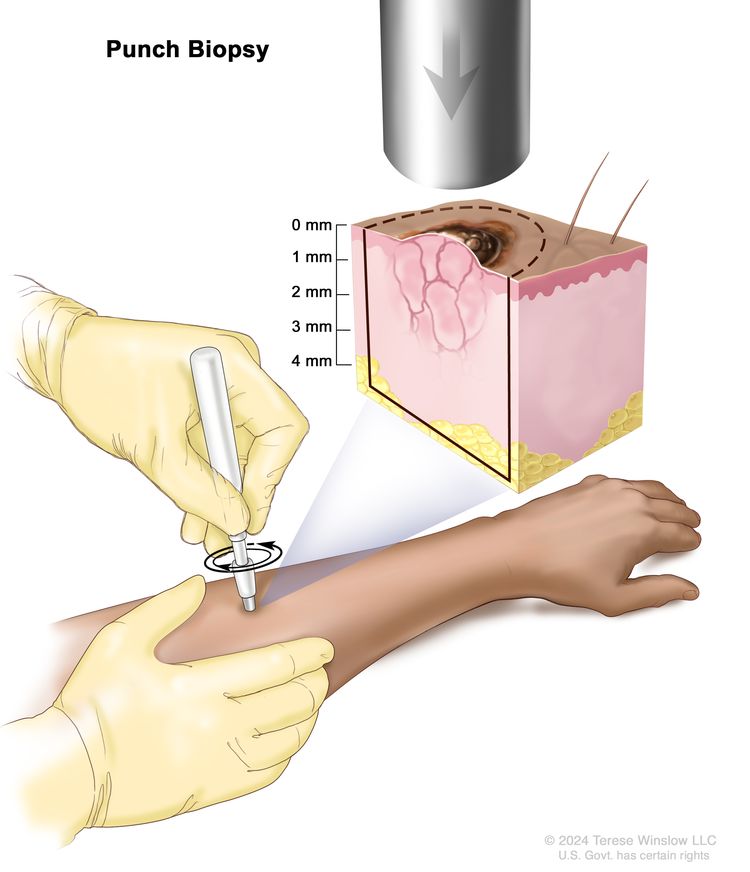","execution_count":null},{"metadata":{},"cell_type":"markdown","source":"if you are a researcher, then probably you will like to spend some times analyzing melanoma mole sizes as i have shown LEVELS OF MELANOMA in my past kernel [In-Depth Melanoma with modeling](https://www.kaggle.com/mobassir/in-depth-melanoma-with-modeling) so we know that....
**The Clark Scale has 5 levels of melanoma:**\n\n* Cells are in the out layer of the skin (epidermis)\n\n* Cells are in the layer directly under the epidermis (pupillary dermis)\n\n* The cells are touching the next layer known as the deep dermis\n\n* Cells have spread to the reticular dermis\n\n* Cells have grown in the fat layer\n\n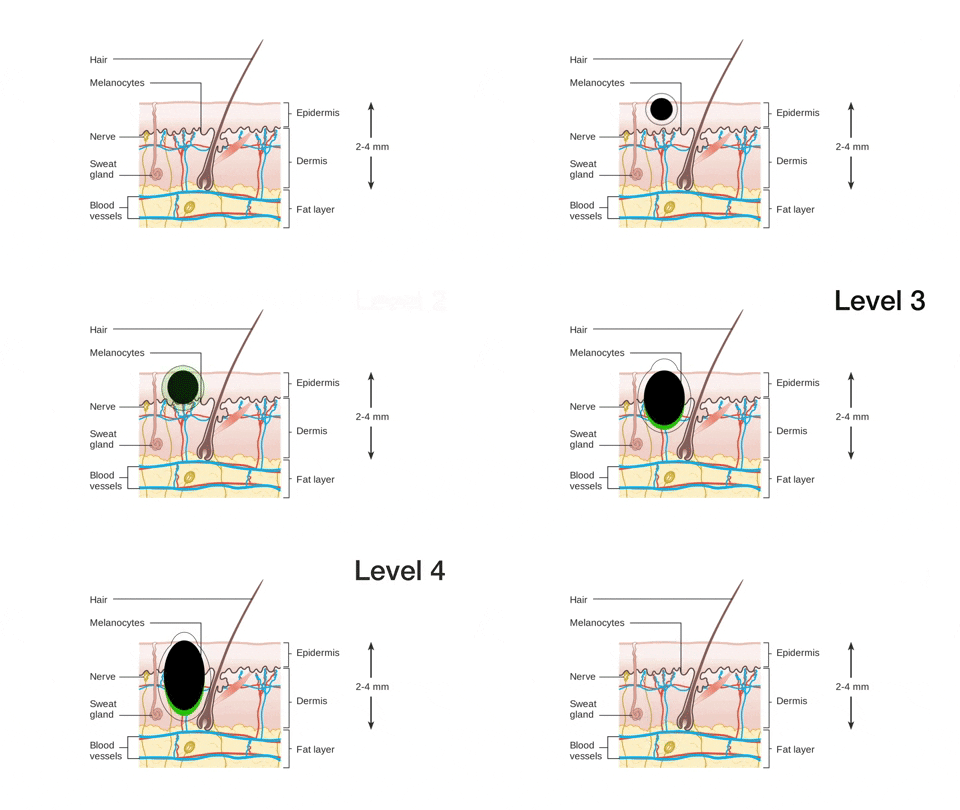","execution_count":null},{"metadata":{},"cell_type":"markdown","source":"# References \n","execution_count":null},{"metadata":{},"cell_type":"markdown","source":"* [TensorFlow + Transfer Learning: Melanoma](https://www.kaggle.com/amyjang/tensorflow-transfer-learning-melanoma)\n* [Measuring size of objects in an image with OpenCV](https://www.pyimagesearch.com/2016/03/28/measuring-size-of-objects-in-an-image-with-opencv/)\n* [object-size](https://github.com/snsharma1311/object-size)\n* [Ensemble of Convolutional Neural Networks for Disease Classification of Skin Lesions](https://github.com/anindox8/Ensemble-of-Multi-Scale-CNN-for-Dermatoscopy-Classification)\n* [In-Depth Melanoma with modeling](https://www.kaggle.com/mobassir/in-depth-melanoma-with-modeling?scriptVersionId=39094350)\n* [GENERAL INFORMATION ABOUT MELANOMA](https://www.uhhospitals.org/services/cancer-services/skin-cancer/melanoma/about-melanoma)\n* [Measuring Size of Objects with OpenCV](https://github.com/Practical-CV/Measuring-Size-of-Objects-with-OpenCV)\n* [Color Constancy](https://github.com/MinaSGorgi/Color-Constancy)\n* [Edge-Based Color Constancy](https://ieeexplore.ieee.org/document/4287009)\n* [Python | Thresholding techniques using OpenCV | Set-1 (Simple Thresholding)](https://www.geeksforgeeks.org/python-thresholding-techniques-using-opencv-set-1-simple-thresholding/)","execution_count":null},{"metadata":{},"cell_type":"markdown","source":"# imports","execution_count":null},{"metadata":{"_kg_hide-input":true,"_kg_hide-output":true,"trusted":true},"cell_type":"code","source":"!pip install imutils","execution_count":null,"outputs":[]},{"metadata":{"_uuid":"8f2839f25d086af736a60e9eeb907d3b93b6e0e5","_cell_guid":"b1076dfc-b9ad-4769-8c92-a6c4dae69d19","trusted":true,"_kg_hide-input":true,"_kg_hide-output":true},"cell_type":"code","source":"# This Python 3 environment comes with many helpful analytics libraries installed\n# It is defined by the kaggle/python Docker image: https://github.com/kaggle/docker-python\n# For example, here's several helpful packages to load\nfrom __future__ import unicode_literals\nfrom __future__ import print_function\nfrom __future__ import division\nfrom __future__ import absolute_import\nimport numpy as np # linear algebra\nimport pandas as pd # data processing, CSV file I/O (e.g. pd.read_csv)\n\n# Input data files are available in the read-only \"../input/\" directory\n# For example, running this (by clicking run or pressing Shift+Enter) will list all files under the input directory\nfrom pathlib import Path\nimport pandas as pd\nfrom torch.utils.data import Dataset,DataLoader\n\nfrom scipy.spatial import distance as dist\nfrom imutils import perspective\nfrom imutils import contours\nimport matplotlib.pyplot as plt\nimport numpy as np\nimport imutils\nimport cv2\n\nimport imageio\nfrom PIL import Image\nimport requests\nfrom io import BytesIO\nfrom torchvision import transforms as T\nimport torch.nn as nn\nimport torch\nimport torch.nn.functional as F\nfrom sklearn.model_selection import GroupKFold\nfrom kaggle_datasets import KaggleDatasets\n\nfrom scipy.spatial.distance import euclidean\nfrom imutils import perspective\nfrom imutils import contours\nimport numpy as np\nimport imutils\nimport cv2\nimport matplotlib.pyplot as plt\n\n\n\nfrom sklearn.model_selection import train_test_split\nimport tensorflow as tf\nfrom functools import partial\n\nimport glob\nimport numpy as np\nimport cv2\nfrom skimage import filters as skifilters\nfrom scipy import ndimage\nfrom skimage import filters\nimport matplotlib.pyplot as plt\nimport tqdm\nfrom sklearn.utils import shuffle\nimport pandas as pd\n\nimport os\nimport h5py\nimport time\nimport json\nimport warnings\nfrom PIL import Image\n\nfrom fastprogress.fastprogress import master_bar, progress_bar\nfrom sklearn.metrics import accuracy_score, roc_auc_score\nfrom torchvision import models\nimport pdb\nimport albumentations as A\nfrom albumentations.pytorch.transforms import ToTensor\nimport matplotlib.pyplot as plt\n\nimport pickle \nimport os\n\nfrom tqdm.notebook import tqdm\n\n# You can write up to 5GB to the current directory (/kaggle/working/) that gets preserved as output when you create a version using \"Save & Run All\" \n# You can also write temporary files to /kaggle/temp/, but they won't be saved outside of the current session","execution_count":null,"outputs":[]},{"metadata":{"_uuid":"d629ff2d2480ee46fbb7e2d37f6b5fab8052498a","_cell_guid":"79c7e3d0-c299-4dcb-8224-4455121ee9b0","trusted":true},"cell_type":"code","source":"def list_files(path:Path):\n return [o for o in path.iterdir()]","execution_count":null,"outputs":[]},{"metadata":{"trusted":true},"cell_type":"code","source":"path = Path('../input/jpeg-melanoma-768x768/')\ndf_path = Path('../input/jpeg-melanoma-768x768/')\nim_sz = 256\nbs = 16","execution_count":null,"outputs":[]},{"metadata":{"trusted":true},"cell_type":"code","source":"train_fnames = list_files(path/'train')\ndf = pd.read_csv(df_path/'train.csv')\ndf.head()","execution_count":null,"outputs":[]},{"metadata":{"trusted":true},"cell_type":"code","source":"df.target.value_counts(),df.shape","execution_count":null,"outputs":[]},{"metadata":{"trusted":true},"cell_type":"code","source":"","execution_count":null,"outputs":[]},{"metadata":{"trusted":true},"cell_type":"code","source":"GCS_PATH = KaggleDatasets().get_gcs_path('melanoma-768x768')","execution_count":null,"outputs":[]},{"metadata":{"trusted":true},"cell_type":"code","source":"def decode_image(image):\n image = tf.image.decode_jpeg(image, channels=3)\n image = tf.cast(image, tf.float32) / 255.0\n image = tf.reshape(image, [*IMAGE_SIZE, 3])\n return image","execution_count":null,"outputs":[]},{"metadata":{"trusted":true},"cell_type":"code","source":"def read_tfrecord(example, labeled):\n tfrecord_format = {\n \"image\": tf.io.FixedLenFeature([], tf.string),\n \"target\": tf.io.FixedLenFeature([], tf.int64)\n } if labeled else {\n \"image\": tf.io.FixedLenFeature([], tf.string),\n \"image_name\": tf.io.FixedLenFeature([], tf.string)\n }\n example = tf.io.parse_single_example(example, tfrecord_format)\n image = decode_image(example['image'])\n if labeled:\n label = tf.cast(example['target'], tf.int32)\n return image, label\n idnum = example['image_name']\n return image, idnum","execution_count":null,"outputs":[]},{"metadata":{"trusted":true},"cell_type":"code","source":"def load_dataset(filenames, labeled=True, ordered=False):\n ignore_order = tf.data.Options()\n if not ordered:\n ignore_order.experimental_deterministic = False # disable order, increase speed\n dataset = tf.data.TFRecordDataset(filenames, num_parallel_reads=AUTOTUNE) # automatically interleaves reads from multiple files\n dataset = dataset.with_options(ignore_order) # uses data as soon as it streams in, rather than in its original order\n dataset = dataset.map(partial(read_tfrecord, labeled=labeled), num_parallel_calls=AUTOTUNE)\n # returns a dataset of (image, label) pairs if labeled=True or (image, id) pairs if labeled=False\n return dataset","execution_count":null,"outputs":[]},{"metadata":{"trusted":true},"cell_type":"code","source":"\nBATCH_SIZE = 8\nAUTOTUNE = tf.data.experimental.AUTOTUNE\nIMAGE_SIZE = [768, 768]\nTRAINING_FILENAMES, VALID_FILENAMES = train_test_split(\n tf.io.gfile.glob(GCS_PATH + '/train*.tfrec'),\n test_size=0.2, random_state=5\n)\nTEST_FILENAMES = tf.io.gfile.glob(GCS_PATH + '/test*.tfrec')\nprint('Train TFRecord Files:', len(TRAINING_FILENAMES))\nprint('Validation TFRecord Files:', len(VALID_FILENAMES))\nprint('Test TFRecord Files:', len(TEST_FILENAMES))","execution_count":null,"outputs":[]},{"metadata":{"trusted":true},"cell_type":"code","source":"\n\ndef get_training_dataset():\n dataset = load_dataset(TRAINING_FILENAMES, labeled=True)\n #dataset = dataset.map(augmentation_pipeline, num_parallel_calls=AUTOTUNE)\n dataset = dataset.repeat()\n dataset = dataset.shuffle(2048)\n dataset = dataset.batch(BATCH_SIZE)\n dataset = dataset.prefetch(AUTOTUNE)\n return dataset\n\n","execution_count":null,"outputs":[]},{"metadata":{"trusted":true},"cell_type":"code","source":"train_dataset = get_training_dataset()","execution_count":null,"outputs":[]},{"metadata":{"trusted":true},"cell_type":"code","source":"def show_batch(image_batch, label_batch):\n plt.figure(figsize=(15,15))\n for n in range(8):\n ax = plt.subplot(8,8,n+1)\n plt.imshow(image_batch[n])\n if label_batch[n]:\n plt.title(\"MALIGNANT(1)\")\n else:\n plt.title(\"BENIGN(0)\")\n plt.axis(\"off\")","execution_count":null,"outputs":[]},{"metadata":{"trusted":true},"cell_type":"code","source":"\"\"\"\n%%time\nfor i in range(0,10):\n image_batch, label_batch = next(iter(train_dataset))\n for j in range(0,8):\n var = label_batch[j].numpy()\n if(var!=0):\n show_batch(image_batch.numpy(), label_batch.numpy())\n\"\"\"\n","execution_count":null,"outputs":[]},{"metadata":{"trusted":true},"cell_type":"code","source":"\"\"\"\nprint(\"Samples with Melanoma\")\nimgs = df[df.target==1]['image_name'].values\n_, axs = plt.subplots(2, 3, figsize=(20, 8))\naxs = axs.flatten()\nfor f_name,ax in zip(imgs[10:20],axs):\n img = Image.open(path/f'train/{f_name}.jpg')\n ax.imshow(img)\n ax.axis('off') \nplt.show()\n\"\"\"","execution_count":null,"outputs":[]},{"metadata":{},"cell_type":"markdown","source":"The thickness of the tumor. The thickness of the tumor is measured from the surface of the skin to the deepest part of the tumor.\n\n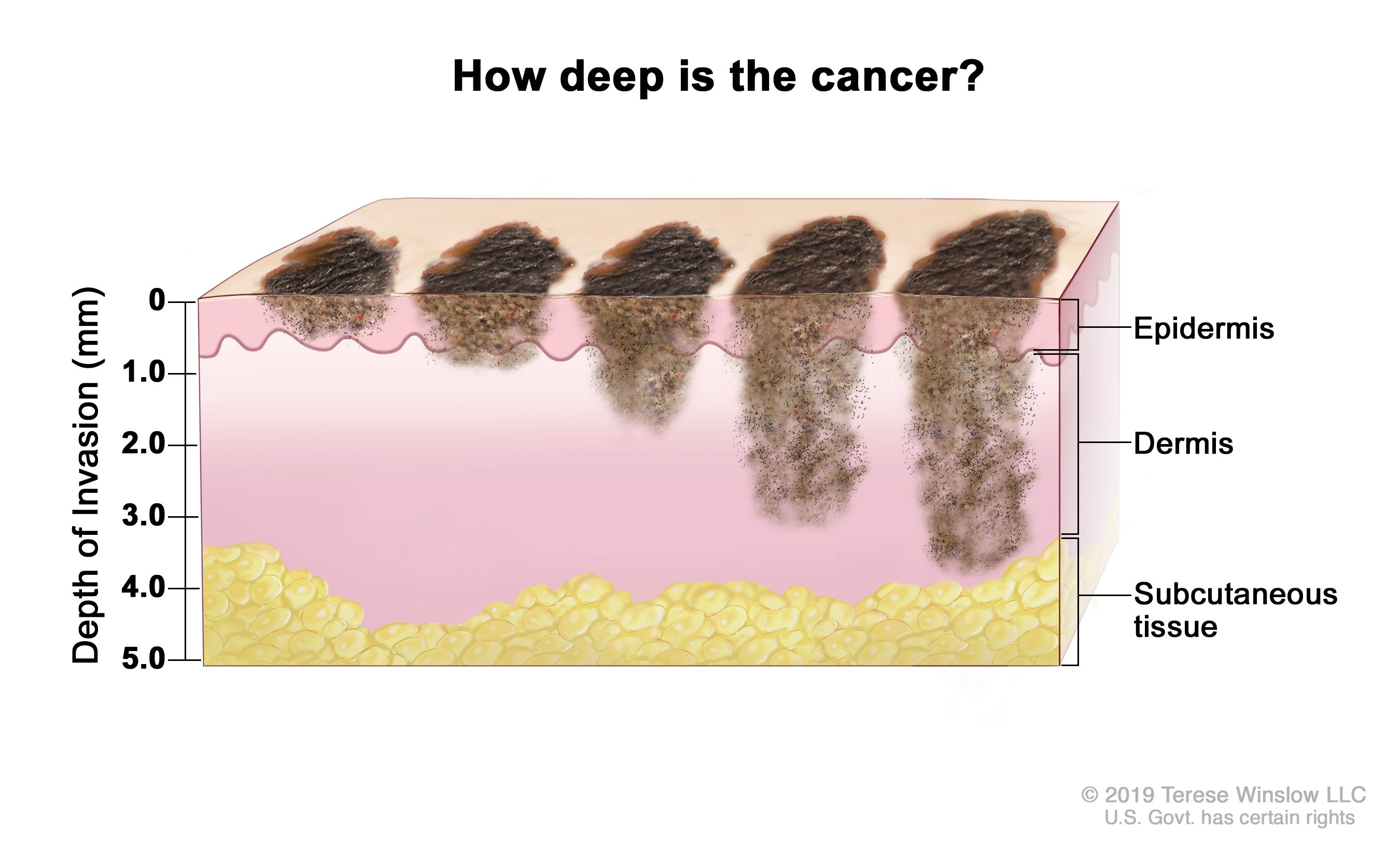","execution_count":null},{"metadata":{},"cell_type":"markdown","source":"**Whether the tumor is ulcerated (has broken through the skin).**\n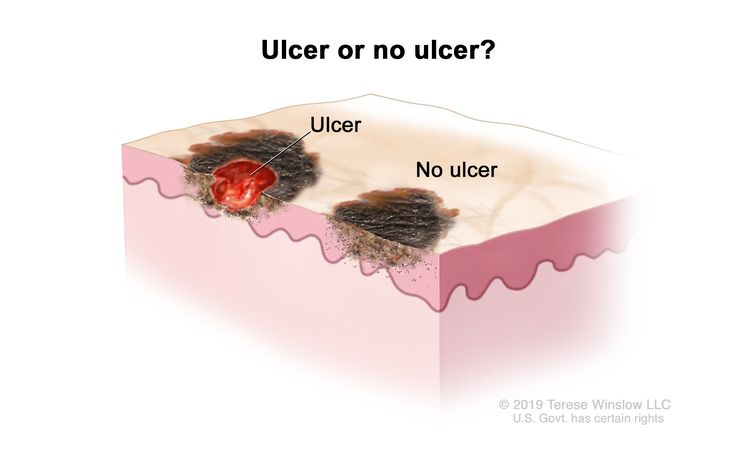","execution_count":null},{"metadata":{},"cell_type":"markdown","source":"from above 2 images we can see that depth of melanoma increases as the mole size grows","execution_count":null},{"metadata":{},"cell_type":"markdown","source":"# Algorithm","execution_count":null},{"metadata":{},"cell_type":"markdown","source":"1. Image pre-processing\n - Read an image and convert it it no grayscale\n - Blur the image using Gaussian Kernel to remove un-necessary edges\n - Edge detection using Canny edge detector\n - Perform morphological closing operation to remove noisy contours\n2. Object Segmentation\n - Find contours\n - Remove small contours by calculating its area (threshold used here is 100)\n - Sort contours from left to right to find the reference objects\n3. Reference object\n - Calculate how many pixels are there per metric (centi meter is used here)\n4. Compute results\n - Draw bounding boxes around each object and calculate its height and width","execution_count":null},{"metadata":{"trusted":true},"cell_type":"code","source":"path","execution_count":null,"outputs":[]},{"metadata":{"trusted":true},"cell_type":"code","source":"import glob\ntrain_list = glob.glob(\"../input/jpeg-melanoma-768x768/train/*.jpg\")\ntest_list = glob.glob(\"../input/jpeg-melanoma-768x768/test/*.jpg\")","execution_count":null,"outputs":[]},{"metadata":{"trusted":true},"cell_type":"code","source":"\n# Usage: This script will measure different objects in the frame using a reference object \n\n\n\n# Function to show array of images (intermediate results)\n\ndef show_images(images):\n for i, img in enumerate(images):\n plt.figure(figsize=(20,20))\n plt.imshow(img)\n plt.show()\n\ndef get_size_of_rectangle(f_name, train=True):\n \n if train:\n im1 = Image.open(path/f'train/{f_name}.jpg')\n #print(path/f'train/{f_name}.jpg')\n else:\n if '../input/jpeg-melanoma-768x768/test/' + f_name + \".jpg\" in test_list:\n im1 = Image.open(path/f'test/{f_name}.jpg')\n else:\n im1 = Image.open(path/f'train/{f_name}.jpg')\n #print(path/f'train/{f_name}.jpg')\n \n im1.save('./a.png')\n img_path = '../working/a.png'\n\n\n\n '''load our image from disk, convert it to grayscale, and then smooth it using a Gaussian filter.\n We then perform edge detection along with a dilation + erosion to close any gaps \n in between edges in the edge map\n '''\n\n # Read image and preprocess\n image = cv2.imread(img_path)\n \n #image = img\n\n gray = cv2.cvtColor(image, cv2.COLOR_BGR2GRAY)\n blur = cv2.GaussianBlur(gray, (7, 7), 0)\n\n edged = cv2.Canny(blur, 50, 100)\n edged = cv2.dilate(edged, None, iterations=1)\n edged = cv2.erode(edged, None, iterations=1)\n\n #show_images([blur, edged])\n\n '''find contours (i.e., the outlines) that correspond to the objects in our edge map.'''\n # Find contours\n cnts = cv2.findContours(edged.copy(), cv2.RETR_EXTERNAL, cv2.CHAIN_APPROX_SIMPLE)\n cnts = imutils.grab_contours(cnts)\n\n # Sort contours from left to right as leftmost contour is reference object\n try:\n '''These contours are then sorted from left-to-right (allowing us to extract our reference object)'''\n (cnts, _) = contours.sort_contours(cnts)\n # Remove contours which are not large enough\n for k in range(0,20):\n try:\n cnts = [x for x in cnts if cv2.contourArea(x) > k]\n # Reference object dimensions\n # Here for reference I have used a 2cm x 2cm square\n mid = len(cnts)//2\n ref_object = cnts[mid]\n except:\n #pass\n return [(0, 0), (0, 0)]\n except:\n #print(\"An exception occurred\") \n return [(0, 0), (0, 0)]\n #cv2.drawContours(image, cnts, -1, (0,255,0), 3)\n\n #show_images([image, edged])\n #print(len(cnts))\n\n # compute the rotated bounding box of the contour\n orig = image.copy()\n box = cv2.minAreaRect(ref_object)\n box = cv2.boxPoints(box)\n box = np.array(box, dtype=\"int\")\n \n # order the points in the contour such that they appear\n # in top-left, top-right, bottom-right, and bottom-left\n # order, then draw the outline of the rotated bounding\n # box\n \n box = perspective.order_points(box)\n \n cv2.drawContours(orig, [box.astype(\"int\")], -1, (0, 255, 0), 2)\n # loop over the original points and draw them\n for (x, y) in box:\n cv2.circle(orig, (int(x), int(y)), 5, (0, 0, 255), -1)\n \n (tl, tr, br, bl) = box\n dist_in_pixel = euclidean(tl, tr)\n dist_in_cm = 2\n pixel_per_cm = dist_in_pixel/dist_in_cm\n largestht = []\n largestwid = []\n # Draw remaining contours\n for cnt in cnts:\n box = cv2.minAreaRect(cnt)\n box = cv2.boxPoints(box)\n box = np.array(box, dtype=\"int\")\n box = perspective.order_points(box)\n (tl, tr, br, bl) = box\n cv2.drawContours(image, [box.astype(\"int\")], -1, (0, 0, 255), 2)\n mid_pt_horizontal = (tl[0] + int(abs(tr[0] - tl[0])/2), tl[1] + int(abs(tr[1] - tl[1])/2))\n mid_pt_verticle = (tr[0] + int(abs(tr[0] - br[0])/2), tr[1] + int(abs(tr[1] - br[1])/2))\n wid = euclidean(tl, tr)/pixel_per_cm\n ht = euclidean(tr, br)/pixel_per_cm\n largestht.append(ht)\n largestwid.append(wid)\n \n #cv2.putText(image, \"{:.1f}cm\".format(wid), (int(mid_pt_horizontal[0] - 15), int(mid_pt_horizontal[1] - 10)), \n #cv2.FONT_HERSHEY_SIMPLEX, 0.5, (255, 255, 0), 2)\n #cv2.putText(image, \"{:.1f}cm\".format(ht), (int(mid_pt_verticle[0] + 10), int(mid_pt_verticle[1])), \n #cv2.FONT_HERSHEY_SIMPLEX, 0.5, (255, 255, 0), 2)\n #show_images([image]) \n if(len(largestht)>0):\n a = largestht.index(max(largestht))\n b = largestwid.index(max(largestwid))\n largestht1 = largestht[b]\n largestwid1 = largestwid[b]\n largestht = largestht[a]\n largestwid = largestwid[a]\n \n\n #print(\"Rectangle 1 has : HEIGHT = \",largestht,\"and WIDTH = \",largestwid)\n #print(\"Rectangle 2 has : HEIGHT = \",largestht1,\"and WIDTH = \",largestwid1)\n return [(largestht, largestwid), (largestht1, largestwid1)]\n else:\n return [(0, 0), (0, 0)]","execution_count":null,"outputs":[]},{"metadata":{"trusted":true},"cell_type":"code","source":"test = pd.read_csv(\"../input/siim-isic-melanoma-classification/test.csv\")\ntest_image_name = test.image_name.values\n\ntrain_image_name = df.image_name.values\n\nprint(len(train_image_name))\nprint(len(test_image_name))","execution_count":null,"outputs":[]},{"metadata":{"trusted":true},"cell_type":"code","source":"train_melanoma_sizes = []\nfor f_name in tqdm(train_image_name):\n size = get_size_of_rectangle(f_name)\n train_melanoma_sizes.append((f_name, size))\n \ntest_melanoma_sizes = []\nfor f_name in tqdm(test_image_name):\n size = get_size_of_rectangle(f_name, train=False)\n test_melanoma_sizes.append((f_name, size))","execution_count":null,"outputs":[]},{"metadata":{"trusted":true},"cell_type":"code","source":"unpacked_train =\\\n[(name, sizes[0][0], sizes[0][1], sizes[1][0], sizes[1][1]) for (name, sizes) in train_melanoma_sizes]\n\nunpacked_test =\\\n[(name, sizes[0][0], sizes[0][1], sizes[1][0], sizes[1][1]) for (name, sizes) in test_melanoma_sizes]","execution_count":null,"outputs":[]},{"metadata":{"trusted":true},"cell_type":"code","source":"pd.DataFrame(unpacked_train).to_csv(\"train_melanoma_size.csv\", index=False)\npd.DataFrame(unpacked_test).to_csv(\"test_melanoma_size.csv\", index=False)","execution_count":null,"outputs":[]},{"metadata":{"trusted":true},"cell_type":"code","source":"","execution_count":null,"outputs":[]}],"metadata":{"kernelspec":{"language":"python","display_name":"Python 3","name":"python3"},"language_info":{"pygments_lexer":"ipython3","nbconvert_exporter":"python","version":"3.6.4","file_extension":".py","codemirror_mode":{"name":"ipython","version":3},"name":"python","mimetype":"text/x-python"}},"nbformat":4,"nbformat_minor":4}