
Thanks to the organisers, this was good fun!
\nI'm getting married tomorrow so I wasn't even sure if I'd rejoin the competition after the reset. However, the end of last week before I went on my stag do I thought I'd just get some models training and see how they went. Turns out they did quite well!
\nJust one model of mine did nearly all the heavy lifting and would have had me in 8th place, so I'll focus on that.
\nIt was an EfficientNet-B7 that I trained in mixed precision at 1024 * 1024 resolution (and tested at 1280 * 1280).
\nI'm sure what made my model so effective was I felt I needed to structure the input data so that the model was able to identify whether a needle appearing/disappearing was as at a transition (between \"on\" or \"off\" target) or 'within' a segment - these have fundamentally different significance. Also, you can't just put all the \"ons\" next to each other and all the \"offs\" next to each other, because then the data time aren't aligned, and a continuously present signal such as the red line here…
\n
… would jump around, and wouldn't be \"trackable\" across.
\nI therefore used a very simple solution, which was add an input channel which was 1 or 0 depending on whether that period was \"on\" or \"off\", see the penultimate line:
\nx = np.load(npy_path).astype(np.float32)\ntime, spec = x.shape[1:]\n_x = np.zeros((spec, time * 6, 2))\n_x[:, :, 0] = np.vstack(x).transpose()\nfor i_channel in range(len(x)):\n _x[:, i_channel*time:(i_channel+1)*time, 1] = 1 if (i_channel % 2 == 1) else 0\nx = _x\nI figured this would allow convolutional kernels in the first layer to emerge which are \"transitional\" needle detectors and \"non-transitional\" needle detectors, which obviously is hugely relevant.
\nThis also meant that if I did aggressive RandomResizedCropping (which I did) the model would still \"know\" if it was an On or Off signal, regardless, of its location in the image.
\nOther things:
\nI didn't really try anything else because I only had time to train 3 different models! Didn't even have time to test TTA; my final model finished a few hours before competition end and I ran out of subs. There's a lesson in here somewhere…
", "messages": [ { "id": 1480848, "postDate": "2021-08-19T07:44:48.357Z", "content": "Thanks to the organisers, this was good fun!
\nI'm getting married tomorrow so I wasn't even sure if I'd rejoin the competition after the reset. However, the end of last week before I went on my stag do I thought I'd just get some models training and see how they went. Turns out they did quite well!
\nJust one model of mine did nearly all the heavy lifting and would have had me in 8th place, so I'll focus on that.
\nIt was an EfficientNet-B7 that I trained in mixed precision at 1024 * 1024 resolution (and tested at 1280 * 1280).
\nI'm sure what made my model so effective was I felt I needed to structure the input data so that the model was able to identify whether a needle appearing/disappearing was as at a transition (between \"on\" or \"off\" target) or 'within' a segment - these have fundamentally different significance. Also, you can't just put all the \"ons\" next to each other and all the \"offs\" next to each other, because then the data time aren't aligned, and a continuously present signal such as the red line here…
\n
… would jump around, and wouldn't be \"trackable\" across.
\nI therefore used a very simple solution, which was add an input channel which was 1 or 0 depending on whether that period was \"on\" or \"off\", see the penultimate line:
\nx = np.load(npy_path).astype(np.float32)\ntime, spec = x.shape[1:]\n_x = np.zeros((spec, time * 6, 2))\n_x[:, :, 0] = np.vstack(x).transpose()\nfor i_channel in range(len(x)):\n _x[:, i_channel*time:(i_channel+1)*time, 1] = 1 if (i_channel % 2 == 1) else 0\nx = _x\nI figured this would allow convolutional kernels in the first layer to emerge which are \"transitional\" needle detectors and \"non-transitional\" needle detectors, which obviously is hugely relevant.
\nThis also meant that if I did aggressive RandomResizedCropping (which I did) the model would still \"know\" if it was an On or Off signal, regardless, of its location in the image.
\nOther things:
\nI didn't really try anything else because I only had time to train 3 different models! Didn't even have time to test TTA; my final model finished a few hours before competition end and I ran out of subs. There's a lesson in here somewhere…
", "rawMarkdown": "Thanks to the organisers, this was good fun!\n\nI'm getting married tomorrow so I wasn't even sure if I'd rejoin the competition after the reset. However, the end of last week before I went on my stag do I thought I'd just get some models training and see how they went. Turns out they did quite well!\n\nJust one model of mine did nearly all the heavy lifting and would have had me in 8th place, so I'll focus on that.\n\nIt was an EfficientNet-B7 that I trained in mixed precision at 1024 * 1024 resolution (and tested at 1280 * 1280).\n\nI'm sure what made my model so effective was I felt I needed to structure the input data so that the model was able to identify whether a needle appearing/disappearing was as at a transition (between \"on\" or \"off\" target) or 'within' a segment - these have fundamentally different significance. Also, you can't just put all the \"ons\" next to each other and all the \"offs\" next to each other, because then the data time aren't aligned, and a continuously present signal such as the red line here...\n\n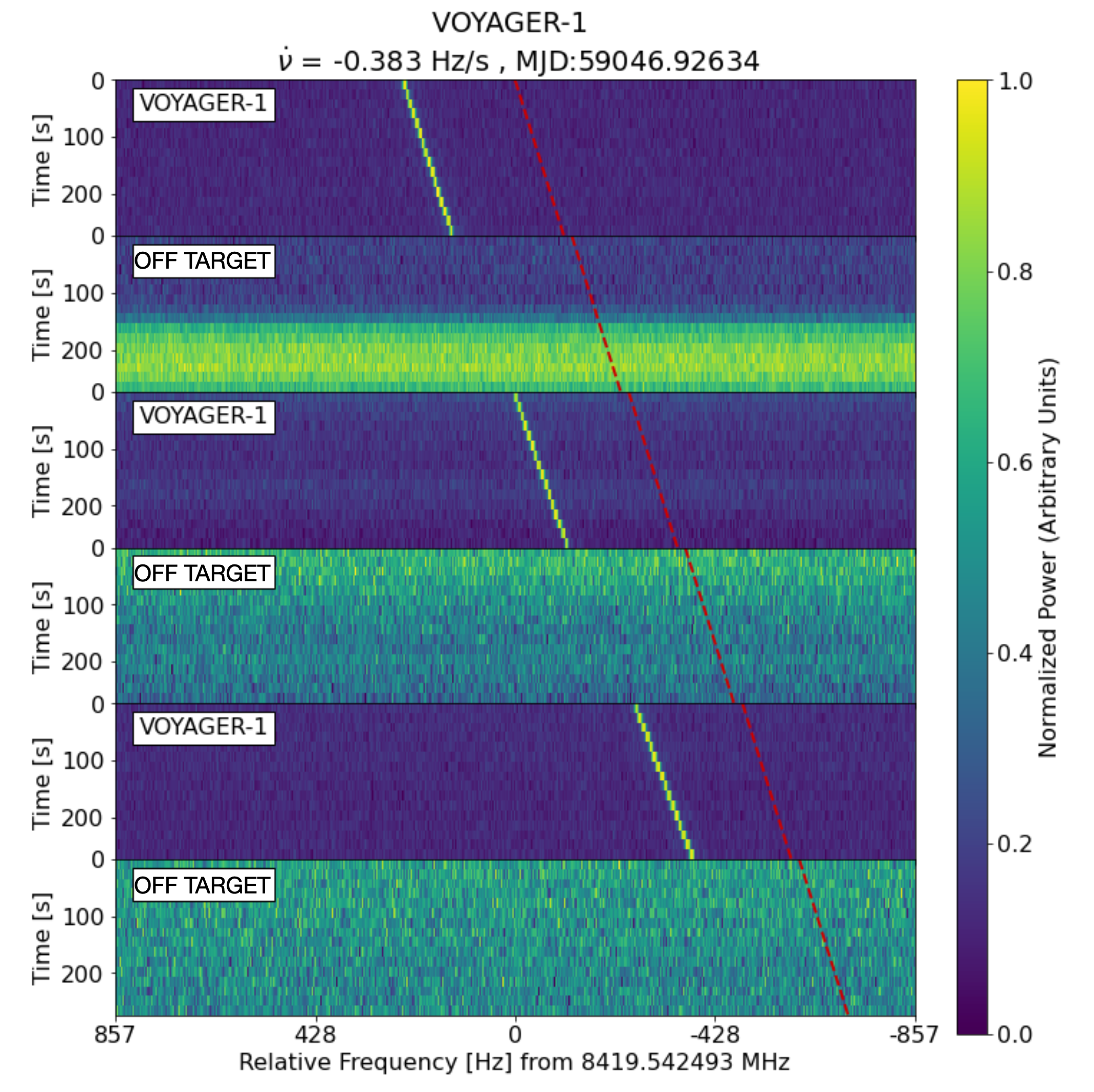\n\n... would jump around, and wouldn't be \"trackable\" across.\n\nI therefore used a very simple solution, which was add an input channel which was 1 or 0 depending on whether that period was \"on\" or \"off\", see the penultimate line:\n\n```\nx = np.load(npy_path).astype(np.float32)\ntime, spec = x.shape[1:]\n_x = np.zeros((spec, time * 6, 2))\n_x[:, :, 0] = np.vstack(x).transpose()\nfor i_channel in range(len(x)):\n _x[:, i_channel*time:(i_channel+1)*time, 1] = 1 if (i_channel % 2 == 1) else 0\nx = _x\n```\n\nI figured this would allow convolutional kernels in the first layer to emerge which are \"transitional\" needle detectors and \"non-transitional\" needle detectors, which obviously is hugely relevant.\n\nThis also meant that if I did aggressive RandomResizedCropping (which I did) the model would still \"know\" if it was an On or Off signal, regardless, of its location in the image.\n\nOther things:\n- As with everyone else, Mixup was very important\n- HFlip, VFlip. \n- AdamW, OneCycle (5e-5 -> 1e-8), gradient clipping\n\nI didn't really try anything else because I only had time to train 3 different models! Didn't even have time to test TTA; my final model finished a few hours before competition end and I ran out of subs. There's a lesson in here somewhere...", "votes": 34 }, { "id": 1495849, "postDate": "2021-08-29T20:42:08.320Z", "content": "Good idea. Congrats =))
", "rawMarkdown": "Good idea. Congrats =))", "votes": 1 }, { "id": 1482671, "postDate": "2021-08-20T07:30:42.633Z", "content": "Congratulations mate :)
", "rawMarkdown": "Congratulations mate :)", "votes": 1 }, { "id": 1481292, "postDate": "2021-08-19T12:19:54.240Z", "content": "Thanks! Congratulations for you! I have a question after you processing x input data, and then i think the shape of x is (256, 1638, 2).How do you reshape the shape of data that fit the model?
", "rawMarkdown": "Thanks! Congratulations for you! I have a question after you processing x input data, and then i think the shape of x is (256, 1638, 2).How do you reshape the shape of data that fit the model?", "votes": 1, "replies": [ { "id": 1481316, "postDate": "2021-08-19T12:30:21.720Z", "content": "I wrote my own RRC class inherits from Albumentations' transforms. It has the extra feature where I can bias it to always keep the \"bottom\" of the spectrogram and only crop the top off. I ended up not really using that, though.
\nimport albumentations.augmentations.geometric.functional as fa\nfrom albumentations.core.transforms_interface import ImageOnlyTransform\n\nclass RandomResizedCrop(ImageOnlyTransform):\n def __init__(self,\n final_height,\n final_width,\n keep_bottom=False,\n height_proportion_range=(0.3, 1.0),\n width_proportion_range=(0.5, 1.0),\n always_apply=False,\n p=1.0):\n super().__init__(always_apply, p)\n self.final_height = final_height\n self.final_width = final_width\n self.keep_bottom = keep_bottom\n self.height_proportion_range = height_proportion_range\n self.width_proportion_range = width_proportion_range\n\n def apply(self, img, **params):\n orig_height, orig_width = img.shape[:2]\n height_proportion = random.uniform(*self.height_proportion_range)\n width_proportion = random.uniform(*self.width_proportion_range)\n crop_height = round(height_proportion * orig_height)\n crop_width = round(width_proportion * orig_width)\n if self.keep_bottom:\n h_from = orig_height - crop_height # Always crops to the bottom\n else:\n h_from = random.randint(0, orig_height - crop_height)\n w_from = random.randint(0, orig_width - crop_width)\n cropped_img = img[h_from:, w_from:w_from+crop_width]\n return fa.resize(cropped_img, self.final_height, self.final_width, cv2.INTER_LINEAR)\nThank you for your replying. But i mean we first transform the shape of data , for example, i use the resnet18, i should reshape the data into (1024,1024,3) like these and then train the model. But i have no idea with how do you transform(256, 1638, 2) into(1024,1024,3)
", "rawMarkdown": "Thank you for your replying. But i mean we first transform the shape of data , for example, i use the resnet18, i should reshape the data into (1024,1024,3) like these and then train the model. But i have no idea with how do you transform(256, 1638, 2) into(1024,1024,3)", "votes": 1 } ] }, { "id": 1481363, "postDate": "2021-08-19T13:06:45.127Z", "content": "Ah, I don't resize the channels. I use a model with the first layer comprising convolutions of depth 2 (rather than 3). This is easy using the timm library, where you can do model = timm.create_model(model_name, pretrained=True, in_chans=in_channels, num_classes=1) where in_channels is 2. It's even clever enough to adjust the first convolutional layer's weights so you can use pretrained weights, see here
Oh,Thank you! You are so nice to reply my question!
", "rawMarkdown": "Oh,Thank you! You are so nice to reply my question! ", "votes": 2 } ] } ] }, { "id": 1481047, "postDate": "2021-08-19T09:36:16.043Z", "content": "Thanks. You are great!
\nI think your method is general and it can applied other topic too.
that was an incredible comeback! congratulations on everything!
", "rawMarkdown": "that was an incredible comeback! congratulations on everything!", "votes": 1 }, { "id": 1482227, "postDate": "2021-08-20T00:48:03.547Z", "content": "Congratulations on solo gold. Adding a channel of 0s and 1s to indicate \"on\" and \"off\" was really smart. I agree that it would help the model detecting that a signal \"stops\" at the time transition while other non-alien signals would \"continue\" through the transition.
", "rawMarkdown": "Congratulations on solo gold. Adding a channel of 0s and 1s to indicate \"on\" and \"off\" was really smart. I agree that it would help the model detecting that a signal \"stops\" at the time transition while other non-alien signals would \"continue\" through the transition.", "votes": 2 }, { "id": 1498823, "postDate": "2021-09-01T08:16:24.830Z", "content": "Congrats! On which hardware did you train your EffNetB7 1024x1024 model?
", "rawMarkdown": "Congrats! On which hardware did you train your EffNetB7 1024x1024 model? " } ], "comments": [ { "id": 1495849, "author_name": "Fuco", "author_url": "", "post_date": "2021-08-29T20:42:08.320000", "content": "Good idea. Congrats =))
", "votes": 1, "replies": [] }, { "id": 1482671, "author_name": "Ashutosh Sahay", "author_url": "", "post_date": "2021-08-20T07:30:42.633000", "content": "Congratulations mate :)
", "votes": 1, "replies": [] }, { "id": 1481292, "author_name": "Jackie Mai", "author_url": "", "post_date": "2021-08-19T12:19:54.240000", "content": "Thanks! Congratulations for you! I have a question after you processing x input data, and then i think the shape of x is (256, 1638, 2).How do you reshape the shape of data that fit the model?
", "votes": 1, "replies": [ { "id": 1481316, "author_name": "James Howard", "author_url": "", "post_date": "2021-08-19T12:30:21.720000", "content": "I wrote my own RRC class inherits from Albumentations' transforms. It has the extra feature where I can bias it to always keep the \"bottom\" of the spectrogram and only crop the top off. I ended up not really using that, though.
\nimport albumentations.augmentations.geometric.functional as fa\nfrom albumentations.core.transforms_interface import ImageOnlyTransform\n\nclass RandomResizedCrop(ImageOnlyTransform):\n def __init__(self,\n final_height,\n final_width,\n keep_bottom=False,\n height_proportion_range=(0.3, 1.0),\n width_proportion_range=(0.5, 1.0),\n always_apply=False,\n p=1.0):\n super().__init__(always_apply, p)\n self.final_height = final_height\n self.final_width = final_width\n self.keep_bottom = keep_bottom\n self.height_proportion_range = height_proportion_range\n self.width_proportion_range = width_proportion_range\n\n def apply(self, img, **params):\n orig_height, orig_width = img.shape[:2]\n height_proportion = random.uniform(*self.height_proportion_range)\n width_proportion = random.uniform(*self.width_proportion_range)\n crop_height = round(height_proportion * orig_height)\n crop_width = round(width_proportion * orig_width)\n if self.keep_bottom:\n h_from = orig_height - crop_height # Always crops to the bottom\n else:\n h_from = random.randint(0, orig_height - crop_height)\n w_from = random.randint(0, orig_width - crop_width)\n cropped_img = img[h_from:, w_from:w_from+crop_width]\n return fa.resize(cropped_img, self.final_height, self.final_width, cv2.INTER_LINEAR)\nThank you for your replying. But i mean we first transform the shape of data , for example, i use the resnet18, i should reshape the data into (1024,1024,3) like these and then train the model. But i have no idea with how do you transform(256, 1638, 2) into(1024,1024,3)
", "votes": 1, "replies": [] } ] }, { "id": 1481363, "author_name": "James Howard", "author_url": "", "post_date": "2021-08-19T13:06:45.127000", "content": "Ah, I don't resize the channels. I use a model with the first layer comprising convolutions of depth 2 (rather than 3). This is easy using the timm library, where you can do model = timm.create_model(model_name, pretrained=True, in_chans=in_channels, num_classes=1) where in_channels is 2. It's even clever enough to adjust the first convolutional layer's weights so you can use pretrained weights, see here
Oh,Thank you! You are so nice to reply my question!
", "votes": 2, "replies": [] } ] } ] }, { "id": 1481047, "author_name": "WOOSUNG YOON", "author_url": "", "post_date": "2021-08-19T09:36:16.043000", "content": "Thanks. You are great!
\nI think your method is general and it can applied other topic too.
that was an incredible comeback! congratulations on everything!
", "votes": 1, "replies": [] }, { "id": 1482227, "author_name": "Chris Deotte", "author_url": "", "post_date": "2021-08-20T00:48:03.547000", "content": "Congratulations on solo gold. Adding a channel of 0s and 1s to indicate \"on\" and \"off\" was really smart. I agree that it would help the model detecting that a signal \"stops\" at the time transition while other non-alien signals would \"continue\" through the transition.
", "votes": 2, "replies": [] }, { "id": 1498823, "author_name": "GG", "author_url": "", "post_date": "2021-09-01T08:16:24.830000", "content": "Congrats! On which hardware did you train your EffNetB7 1024x1024 model?
", "votes": 0, "replies": [] } ], "raw_markdown_by_id": { "1480848": "Thanks to the organisers, this was good fun!\n\nI'm getting married tomorrow so I wasn't even sure if I'd rejoin the competition after the reset. However, the end of last week before I went on my stag do I thought I'd just get some models training and see how they went. Turns out they did quite well!\n\nJust one model of mine did nearly all the heavy lifting and would have had me in 8th place, so I'll focus on that.\n\nIt was an EfficientNet-B7 that I trained in mixed precision at 1024 * 1024 resolution (and tested at 1280 * 1280).\n\nI'm sure what made my model so effective was I felt I needed to structure the input data so that the model was able to identify whether a needle appearing/disappearing was as at a transition (between \"on\" or \"off\" target) or 'within' a segment - these have fundamentally different significance. Also, you can't just put all the \"ons\" next to each other and all the \"offs\" next to each other, because then the data time aren't aligned, and a continuously present signal such as the red line here...\n\n\n\n... would jump around, and wouldn't be \"trackable\" across.\n\nI therefore used a very simple solution, which was add an input channel which was 1 or 0 depending on whether that period was \"on\" or \"off\", see the penultimate line:\n\n```\nx = np.load(npy_path).astype(np.float32)\ntime, spec = x.shape[1:]\n_x = np.zeros((spec, time * 6, 2))\n_x[:, :, 0] = np.vstack(x).transpose()\nfor i_channel in range(len(x)):\n _x[:, i_channel*time:(i_channel+1)*time, 1] = 1 if (i_channel % 2 == 1) else 0\nx = _x\n```\n\nI figured this would allow convolutional kernels in the first layer to emerge which are \"transitional\" needle detectors and \"non-transitional\" needle detectors, which obviously is hugely relevant.\n\nThis also meant that if I did aggressive RandomResizedCropping (which I did) the model would still \"know\" if it was an On or Off signal, regardless, of its location in the image.\n\nOther things:\n- As with everyone else, Mixup was very important\n- HFlip, VFlip. \n- AdamW, OneCycle (5e-5 -> 1e-8), gradient clipping\n\nI didn't really try anything else because I only had time to train 3 different models! Didn't even have time to test TTA; my final model finished a few hours before competition end and I ran out of subs. There's a lesson in here somewhere...", "1495849": "Good idea. Congrats =))", "1482671": "Congratulations mate :)", "1481292": "Thanks! Congratulations for you! I have a question after you processing x input data, and then i think the shape of x is (256, 1638, 2).How do you reshape the shape of data that fit the model?", "1481047": "Thanks. You are great!\nI think your method is general and it can applied other topic too.", "1480853": "that was an incredible comeback! congratulations on everything!", "1482227": "Congratulations on solo gold. Adding a channel of 0s and 1s to indicate \"on\" and \"off\" was really smart. I agree that it would help the model detecting that a signal \"stops\" at the time transition while other non-alien signals would \"continue\" through the transition.", "1498823": "Congrats! On which hardware did you train your EffNetB7 1024x1024 model? " } }