
As you probably already know, the rasterization process is the bottleneck in this competition. At first, I tried to optimize the l5kit, but I only achieved minor speedup. With pre-generated images (and the optimized l5kit), I achieved ~ 4-5x it/sec. Unfortunately, the GPU utilization was still ~40-45% (I have an RTX-2080ti I used 10 cores; 20 CPU threads). The obvious solution is to render the images on the GPU. As @lucabergamini mentioned on their github discussion that it is not an easy task with the current implementation.
\nI implemented an OpenGLRasterizer, and it looks very promising. Here is my baseline benchmark.
\n
| Method | \nSize | \nHistory | \n# of samples | \nRunning time | \nit/sec | \n
|---|---|---|---|---|---|
| CPU rasterizer | \n650px | \n0 | \n1,000 | \n1:14 | \n13.41 | \n
| OpenGL GPU | \n650px | \n0 | \n10,000 | \n1:16 | \n130.49 | \n
Notes
\nI have to solve/fix a few things before I can publish the code. I don't want to make any promises because I am busy with other projects, but I expect to be ready next week.
\nUpdate
\nI was a bit optimistic when I posted this thread. Unfortunately, my idea is not working. It could give some improvement if you have only 1-2 CPU cores, or you have multiple GPUs (I haven't tested).
You can find more details and the source code on my github.
", "messages": [ { "id": 998423, "postDate": "2020-09-04T18:03:46.877Z", "content": "As you probably already know, the rasterization process is the bottleneck in this competition. At first, I tried to optimize the l5kit, but I only achieved minor speedup. With pre-generated images (and the optimized l5kit), I achieved ~ 4-5x it/sec. Unfortunately, the GPU utilization was still ~40-45% (I have an RTX-2080ti I used 10 cores; 20 CPU threads). The obvious solution is to render the images on the GPU. As @lucabergamini mentioned on their github discussion that it is not an easy task with the current implementation.
\nI implemented an OpenGLRasterizer, and it looks very promising. Here is my baseline benchmark.
\n
| Method | \nSize | \nHistory | \n# of samples | \nRunning time | \nit/sec | \n
|---|---|---|---|---|---|
| CPU rasterizer | \n650px | \n0 | \n1,000 | \n1:14 | \n13.41 | \n
| OpenGL GPU | \n650px | \n0 | \n10,000 | \n1:16 | \n130.49 | \n
Notes
\nI have to solve/fix a few things before I can publish the code. I don't want to make any promises because I am busy with other projects, but I expect to be ready next week.
\nUpdate
\nI was a bit optimistic when I posted this thread. Unfortunately, my idea is not working. It could give some improvement if you have only 1-2 CPU cores, or you have multiple GPUs (I haven't tested).
You can find more details and the source code on my github.
", "rawMarkdown": "As you probably already know, the rasterization process is the bottleneck in this competition. At first, I tried to optimize the l5kit, but I only achieved minor speedup. With pre-generated images (and the optimized l5kit), I achieved ~ 4-5x it/sec. Unfortunately, the GPU utilization was still ~40-45% (I have an RTX-2080ti I used 10 cores; 20 CPU threads). The obvious solution is to render the images on the GPU. As @lucabergamini mentioned on their [github discussion](https://github.com/lyft/l5kit/issues/136#issuecomment-686370259) that it is not an easy task with the current implementation.\n\nI implemented an OpenGLRasterizer, and it looks very promising. Here is my baseline benchmark.\n\n## Results\n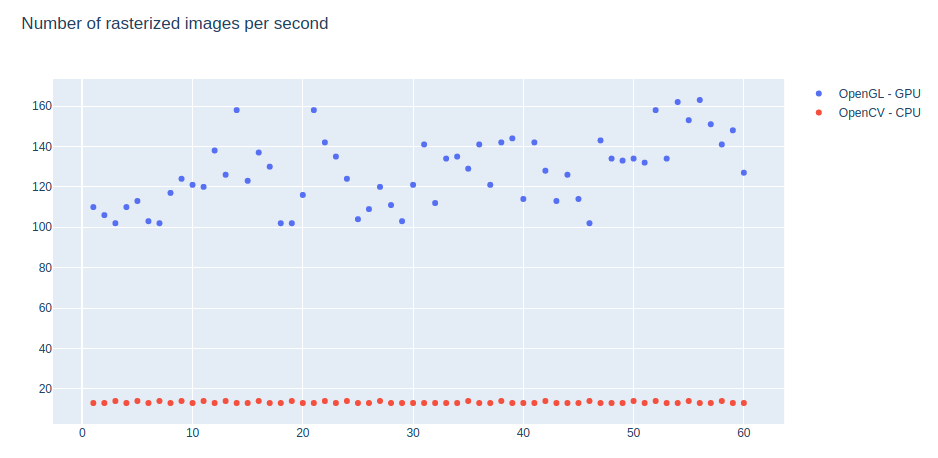\n\n## Experiments:\n| Method | Size | History | \\# of samples | Running time | it/sec |\n| --------------- | ---- | ------- | ------------ | ------------- | ------ |\n| CPU rasterizer | 650px | 0 | 1,000 | 1:14 | 13.41 |\n| OpenGL GPU | 650px | 0 | 10,000 | 1:16 | 130.49 |\n\n**Notes**\n- I haven't implemented the crosswalks and the traffic lights yet. (CPU rasterizer generates both)\n- It is hard to generate the history (in the current output form) on the GPU (at least need some CPU post-process). I am looking for alternatives.\n- l5kit optimization is in progress (see [their github](https://github.com/lyft/l5kit); both methods will improve.\n- Data loading is still a bottleneck. OpenGL can generate at a ~800 it/sec rate if I use the same preloaded frame's data. (I used a busy frame with lots of agents)\n- I used 1 CPU core for both methods.\n- GPU memory usage is low: ~35Mb.\n\nI have to solve/fix a few things before I can publish the code. I don't want to make any promises because I am busy with other projects, but I expect to be ready next week.\n\n--------------\n\n**Update**\nI was a bit optimistic when I posted this thread. Unfortunately, my idea is not working. It could give some improvement if you have only 1-2 CPU cores, or you have multiple GPUs (I haven't tested).\n\nYou can find more details and the source code [on my github](https://github.com/pestipeti/LyftOpenGLRasterizer).\n", "votes": 55 }, { "id": 1003526, "postDate": "2020-09-09T04:08:19.133Z", "content": "Update
\nI was a bit optimistic when I posted this thread. Unfortunately, my idea is not working. It could give some improvement if you have only 1-2 CPU cores, or you have multiple GPUs (I haven't tested).
You can find more details and the source code on my github.
", "rawMarkdown": "**Update**\nI was a bit optimistic when I posted this thread. Unfortunately, my idea is not working. It could give some improvement if you have only 1-2 CPU cores, or you have multiple GPUs (I haven't tested).\n\nYou can find more details and the source code [on my github](https://github.com/pestipeti/LyftOpenGLRasterizer).\n\n", "votes": 4, "replies": [ { "id": 1012015, "postDate": "2020-09-15T21:05:03.117Z", "content": "@pestipeti Thanks for sharing your progress/work. Given the difficulties going back/forth between CPU GPU, GL/PyTorch wonder if you've looked at fully Torch tensor based options?
\nAfter seeing how bad the bottleneck is, I looked for some native PyTorch 2D drawing/rasterization but didn't find anything. Kornia has some discussion in issue tracker but no implemented functionality. I then looked for 3d options and ran into two libs I'd looked at before but never tried.
\nBoth NVIDIA Kaolin (https://github.com/NVIDIAGameWorks/kaolin) and Facebook PyTorch3d (https://github.com/facebookresearch/pytorch3d) have 3d rasterizers that may have enough functionality. They are full differentiable, which is not needed here, but does mean they should work with PyTorch cuda tensors.
", "rawMarkdown": "@pestipeti Thanks for sharing your progress/work. Given the difficulties going back/forth between CPU GPU, GL/PyTorch wonder if you've looked at fully Torch tensor based options?\n\nAfter seeing how bad the bottleneck is, I looked for some native PyTorch 2D drawing/rasterization but didn't find anything. Kornia has some discussion in issue tracker but no implemented functionality. I then looked for 3d options and ran into two libs I'd looked at before but never tried.\n\nBoth NVIDIA Kaolin (https://github.com/NVIDIAGameWorks/kaolin) and Facebook PyTorch3d (https://github.com/facebookresearch/pytorch3d) have 3d rasterizers that may have enough functionality. They are full differentiable, which is not needed here, but does mean they should work with PyTorch cuda tensors.", "votes": 4 }, { "id": 1012654, "postDate": "2020-09-16T07:58:23.917Z", "content": "I looked for PyTorch 2D drawing, too; the same result. 3D tools did not come to my mind. I'll take a look at both. Thank you for the links.
", "rawMarkdown": "I looked for PyTorch 2D drawing, too; the same result. 3D tools did not come to my mind. I'll take a look at both. Thank you for the links.", "votes": 1 }, { "id": 1021480, "postDate": "2020-09-21T22:11:19.987Z", "content": "I received impressions on your code, so I've written a rendering process in PyTorch3d. But I have yet to see any speed improvements. I'm rendering in Torch on the GPU, can you make this code better?
\nhttps://www.kaggle.com/nmygle/pytorch3d-rendering
this is amazing @pestipeti! I can't help you on the openGL side, but If you start a PR in L5Kit I can surely assist with integration. The rasterisation in Python is a huge bottleneck, so everything that can help on that side is more than welcomed!
", "rawMarkdown": "this is **amazing** @pestipeti! I can't help you on the openGL side, but If you start a PR in L5Kit I can surely assist with integration. The rasterisation in Python is a huge bottleneck, so everything that can help on that side is more than welcomed!", "votes": 1, "replies": [ { "id": 1003075, "postDate": "2020-09-08T16:36:57.913Z", "content": "\nUnfortunately, it won't work. The problem is the same that you mentioned on the github discussion. The data transfer between OpenGL gpu mem -> ram -> pytorch gpu tensor kills the entire idea. OpenGL is extremely fast until I want to \"download\" the data. There is a (possible) solution in C++, but that won't help us in python.
\nI'll publish the code later, maybe someone will come up with a solution.
", "rawMarkdown": "@lucabergamini \n\nUnfortunately, it won't work. The problem is the same that you mentioned on the github discussion. The data transfer between OpenGL gpu mem -> ram -> pytorch gpu tensor kills the entire idea. OpenGL is extremely fast until I want to \"download\" the data. There is a (possible) solution in C++, but that won't help us in python.\n\n I'll publish the code later, maybe someone will come up with a solution.", "votes": 1 }, { "id": 1003086, "postDate": "2020-09-08T16:45:12.670Z", "content": "Yeah, that's problematic. A possible solution would be a C++ implementation wrapped in Python (that alone would probably speed things up quite a lot), but sadly this is again outside my expertise :(
", "rawMarkdown": "Yeah, that's problematic. A possible solution would be a C++ implementation wrapped in Python (that alone would probably speed things up quite a lot), but sadly this is again outside my expertise :( ", "votes": 1 } ] }, { "id": 1002197, "postDate": "2020-09-07T23:02:17.570Z", "content": "Did you try a context.save / context.restore type method for the background data? - it would probably just be the lane info, but you should be able to reuse for some number of frames before drawing the next
\nAdded: there's a stray assert in an is_lane()?, but also the map api cache is set quite low at 90kb?
", "rawMarkdown": "Did you try a context.save / context.restore type method for the background data? - it would probably just be the lane info, but you should be able to reuse for some number of frames before drawing the next\n\nAdded: there's a stray assert in an is_lane()?, but also the map api cache is set quite low at 90kb?", "votes": 1, "replies": [ { "id": 1002362, "postDate": "2020-09-08T04:38:49.490Z", "content": "I stored the semantic map in vbo/vao (only ~30mb gpu mem). It is fast, no need for context. The real problem is moving the image/pixels from opengl -> cpu -> pytorch cuda tensor.
", "rawMarkdown": "I stored the semantic map in vbo/vao (only ~30mb gpu mem). It is fast, no need for context. The real problem is moving the image/pixels from opengl -> cpu -> pytorch cuda tensor. ", "votes": 1 }, { "id": 1002442, "postDate": "2020-09-08T06:08:32.153Z", "content": "Maybe passing a shared memory reference would work, but it's just a guess
", "rawMarkdown": "Maybe passing a shared memory reference would work, but it's just a guess" }, { "id": 1002480, "postDate": "2020-09-08T06:56:40.807Z", "content": "Unfortunately, I don't think we have that level of control over opengl in python (or I don't know how to do it). I'll share the code later today or tomorrow, maybe someone will come up with a solution.
", "rawMarkdown": "Unfortunately, I don't think we have that level of control over opengl in python (or I don't know how to do it). I'll share the code later today or tomorrow, maybe someone will come up with a solution." }, { "id": 1003395, "postDate": "2020-09-08T23:26:28.063Z", "content": "Oldish article with c++ https://www.3dgep.com/opengl-interoperability-with-cuda/
", "rawMarkdown": "Oldish article with c++ https://www.3dgep.com/opengl-interoperability-with-cuda/" } ] }, { "id": 3300065, "postDate": "2025-10-09T12:24:40.057Z", "content": "Thanks for the deep dive into OpenGL rasterization! That 10x speed boost is huge, especially since CPU rasterization is the main slow point.
\nYour benchmark of 130 it/sec vs 13 it/sec is impressive, even without history rendering. It makes sense that history generation on GPU is tricky due to how l5kit works.
\nLooks like data loading is now the bottleneck, showing how much faster GPU rasterization is. Pre-caching images might still be easier for training, but your method could be great for inference or live use.
", "rawMarkdown": "Thanks for the deep dive into OpenGL rasterization! That 10x speed boost is huge, especially since CPU rasterization is the main slow point.\n\nYour benchmark of 130 it/sec vs 13 it/sec is impressive, even without history rendering. It makes sense that history generation on GPU is tricky due to how l5kit works.\n\nLooks like data loading is now the bottleneck, showing how much faster GPU rasterization is. Pre-caching images might still be easier for training, but your method could be great for inference or live use." }, { "id": 1061559, "postDate": "2020-10-27T04:53:19.547Z", "content": "\n\nI haven't implemented the crosswalks and the traffic lights yet.<
\n
torch.multiprocessing will that works?train.zarr file with your fastest method you drew for this competition to become 8th place in Public. If you don't mind Can you share how you done them?@morizin
\nSorry for the confusion. That table shows stats about one image generated on CPU (one core) vs GPU. When you want to generate a batch of images, you can use multiple CPU cores, but OpenGL is still working on one CPU thread + GPU. The main issue is that you have to move somehow the generated images from OpenGL's memory to a PyTorch Tensor. The simplest way is OpenGL (GPU mem) -> CPU (RAM) -> PyTorch/CUDA (GPU mem). Unfortunately, this data transfer is too slow and it kills the whole idea.
\n\nI looked for PyTorch 2D drawing, too; the same result. 3D tools did not come to my mind. I'll take a look at both. Thank you for the links.
\n
Have you done this? did they improved
I ran this notebook I felt a improvement of 7.5%
I haven't tried it. I am not sure they have implemented the drawing API on GPU/Cuda. Maybe in the c++ version, I don't know.
", "rawMarkdown": "I haven't tried it. I am not sure they have implemented the drawing API on GPU/Cuda. Maybe in the c++ version, I don't know.", "votes": 1 }, { "id": 1061724, "postDate": "2020-10-27T09:03:40.413Z", "content": "Thank for your multiple replies
\nI am trying recoding slow functions in C++
\nI have connected you in LinkedIn
\n\n\n \n
\n\n \n \n \nMethod \nSize \nHistory \n# of samples \nStorage size \nTraining time \nit/sec \n\n \nRasterizer \n300 \n10 \n32000 \n0 \n4:48 \n3.47 \n\n \nRasterizer \n300 \n5 \n32000 \n0 \n3:46 \n4.42 \n\n \nPre-generated data \n300 \n10 \n32000 \n1.9 Gb \n3:26 \n4.85 \n\n \n \nPre-generated data \n300 \n5 \n32000 \n1.8 Gb \n2:56 \n5.68 \n
When I choosed 16 batch and 224 rastersize it takes 32 min for 16*2000 iters
\nand you said only 4:48min Can you say how you did it?
\nhow many channels you inputted into network. no. of history frames?
I checked out this but got an error of pbz file not found to write
 But even OpenGL is slow it takes only 3 days for 22million samples( over count in pic)
\nI have error in your LyftOpenGLRasterizer. Is the rasterized image is same as py semantic
\nCould you please show the rasterized image
\nCould we generate pbz files from this
I can't remember the stats, but I did not finish the OpenGL rasterizer. My tests did not have historical frames or traffic lights, etc.
", "rawMarkdown": "I can't remember the stats, but I did not finish the OpenGL rasterizer. My tests did not have historical frames or traffic lights, etc. " }, { "id": 1062683, "postDate": "2020-10-28T05:11:00.640Z", "content": "I believe there is actually a way to have OpenGL render to texture and then have CUDA use the texture and thus skip the CPU transfer. (Here's an example of the concept, I'm not sure if it still works with latest CUDA etc but I know it was possible with older CUDA https://stackoverflow.com/questions/19244191/cuda-opengl-interop-draw-to-opengl-texture-with-cuda ).
\nOne nice feature of this OpenGL implementation is that you could use XvFB / llvmpipe / Mesa software rasterizer to do CPU rendering in the case you don't have a GPU. I know that's not the focus on this work, but if you happened to have GCloud credits, you could use a 96-core instance and run 96 rendering threads in parallel. It's also handy to use in cases where you need CI and CI doesn't have GPUs. So OpenGL impl has some nice value.
\nLooking at the code, I'm probably missing something but I don't quite see the showstopper. In any case this is a really nice effort!! Comparable libraries in differential rendering, like pytorch3d or DIRT ( https://github.com/pmh47/dirt ) are still kinda slow, especially versus OpenGL for simple stuff. There's actually probably a lot of value in trying to pick through these perf bottlenecks… There's also Kaolin but that project looks a bit hectic right now :S
", "rawMarkdown": "I believe there is actually a way to have OpenGL render to texture and then have CUDA use the texture and thus skip the CPU transfer. (Here's an example of the concept, I'm not sure if it still works with latest CUDA etc but I know it was possible with older CUDA https://stackoverflow.com/questions/19244191/cuda-opengl-interop-draw-to-opengl-texture-with-cuda ). \n\nOne nice feature of this OpenGL implementation is that you could use XvFB / llvmpipe / Mesa software rasterizer to do CPU rendering in the case you don't have a GPU. I know that's not the focus on this work, but if you happened to have GCloud credits, you could use a 96-core instance and run 96 rendering threads in parallel. It's also handy to use in cases where you need CI and CI doesn't have GPUs. So OpenGL impl has some nice value. \n\nLooking at the code, I'm probably missing something but I don't quite see the showstopper. In any case this is a really nice effort!! Comparable libraries in differential rendering, like pytorch3d or DIRT ( https://github.com/pmh47/dirt ) are still kinda slow, especially versus OpenGL for simple stuff. There's actually probably a lot of value in trying to pick through these perf bottlenecks... There's also Kaolin but that project looks a bit hectic right now :S" }, { "id": 1062794, "postDate": "2020-10-28T07:27:38.510Z", "content": "is we able to get 96 core CPU + GPU in $300 GCP Credits
", "rawMarkdown": "is we able to get 96 core CPU + GPU in $300 GCP Credits" }, { "id": 1062811, "postDate": "2020-10-28T08:05:37.437Z", "content": "you can get the quota for sure… I think 96 cores is about $5/hr not including GPU. so you'd have to be pretty efficient with your time… aside: in the original pytorch + TPU demo, google wanted you to use a 96-core box because the TPU doesn't support a lot of ops you need for I/O
", "rawMarkdown": "you can get the quota for sure... I think 96 cores is about $5/hr not including GPU. so you'd have to be pretty efficient with your time... aside: in the original pytorch + TPU demo, google wanted you to use a 96-core box because the TPU doesn't support a lot of ops you need for I/O" }, { "id": 1062815, "postDate": "2020-10-28T08:08:54.877Z", "content": "What is 1vCPU = how many cores
", "rawMarkdown": "What is 1vCPU = how many cores" }, { "id": 1069666, "postDate": "2020-11-04T18:23:44.713Z", "content": "@oarphme I have a request to you. will you help me fix this issue which I faced during while increasing GCP quota? 
Wow, great work Peter! This looks very promising.
", "rawMarkdown": "Wow, great work Peter! This looks very promising." }, { "id": 1047727, "postDate": "2020-10-12T21:59:19.500Z", "rawMarkdown": "", "isDeleted": true } ], "comments": [ { "id": 1003526, "author_name": "Peter", "author_url": "", "post_date": "2020-09-09T04:08:19.133000", "content": "Update
\nI was a bit optimistic when I posted this thread. Unfortunately, my idea is not working. It could give some improvement if you have only 1-2 CPU cores, or you have multiple GPUs (I haven't tested).
You can find more details and the source code on my github.
", "votes": 4, "replies": [ { "id": 1012015, "author_name": "RossWightman", "author_url": "", "post_date": "2020-09-15T21:05:03.117000", "content": "@pestipeti Thanks for sharing your progress/work. Given the difficulties going back/forth between CPU GPU, GL/PyTorch wonder if you've looked at fully Torch tensor based options?
\nAfter seeing how bad the bottleneck is, I looked for some native PyTorch 2D drawing/rasterization but didn't find anything. Kornia has some discussion in issue tracker but no implemented functionality. I then looked for 3d options and ran into two libs I'd looked at before but never tried.
\nBoth NVIDIA Kaolin (https://github.com/NVIDIAGameWorks/kaolin) and Facebook PyTorch3d (https://github.com/facebookresearch/pytorch3d) have 3d rasterizers that may have enough functionality. They are full differentiable, which is not needed here, but does mean they should work with PyTorch cuda tensors.
", "votes": 4, "replies": [] }, { "id": 1012654, "author_name": "Peter", "author_url": "", "post_date": "2020-09-16T07:58:23.917000", "content": "I looked for PyTorch 2D drawing, too; the same result. 3D tools did not come to my mind. I'll take a look at both. Thank you for the links.
", "votes": 1, "replies": [] }, { "id": 1021480, "author_name": "nmygle", "author_url": "", "post_date": "2020-09-21T22:11:19.987000", "content": "I received impressions on your code, so I've written a rendering process in PyTorch3d. But I have yet to see any speed improvements. I'm rendering in Torch on the GPU, can you make this code better?
\nhttps://www.kaggle.com/nmygle/pytorch3d-rendering
this is amazing @pestipeti! I can't help you on the openGL side, but If you start a PR in L5Kit I can surely assist with integration. The rasterisation in Python is a huge bottleneck, so everything that can help on that side is more than welcomed!
", "votes": 1, "replies": [ { "id": 1003075, "author_name": "Peter", "author_url": "", "post_date": "2020-09-08T16:36:57.913000", "content": "\nUnfortunately, it won't work. The problem is the same that you mentioned on the github discussion. The data transfer between OpenGL gpu mem -> ram -> pytorch gpu tensor kills the entire idea. OpenGL is extremely fast until I want to \"download\" the data. There is a (possible) solution in C++, but that won't help us in python.
\nI'll publish the code later, maybe someone will come up with a solution.
", "votes": 1, "replies": [] }, { "id": 1003086, "author_name": "Luca Bergamini", "author_url": "", "post_date": "2020-09-08T16:45:12.670000", "content": "Yeah, that's problematic. A possible solution would be a C++ implementation wrapped in Python (that alone would probably speed things up quite a lot), but sadly this is again outside my expertise :(
", "votes": 1, "replies": [] } ] }, { "id": 1002197, "author_name": "n3n7i", "author_url": "", "post_date": "2020-09-07T23:02:17.570000", "content": "Did you try a context.save / context.restore type method for the background data? - it would probably just be the lane info, but you should be able to reuse for some number of frames before drawing the next
\nAdded: there's a stray assert in an is_lane()?, but also the map api cache is set quite low at 90kb?
", "votes": 1, "replies": [ { "id": 1002362, "author_name": "Peter", "author_url": "", "post_date": "2020-09-08T04:38:49.490000", "content": "I stored the semantic map in vbo/vao (only ~30mb gpu mem). It is fast, no need for context. The real problem is moving the image/pixels from opengl -> cpu -> pytorch cuda tensor.
", "votes": 1, "replies": [] }, { "id": 1002442, "author_name": "n3n7i", "author_url": "", "post_date": "2020-09-08T06:08:32.153000", "content": "Maybe passing a shared memory reference would work, but it's just a guess
", "votes": 0, "replies": [] }, { "id": 1002480, "author_name": "Peter", "author_url": "", "post_date": "2020-09-08T06:56:40.807000", "content": "Unfortunately, I don't think we have that level of control over opengl in python (or I don't know how to do it). I'll share the code later today or tomorrow, maybe someone will come up with a solution.
", "votes": 0, "replies": [] }, { "id": 1003395, "author_name": "n3n7i", "author_url": "", "post_date": "2020-09-08T23:26:28.063000", "content": "Oldish article with c++ https://www.3dgep.com/opengl-interoperability-with-cuda/
", "votes": 0, "replies": [] } ] }, { "id": 3300065, "author_name": "daya.s", "author_url": "", "post_date": "2025-10-09T12:24:40.057000", "content": "Thanks for the deep dive into OpenGL rasterization! That 10x speed boost is huge, especially since CPU rasterization is the main slow point.
\nYour benchmark of 130 it/sec vs 13 it/sec is impressive, even without history rendering. It makes sense that history generation on GPU is tricky due to how l5kit works.
\nLooks like data loading is now the bottleneck, showing how much faster GPU rasterization is. Pre-caching images might still be easier for training, but your method could be great for inference or live use.
", "votes": 0, "replies": [] }, { "id": 1061559, "author_name": "Mohammed Rizin V K", "author_url": "", "post_date": "2020-10-27T04:53:19.547000", "content": "\n\nI haven't implemented the crosswalks and the traffic lights yet.<
\n
torch.multiprocessing will that works?train.zarr file with your fastest method you drew for this competition to become 8th place in Public. If you don't mind Can you share how you done them?@morizin
\nSorry for the confusion. That table shows stats about one image generated on CPU (one core) vs GPU. When you want to generate a batch of images, you can use multiple CPU cores, but OpenGL is still working on one CPU thread + GPU. The main issue is that you have to move somehow the generated images from OpenGL's memory to a PyTorch Tensor. The simplest way is OpenGL (GPU mem) -> CPU (RAM) -> PyTorch/CUDA (GPU mem). Unfortunately, this data transfer is too slow and it kills the whole idea.
\n\nI looked for PyTorch 2D drawing, too; the same result. 3D tools did not come to my mind. I'll take a look at both. Thank you for the links.
\n
Have you done this? did they improved
I ran this notebook I felt a improvement of 7.5%
I haven't tried it. I am not sure they have implemented the drawing API on GPU/Cuda. Maybe in the c++ version, I don't know.
", "votes": 1, "replies": [] }, { "id": 1061724, "author_name": "Mohammed Rizin V K", "author_url": "", "post_date": "2020-10-27T09:03:40.413000", "content": "Thank for your multiple replies
\nI am trying recoding slow functions in C++
\nI have connected you in LinkedIn
\n\n\n \n
\n\n \n \n \nMethod \nSize \nHistory \n# of samples \nStorage size \nTraining time \nit/sec \n\n \nRasterizer \n300 \n10 \n32000 \n0 \n4:48 \n3.47 \n\n \nRasterizer \n300 \n5 \n32000 \n0 \n3:46 \n4.42 \n\n \nPre-generated data \n300 \n10 \n32000 \n1.9 Gb \n3:26 \n4.85 \n\n \n \nPre-generated data \n300 \n5 \n32000 \n1.8 Gb \n2:56 \n5.68 \n
When I choosed 16 batch and 224 rastersize it takes 32 min for 16*2000 iters
\nand you said only 4:48min Can you say how you did it?
\nhow many channels you inputted into network. no. of history frames?
I checked out this but got an error of pbz file not found to write
But even OpenGL is slow it takes only 3 days for 22million samples( over count in pic)
\nI have error in your LyftOpenGLRasterizer. Is the rasterized image is same as py semantic
\nCould you please show the rasterized image
\nCould we generate pbz files from this
I can't remember the stats, but I did not finish the OpenGL rasterizer. My tests did not have historical frames or traffic lights, etc.
", "votes": 0, "replies": [] }, { "id": 1062683, "author_name": "oarph", "author_url": "", "post_date": "2020-10-28T05:11:00.640000", "content": "I believe there is actually a way to have OpenGL render to texture and then have CUDA use the texture and thus skip the CPU transfer. (Here's an example of the concept, I'm not sure if it still works with latest CUDA etc but I know it was possible with older CUDA https://stackoverflow.com/questions/19244191/cuda-opengl-interop-draw-to-opengl-texture-with-cuda ).
\nOne nice feature of this OpenGL implementation is that you could use XvFB / llvmpipe / Mesa software rasterizer to do CPU rendering in the case you don't have a GPU. I know that's not the focus on this work, but if you happened to have GCloud credits, you could use a 96-core instance and run 96 rendering threads in parallel. It's also handy to use in cases where you need CI and CI doesn't have GPUs. So OpenGL impl has some nice value.
\nLooking at the code, I'm probably missing something but I don't quite see the showstopper. In any case this is a really nice effort!! Comparable libraries in differential rendering, like pytorch3d or DIRT ( https://github.com/pmh47/dirt ) are still kinda slow, especially versus OpenGL for simple stuff. There's actually probably a lot of value in trying to pick through these perf bottlenecks… There's also Kaolin but that project looks a bit hectic right now :S
", "votes": 0, "replies": [] }, { "id": 1062794, "author_name": "Mohammed Rizin V K", "author_url": "", "post_date": "2020-10-28T07:27:38.510000", "content": "is we able to get 96 core CPU + GPU in $300 GCP Credits
", "votes": 0, "replies": [] }, { "id": 1062811, "author_name": "oarph", "author_url": "", "post_date": "2020-10-28T08:05:37.437000", "content": "you can get the quota for sure… I think 96 cores is about $5/hr not including GPU. so you'd have to be pretty efficient with your time… aside: in the original pytorch + TPU demo, google wanted you to use a 96-core box because the TPU doesn't support a lot of ops you need for I/O
", "votes": 0, "replies": [] }, { "id": 1062815, "author_name": "Mohammed Rizin V K", "author_url": "", "post_date": "2020-10-28T08:08:54.877000", "content": "What is 1vCPU = how many cores
", "votes": 0, "replies": [] }, { "id": 1069666, "author_name": "Mohammed Rizin V K", "author_url": "", "post_date": "2020-11-04T18:23:44.713000", "content": "@oarphme I have a request to you. will you help me fix this issue which I faced during while increasing GCP quota?
Wow, great work Peter! This looks very promising.
", "votes": 0, "replies": [] }, { "id": 1047727, "author_name": "", "author_url": "", "post_date": "2020-10-12T21:59:19.500000", "content": "", "votes": 0, "replies": [] } ], "raw_markdown_by_id": { "998423": "As you probably already know, the rasterization process is the bottleneck in this competition. At first, I tried to optimize the l5kit, but I only achieved minor speedup. With pre-generated images (and the optimized l5kit), I achieved ~ 4-5x it/sec. Unfortunately, the GPU utilization was still ~40-45% (I have an RTX-2080ti I used 10 cores; 20 CPU threads). The obvious solution is to render the images on the GPU. As @lucabergamini mentioned on their [github discussion](https://github.com/lyft/l5kit/issues/136#issuecomment-686370259) that it is not an easy task with the current implementation.\n\nI implemented an OpenGLRasterizer, and it looks very promising. Here is my baseline benchmark.\n\n## Results\n\n\n## Experiments:\n| Method | Size | History | \\# of samples | Running time | it/sec |\n| --------------- | ---- | ------- | ------------ | ------------- | ------ |\n| CPU rasterizer | 650px | 0 | 1,000 | 1:14 | 13.41 |\n| OpenGL GPU | 650px | 0 | 10,000 | 1:16 | 130.49 |\n\n**Notes**\n- I haven't implemented the crosswalks and the traffic lights yet. (CPU rasterizer generates both)\n- It is hard to generate the history (in the current output form) on the GPU (at least need some CPU post-process). I am looking for alternatives.\n- l5kit optimization is in progress (see [their github](https://github.com/lyft/l5kit); both methods will improve.\n- Data loading is still a bottleneck. OpenGL can generate at a ~800 it/sec rate if I use the same preloaded frame's data. (I used a busy frame with lots of agents)\n- I used 1 CPU core for both methods.\n- GPU memory usage is low: ~35Mb.\n\nI have to solve/fix a few things before I can publish the code. I don't want to make any promises because I am busy with other projects, but I expect to be ready next week.\n\n--------------\n\n**Update**\nI was a bit optimistic when I posted this thread. Unfortunately, my idea is not working. It could give some improvement if you have only 1-2 CPU cores, or you have multiple GPUs (I haven't tested).\n\nYou can find more details and the source code [on my github](https://github.com/pestipeti/LyftOpenGLRasterizer).\n", "1003526": "**Update**\nI was a bit optimistic when I posted this thread. Unfortunately, my idea is not working. It could give some improvement if you have only 1-2 CPU cores, or you have multiple GPUs (I haven't tested).\n\nYou can find more details and the source code [on my github](https://github.com/pestipeti/LyftOpenGLRasterizer).\n\n", "1003062": "this is **amazing** @pestipeti! I can't help you on the openGL side, but If you start a PR in L5Kit I can surely assist with integration. The rasterisation in Python is a huge bottleneck, so everything that can help on that side is more than welcomed!", "1002197": "Did you try a context.save / context.restore type method for the background data? - it would probably just be the lane info, but you should be able to reuse for some number of frames before drawing the next\n\nAdded: there's a stray assert in an is_lane()?, but also the map api cache is set quite low at 90kb?", "3300065": "Thanks for the deep dive into OpenGL rasterization! That 10x speed boost is huge, especially since CPU rasterization is the main slow point.\n\nYour benchmark of 130 it/sec vs 13 it/sec is impressive, even without history rendering. It makes sense that history generation on GPU is tricky due to how l5kit works.\n\nLooks like data loading is now the bottleneck, showing how much faster GPU rasterization is. Pre-caching images might still be easier for training, but your method could be great for inference or live use.", "1061559": "- Is this notebook works on new L5kit?\n- Do they have any improvement?\n- Your table show it has but on the same time you are saying OpenGl GPU -> CPU -> Pytorch Tensor. Can you please clarify this?\n> I haven't implemented the crosswalks and the traffic lights yet.<\n\n\n- In your Github, Have you included them in the Github\n- Will it improves if we improve all the function as a torch function?\n- or by `torch.multiprocessing` will that works?\n- What time it takes to complete the `train.zarr` file with your fastest method you drew for this competition to become 8th place in Public. If you don't mind Can you share how you done them?", "998693": "Wow, great work Peter! This looks very promising.", "1047727": "" } }