
Thanks to the organizers for hosting a very interesting competition.
\n\nThe outline of my solution is as follows.\n- Detect with Centernet (HourglassNet backbone)\n- Classify character classes with Resnet base model\nThe final private leaderboard score was 0.900.
\n\n
Here is my code.\nhttps://github.com/statsu1990/kuzushiji-recognition
\n\nUse the two-stage Centernet to detect the bounding box of the character by the following procedure.\n- Step 1: Resize the image to 512x512 and estimate bounding box 1 with the Centernet1.\n- Step 2: Use the bounding box 1 to remove the outside of the outermost bounding box in the image.\n- Step 3: Resize the image to 512x512 and estimate bounding box 2 with the Centernet2.\n- Step 4: Ensemble bounding boxes 1 and 2 to create the final bounding box.
\n\nAbout centernet1, it is as follows.\n- Training data: Use 80% of all data. (Create two models by changing the data division with random numbers.)\n- Data augmentation: horizontal movement, brightness adjustment\nData expansion was essential to prevent overlearning.
\n\nAbout centernet2 is as follows.\n- Training data: Use 80% of all data. (Create two models by changing the data division with random numbers)\n- Data augmentation: Random erasing, horizontal movement, brightness adjustment\nThe effect of horizontal data augmentation was weak because the input image was removed outside of the bounding box. Therefore, Random erasing was indispensable.
\n\nUse the following procedure to classify character labels using three ensemble models of Resnet base.\n- Step 1: Crop text image from original image using estimated bounding box and resize to 64x64.\n- Step 2: Classify text labels with 3 Resnet base models using test time augmentation (9 types of horizontal movement).\n- Step 3: Ensemble the classification results of the three models and estimate the final classification results.
\n\nEach model is the same except that learning data is changed as described above and pseudo-labeling is used.\n- Learning data: Use 80% of all data.\n- Data expansion: horizontal movement, rotation, zoom, Random erasing
\n\nAll models were trained using one GTX 1080 on my home server.
", "messages": [ { "id": "656564", "postDate": "10/24/2019 11:58:04", "content": "Thanks to the organizers for hosting a very interesting competition.
\n\nThe outline of my solution is as follows.\n- Detect with Centernet (HourglassNet backbone)\n- Classify character classes with Resnet base model\nThe final private leaderboard score was 0.900.
\n\n
Here is my code.\nhttps://github.com/statsu1990/kuzushiji-recognition
\n\nUse the two-stage Centernet to detect the bounding box of the character by the following procedure.\n- Step 1: Resize the image to 512x512 and estimate bounding box 1 with the Centernet1.\n- Step 2: Use the bounding box 1 to remove the outside of the outermost bounding box in the image.\n- Step 3: Resize the image to 512x512 and estimate bounding box 2 with the Centernet2.\n- Step 4: Ensemble bounding boxes 1 and 2 to create the final bounding box.
\n\nAbout centernet1, it is as follows.\n- Training data: Use 80% of all data. (Create two models by changing the data division with random numbers.)\n- Data augmentation: horizontal movement, brightness adjustment\nData expansion was essential to prevent overlearning.
\n\nAbout centernet2 is as follows.\n- Training data: Use 80% of all data. (Create two models by changing the data division with random numbers)\n- Data augmentation: Random erasing, horizontal movement, brightness adjustment\nThe effect of horizontal data augmentation was weak because the input image was removed outside of the bounding box. Therefore, Random erasing was indispensable.
\n\nUse the following procedure to classify character labels using three ensemble models of Resnet base.\n- Step 1: Crop text image from original image using estimated bounding box and resize to 64x64.\n- Step 2: Classify text labels with 3 Resnet base models using test time augmentation (9 types of horizontal movement).\n- Step 3: Ensemble the classification results of the three models and estimate the final classification results.
\n\nEach model is the same except that learning data is changed as described above and pseudo-labeling is used.\n- Learning data: Use 80% of all data.\n- Data expansion: horizontal movement, rotation, zoom, Random erasing
\n\nAll models were trained using one GTX 1080 on my home server.
", "rawMarkdown": "Thanks to the organizers for hosting a very interesting competition.\n\nThe outline of my solution is as follows.\n- Detect with Centernet (HourglassNet backbone)\n- Classify character classes with Resnet base model\nThe final private leaderboard score was 0.900.\n\n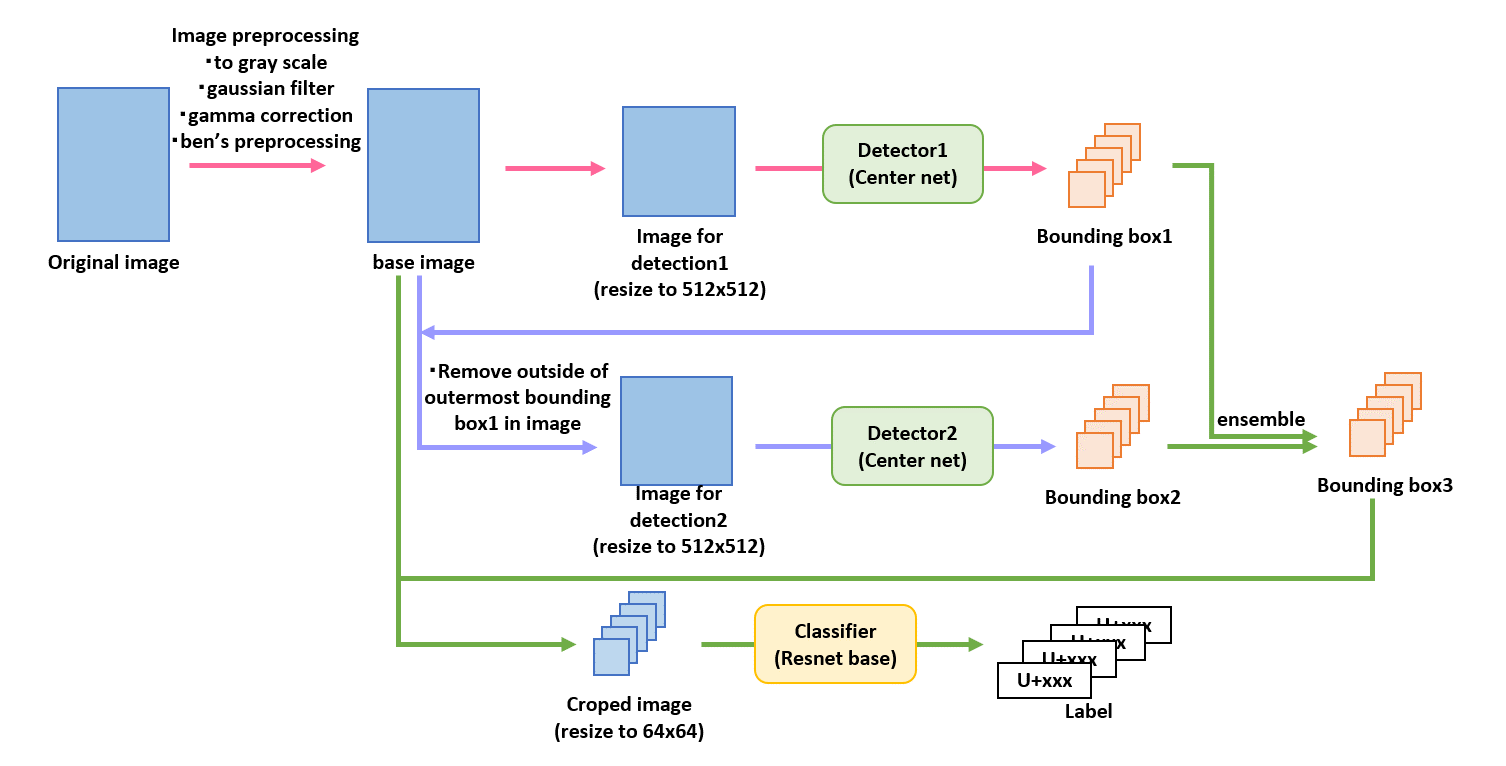\n\n\nHere is my code.\n[https://github.com/statsu1990/kuzushiji-recognition](https://github.com/statsu1990/kuzushiji-recognition)\n\n# Image preprocessing\n- to gray scale\n- gaussian filter\n- gamma correction\n- ben's preprocessing\n\n\n# Detection\n### Inference\nUse the two-stage Centernet to detect the bounding box of the character by the following procedure.\n- Step 1: Resize the image to 512x512 and estimate bounding box 1 with the Centernet1.\n- Step 2: Use the bounding box 1 to remove the outside of the outermost bounding box in the image.\n- Step 3: Resize the image to 512x512 and estimate bounding box 2 with the Centernet2.\n- Step 4: Ensemble bounding boxes 1 and 2 to create the final bounding box.\n\n### Model Architecture\n- Centernet1 is an ensemble of two Centernets (based on one stack hourglassnet).\n- Centernet2 is an ensemble of two Centernets (based on one stack hourglassnet).\n\n### Training\nAbout centernet1, it is as follows.\n- Training data: Use 80% of all data. (Create two models by changing the data division with random numbers.)\n- Data augmentation: horizontal movement, brightness adjustment\nData expansion was essential to prevent overlearning.\n\nAbout centernet2 is as follows.\n- Training data: Use 80% of all data. (Create two models by changing the data division with random numbers)\n- Data augmentation: Random erasing, horizontal movement, brightness adjustment\nThe effect of horizontal data augmentation was weak because the input image was removed outside of the bounding box. Therefore, Random erasing was indispensable.\n\n# Classification\n### Inference\nUse the following procedure to classify character labels using three ensemble models of Resnet base.\n- Step 1: Crop text image from original image using estimated bounding box and resize to 64x64.\n- Step 2: Classify text labels with 3 Resnet base models using test time augmentation (9 types of horizontal movement).\n- Step 3: Ensemble the classification results of the three models and estimate the final classification results.\n\n### Model Architecture\n- Resnet base1: Log(bounding box aspect ratio) is concatenated at FC layer.\n- Resnet base2: Changed Training data from Resnet base1.\n- Resnet base3: The architecture is the same as Resnet base1. A pseudo-labeled input from the above-mentioned Detection model, Resnet base1 and 2 ensemble models was added to training data. \n\n### Training\nEach model is the same except that learning data is changed as described above and pseudo-labeling is used.\n- Learning data: Use 80% of all data.\n- Data expansion: horizontal movement, rotation, zoom, Random erasing\n\n# Hardware\nAll models were trained using one GTX 1080 on my home server.", "votes": null }, { "id": "659213", "postDate": "10/27/2019 09:28:29", "content": "Thank you for sharing your excellent solution and congrats! 🎉
", "rawMarkdown": "Thank you for sharing your excellent solution and congrats! 🎉", "votes": null }, { "id": "684139", "postDate": "11/29/2019 09:35:49", "content": "Congrats!\nI have a question. When you used CenterNet, was you able to find it out that what this character is?\nIf you found it out, I think we wouldn't need to classify. Or at time when we are using CanterNet, we can't know what character is?\nThis model may learn where the center point each one is. And when we do test with this model, I suppose we can know size of bounding box by learning result of each one. So we would know what kind of result gave us this result, I suppose we have known what this is yet. Maybe you can't catch what I wanna tell you since my explanation is terrible. I'm sorry for that. \nTo cut a long story short, my question is that can we know bounding box and what this character is simultaneously?\nIf you have a time, I'm waiting for your answer.
", "rawMarkdown": "Congrats!\nI have a question. When you used CenterNet, was you able to find it out that what this character is?\nIf you found it out, I think we wouldn't need to classify. Or at time when we are using CanterNet, we can't know what character is?\nThis model may learn where the center point each one is. And when we do test with this model, I suppose we can know size of bounding box by learning result of each one. So we would know what kind of result gave us this result, I suppose we have known what this is yet. Maybe you can't catch what I wanna tell you since my explanation is terrible. I'm sorry for that. \nTo cut a long story short, my question is that can we know bounding box and what this character is simultaneously?\nIf you have a time, I'm waiting for your answer.", "votes": null } ], "comments": [ { "id": 659213, "author_name": "moximo13", "author_url": "", "post_date": "10/27/2019 09:28:29", "content": "Thank you for sharing your excellent solution and congrats! 🎉
", "votes": null, "replies": [] }, { "id": 684139, "author_name": "minoriendou", "author_url": "", "post_date": "11/29/2019 09:35:49", "content": "Congrats!\nI have a question. When you used CenterNet, was you able to find it out that what this character is?\nIf you found it out, I think we wouldn't need to classify. Or at time when we are using CanterNet, we can't know what character is?\nThis model may learn where the center point each one is. And when we do test with this model, I suppose we can know size of bounding box by learning result of each one. So we would know what kind of result gave us this result, I suppose we have known what this is yet. Maybe you can't catch what I wanna tell you since my explanation is terrible. I'm sorry for that. \nTo cut a long story short, my question is that can we know bounding box and what this character is simultaneously?\nIf you have a time, I'm waiting for your answer.
", "votes": null, "replies": [] } ], "raw_markdown_by_id": { "656564": "Thanks to the organizers for hosting a very interesting competition.\n\nThe outline of my solution is as follows.\n- Detect with Centernet (HourglassNet backbone)\n- Classify character classes with Resnet base model\nThe final private leaderboard score was 0.900.\n\n\n\n\nHere is my code.\n[https://github.com/statsu1990/kuzushiji-recognition](https://github.com/statsu1990/kuzushiji-recognition)\n\n# Image preprocessing\n- to gray scale\n- gaussian filter\n- gamma correction\n- ben's preprocessing\n\n\n# Detection\n### Inference\nUse the two-stage Centernet to detect the bounding box of the character by the following procedure.\n- Step 1: Resize the image to 512x512 and estimate bounding box 1 with the Centernet1.\n- Step 2: Use the bounding box 1 to remove the outside of the outermost bounding box in the image.\n- Step 3: Resize the image to 512x512 and estimate bounding box 2 with the Centernet2.\n- Step 4: Ensemble bounding boxes 1 and 2 to create the final bounding box.\n\n### Model Architecture\n- Centernet1 is an ensemble of two Centernets (based on one stack hourglassnet).\n- Centernet2 is an ensemble of two Centernets (based on one stack hourglassnet).\n\n### Training\nAbout centernet1, it is as follows.\n- Training data: Use 80% of all data. (Create two models by changing the data division with random numbers.)\n- Data augmentation: horizontal movement, brightness adjustment\nData expansion was essential to prevent overlearning.\n\nAbout centernet2 is as follows.\n- Training data: Use 80% of all data. (Create two models by changing the data division with random numbers)\n- Data augmentation: Random erasing, horizontal movement, brightness adjustment\nThe effect of horizontal data augmentation was weak because the input image was removed outside of the bounding box. Therefore, Random erasing was indispensable.\n\n# Classification\n### Inference\nUse the following procedure to classify character labels using three ensemble models of Resnet base.\n- Step 1: Crop text image from original image using estimated bounding box and resize to 64x64.\n- Step 2: Classify text labels with 3 Resnet base models using test time augmentation (9 types of horizontal movement).\n- Step 3: Ensemble the classification results of the three models and estimate the final classification results.\n\n### Model Architecture\n- Resnet base1: Log(bounding box aspect ratio) is concatenated at FC layer.\n- Resnet base2: Changed Training data from Resnet base1.\n- Resnet base3: The architecture is the same as Resnet base1. A pseudo-labeled input from the above-mentioned Detection model, Resnet base1 and 2 ensemble models was added to training data. \n\n### Training\nEach model is the same except that learning data is changed as described above and pseudo-labeling is used.\n- Learning data: Use 80% of all data.\n- Data expansion: horizontal movement, rotation, zoom, Random erasing\n\n# Hardware\nAll models were trained using one GTX 1080 on my home server.", "659213": "Thank you for sharing your excellent solution and congrats! 🎉", "684139": "Congrats!\nI have a question. When you used CenterNet, was you able to find it out that what this character is?\nIf you found it out, I think we wouldn't need to classify. Or at time when we are using CanterNet, we can't know what character is?\nThis model may learn where the center point each one is. And when we do test with this model, I suppose we can know size of bounding box by learning result of each one. So we would know what kind of result gave us this result, I suppose we have known what this is yet. Maybe you can't catch what I wanna tell you since my explanation is terrible. I'm sorry for that. \nTo cut a long story short, my question is that can we know bounding box and what this character is simultaneously?\nIf you have a time, I'm waiting for your answer." }, "source": "meta" }