\n

First of all, thanks to the hosts for organizing the Image Matching Challenge for the third time on Kaggle. Also, congratulate the winners and wish the best to everyone who has gone through this tough journey safe and sound.
\nI have to admit that I attended the competition quite late. Therefore, I just did whatever I “felt” right and improvised a lot. So, you might find my write-up a little bit tricky at some points :)). Let's go!
\nMy solution architecture can be summarized in the following figure:
\n
I will split my summary into 4 main sections:
\nThe original dataset is obviously too large and unrealistic to evaluate. To tackle this, I built 3 versions of subsets (by applying some random sampling strategies). The results on those 3 versions were highly correlated. Hence, I chose one as my main local validation dataset:
\n| Dataset/Scene | \nNumber of samples | \n
|---|---|
| Pond | \n100 | \n
| Lizard | \n90 | \n
| Church | \n80 | \n
| Dioscuri | \n70 | \n
| Multi-temporal-temple-baalshamin | \n68 | \n
| Transp_obj_glass_cup | \n36 | \n
| Transp_obj_glass_cylinder | \n36 | \n
I will report my local CV results on this dataset.
\nFor a better explanation, I will divide the pipeline into 3 modules:
\nI used 3 pretrained models from timm to extract global features:
\nEVA-CLIP \\\nConvNeXt | -->[]--> [fc ]\nDinov2 ViT /\nI also customized similarity thresholds for different types of scenes (note that I used cosine similarity instead of distance). For example, with highly diverse scenes like Lizard, I used a small threshold of 0.6. In contrast, for object scenes like Cylinder and Cup, a high threshold of 0.95 would make much more sense.
\nFollowing the spirit of my last year’s solution, I only focused on detector-based methods, because they are much more lightweight than semi-dense or dense models. Due to the lack of experiments on both CV and LB, I cannot give detailed numbers for each method, but only tell the sense of their performance in general. Here are some combinations that I tried during the competitions:
\n| Method | \nCV performance | \nLB performance | \nRemark | \n
|---|---|---|---|
| SuperPoint + SuperGlue | \ngood | \nnot good | \nslow compared to LightGlue | \n
| GlueStick | \nnormal | \n- | \nslow | \n
| SuperPoint + LightGlue | \nvery good | \nnot good | \nno ideas why it is not good on LB | \n
| ALIKED + LightGlue | \ngood | \nvery good | \nbest on LB | \n
| DISK + LightGlue | \ngood | \nnormal | \n\n |
| OmniGlue | \nnot good | \n- | \nslow | \n
In addition, I also tried SIFT + NN as a light ensemble model added to LightGlue. It is claimed in IMC23 7th solution that ensembling SIFT with LightGlue could boost the performance. I think it is the case in some scenes in CV, but it harmed the LB results a lot (-0.03).
\nIn summary, I could say that LightGlue is one of the best models in Image Matching problem at present (hats off to the authors)!
\nThis year I spent some time trying to make use of colmap better than the host baseline. Here are some of my trials:
\nSadly to say that I could not make any noticeable improvement with colmap.
\nI think this category decides the gold medal. Because when I cracked the problem, I moved from top 300 to top 10 immediately!!!
\nFirst, I will present the process of how I created this solution, hope that it will be more vivid :).
\nIf you open one image and move to the next image-by-image, you can easily see that it is like a sequence of frames cut from a video captured by only one camera.
\nWhat a human might do to match those images? If it were me, I would focus on the object only and ignore the whole background. In addition, I only need to match a sequence (or a ring) of frames: (0, 1), (1, 2),…,(35, 0), which means there is no need to match (1, 20) or (3, 29)!

By adding these two lines of code before matching the cylinder, I went from ~0.0 to 0.86 on CV with LightGlue:
\n = [:, :, :]\nindex_pairs = [(i, i+) i (len()-)] + [(len()-, )]\nSo the problem now can be broken down into 2 smaller problems:
\nMethod 1 (not worked): Use object detection models: I tried Yolo family. Nonetheless, it is hard to make the prompt for the model to find out the exact object location.
\nMethod 2 (final solution): Use segmentation models:
\nI tried DBSCAN too. However, due to the limitation of development time, I did not go to the end to see if it could replace SAM.
\n
Problem definition:
\nMethod 1 (not good): Stem from the fact that two consecutive frames would have the smallest movement among pixels, I calculated Optical Flow with RAFT for every possible pairs, then got the average magnitudes. I further combined with cosine similarity of Global embeddings above to build an NxN matrix:
\npair_score = -of_mag + cos_sim\nTSP solver could not produce the perfect ring (~90% accuracy). Thus, I think it is not good enough.
\nMethod 2 (simpler but better): I performed exhaustive matching on all pairs. Then, build an NxN matrix with elements that are the number of matches between each pair:
\npair_score = n_matches\nSubsequently, I just picked out the top-2 largest values on each row. This simple approach astonishingly produced nearly 100% accuracy (I tried different matchers, and sometimes there were 1-2 wrong pairs).
\nMethod 1: Find dark images and enhance them.
\nDark detection is very easy, just find those images that have the mean value < threshold (can be 65, 70).
\nI used CLAHE to enhance the dark images. Unfortunately, it downgraded my LB score by 0.01.
\nMethod 2: Use DarkFeat matcher.
\nMy idea is to ensemble LightGlue with a more robust matcher for dark images. I found out that DarkFeat might be a promising candidate. Unluckily, I didn’t see any benefits of using it.
I assume that these scenes may have plenty of false positive matches because of their natural properties.
\nMethod 1: First, I tried tuning parameters with much more strict values (e.g., increasing the matching threshold to 0.5, etc.). Nonetheless, it didn’t show any improvement.
Method 2: Next, I move to a more promising method: Doppelgangers: Learning to Disambiguate Images of Similar Structures. The main idea of this method is:
\nSo basically, I could not make any improvement on this category.
\nThe remaining categories are nature, air-to-ground, historical_preservation, temporal.
\nActually, it is hard to customize these scenes, since they seem too general.
\nTherefore, I just applied the rotation checking method to correct the image orientations. It made a huge boost on the Dioscuri scene in local CV, and added about +0.005 to the LB.
Cross validation
\n| Scene | \nMethod | \nResult | \n
|---|---|---|
| Pond | \nALIKED+LightGlue | \n0.46 | \n
| Lizard | \nSP+LightGlue | \n0.73 | \n
| Church | \nALIKED+LightGlue | \n0.18 | \n
| Dioscuri | \nALIKED+LightGlue | \n0.49 | \n
| Multi-temporal-temple-baalshamin | \nALIKED+LightGlue | \n0.48 | \n
| Transp_obj_glass_cup | \nDISK+LightGlue | \n0.32 | \n
| Transp_obj_glass_cylinder | \nALIKED+LightGlue | \n0.81 | \n
Leaderboard
\n| Method | \nPublic LB | \nPrivate LB | \n
|---|---|---|
| My IMC23: SP+SG | \n0.104 | \n0.111 | \n
| SP+LG | \n0.099 | \n0.115 | \n
| SP+LG+rot | \n0.103 | \n0.119 | \n
| ALIKED+LG+rot | \n0.135 | \n0.147 | \n
| ALIKED+LG+rot+transparent_custom | \n0.18 | \n0.19 | \n
| ALIKED+LG+rot+transparent_custom+tuning | \n0.186 | \n0.195 | \n
| ALIKED+LG+rot+transparent_custom+tuning+dark_enhance | \n0.179 | \n0.183 | \n
A fun fact: I participated in all three Image Matching Challenges on Kaggle and earned medals of all three different colors 😂:
\nI feel exhausted after going solo in a tough competition like this. But finally, the sweet fruits have come after tireless efforts 😁.
\nThank you for your reading. I hope you can find something interesting in my write-up.
\nHappy Kaggling!
", "messages": [ { "id": "2859107", "postDate": "06/06/2024 19:37:59", "content": "First of all, thanks to the hosts for organizing the Image Matching Challenge for the third time on Kaggle. Also, congratulate the winners and wish the best to everyone who has gone through this tough journey safe and sound.
\nI have to admit that I attended the competition quite late. Therefore, I just did whatever I “felt” right and improvised a lot. So, you might find my write-up a little bit tricky at some points :)). Let's go!
\nMy solution architecture can be summarized in the following figure:
\n
I will split my summary into 4 main sections:
\nThe original dataset is obviously too large and unrealistic to evaluate. To tackle this, I built 3 versions of subsets (by applying some random sampling strategies). The results on those 3 versions were highly correlated. Hence, I chose one as my main local validation dataset:
\n| Dataset/Scene | \nNumber of samples | \n
|---|---|
| Pond | \n100 | \n
| Lizard | \n90 | \n
| Church | \n80 | \n
| Dioscuri | \n70 | \n
| Multi-temporal-temple-baalshamin | \n68 | \n
| Transp_obj_glass_cup | \n36 | \n
| Transp_obj_glass_cylinder | \n36 | \n
I will report my local CV results on this dataset.
\nFor a better explanation, I will divide the pipeline into 3 modules:
\nI used 3 pretrained models from timm to extract global features:
\nEVA-CLIP \\\nConvNeXt | -->[]--> [fc ]\nDinov2 ViT /\nI also customized similarity thresholds for different types of scenes (note that I used cosine similarity instead of distance). For example, with highly diverse scenes like Lizard, I used a small threshold of 0.6. In contrast, for object scenes like Cylinder and Cup, a high threshold of 0.95 would make much more sense.
\nFollowing the spirit of my last year’s solution, I only focused on detector-based methods, because they are much more lightweight than semi-dense or dense models. Due to the lack of experiments on both CV and LB, I cannot give detailed numbers for each method, but only tell the sense of their performance in general. Here are some combinations that I tried during the competitions:
\n| Method | \nCV performance | \nLB performance | \nRemark | \n
|---|---|---|---|
| SuperPoint + SuperGlue | \ngood | \nnot good | \nslow compared to LightGlue | \n
| GlueStick | \nnormal | \n- | \nslow | \n
| SuperPoint + LightGlue | \nvery good | \nnot good | \nno ideas why it is not good on LB | \n
| ALIKED + LightGlue | \ngood | \nvery good | \nbest on LB | \n
| DISK + LightGlue | \ngood | \nnormal | \n\n |
| OmniGlue | \nnot good | \n- | \nslow | \n
In addition, I also tried SIFT + NN as a light ensemble model added to LightGlue. It is claimed in IMC23 7th solution that ensembling SIFT with LightGlue could boost the performance. I think it is the case in some scenes in CV, but it harmed the LB results a lot (-0.03).
\nIn summary, I could say that LightGlue is one of the best models in Image Matching problem at present (hats off to the authors)!
\nThis year I spent some time trying to make use of colmap better than the host baseline. Here are some of my trials:
\nSadly to say that I could not make any noticeable improvement with colmap.
\nI think this category decides the gold medal. Because when I cracked the problem, I moved from top 300 to top 10 immediately!!!
\nFirst, I will present the process of how I created this solution, hope that it will be more vivid :).
\nIf you open one image and move to the next image-by-image, you can easily see that it is like a sequence of frames cut from a video captured by only one camera.
\nWhat a human might do to match those images? If it were me, I would focus on the object only and ignore the whole background. In addition, I only need to match a sequence (or a ring) of frames: (0, 1), (1, 2),…,(35, 0), which means there is no need to match (1, 20) or (3, 29)!
By adding these two lines of code before matching the cylinder, I went from ~0.0 to 0.86 on CV with LightGlue:
\n = [:, :, :]\nindex_pairs = [(i, i+) i (len()-)] + [(len()-, )]\nSo the problem now can be broken down into 2 smaller problems:
\nMethod 1 (not worked): Use object detection models: I tried Yolo family. Nonetheless, it is hard to make the prompt for the model to find out the exact object location.
\nMethod 2 (final solution): Use segmentation models:
\nI tried DBSCAN too. However, due to the limitation of development time, I did not go to the end to see if it could replace SAM.
\n
Problem definition:
\nMethod 1 (not good): Stem from the fact that two consecutive frames would have the smallest movement among pixels, I calculated Optical Flow with RAFT for every possible pairs, then got the average magnitudes. I further combined with cosine similarity of Global embeddings above to build an NxN matrix:
\npair_score = -of_mag + cos_sim\nTSP solver could not produce the perfect ring (~90% accuracy). Thus, I think it is not good enough.
\nMethod 2 (simpler but better): I performed exhaustive matching on all pairs. Then, build an NxN matrix with elements that are the number of matches between each pair:
\npair_score = n_matches\nSubsequently, I just picked out the top-2 largest values on each row. This simple approach astonishingly produced nearly 100% accuracy (I tried different matchers, and sometimes there were 1-2 wrong pairs).
\nMethod 1: Find dark images and enhance them.
\nDark detection is very easy, just find those images that have the mean value < threshold (can be 65, 70).
\nI used CLAHE to enhance the dark images. Unfortunately, it downgraded my LB score by 0.01.
\nMethod 2: Use DarkFeat matcher.
\nMy idea is to ensemble LightGlue with a more robust matcher for dark images. I found out that DarkFeat might be a promising candidate. Unluckily, I didn’t see any benefits of using it.
I assume that these scenes may have plenty of false positive matches because of their natural properties.
\nMethod 1: First, I tried tuning parameters with much more strict values (e.g., increasing the matching threshold to 0.5, etc.). Nonetheless, it didn’t show any improvement.
Method 2: Next, I move to a more promising method: Doppelgangers: Learning to Disambiguate Images of Similar Structures. The main idea of this method is:
\nSo basically, I could not make any improvement on this category.
\nThe remaining categories are nature, air-to-ground, historical_preservation, temporal.
\nActually, it is hard to customize these scenes, since they seem too general.
\nTherefore, I just applied the rotation checking method to correct the image orientations. It made a huge boost on the Dioscuri scene in local CV, and added about +0.005 to the LB.
Cross validation
\n| Scene | \nMethod | \nResult | \n
|---|---|---|
| Pond | \nALIKED+LightGlue | \n0.46 | \n
| Lizard | \nSP+LightGlue | \n0.73 | \n
| Church | \nALIKED+LightGlue | \n0.18 | \n
| Dioscuri | \nALIKED+LightGlue | \n0.49 | \n
| Multi-temporal-temple-baalshamin | \nALIKED+LightGlue | \n0.48 | \n
| Transp_obj_glass_cup | \nDISK+LightGlue | \n0.32 | \n
| Transp_obj_glass_cylinder | \nALIKED+LightGlue | \n0.81 | \n
Leaderboard
\n| Method | \nPublic LB | \nPrivate LB | \n
|---|---|---|
| My IMC23: SP+SG | \n0.104 | \n0.111 | \n
| SP+LG | \n0.099 | \n0.115 | \n
| SP+LG+rot | \n0.103 | \n0.119 | \n
| ALIKED+LG+rot | \n0.135 | \n0.147 | \n
| ALIKED+LG+rot+transparent_custom | \n0.18 | \n0.19 | \n
| ALIKED+LG+rot+transparent_custom+tuning | \n0.186 | \n0.195 | \n
| ALIKED+LG+rot+transparent_custom+tuning+dark_enhance | \n0.179 | \n0.183 | \n
A fun fact: I participated in all three Image Matching Challenges on Kaggle and earned medals of all three different colors 😂:
\nI feel exhausted after going solo in a tough competition like this. But finally, the sweet fruits have come after tireless efforts 😁.
\nThank you for your reading. I hope you can find something interesting in my write-up.
\nHappy Kaggling!
", "rawMarkdown": "First of all, thanks to the hosts for organizing the Image Matching Challenge for the third time on Kaggle. Also, congratulate the winners and wish the best to everyone who has gone through this tough journey safe and sound.\n\nI have to admit that I attended the competition quite late. Therefore, I just did whatever I “felt” right and improvised a lot. So, you might find my write-up a little bit tricky at some points :)). Let's go!\n\n# 1. Overview \nMy solution architecture can be summarized in the following figure:\n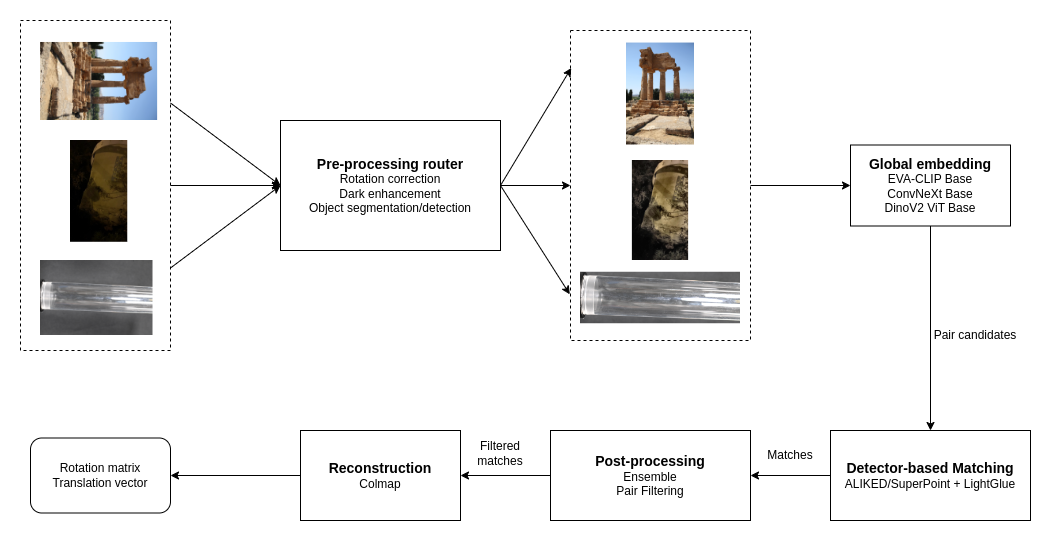\n\nI will split my summary into 4 main sections:\n- Build local evaluation datasets\n- Build a general SfM pipeline\n- Customize the pipeline for each specific category\n- Results\n\n# 2. Local evaluation datasets\nThe original dataset is obviously too large and unrealistic to evaluate. To tackle this, I built 3 versions of subsets (by applying some random sampling strategies). The results on those 3 versions were highly correlated. Hence, I chose one as my main local validation dataset:\n\n| Dataset/Scene |Number of samples |\n| :--- | :---: |\n| Pond | 100 |\n|Lizard|90|\n|Church|80|\n|Dioscuri|70|\n|Multi-temporal-temple-baalshamin|68|\n|Transp_obj_glass_cup|36|\n|Transp_obj_glass_cylinder|36|\n\n\nI will report my local CV results on this dataset.\n\n# 3. SfM pipeline\nFor a better explanation, I will divide the pipeline into 3 modules:\n- Proposing pair candidates by global descriptors\n- Matching pairs in the candidate list\n- Reconstruction with Colmap\n\n## 3.1. Finding pair candidates\nI used 3 pretrained models from [timm](https://github.com/huggingface/pytorch-image-models) to extract global features:\n```\nEVA-CLIP Base \\\nConvNeXt Base | -->[concat]--> [fc 2560]\nDinov2 ViT Base /\n```\nI also customized similarity thresholds for different types of scenes (note that I used cosine similarity instead of distance). For example, with highly diverse scenes like Lizard, I used a small threshold of 0.6. In contrast, for object scenes like Cylinder and Cup, a high threshold of 0.95 would make much more sense.\n\n## 3.2. Image matching\nFollowing the spirit of my last year’s solution, I only focused on **detector-based** methods, because they are much more lightweight than semi-dense or dense models. Due to the lack of experiments on both CV and LB, I cannot give detailed numbers for each method, but only tell the sense of their performance in general. Here are some combinations that I tried during the competitions:\n\n| Method |CV performance|LB performance|Remark |\n| :------------------------|:----------------:|:---------------:|:-----------------------------------|\n|SuperPoint + SuperGlue| good | not good | slow compared to LightGlue |\n|GlueStick | normal | - | slow |\n|**SuperPoint + LightGlue** | **very good** | not good | no ideas why it is not good on LB |\n|**ALIKED + LightGlue**|good|**very good**|best on LB|\n|DISK + LightGlue| good|normal||\n|OmniGlue|not good|-|slow|\n\n\nIn addition, I also tried SIFT + NN as a light ensemble model added to LightGlue. It is claimed in [IMC23 7th solution](https://www.kaggle.com/competitions/image-matching-challenge-2023/discussion/427143) that ensembling SIFT with LightGlue could boost the performance. I think it is the case in some scenes in CV, but it harmed the LB results a lot (-0.03).\n\nIn summary, I could say that **LightGlue** is one of the best models in Image Matching problem at present (hats off to the authors)!\n\n## 3.3. Reconstruction\nThis year I spent some time trying to make use of colmap better than the host baseline. Here are some of my trials:\n- **Single camera for specific scenes**: good on transparent object scenes in local CV, but worsens the result on LB.\n- **Manual initial pair**: I chose the pair with most matches and most keypoints and set it as the initial pair for colmap. But it made the results worse in my CV (maybe my code is wrong?!!).\n- **Run Incremental Mapping multiple times**: it made the results on my CV more consistent and a little better. However, I didn’t see it had any effect on LB.\n\nSadly to say that I could not make any noticeable improvement with colmap.\n\n# 4. Deal with specific categories\n## 4.1. Transparent objects\nI think this category decides the **gold medal**. Because when I cracked the problem, I moved from top 300 to top 10 immediately!!!\nFirst, I will present the process of how I created this solution, hope that it will be more vivid :).\nIf you open one image and move to the next image-by-image, you can easily see that it is like a sequence of frames cut from a video captured by only one camera.\nWhat a human might do to match those images? If it were me, I would focus on the **object** only and ignore the whole background. In addition, I only need to match a **sequence** (or a **ring**) of frames: (0, 1), (1, 2),...,(35, 0), which means there is no need to match (1, 20) or (3, 29)!\n\n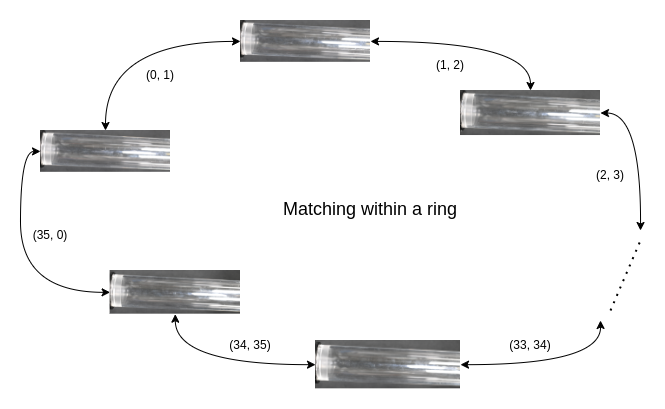\n\nBy adding these two lines of code before matching the cylinder, I went from ~0.0 to **0.86** on CV with LightGlue:\n```\nimage = image[950:2850, :, :]\nindex_pairs = [(i, i+1) for i in range(len(scene)-1)] + [(len(scene)-1, 0)]\n```\nSo the problem now can be broken down into 2 smaller problems:\n- Detect the object\n- Find consecutive pairs\n### 4.1.1. Object detection\n**Method 1** (not worked): Use object detection models: I tried **Yolo** family. Nonetheless, it is hard to make the prompt for the model to find out the exact object location.\n- **Approach 1**: Use **Yolov8** to produce all bounding boxes => it found no boxes!\n- **Approach 2**: Use **YoloWorld** with keyword “transparent object” => not detect anything.\n- **Approach 3**: Use **YoloWorld** with keyword “cup” => it could detect the cup. Yet, it is not generalized enough to apply to LB dataset.\n\n**Method 2** (final solution): Use segmentation models:\n- **Step 1**: Use **[MobileSAM](https://github.com/ChaoningZhang/MobileSAM)** to detect all the masks in the images.\n- **Step 2**: Use keypoint extractors above (SuperPoint or ALIKED) to extract object keypoints. It will produce some noise in the background.\n- **Step 3**: Find the best mask: the smallest mask which contains most of the keypoints.\n- **Step 4**: Find the smallest bounding box which includes the best mask.\n\nI tried DBSCAN too. However, due to the limitation of development time, I did not go to the end to see if it could replace SAM.\n\n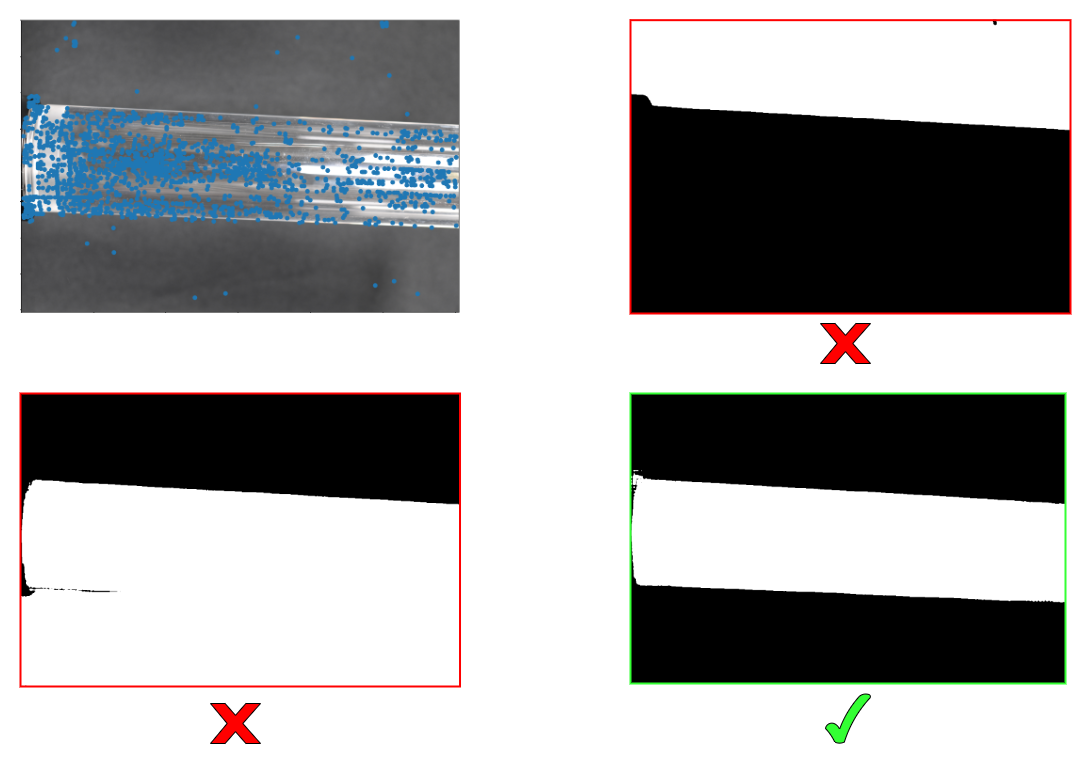\n\n### 4.1.2. Finding the best pairs\n**Problem definition**:\n- Version 1: Find the perfect sequence of images.\n- Version 2 (simplified): For each image, find out two other best images for matching.\n\n**Method 1** (not good): Stem from the fact that two consecutive frames would have the smallest movement among pixels, I calculated Optical Flow with [RAFT](https://pytorch.org/vision/0.12/auto_examples/plot_optical_flow.html) for every possible pairs, then got the average magnitudes. I further combined with cosine similarity of Global embeddings above to build an NxN matrix:\n```\npair_score[i, j] = -of_mag[i, j] + cos_sim[i, j]\n```\n\nTSP solver could not produce the perfect ring (~90% accuracy). Thus, I think it is not good enough.\n\n**Method 2** (simpler but better): I performed exhaustive matching on all pairs. Then, build an NxN matrix with elements that are the number of matches between each pair:\n```\npair_score[i, j] = n_matches[i, j]\n```\n\nSubsequently, I just picked out the top-2 largest values on each row. This simple approach astonishingly produced nearly 100% accuracy (I tried different matchers, and sometimes there were 1-2 wrong pairs).\n\n## 4.2. Day-night\n**Method 1**: Find dark images and enhance them.\nDark detection is very easy, just find those images that have the mean value < threshold (can be 65, 70).\nI used **CLAHE** to enhance the dark images. Unfortunately, it downgraded my LB score by 0.01.\n**Method 2**: Use [DarkFeat](https://github.com/THU-LYJ-Lab/DarkFeat) matcher.\nMy idea is to ensemble LightGlue with a more robust matcher for dark images. I found out that DarkFeat might be a promising candidate. Unluckily, I didn’t see any benefits of using it.\n\n## 4.3. Symmetries-and-repeats\nI assume that these scenes may have plenty of false positive matches because of their natural properties. \n**Method 1**: First, I tried tuning parameters with much more strict values (e.g., increasing the matching threshold to 0.5, etc.). Nonetheless, it didn’t show any improvement.\n\n**Method 2**: Next, I move to a more promising method: [Doppelgangers: Learning to Disambiguate Images of Similar Structures](https://github.com/RuojinCai/Doppelgangers). The main idea of this method is:\n- First, run SfM one time to get all the matching pairs.\n- Use the Doppelganger model to filter out pairs that have high probabilities as false positives (doppelgangers).\nIt didn’t show any improvement on the church scene on my local CV.\n\nSo basically, I could not make any improvement on this category.\n\n## 4.4. Others\nThe remaining categories are nature, air-to-ground, historical_preservation, temporal.\nActually, it is hard to customize these scenes, since they seem too general.\nTherefore, I just applied the [rotation checking method](https://github.com/ternaus/check_orientation) to correct the image orientations. It made a huge boost on the Dioscuri scene in local CV, and added about +0.005 to the LB.\n\n# 5. Results\n**Cross validation**\n\n|Scene|Method|Result|\n|---|---|---|\n|Pond|ALIKED+LightGlue|0.46|\n|Lizard|SP+LightGlue|0.73|\n|Church|ALIKED+LightGlue|0.18|\n|Dioscuri|ALIKED+LightGlue|0.49|\n|Multi-temporal-temple-baalshamin|ALIKED+LightGlue|0.48|\n|Transp_obj_glass_cup|DISK+LightGlue|0.32|\n|Transp_obj_glass_cylinder|ALIKED+LightGlue|0.81|\n\n**Leaderboard**\n\n|Method|Public LB|Private LB|\n|---|---|---|\n|My IMC23: SP+SG|0.104|0.111|\n|SP+LG|0.099|0.115|\n|SP+LG+rot|0.103|0.119|\n|ALIKED+LG+rot|0.135|0.147|\n|ALIKED+LG+rot+transparent_custom|0.18|0.19|\n|**ALIKED+LG+rot+transparent_custom+tuning**|**0.186**|**0.195**|\n|ALIKED+LG+rot+transparent_custom+tuning+dark_enhance|0.179|0.183|\n\n# 6. Conclusion\nA fun fact: I participated in all three Image Matching Challenges on Kaggle and earned medals of all three different colors 😂:\n- 2022: bronze🥉\n- 2023: silver 🥈\n- 2024: gold 🥇\n\nI feel exhausted after going solo in a tough competition like this. But finally, the sweet fruits have come after tireless efforts 😁.\n\nThank you for your reading. I hope you can find something interesting in my write-up.\n\nHappy Kaggling!", "votes": null }, { "id": "2859255", "postDate": "06/06/2024 22:16:17", "content": "Impressive work, especially for solo, congrats!
", "rawMarkdown": "Impressive work, especially for solo, congrats!", "votes": null }, { "id": "2859362", "postDate": "06/07/2024 01:53:21", "content": "Thank you. Congrats your 1st place, too. Your team is truly amazing!
", "rawMarkdown": "Thank you. Congrats your 1st place, too. Your team is truly amazing!", "votes": null }, { "id": "2864247", "postDate": "06/10/2024 04:23:08", "content": "Congrat e @nejicool96 for solo gold medal ! Chờ mãi thành quả rồi cũng đến nhỉ 🎉
", "rawMarkdown": "Congrat e @nejicool96 for solo gold medal ! Chờ mãi thành quả rồi cũng đến nhỉ 🎉", "votes": null }, { "id": "2864460", "postDate": "06/10/2024 06:43:42", "content": "Thanks anh. Fighting so long for this.
\nAnh P. đúng ko ạ :)).
Congrats e. Kiên trì quá
", "rawMarkdown": "Congrats e. Kiên trì quá", "votes": null }, { "id": "2887013", "postDate": "06/24/2024 01:46:23", "content": "Thanks anh 😄.
", "rawMarkdown": "Thanks anh 😄.", "votes": null }, { "id": "2900458", "postDate": "07/02/2024 09:59:32", "content": "detailed solution guys, so happy to see you score all 3 color medals :D
", "rawMarkdown": "detailed solution guys, so happy to see you score all 3 color medals :D", "votes": null }, { "id": "2900553", "postDate": "07/02/2024 10:59:38", "content": "Thank you guys 😁
", "rawMarkdown": "Thank you guys 😁", "votes": null } ], "comments": [ { "id": 2859255, "author_name": "vostankovich", "author_url": "", "post_date": "06/06/2024 22:16:17", "content": "Impressive work, especially for solo, congrats!
", "votes": null, "replies": [ { "id": 2859362, "author_name": "nejicool96", "author_url": "", "post_date": "06/07/2024 01:53:21", "content": "Thank you. Congrats your 1st place, too. Your team is truly amazing!
", "votes": null, "replies": [] } ] }, { "id": 2864247, "author_name": "nocturnebflat123", "author_url": "", "post_date": "06/10/2024 04:23:08", "content": "Congrat e @nejicool96 for solo gold medal ! Chờ mãi thành quả rồi cũng đến nhỉ 🎉
", "votes": null, "replies": [ { "id": 2864460, "author_name": "nejicool96", "author_url": "", "post_date": "06/10/2024 06:43:42", "content": "Thanks anh. Fighting so long for this.
\nAnh P. đúng ko ạ :)).
Congrats e. Kiên trì quá
", "votes": null, "replies": [ { "id": 2887013, "author_name": "nejicool96", "author_url": "", "post_date": "06/24/2024 01:46:23", "content": "Thanks anh 😄.
", "votes": null, "replies": [] } ] }, { "id": 2900458, "author_name": "shyamgupta196", "author_url": "", "post_date": "07/02/2024 09:59:32", "content": "detailed solution guys, so happy to see you score all 3 color medals :D
", "votes": null, "replies": [ { "id": 2900553, "author_name": "nejicool96", "author_url": "", "post_date": "07/02/2024 10:59:38", "content": "Thank you guys 😁
", "votes": null, "replies": [] } ] } ], "raw_markdown_by_id": { "2859107": "First of all, thanks to the hosts for organizing the Image Matching Challenge for the third time on Kaggle. Also, congratulate the winners and wish the best to everyone who has gone through this tough journey safe and sound.\n\nI have to admit that I attended the competition quite late. Therefore, I just did whatever I “felt” right and improvised a lot. So, you might find my write-up a little bit tricky at some points :)). Let's go!\n\n# 1. Overview \nMy solution architecture can be summarized in the following figure:\n\n\nI will split my summary into 4 main sections:\n- Build local evaluation datasets\n- Build a general SfM pipeline\n- Customize the pipeline for each specific category\n- Results\n\n# 2. Local evaluation datasets\nThe original dataset is obviously too large and unrealistic to evaluate. To tackle this, I built 3 versions of subsets (by applying some random sampling strategies). The results on those 3 versions were highly correlated. Hence, I chose one as my main local validation dataset:\n\n| Dataset/Scene |Number of samples |\n| :--- | :---: |\n| Pond | 100 |\n|Lizard|90|\n|Church|80|\n|Dioscuri|70|\n|Multi-temporal-temple-baalshamin|68|\n|Transp_obj_glass_cup|36|\n|Transp_obj_glass_cylinder|36|\n\n\nI will report my local CV results on this dataset.\n\n# 3. SfM pipeline\nFor a better explanation, I will divide the pipeline into 3 modules:\n- Proposing pair candidates by global descriptors\n- Matching pairs in the candidate list\n- Reconstruction with Colmap\n\n## 3.1. Finding pair candidates\nI used 3 pretrained models from [timm](https://github.com/huggingface/pytorch-image-models) to extract global features:\n```\nEVA-CLIP Base \\\nConvNeXt Base | -->[concat]--> [fc 2560]\nDinov2 ViT Base /\n```\nI also customized similarity thresholds for different types of scenes (note that I used cosine similarity instead of distance). For example, with highly diverse scenes like Lizard, I used a small threshold of 0.6. In contrast, for object scenes like Cylinder and Cup, a high threshold of 0.95 would make much more sense.\n\n## 3.2. Image matching\nFollowing the spirit of my last year’s solution, I only focused on **detector-based** methods, because they are much more lightweight than semi-dense or dense models. Due to the lack of experiments on both CV and LB, I cannot give detailed numbers for each method, but only tell the sense of their performance in general. Here are some combinations that I tried during the competitions:\n\n| Method |CV performance|LB performance|Remark |\n| :------------------------|:----------------:|:---------------:|:-----------------------------------|\n|SuperPoint + SuperGlue| good | not good | slow compared to LightGlue |\n|GlueStick | normal | - | slow |\n|**SuperPoint + LightGlue** | **very good** | not good | no ideas why it is not good on LB |\n|**ALIKED + LightGlue**|good|**very good**|best on LB|\n|DISK + LightGlue| good|normal||\n|OmniGlue|not good|-|slow|\n\n\nIn addition, I also tried SIFT + NN as a light ensemble model added to LightGlue. It is claimed in [IMC23 7th solution](https://www.kaggle.com/competitions/image-matching-challenge-2023/discussion/427143) that ensembling SIFT with LightGlue could boost the performance. I think it is the case in some scenes in CV, but it harmed the LB results a lot (-0.03).\n\nIn summary, I could say that **LightGlue** is one of the best models in Image Matching problem at present (hats off to the authors)!\n\n## 3.3. Reconstruction\nThis year I spent some time trying to make use of colmap better than the host baseline. Here are some of my trials:\n- **Single camera for specific scenes**: good on transparent object scenes in local CV, but worsens the result on LB.\n- **Manual initial pair**: I chose the pair with most matches and most keypoints and set it as the initial pair for colmap. But it made the results worse in my CV (maybe my code is wrong?!!).\n- **Run Incremental Mapping multiple times**: it made the results on my CV more consistent and a little better. However, I didn’t see it had any effect on LB.\n\nSadly to say that I could not make any noticeable improvement with colmap.\n\n# 4. Deal with specific categories\n## 4.1. Transparent objects\nI think this category decides the **gold medal**. Because when I cracked the problem, I moved from top 300 to top 10 immediately!!!\nFirst, I will present the process of how I created this solution, hope that it will be more vivid :).\nIf you open one image and move to the next image-by-image, you can easily see that it is like a sequence of frames cut from a video captured by only one camera.\nWhat a human might do to match those images? If it were me, I would focus on the **object** only and ignore the whole background. In addition, I only need to match a **sequence** (or a **ring**) of frames: (0, 1), (1, 2),...,(35, 0), which means there is no need to match (1, 20) or (3, 29)!\n\n\n\nBy adding these two lines of code before matching the cylinder, I went from ~0.0 to **0.86** on CV with LightGlue:\n```\nimage = image[950:2850, :, :]\nindex_pairs = [(i, i+1) for i in range(len(scene)-1)] + [(len(scene)-1, 0)]\n```\nSo the problem now can be broken down into 2 smaller problems:\n- Detect the object\n- Find consecutive pairs\n### 4.1.1. Object detection\n**Method 1** (not worked): Use object detection models: I tried **Yolo** family. Nonetheless, it is hard to make the prompt for the model to find out the exact object location.\n- **Approach 1**: Use **Yolov8** to produce all bounding boxes => it found no boxes!\n- **Approach 2**: Use **YoloWorld** with keyword “transparent object” => not detect anything.\n- **Approach 3**: Use **YoloWorld** with keyword “cup” => it could detect the cup. Yet, it is not generalized enough to apply to LB dataset.\n\n**Method 2** (final solution): Use segmentation models:\n- **Step 1**: Use **[MobileSAM](https://github.com/ChaoningZhang/MobileSAM)** to detect all the masks in the images.\n- **Step 2**: Use keypoint extractors above (SuperPoint or ALIKED) to extract object keypoints. It will produce some noise in the background.\n- **Step 3**: Find the best mask: the smallest mask which contains most of the keypoints.\n- **Step 4**: Find the smallest bounding box which includes the best mask.\n\nI tried DBSCAN too. However, due to the limitation of development time, I did not go to the end to see if it could replace SAM.\n\n\n\n### 4.1.2. Finding the best pairs\n**Problem definition**:\n- Version 1: Find the perfect sequence of images.\n- Version 2 (simplified): For each image, find out two other best images for matching.\n\n**Method 1** (not good): Stem from the fact that two consecutive frames would have the smallest movement among pixels, I calculated Optical Flow with [RAFT](https://pytorch.org/vision/0.12/auto_examples/plot_optical_flow.html) for every possible pairs, then got the average magnitudes. I further combined with cosine similarity of Global embeddings above to build an NxN matrix:\n```\npair_score[i, j] = -of_mag[i, j] + cos_sim[i, j]\n```\n\nTSP solver could not produce the perfect ring (~90% accuracy). Thus, I think it is not good enough.\n\n**Method 2** (simpler but better): I performed exhaustive matching on all pairs. Then, build an NxN matrix with elements that are the number of matches between each pair:\n```\npair_score[i, j] = n_matches[i, j]\n```\n\nSubsequently, I just picked out the top-2 largest values on each row. This simple approach astonishingly produced nearly 100% accuracy (I tried different matchers, and sometimes there were 1-2 wrong pairs).\n\n## 4.2. Day-night\n**Method 1**: Find dark images and enhance them.\nDark detection is very easy, just find those images that have the mean value < threshold (can be 65, 70).\nI used **CLAHE** to enhance the dark images. Unfortunately, it downgraded my LB score by 0.01.\n**Method 2**: Use [DarkFeat](https://github.com/THU-LYJ-Lab/DarkFeat) matcher.\nMy idea is to ensemble LightGlue with a more robust matcher for dark images. I found out that DarkFeat might be a promising candidate. Unluckily, I didn’t see any benefits of using it.\n\n## 4.3. Symmetries-and-repeats\nI assume that these scenes may have plenty of false positive matches because of their natural properties. \n**Method 1**: First, I tried tuning parameters with much more strict values (e.g., increasing the matching threshold to 0.5, etc.). Nonetheless, it didn’t show any improvement.\n\n**Method 2**: Next, I move to a more promising method: [Doppelgangers: Learning to Disambiguate Images of Similar Structures](https://github.com/RuojinCai/Doppelgangers). The main idea of this method is:\n- First, run SfM one time to get all the matching pairs.\n- Use the Doppelganger model to filter out pairs that have high probabilities as false positives (doppelgangers).\nIt didn’t show any improvement on the church scene on my local CV.\n\nSo basically, I could not make any improvement on this category.\n\n## 4.4. Others\nThe remaining categories are nature, air-to-ground, historical_preservation, temporal.\nActually, it is hard to customize these scenes, since they seem too general.\nTherefore, I just applied the [rotation checking method](https://github.com/ternaus/check_orientation) to correct the image orientations. It made a huge boost on the Dioscuri scene in local CV, and added about +0.005 to the LB.\n\n# 5. Results\n**Cross validation**\n\n|Scene|Method|Result|\n|---|---|---|\n|Pond|ALIKED+LightGlue|0.46|\n|Lizard|SP+LightGlue|0.73|\n|Church|ALIKED+LightGlue|0.18|\n|Dioscuri|ALIKED+LightGlue|0.49|\n|Multi-temporal-temple-baalshamin|ALIKED+LightGlue|0.48|\n|Transp_obj_glass_cup|DISK+LightGlue|0.32|\n|Transp_obj_glass_cylinder|ALIKED+LightGlue|0.81|\n\n**Leaderboard**\n\n|Method|Public LB|Private LB|\n|---|---|---|\n|My IMC23: SP+SG|0.104|0.111|\n|SP+LG|0.099|0.115|\n|SP+LG+rot|0.103|0.119|\n|ALIKED+LG+rot|0.135|0.147|\n|ALIKED+LG+rot+transparent_custom|0.18|0.19|\n|**ALIKED+LG+rot+transparent_custom+tuning**|**0.186**|**0.195**|\n|ALIKED+LG+rot+transparent_custom+tuning+dark_enhance|0.179|0.183|\n\n# 6. Conclusion\nA fun fact: I participated in all three Image Matching Challenges on Kaggle and earned medals of all three different colors 😂:\n- 2022: bronze🥉\n- 2023: silver 🥈\n- 2024: gold 🥇\n\nI feel exhausted after going solo in a tough competition like this. But finally, the sweet fruits have come after tireless efforts 😁.\n\nThank you for your reading. I hope you can find something interesting in my write-up.\n\nHappy Kaggling!", "2859255": "Impressive work, especially for solo, congrats!", "2859362": "Thank you. Congrats your 1st place, too. Your team is truly amazing!", "2864247": "Congrat e @nejicool96 for solo gold medal ! Chờ mãi thành quả rồi cũng đến nhỉ 🎉", "2864460": "Thanks anh. Fighting so long for this.\nAnh P. đúng ko ạ :)).", "2885286": "Congrats e. Kiên trì quá", "2887013": "Thanks anh 😄.", "2900458": "detailed solution guys, so happy to see you score all 3 color medals :D", "2900553": "Thank you guys 😁" }, "source": "meta" }