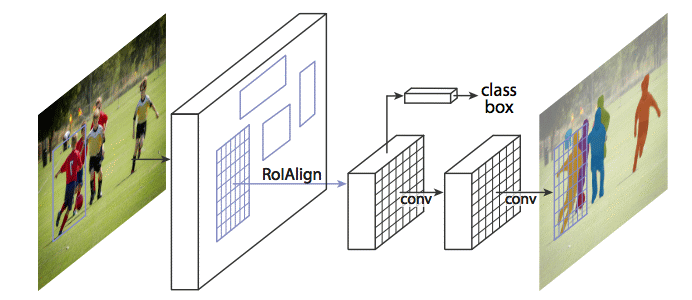
{"metadata":{"kernelspec":{"language":"python","display_name":"Python 3","name":"python3"},"language_info":{"name":"python","version":"3.10.13","mimetype":"text/x-python","codemirror_mode":{"name":"ipython","version":3},"pygments_lexer":"ipython3","nbconvert_exporter":"python","file_extension":".py"},"kaggle":{"accelerator":"none","dataSources":[{"sourceId":52279,"databundleVersionId":5822112,"sourceType":"competition"},{"sourceId":6021726,"sourceType":"datasetVersion","datasetId":3446188}],"dockerImageVersionId":30732,"isInternetEnabled":true,"language":"python","sourceType":"notebook","isGpuEnabled":false}},"nbformat_minor":4,"nbformat":4,"cells":[{"cell_type":"markdown","source":"<div class=\"alert alert-block alert-info\" style=\"font-size:15px; background-color: #f3fc9a; font-family:verdana; color: #252908; border: 3px #252908 solid\">\n    <b> MaskRCNN from scratch | Medical Segmentation</b>\n     We will dive into the problem of segmentation of instances in a medical context, and use the MaskRCNN model. The topic is instance segmentation, we will use the ready-made pipelines like ultralytics and build a pipeline, design a model and train it. \n</div>","metadata":{}},{"cell_type":"markdown","source":"<div class=\"alert alert-block alert-info\" style=\"font-size:15px; background-color: #d1a6ff; font-family:verdana; color: #533078; border: 3px #533078 solid\">\n    <b>Biological overview</b>\n    <br>Our task is to segment medical images of kidney tissue samples. Human tissues are covered with many vessels. Our task is to segment such vessels.<br>\n</div>","metadata":{}},{"cell_type":"markdown","source":"![](https://i.ibb.co/1MZNhNF/003.png)","metadata":{}},{"cell_type":"markdown","source":"<div class=\"alert alert-block alert-info\" style=\"font-size:15px; background-color: #d1a6ff; font-family:verdana; color: #533078; border: 2px #533078 solid\">\n    <b>Tissue samples</b>\n    <br>Renal cortex: the renal cortex is the outer portion of the kidney that contains round renal corpuscles enclosing glomerular tufts, balls of capillary loops. The renal corpuscle is the start of the nephron, through which the filtration of blood occurs. The renal cortex also contains proximal and distal convoluted tubules, PCTs and DCTs, which are also regions of the nephron. Between these tubular structures is a complex network of capillaries called the peritubular capillaries.<br>\n    <br>Renal medulla: the renal medulla is the inner portion of the kidney and is arranged in 8-15 renal pyramids containing linearly arranged tubules comprising the loops of Henle and ducts that gather products for excretion. The capillary network in the renal medulla consists of capillaries called vasa recta. The renal pyramids (medullary tissue) are divided by extensions of the renal cortex called renal columns. There are also projections of the renal medulla into the outer cortex called medullary rays.<br>\n    <br>Renal papilla (subsection of medulla): the broad bases of the pyramids connect to the renal cortex at the corticomedullary junctions while the tips form structures called the renal papilla, which project in the minor renal calyces where urine is collected.<br>\n</div>","metadata":{}},{"cell_type":"markdown","source":"<div class=\"alert alert-block alert-info\" style=\"font-size:15px; background-color: #b5e1ff; font-family:verdana; color: #011d82; border: 2px #011d82 solid\">\n    <b>What is instance segmentation?</b>\n    <br>Instance Segmentation is a unique form of image segmentation that deals with detecting and delineating each distinct instance of an object appearing in an image. Instance segmentation detects all instances of a class with the extra functionality of demarcating separate instances of any segment class. Hence, it is also referred to as incorporating object detection and semantic segmentation functionality. Watch video to learn more: <a href=instance segmentation>Instance segmentation | Tutorial</a> <br>\n</div>","metadata":{}},{"cell_type":"markdown","source":"<div class=\"alert alert-block alert-info\" style=\"font-size:15px; background-color: #b5e1ff; font-family:verdana; color: #011d82; border: 2px #011d82 solid\">\n    <b>Applications of Semantic Segmentation</b>\n<ol><li><strong>Medical Diagnostics: </strong>For detecting medical abnormalities in <a href=\"https://universe.roboflow.com/search?q=xray&amp;ref=blog.roboflow.com\">X-Rays, CT Scans, MRI Scans</a></li><li><strong>GeoSensing:</strong> For land usage mapping from <a href=\"https://roboflow.com/solutions/aerial?ref=blog.roboflow.com\">satellite imagery</a> and monitoring areas of deforestation and urbanization</li><li><strong>Autonomous Driving:</strong> For accurately <a href=\"https://universe.roboflow.com/browse/self-driving?ref=blog.roboflow.com\">detecting lanes, pedestrians, traffic signs, road</a>, sky and other vehicles on the road</li></ol><br>\n</div>","metadata":{}},{"cell_type":"code","source":"import numpy as np\nimport random\nimport torch\nimport os","metadata":{"execution":{"iopub.status.busy":"2024-07-09T07:11:27.779054Z","iopub.execute_input":"2024-07-09T07:11:27.779457Z","iopub.status.idle":"2024-07-09T07:11:27.784962Z","shell.execute_reply.started":"2024-07-09T07:11:27.779416Z","shell.execute_reply":"2024-07-09T07:11:27.783718Z"},"trusted":true},"execution_count":null,"outputs":[]},{"cell_type":"code","source":"def seed_everythig(seed):\n    np.random.seed(seed)\n    random.seed(seed)\n    os.environ[\"GLOBALSEED\"] = str(seed)\n    torch.manual_seed(seed)\n    torch.cuda.manual_seed(seed)\n    if torch.cuda.is_available():\n        torch.cuda.manual_seed_all(seed)\n        torch.backends.cudnn.deterministic = True","metadata":{"execution":{"iopub.status.busy":"2024-07-09T07:11:28.726925Z","iopub.execute_input":"2024-07-09T07:11:28.727308Z","iopub.status.idle":"2024-07-09T07:11:28.734257Z","shell.execute_reply.started":"2024-07-09T07:11:28.727279Z","shell.execute_reply":"2024-07-09T07:11:28.733086Z"},"trusted":true},"execution_count":null,"outputs":[]},{"cell_type":"code","source":"seed_everythig(42)","metadata":{"execution":{"iopub.status.busy":"2024-07-09T07:11:30.426279Z","iopub.execute_input":"2024-07-09T07:11:30.427651Z","iopub.status.idle":"2024-07-09T07:11:30.435946Z","shell.execute_reply.started":"2024-07-09T07:11:30.427607Z","shell.execute_reply":"2024-07-09T07:11:30.434665Z"},"trusted":true},"execution_count":null,"outputs":[]},{"cell_type":"markdown","source":"# Prepare data\n<div class=\"alert alert-block alert-info\" style=\"font-size:15px; background-color: #abffd1; font-family:verdana; color: #003819; border: 2px #003819 solid\">\n    <b>It's time to think about data</b>\n    <br>For training, we need a dataset, and not just any, but in the COCO format. COCO is an open database for object detection, it is huge and therefore it is used all over the world to evaluate new models according to various metrics. It plays a rather important role, and most detection models are pre-trained on it. That is why this dataset format is used in ultralytics. There is an already prepared a class for data processing.<br>\n</div>","metadata":{}},{"cell_type":"markdown","source":"<div class=\"alert alert-block alert-info\" style=\"font-size:20px; background-color: #abffd1; font-family:verdana; color: #003819; border: 2px #003819 solid\">\n    <b>Libraries for creating dataset</b>\n</div>","metadata":{}},{"cell_type":"code","source":"from itertools import chain\nimport json\nimport os\nimport shutil\nfrom tqdm.notebook import tqdm\nfrom colorama import Fore\nimport yaml","metadata":{"execution":{"iopub.status.busy":"2024-07-09T07:11:32.400373Z","iopub.execute_input":"2024-07-09T07:11:32.400815Z","iopub.status.idle":"2024-07-09T07:11:32.545262Z","shell.execute_reply.started":"2024-07-09T07:11:32.400761Z","shell.execute_reply":"2024-07-09T07:11:32.544074Z"},"trusted":true},"execution_count":null,"outputs":[]},{"cell_type":"markdown","source":"<div class=\"alert alert-block alert-info\" style=\"font-size:20px; background-color: #abffd1; font-family:verdana; color: #003819; border: 2px #003819 solid\">\n    <b>Class for creating dataset</b>\n</div>","metadata":{}},{"cell_type":"code","source":"class COCODataset:\n    def __init__(self, images_dirpath: str, annotations_filepath: str, length: int = 1633):\n        self.train_size = None\n        self.val_size = None\n        self.length = length\n        self.classes = None\n        self.labels_counter = None\n        self.normalize = None\n        \n        self.images_dirpath = images_dirpath\n        self.annotations_filepath = annotations_filepath\n        self.dataset_dirpath = os.path.join(os.getcwd(), \"dataset\")\n        self.train_dirpath =  os.path.join(self.dataset_dirpath, \"train\")\n        self.val_dirpath =  os.path.join(self.dataset_dirpath, \"val\")\n        self.config_path = os.path.join(self.dataset_dirpath, \"coco.yaml\")\n\n        self.samples = self.parse_jsonl(annotations_filepath)\n        self.classes_dict = {\n            \"background\": 0,\n            \"blood_vessel\": 1,\n            \"glomerulus\": 2,\n            \"unsure\": 3,\n        }\n\n    def __prepare_dirs(self) -> None:\n        if not os.path.exists(self.dataset_dirpath):\n            os.makedirs(os.path.join(self.train_dirpath, \"images\"), exist_ok=True)\n            os.makedirs(os.path.join(self.train_dirpath, \"labels\"), exist_ok=True)\n            os.makedirs(os.path.join(self.val_dirpath, \"images\"), exist_ok=True)\n            os.makedirs(os.path.join(self.val_dirpath, \"labels\"), exist_ok=True)\n        else:\n            raise RuntimeError(\"Dataset already exists!\")\n\n    def __define_splitratio(self) -> None:\n        self.train_size = round(self.length * self.train_size)\n        self.val_size = self.length - self.train_size\n        assert self.train_size + self.val_size == self.length\n\n    def parse_jsonl(self, path: str) -> list[dict, ...]:\n        with open(path, 'r') as json_file:\n            jsonl_samples = [\n                json.loads(line)\n                for line in tqdm(\n                    json_file, desc=\"Processing polygons\", total=self.length\n                )\n            ]\n        return jsonl_samples\n\n    def __define_paths(self, i: int) -> dict:\n        data_path = self.val_dirpath\n        if i < self.train_size:\n            data_path = self.train_dirpath\n        return {\n            \"images\": os.path.join(data_path, \"images\"),\n            \"labels\": os.path.join(data_path, \"labels\")\n        }\n\n    @staticmethod\n    def __get_label_path(paths_dict: dict, identifier: str) -> str:\n        return os.path.join(\n            paths_dict[\"labels\"],\n            f\"{identifier}.txt\"\n        )\n\n    @staticmethod\n    def __get_image_path(paths_dict: dict, identifier: str) -> str:\n        return os.path.join(\n            paths_dict[\"images\"],\n            f\"{identifier}.tif\"\n        )\n\n    def __copy_image(self, dst_path: str, identifier: str) -> str:\n        shutil.copyfile(\n            os.path.join(self.images_dirpath, f\"{identifier}.tif\"),\n            dst_path\n        )\n\n    def __copy_label(self, annotations: list, dst_path: str) -> None:\n        with open(dst_path, \"w\") as file:\n            for annotation in annotations:\n                coordinates = annotation[\"coordinates\"][0]\n                label = self.classes_dict[annotation[\"type\"]]\n                if label in self.classes:\n                    if coordinates:\n                        if self.normalize:\n                            coordinates = np.array(coordinates) / 512.0\n                        coordinates = \" \".join(map(str, chain(*coordinates)))\n                        file.write(f\"{label} {coordinates}\\n\")\n                        self.labels_counter += 1\n\n    def __splitfolders(self):\n        for i, line in tqdm(\n                enumerate(self.samples),\n                desc=\"Dataset creation\", total=self.length\n        ):\n            self.labels_counter = 0\n            identifier = line[\"id\"]\n            annotations = line[\"annotations\"]\n            paths_dict = self.__define_paths(i)\n\n            dst_image_path = self.__get_image_path(paths_dict, identifier)\n            dst_label_path = self.__get_label_path(paths_dict, identifier)\n\n            self.__copy_image(dst_image_path, identifier)\n            self.__copy_label(annotations, dst_label_path)\n\n            if self.labels_counter == 0:\n                os.remove(dst_image_path)\n                os.remove(dst_label_path)\n\n    def __count_dataset(self) -> dict:\n        train_images = len(os.listdir(os.path.join(self.train_dirpath, \"images\")))\n        train_labels = len(os.listdir(os.path.join(self.train_dirpath, \"labels\")))\n        val_images = len(os.listdir(os.path.join(self.val_dirpath, \"images\")))\n        val_labels = len(os.listdir(os.path.join(self.val_dirpath, \"labels\")))\n        return {\n            \"train_images\": train_images,\n            \"train_labels\": train_labels,\n            \"val_images\": val_images,\n            \"val_labels\": val_labels\n        }\n\n    @staticmethod\n    def __check_sanity(count_dict: dict) -> None:\n        assert count_dict[\"train_images\"] == count_dict[\"train_labels\"]\n        assert count_dict[\"val_images\"] == count_dict[\"val_labels\"]\n\n    def __finalizing(self, count_dict: dict) -> None:\n        assert os.path.exists(self.dataset_dirpath)\n\n        example_structure = [\n            \"dataset\",\n            \"train\", \"labels\", \"images\",\n            \"val\", \"labels\", \"images\"\n        ]\n\n        dir_bone = (\n            dirname.split(\"/\")[-1]\n            for dirname, _, filenames in os.walk(self.dataset_dirpath)\n            if dirname.split(\"/\")[-1] in example_structure\n        )\n\n        try:\n            print(\"\\n~ HuBMAP Dataset Structure ~\\n\")\n            print(\n            f\"\"\"\n          ├── {next(dir_bone)}\n          │   │\n          │   ├── {next(dir_bone)}\n          │   │   └── {next(dir_bone)}\n          │   │   └── {next(dir_bone)}\n          │   │\n          │   ├── {next(dir_bone)}\n          │   │   └── {next(dir_bone)}\n          │   │   └── {next(dir_bone)}\n            \"\"\"\n            )\n        except StopIteration as e:\n            print(e)\n        else:\n            print(Fore.GREEN + \"-> Success\")\n            print(Fore.GREEN + f\"Train dataset: {count_dict['train_images']}\\nVal dataset: {count_dict['val_images']}\")\n\n    def get_config(self) ->dict:\n        names = [\"background\", \"blood_vessel\", \"glomerulus\", \"unsure\"]\n        return {\n            \"train\": str(self.train_dirpath),\n            \"val\": str(self.val_dirpath),\n            \"names\": [names[i] for i in self.classes]\n        }\n\n    @staticmethod\n    def display_config(config: dict) -> None:\n        print(Fore.BLACK + \"\\n~ HuBMAP Config Structure ~\\n\")\n        print(\n        f\"\"\"\n      │   │\n      │   ├── train\n      │   │   └── {config['train']}/images\n      │   │\n      │   │\n      │   ├── val\n      │   │   └── {config['val']}/images\n      │   │\n      │   │\n      │   ├── names\n      │   │   └── {' '.join(config['names'])}\n        \"\"\"\n        )\n        print(Fore.GREEN + \"-> Success\")\n        print(Fore.GREEN + f\"Number of classes: {len(config['names'])}\"\n                           f\"\\nClasses: {' '.join(config['names'])}\" \n              )\n\n    def write_config(self, config: dict) -> None:\n        with open(self.config_path, mode=\"w\") as f:\n            yaml.safe_dump(stream=f, data=config)\n\n    def __call__(self, train_size: float,\n                 classes: list[int, ...],\n                 make_config: bool = True,\n                 normalize: bool = True\n                ) -> None:\n        \n        self.train_size = train_size\n        self.classes = classes\n        self.normalize = normalize\n        \n        self.__define_splitratio()\n        self.__prepare_dirs()\n        self.__splitfolders()\n        count_dict = self.__count_dataset()\n        self.__check_sanity(count_dict)\n        self.__finalizing(count_dict)\n        \n        if make_config:\n            config = self.get_config()\n            self.write_config(config)\n            self.display_config(config)","metadata":{"execution":{"iopub.status.busy":"2024-07-09T07:11:33.697995Z","iopub.execute_input":"2024-07-09T07:11:33.698401Z","iopub.status.idle":"2024-07-09T07:11:33.745141Z","shell.execute_reply.started":"2024-07-09T07:11:33.698369Z","shell.execute_reply":"2024-07-09T07:11:33.743876Z"},"trusted":true},"execution_count":null,"outputs":[]},{"cell_type":"code","source":"coco = COCODataset(\n    annotations_filepath=\"/kaggle/input/hubmap-hacking-the-human-vasculature/polygons.jsonl\",\n    images_dirpath=\"/kaggle/input/hubmap-hacking-the-human-vasculature/train\",\n)","metadata":{"execution":{"iopub.status.busy":"2024-07-09T07:11:35.219247Z","iopub.execute_input":"2024-07-09T07:11:35.219637Z","iopub.status.idle":"2024-07-09T07:11:40.009772Z","shell.execute_reply.started":"2024-07-09T07:11:35.219607Z","shell.execute_reply":"2024-07-09T07:11:40.008654Z"},"trusted":true},"execution_count":null,"outputs":[]},{"cell_type":"code","source":"coco(train_size=0.85, classes=[1, 2, 3], normalize=False)","metadata":{"execution":{"iopub.status.busy":"2024-07-09T07:11:48.211124Z","iopub.execute_input":"2024-07-09T07:11:48.21154Z","iopub.status.idle":"2024-07-09T07:12:23.316237Z","shell.execute_reply.started":"2024-07-09T07:11:48.211508Z","shell.execute_reply":"2024-07-09T07:12:23.314781Z"},"trusted":true},"execution_count":null,"outputs":[]},{"cell_type":"markdown","source":"# About Mask-RCNN\n<div class=\"alert alert-block alert-info\" style=\"font-size:20px; background-color: #FFF0F5; font-family:verdana; color: #004725; border: 2px #004725 solid\">\n    <b>Understanding Architecture</b>\n<div class=\"alert alert-block alert-info\" style=\"font-size:15px; background-color: #FFF0F5; font-family:verdana; color: #004725; border: 2px #004725 solid\">\n    <b>R-CNN (Regions With CNNs)</b>\n    <br>The R-CNN (Regions With CNNs) network architecture was developed by a team at UC Berkley to apply Convolution Neural Networks to the object detection problem. The approaches to solving such problems that existed at that time approached the maximum of their capabilities and it was not possible to significantly improve their performance.<br>\n    <br>CNNs have been good at image classification, and in this network they have essentially been applied to do the same thing. To do this, not the entire image was fed to the input of the CNN, but regions previously selected in a different way, in which presumably there are some objects. At that time there were several such approaches, the authors chose Selective Search, although they indicate that there are no special reasons for preferring it.<br>\n    <br>A ready-made architecture, CaffeNet (AlexNet), was also used as a CNN network. Such neural networks, like others for the ImageNet image set, classify into 1000 classes. R-CNN was designed to detect objects of fewer classes (N=20 or 200), so the last CaffeNet classification layer was replaced with a layer with N+1 outputs (with an additional class for the background).<br>\n    <br>Selective Search returned about 2000 regions of different sizes and aspect ratios, but CaffeNet accepts images of a fixed size of 227x227 pixels as input, so they had to be modified before submitting the regions to the network input. To do this, the image from the region was enclosed in the smallest enclosing square. Along that (smaller) side on which the fields were formed, several “context” (surrounding the region) pixels of the image were added, the rest of the field was not filled with anything. The resulting square was scaled to 227x227 and fed to the CaffeNet input.<br>\n    <br>Even though the CNN was trained to recognize N+1 classes, it ended up being used only to extract a fixed 4096-dimensional feature vector. N linear SVMs were engaged in the direct determination of the object in the image, each of which carried out a binary classification according to its type of objects, determining whether there is one in the transferred region or not. In the original document, the whole procedure is illustrated by the following diagram:<br>\n</div>","metadata":{}},{"cell_type":"markdown","source":"![](https://habrastorage.org/r/w1560/webt/6i/zz/rh/6izzrhggbprdgbpbqz-qa7lfreu.jpeg)","metadata":{}},{"cell_type":"markdown","source":"<div class=\"alert alert-block alert-info\" style=\"font-size:15px; background-color: #FFA07A; font-family:verdana; color: #004725; border: 2px #004725 solid\">\n    <b>Fast R-CNN</b>\n    <br>Despite the good results, the performance of R-CNN was still poor, especially for networks deeper than CaffeNet (such as VGG16). In addition, training the bounding box regressor and SVM required a large number of features to be saved to disk, so it was expensive in terms of storage size. The authors of Fast R-CNN suggested speeding up the process with a couple of modifications:<br>\n    <ul>\n        <li>Pass through CNN not each of the 2000 candidate regions separately, but the entire image. The proposed regions are then superimposed on the resulting overall feature map;</li>\n        <li>Instead of training three models (CNN, SVM, bbox regressor) independently, combine all training procedures into one.</li>\n    </ul>\n    <br>The transformation of features that fell into different regions to a fixed size was performed using the RoIPooling procedure. The region window of width w and height h was divided into a grid with H × W cells of size h/H × w/W. (Document authors used W=H=7). For each such cell, Max Pooling was performed to select only one value, thus giving the resulting H×W feature matrix.<br>\n    <br>Binary SVMs were not used, instead the selected features were passed to a fully connected layer and then to two parallel layers: softmax with K+1 outputs (one for each class + 1 for the background) and a bounding box regressor. The general network architecture looks like this:<br>\n</div>","metadata":{}},{"cell_type":"markdown","source":"![](https://habrastorage.org/r/w1560/webt/yt/e-/9u/yte-9u2kp27hykwg9m1n98w6upg.png)","metadata":{}},{"cell_type":"markdown","source":"<div class=\"alert alert-block alert-info\" style=\"font-size:15px; background-color: #FFB6C1; font-family:verdana; color: #004725; border: 2px #004725 solid\">\n    <b>Faster R-CNN</b>\n    <br>After the improvements made in Fast R-CNN, the mechanism for generating candidate regions turned out to be the bottleneck of the neural network. In 2015, the team at Microsoft Research was able to make this phase much faster. They proposed to calculate the regions not from the original image, but again from the feature map obtained from CNN. To do this, a module called the Region Proposal Network (RPN) was added. The new architecture looks like this:<br>\n</div>","metadata":{}},{"cell_type":"markdown","source":"![](https://habrastorage.org/r/w1560/webt/jf/-3/22/jf-3224hkrudwxi1_7oogb1avg0.png)","metadata":{}},{"cell_type":"markdown","source":"<div class=\"alert alert-block alert-info\" style=\"font-size:15px; background-color: #a1e6c4; font-family:verdana; color: #004725; border: 2px #004725 solid\">\nWithin the framework of RPN, a “mini-neural network” with a small (3x3) window slides along the extracted CNN features. The values obtained with its help are transferred to two parallel fully connected layers: box-regression layer (reg) and box-classification layer (cls). The outputs of these layers are based on the so-called anchors: k frames for each position of the sliding window, with different sizes and aspect ratios. The reg layer for each such anchor produces 4 coordinates that adjust the position of the enclosing frame; cls-layer produces two numbers each - the probabilities that the frame contains at least some object or that it does not. This is illustrated in the document as follows:\n</div>","metadata":{}},{"cell_type":"markdown","source":"![](https://habrastorage.org/r/w1560/webt/kj/kj/oz/kjkjozq2gq70fuvf77dbml8-_nw.png)","metadata":{}},{"cell_type":"markdown","source":"<div class=\"alert alert-block alert-info\" style=\"font-size:15px; background-color: #FFDAB9; font-family:verdana; color: #004725; border: 2px #004725 solid\">\n    <b>Mask R-CNN</b>\n<br>Mask R-CNN develops the Faster R-CNN architecture by adding another branch that predicts the position of the mask covering the found object, and thus solves the instance segmentation problem. The mask is simply a rectangular matrix, in which 1 at some position means that the corresponding pixel belongs to an object of a given class, 0 means that the pixel does not belong to the object.<br>\n</div>","metadata":{}},{"cell_type":"markdown","source":"![](https://habrastorage.org/r/w1560/webt/n3/cs/tp/n3cstpty6ktfwhw6vklswah1rxk.png)","metadata":{}},{"cell_type":"code","source":"import torchvision\nfrom torchvision.models.detection.faster_rcnn import FastRCNNPredictor\nfrom torchvision.models.detection.mask_rcnn import MaskRCNNPredictor","metadata":{"execution":{"iopub.status.busy":"2024-07-09T07:13:31.026288Z","iopub.execute_input":"2024-07-09T07:13:31.026707Z","iopub.status.idle":"2024-07-09T07:13:32.950674Z","shell.execute_reply.started":"2024-07-09T07:13:31.026672Z","shell.execute_reply":"2024-07-09T07:13:32.949482Z"},"trusted":true},"execution_count":null,"outputs":[]},{"cell_type":"code","source":"def get_model(num_classes: int):\n    # load an instance segmentation model pre-trained on COCO\n    model = torchvision.models.detection.maskrcnn_resnet50_fpn(weights=\"DEFAULT\")\n\n    # get number of input features for the classifier\n    in_features = model.roi_heads.box_predictor.cls_score.in_features\n    # replace the pre-trained head with a new one\n    model.roi_heads.box_predictor = FastRCNNPredictor(in_features, num_classes)\n\n    # now get the number of input features for the mask classifier\n    in_features_mask = model.roi_heads.mask_predictor.conv5_mask.in_channels\n    hidden_layer = 256\n    # and replace the mask predictor with a new one\n    model.roi_heads.mask_predictor = MaskRCNNPredictor(in_features_mask,\n                                                       hidden_layer,\n                                                       num_classes)\n\n    return model","metadata":{"execution":{"iopub.status.busy":"2024-07-09T07:13:43.597519Z","iopub.execute_input":"2024-07-09T07:13:43.598393Z","iopub.status.idle":"2024-07-09T07:13:43.606521Z","shell.execute_reply.started":"2024-07-09T07:13:43.598354Z","shell.execute_reply":"2024-07-09T07:13:43.605251Z"},"trusted":true},"execution_count":null,"outputs":[]},{"cell_type":"code","source":"model = get_model(4)","metadata":{"execution":{"iopub.status.busy":"2024-07-09T07:13:45.463588Z","iopub.execute_input":"2024-07-09T07:13:45.464521Z","iopub.status.idle":"2024-07-09T07:13:47.93586Z","shell.execute_reply.started":"2024-07-09T07:13:45.464476Z","shell.execute_reply":"2024-07-09T07:13:47.934594Z"},"trusted":true},"execution_count":null,"outputs":[]},{"cell_type":"markdown","source":"<div class=\"alert alert-block alert-info\" style=\"font-size:15px; background-color: #FFA07A; font-family:verdana; color: #543800; border: 2px #543800 solid\">\n    <b>Transforming the data</b>\n<br>Firstly, we absolutely need to bring the pictures to a single size and also normalize them. It would also not be bad to augment our data. After all, we are now working not with an image and its single mask as in semantic segmentation, but with individual instances, their masks and boxes. In this case, we can ignore color transformations, but all spatial transformations change both box and mask coordinates. In this case, we must take this into account. A library called albumentations is used. It easily take into account all the transformations.<br>\n</div>","metadata":{}},{"cell_type":"markdown","source":"![](https://www.researchgate.net/publication/319413978/figure/fig2/AS:533727585333249@1504261980375/Data-augmentation-using-semantic-preserving-transformation-for-SBIR.png)","metadata":{}},{"cell_type":"code","source":"import albumentations as A\nfrom albumentations.pytorch.transforms import ToTensorV2","metadata":{"execution":{"iopub.status.busy":"2024-07-09T07:13:52.05418Z","iopub.execute_input":"2024-07-09T07:13:52.054604Z","iopub.status.idle":"2024-07-09T07:13:53.233274Z","shell.execute_reply.started":"2024-07-09T07:13:52.054568Z","shell.execute_reply":"2024-07-09T07:13:53.232136Z"},"trusted":true},"execution_count":null,"outputs":[]},{"cell_type":"markdown","source":"<div class=\"alert alert-block alert-info\" style=\"font-size:20px; background-color: #ffd37a; font-family:verdana; color: #543800; border: 2px #543800 solid\">\n    <b>Transforms for training</b>\n</div>","metadata":{}},{"cell_type":"code","source":"train_transforms = [\n    A.Resize(512, 512, p=1), \n    A.HorizontalFlip(p=0.5),\n    A.VerticalFlip(p=0.5),\n    A.RandomBrightnessContrast(p=0.45),\n    A.HueSaturationValue(p=0.35),\n    \n    A.OneOf([\n        A.MotionBlur(),\n        A.Blur(blur_limit=3),\n        A.MedianBlur(blur_limit=3),\n        A.GaussNoise()\n        ], p=0.10\n    ),\n                         \n    A.Normalize(),\n    ToTensorV2()\n]","metadata":{"execution":{"iopub.status.busy":"2024-07-09T07:13:56.589793Z","iopub.execute_input":"2024-07-09T07:13:56.591049Z","iopub.status.idle":"2024-07-09T07:13:56.599251Z","shell.execute_reply.started":"2024-07-09T07:13:56.591007Z","shell.execute_reply":"2024-07-09T07:13:56.597786Z"},"trusted":true},"execution_count":null,"outputs":[]},{"cell_type":"markdown","source":"<div class=\"alert alert-block alert-info\" style=\"font-size:20px; background-color: #ffd37a; font-family:verdana; color: #543800; border: 2px #543800 solid\">\n    <b>And for validation</b>\n</div>","metadata":{}},{"cell_type":"code","source":"val_transforms = [\n    A.Resize(512, 512, p=1), \n    A.Normalize(),\n    ToTensorV2()\n]","metadata":{"execution":{"iopub.status.busy":"2024-07-09T07:14:00.544247Z","iopub.execute_input":"2024-07-09T07:14:00.54469Z","iopub.status.idle":"2024-07-09T07:14:00.550654Z","shell.execute_reply.started":"2024-07-09T07:14:00.544656Z","shell.execute_reply":"2024-07-09T07:14:00.549335Z"},"trusted":true},"execution_count":null,"outputs":[]},{"cell_type":"markdown","source":"# Dataset\n<div class=\"alert alert-block alert-info\" style=\"font-size:20px; background-color: #859cd6; font-family:verdana; color: #001342; border: 2px #001342 solid\">\n    <b>The dataset should act as an interface for getting images and a dictionary with target data.<b>\n</div>","metadata":{}},{"cell_type":"markdown","source":"<div class=\"alert alert-block alert-info\" style=\"font-size:15px; background-color: #859cd6; font-family:verdana; color: #001342; border: 2px #001342 solid\">\n<ul class=\"simple\">\n<li><p>image: a PIL Image of size <code class=\"docutils literal notranslate\"><span class=\"pre\">(H,</span> <span class=\"pre\">W)</span></code></p></li>\n<li><p>target: a dict containing the following fields</p>\n<ul>\n<li><p><code class=\"docutils literal notranslate\"><span class=\"pre\">boxes</span> <span class=\"pre\">(FloatTensor[N,</span> <span class=\"pre\">4])</span></code>: the coordinates of the <code class=\"docutils literal notranslate\"><span class=\"pre\">N</span></code>\nbounding boxes in <code class=\"docutils literal notranslate\"><span class=\"pre\">[x0,</span> <span class=\"pre\">y0,</span> <span class=\"pre\">x1,</span> <span class=\"pre\">y1]</span></code> format, ranging from <code class=\"docutils literal notranslate\"><span class=\"pre\">0</span></code>\nto <code class=\"docutils literal notranslate\"><span class=\"pre\">W</span></code> and <code class=\"docutils literal notranslate\"><span class=\"pre\">0</span></code> to <code class=\"docutils literal notranslate\"><span class=\"pre\">H</span></code></p></li>\n<li><p><code class=\"docutils literal notranslate\"><span class=\"pre\">labels</span> <span class=\"pre\">(Int64Tensor[N])</span></code>: the label for each bounding box. <code class=\"docutils literal notranslate\"><span class=\"pre\">0</span></code> represents always the background class.</p></li>\n<li><p><code class=\"docutils literal notranslate\"><span class=\"pre\">image_id</span> <span class=\"pre\">(Int64Tensor[1])</span></code>: an image identifier. It should be\nunique between all the images in the dataset, and is used during\nevaluation</p></li>\n<li><p><code class=\"docutils literal notranslate\"><span class=\"pre\">area</span> <span class=\"pre\">(Tensor[N])</span></code>: The area of the bounding box. This is used\nduring evaluation with the COCO metric, to separate the metric\nscores between small, medium and large boxes.</p></li>\n<li><p><code class=\"docutils literal notranslate\"><span class=\"pre\">iscrowd</span> <span class=\"pre\">(UInt8Tensor[N])</span></code>: instances with iscrowd=True will be\nignored during evaluation.</p></li>\n<li><p>(optionally) <code class=\"docutils literal notranslate\"><span class=\"pre\">masks</span> <span class=\"pre\">(UInt8Tensor[N,</span> <span class=\"pre\">H,</span> <span class=\"pre\">W])</span></code>: The segmentation\nmasks for each one of the objects</p></li>\n<li><p>(optionally) <code class=\"docutils literal notranslate\"><span class=\"pre\">keypoints</span> <span class=\"pre\">(FloatTensor[N,</span> <span class=\"pre\">K,</span> <span class=\"pre\">3])</span></code>: For each one of\nthe N objects, it contains the K keypoints in\n<code class=\"docutils literal notranslate\"><span class=\"pre\">[x,</span> <span class=\"pre\">y,</span> <span class=\"pre\">visibility]</span></code> format, defining the object. visibility=0\nmeans that the keypoint is not visible. Note that for data\naugmentation, the notion of flipping a keypoint is dependent on\nthe data representation, and you should probably adapt\n<code class=\"docutils literal notranslate\"><span class=\"pre\">references/detection/transforms.py</span></code> for your new keypoint\nrepresentation</p></li>\n</ul>\n</li>\n</ul>\n</div>","metadata":{}},{"cell_type":"code","source":"from torch.utils.data import Dataset\nimport albumentations as A\nimport torchvision.transforms as T\nimport cv2\nimport os\nimport yaml\nfrom typing import Literal, Any, Union\nfrom tqdm import tqdm\nimport json","metadata":{"execution":{"iopub.status.busy":"2024-07-09T07:14:04.477793Z","iopub.execute_input":"2024-07-09T07:14:04.47886Z","iopub.status.idle":"2024-07-09T07:14:04.486004Z","shell.execute_reply.started":"2024-07-09T07:14:04.478784Z","shell.execute_reply":"2024-07-09T07:14:04.484763Z"},"trusted":true},"execution_count":null,"outputs":[]},{"cell_type":"code","source":"class HuBMAPDataset(Dataset):\n    def __init__(self,\n                 stage: Literal[\"train\", \"val\"],\n                 config_path: str,\n                 transforms: Union[A.Compose, T.Compose] = None,\n                 *args, **kwargs\n                 ):\n        \n        self.config = self.load_config(config_path)\n        self.images_dirpath = None\n        self.labels_dirpath = None\n        self.__define_paths(stage)\n        \n        self.names = self.config[\"names\"]\n        self.num_classes = len(self.names) \n        self.samples = os.listdir(self.labels_dirpath)\n        \n        if transforms:\n            self.bbox_params = {\n                \"format\":\"pascal_voc\",\n                \"min_area\": 0,\n                \"min_visibility\": 0,\n                \"label_fields\": [\"category_id\"]\n            }\n            self.transforms = A.Compose(transforms, bbox_params=self.bbox_params)\n        \n    @staticmethod\n    def load_config(path: str) -> dict:\n        with open(path, mode=\"r\") as f:\n            data = yaml.load(stream=f, Loader=yaml.SafeLoader)\n        return data\n\n    def __len__(self) -> int:\n        return len(self.samples)\n\n    def __getitem__(self, idx: int) -> tuple[torch.Tensor, dict]:\n        filename = self.samples[idx].split(\".\")[0]\n        paths = self._get_paths(filename)\n        image = cv2.imread(paths[\"image\"], cv2.COLOR_BGR2RGB)  \n        target = self._get_target(paths[\"label\"])\n        target[\"image_id\"] = torch.tensor([idx])\n        if self.transforms:\n            image, target = self.transform(image, target)\n        return image, target\n    \n    def transform(self, image: np.ndarray, target: dict) -> tuple[torch.Tensor, dict]:\n        transformed = self.transforms(\n            image=image, masks=target[\"masks\"],\n            bboxes=target[\"boxes\"], \n            category_id=target[\"labels\"]\n        )\n    \n        image = transformed[\"image\"]\n        target[\"masks\"] = torch.as_tensor(\n            np.array(list(map(np.array, transformed[\"masks\"])), dtype=np.uint8)\n        ) \n        \n        target[\"labels\"] = torch.tensor(transformed[\"category_id\"])\n        target[\"boxes\"] = torch.as_tensor(transformed[\"bboxes\"], dtype=torch.float32)\n        target[\"area\"] = self.__get_area(target[\"boxes\"])\n        return image, target\n        \n    def __define_paths(self, stage: Literal[\"train\", \"val\"]) -> None:\n        data_dirpath = self.config[stage]\n        self.images_dirpath = os.path.join(data_dirpath, \"images\")\n        self.labels_dirpath = os.path.join(data_dirpath, \"labels\")\n        \n    def _get_paths(self, filename: str) -> dict:\n        image_path = os.path.join(self.images_dirpath, f\"{filename}.tif\")\n        label_path = os.path.join(self.labels_dirpath, f\"{filename}.txt\")\n        return {\n            \"image\": image_path,\n            \"label\": label_path\n        }\n    \n    @staticmethod\n    def _get_target_sample() -> dict:\n        return {\n            \"boxes\": [],\n            \"masks\": [],\n            \"area\": [],\n            \"labels\": [],\n            \"iscrowd\": None,\n            \"image_id\": None\n        }\n\n    def _get_target(self, annotations_path: str) -> dict:\n        target = self._get_target_sample()\n\n        with open(annotations_path, \"r\") as file:\n            for line in file:\n                label = int(line[0])\n                coordinates = np.array(list(map(int, line[1:].split()))).reshape(1, -1, 2)\n                mask = self.__get_mask(label, coordinates)\n                box = self.__get_box(mask)\n                target[\"masks\"].append(mask)    \n                target[\"boxes\"].append(box)\n                target[\"labels\"].append(label)\n                \n        num_objs = len(target[\"labels\"])\n        target[\"iscrowd\"] = torch.zeros((num_objs,), dtype=torch.int64)\n        return target \n\n    @staticmethod\n    def __get_mask(label: int, coordinates: np.ndarray) -> np.ndarray:\n        mask = np.zeros((512, 512), dtype=np.uint8)\n        return cv2.fillPoly(\n            mask, pts=coordinates,\n            color=(label, label, label)\n        )\n    \n    @staticmethod\n    def __get_box(mask: np.ndarray) -> list[np.ndarray, ...]:\n        pos = np.nonzero(mask)\n        xmin = np.min(pos[1])\n        xmax = np.max(pos[1])\n        ymin = np.min(pos[0])\n        ymax = np.max(pos[0])\n        return [xmin, ymin, xmax, ymax]\n    \n    @staticmethod\n    def __get_area(boxes: list[list, ...]) -> torch.Tensor:\n         return (boxes[:, 3] - boxes[:, 1]) * (boxes[:, 2] - boxes[:, 0])","metadata":{"execution":{"iopub.status.busy":"2024-07-09T07:14:06.525837Z","iopub.execute_input":"2024-07-09T07:14:06.52625Z","iopub.status.idle":"2024-07-09T07:14:06.559697Z","shell.execute_reply.started":"2024-07-09T07:14:06.526217Z","shell.execute_reply":"2024-07-09T07:14:06.558028Z"},"trusted":true},"execution_count":null,"outputs":[]},{"cell_type":"markdown","source":"<div class=\"alert alert-block alert-info\" style=\"font-size:20px; background-color: #859cd6; font-family:verdana; color: #001342; border: 2px #001342 solid\">\n    <b>Dataset for training</b>\n</div>","metadata":{}},{"cell_type":"code","source":"train_dataset = HuBMAPDataset(\n    stage=\"train\",\n    config_path=coco.config_path,\n    transforms=train_transforms\n)","metadata":{"execution":{"iopub.status.busy":"2024-07-09T07:14:11.160273Z","iopub.execute_input":"2024-07-09T07:14:11.160717Z","iopub.status.idle":"2024-07-09T07:14:11.170543Z","shell.execute_reply.started":"2024-07-09T07:14:11.160681Z","shell.execute_reply":"2024-07-09T07:14:11.169257Z"},"trusted":true},"execution_count":null,"outputs":[]},{"cell_type":"markdown","source":"<div class=\"alert alert-block alert-info\" style=\"font-size:20px; background-color: #859cd6; font-family:verdana; color: #001342; border: 2px #001342 solid\">\n    <b>Dataset for validation</b>\n</div>","metadata":{}},{"cell_type":"code","source":"val_dataset = HuBMAPDataset(\n    stage=\"val\",\n    config_path=coco.config_path,\n    transforms=val_transforms\n)","metadata":{"execution":{"iopub.status.busy":"2024-07-09T07:14:14.048145Z","iopub.execute_input":"2024-07-09T07:14:14.048571Z","iopub.status.idle":"2024-07-09T07:14:14.056278Z","shell.execute_reply.started":"2024-07-09T07:14:14.048537Z","shell.execute_reply":"2024-07-09T07:14:14.054925Z"},"trusted":true},"execution_count":null,"outputs":[]},{"cell_type":"markdown","source":"# Dataloaders\n<div class=\"alert alert-block alert-info\" style=\"font-size:15px; background-color: #b7ebea; font-family:verdana; color: #233d3d; border: 2px #233d3d solid\">\n    <b>Manipulating the unloading of data</b>\n    <br>Dataloaders efficiently manage the loading and unloading of mastaba data(data model and technology stack utilized in the “Mastaba” system) for neural network training. This involves:\n    \nLazy Iteration: Data is loaded into memory only when needed and unloaded immediately after use, reducing RAM usage.\nMemory Management: Data stays briefly in RAM but longer in video memory.\n    \nSimplified Handling: Modern approaches abstract away low-level data management, focusing on using high-level data loaders.\nThis approach optimizes memory usage and simplifies data handling in complex, distributed applications..<br>\n</div>","metadata":{}},{"cell_type":"code","source":"from torch.utils.data import DataLoader","metadata":{"execution":{"iopub.status.busy":"2024-07-09T07:14:16.913233Z","iopub.execute_input":"2024-07-09T07:14:16.913721Z","iopub.status.idle":"2024-07-09T07:14:16.919497Z","shell.execute_reply.started":"2024-07-09T07:14:16.913682Z","shell.execute_reply":"2024-07-09T07:14:16.918132Z"},"trusted":true},"execution_count":null,"outputs":[]},{"cell_type":"markdown","source":"<div class=\"alert alert-block alert-info\" style=\"font-size:20px; background-color: #b7ebea; font-family:verdana; color: #233d3d; border: 2px #233d3d solid\">\n    <b>Dataloader for training</b>\n</div>","metadata":{}},{"cell_type":"code","source":"train_dataloader = DataLoader(\n    dataset=train_dataset,\n    batch_size=16, \n    shuffle=True,\n    pin_memory=True,\n    num_workers=4,\n    collate_fn=lambda x: tuple(zip(*x))\n)","metadata":{"execution":{"iopub.status.busy":"2024-07-09T07:14:19.281257Z","iopub.execute_input":"2024-07-09T07:14:19.281664Z","iopub.status.idle":"2024-07-09T07:14:19.288422Z","shell.execute_reply.started":"2024-07-09T07:14:19.28163Z","shell.execute_reply":"2024-07-09T07:14:19.287091Z"},"trusted":true},"execution_count":null,"outputs":[]},{"cell_type":"markdown","source":"<div class=\"alert alert-block alert-info\" style=\"font-size:20px; background-color: #b7ebea; font-family:verdana; color: #233d3d; border: 2px #233d3d solid\">\n    <b>And for validation</b>\n</div>","metadata":{}},{"cell_type":"code","source":"val_dataloader = DataLoader(\n    dataset=val_dataset,\n    batch_size=16, \n    shuffle=False,\n    pin_memory=True,\n    num_workers=4,\n    collate_fn=lambda x: tuple(zip(*x))\n)","metadata":{"execution":{"iopub.status.busy":"2024-07-09T07:14:21.897836Z","iopub.execute_input":"2024-07-09T07:14:21.898231Z","iopub.status.idle":"2024-07-09T07:14:21.904221Z","shell.execute_reply.started":"2024-07-09T07:14:21.898201Z","shell.execute_reply":"2024-07-09T07:14:21.902883Z"},"trusted":true},"execution_count":null,"outputs":[]},{"cell_type":"markdown","source":"# Weights and biases\n  \n <p align='center'> \n <a href=\"https://pypi.python.org/pypi/wandb\"><img src=\"https://img.shields.io/pypi/v/wandb\" /></a> \n <a href=\"https://anaconda.org/conda-forge/wandb\"><img src=\"https://img.shields.io/conda/vn/conda-forge/wandb\" /></a> \n <a href=\"https://circleci.com/gh/wandb/wandb\"><img src=\"https://img.shields.io/circleci/build/github/wandb/wandb/main\" /></a> \n <a href=\"https://codecov.io/gh/wandb/wandb\"><img src=\"https://img.shields.io/codecov/c/gh/wandb/wandb\" /></a> \n </p> \n <p align='center'> \n <a href=\"https://colab.research.google.com/github/wandb/examples/blob/master/colabs/intro/Intro_to_Weights_%26_Biases.ipynb\"><img src=\"https://colab.research.google.com/assets/colab-badge.svg\" /></a> \n </p> \n  \n Use W&B to build better models faster. Track and visualize all the pieces of your machine learning pipeline, from datasets to production machine learning models. Get started with W&B today, [sign up for a free account!](https://wandb.com?utm_source=github&utm_medium=code&utm_campaign=wandb&utm_content=readme) \n  \n 🎓 W&B is free for students, educators, and academic researchers. For more information, visit [https://wandb.ai/site/research](https://wandb.ai/site/research?utm_source=github&utm_medium=code&utm_campaign=wandb&utm_content=readme). \n  \n Want to use Weights & Biases for seamless collaboration between your ML or Data Science team? Looking for Production-grade MLOps at scale? Sign up to one of [our plans](https://wandb.ai/site/pricing) or [contact the Sales Team](https://wandb.ai/site/contact).\n","metadata":{}},{"cell_type":"code","source":"import wandb\n\nwandb.login() \n\nrun = wandb.init(\n    # Set the project where this run will be logged\n    project=\"HuBMAP-Mask-RCNN\",\n    # Track hyperparameters and run metadata\n    config={\n        \"learning_rate\": 0.0035,\n        \"epochs\": 15,\n    })","metadata":{"execution":{"iopub.status.busy":"2024-07-09T07:14:23.842764Z","iopub.execute_input":"2024-07-09T07:14:23.843185Z","iopub.status.idle":"2024-07-09T07:16:14.711571Z","shell.execute_reply.started":"2024-07-09T07:14:23.843153Z","shell.execute_reply":"2024-07-09T07:16:14.710182Z"},"trusted":true},"execution_count":null,"outputs":[]},{"cell_type":"markdown","source":"# Training","metadata":{}},{"cell_type":"code","source":"from tqdm.notebook import tqdm\nimport torch.nn as nn\nfrom torch import optim","metadata":{"execution":{"iopub.status.busy":"2024-07-09T07:16:16.770555Z","iopub.execute_input":"2024-07-09T07:16:16.770993Z","iopub.status.idle":"2024-07-09T07:16:16.778985Z","shell.execute_reply.started":"2024-07-09T07:16:16.770955Z","shell.execute_reply":"2024-07-09T07:16:16.777309Z"},"trusted":true},"execution_count":null,"outputs":[]},{"cell_type":"code","source":"class Trainer:\n    def __init__(self,\n                 model: nn.Module,\n                train_dataloader: DataLoader,\n                 val_dataloader: DataLoader,\n                 early_stop: dict = {\"monitor\": \"loss_mask\", \"patience\": 5},\n                 save_every_epoch: int = 1,\n                 save_dirpath: str = \"/kaggle/working/runs\"\n                ):\n        \n        # Callbacks | Early stoping & Model checkpoint\n        self.patience = early_stop[\"patience\"]\n        self.monitor = early_stop[\"monitor\"]\n        self.track_list = []\n        self.save_every_epoch = save_every_epoch\n        self.save_dirpath = save_dirpath\n        \n        self.device = \"cuda\" if torch.cuda.is_available() else \"cpu\"\n        self.train_dataloader = train_dataloader\n        self.val_dataloader = val_dataloader\n        self.train_batches = len(train_dataloader)\n        self.val_batches =  len(val_dataloader)\n        \n        self.model = model\n        self.setup_model()\n        \n        self.optim_dict = self.configure_optimizers()\n        self.optimizer = self.optim_dict[\"optimizer\"]\n        self.lr_scheduler = self.optim_dict[\"lr_scheduler\"]\n        \n        self.step_outputs = {\n            \"loss_objectness\": 0,\n            \"loss_mask\": 0,\n            \"loss_classifier\": 0,\n            \"loss_rpn_box_reg\": 0,\n            \"loss_box_reg\": 0,\n            \"loss\": 0\n        }\n        \n    def configure_optimizers(self) -> dict:\n        # construct an optimizer\n        params = [\n            p\n            for p in self.model.parameters()\n            if p.requires_grad\n        ]\n\n        optimizer = optim.SGD(\n            params,\n            lr=0.0018,\n            momentum=0.938,\n            weight_decay=0.00053\n        )\n\n        # and a learning rate scheduler\n        lr_scheduler = torch.optim.lr_scheduler.StepLR(\n            optimizer,\n            step_size=3,\n            gamma=0.1\n        )\n        return {\n            \"lr_scheduler\": lr_scheduler,\n            \"optimizer\": optimizer\n        }\n    \n    def setup_model(self) -> None:\n        for param in self.model.parameters():\n            param.requires_grad = True\n        self.model.to(self.device)\n        self.model.train()\n    \n    def to_device(self, batch: tuple) -> tuple:\n        images, targets = batch\n        images = list(image.to(self.device) for image in images)\n\n        targets = [\n            {key: value.to(self.device) \n             for key, value in target.items()}\n            for target in targets\n        ]\n        \n        return images, targets\n    \n    def training_step(self, batch) -> dict:\n        images, targets = self.to_device(batch)\n        self.optimizer.zero_grad() \n        outputs = self.model(images, targets)\n        loss = sum([loss for loss in outputs.values()])\n        outputs[\"loss\"] = loss\n        loss.backward()\n        self.optimizer.step()\n        self.lr_scheduler.step()\n        return outputs\n    \n    def validation_step(self, batch) -> dict:\n        images, targets = self.to_device(batch)\n        with torch.no_grad():\n            outputs = self.model(images, targets)\n            loss = sum([loss for loss in outputs.values()])\n            outputs[\"loss\"] = loss\n        return outputs\n    \n    def shared_epoch_end(self, stage: str, epoch: int) -> float:\n        tracked_loss = self.step_outputs[self.monitor]    \n        loss_objectness = self.step_outputs[\"loss_objectness\"]\n        loss_mask = self.step_outputs[\"loss_mask\"]\n        loss_classifier = self.step_outputs[\"loss_classifier\"]\n        loss_rpn_box_reg = self.step_outputs[\"loss_rpn_box_reg\"]\n        loss_box_reg = self.step_outputs[\"loss_box_reg\"]\n        loss = self.step_outputs[\"loss\"]\n        \n        wandb.log({\n            f\"{stage}_loss_objectness\": loss_objectness,\n            f\"{stage}_loss_mask\": loss_mask,\n            f\"{stage}_loss_classifier\": loss_classifier,\n            f\"{stage}_loss_rpn_box_reg\": loss_rpn_box_reg,\n            f\"{stage}_loss_box_reg\": loss_box_reg,\n            f\"{stage}_loss\": loss    \n        })\n        \n        print(\n            f\"\"\"\n            || End {epoch} {stage} epoch ||\n            loss_objectness: {loss_objectness:.2f}\n            loss_mask: {loss_mask:.2f}\n            loss_classifier: {loss_classifier:.2f}\n            loss_rpn_box_reg: {loss_rpn_box_reg:.2f}\n            loss_box_reg: {loss_box_reg:.2f} \n            loss: {loss:.2f}\\n\n            \"\"\"\n        )\n              \n        self.step_outputs = self.step_outputs.fromkeys(self.step_outputs, 0)\n        if stage == \"val\":\n            return tracked_loss\n              \n    def on_train_epoch_end(self, epoch: int) -> None:\n        return self.shared_epoch_end(stage=\"train\", epoch=epoch)\n\n    def on_validation_epoch_end(self, epoch: int) -> None:\n        tracked_loss = self.shared_epoch_end(stage=\"val\", epoch=epoch)\n        patience = 0\n        \n        if epoch > self.patience:\n            last_tracked = list(reversed(self.track_list))[:self.patience]\n            for i in last_tracked:\n                if i <= tracked_loss:\n                    patience += 1\n                    \n        self.track_list.append(tracked_loss)\n        return tracked_loss, (self.patience - patience)\n\n    def train(self, max_epochs: int) -> None:\n        \n        for epoch in range(1, max_epochs + 1):\n            for batch_idx, batch in tqdm(enumerate(self.train_dataloader, 1), desc=\"Training\", total=self.train_batches, colour=\"#068e58\"):\n                outputs = self.training_step(batch)\n                for key, value in outputs.items():\n                    self.step_outputs[key] += float(value.detach().cpu().numpy()) / self.train_batches\n            self.on_train_epoch_end(epoch)\n\n            for batch_idx, batch in tqdm(enumerate(val_dataloader, 1), desc=\"Validation\", total=self.val_batches, colour=\"#013385\"):\n                outputs = self.validation_step(batch)\n                for key, value in outputs.items():\n                    self.step_outputs[key] += float(value.detach().cpu().numpy()) / self.val_batches\n            tracked_loss, patience = self.on_validation_epoch_end(epoch)\n            \n            if epoch % self.save_every_epoch == 0:\n                if not os.path.exists(self.save_dirpath):\n                    os.mkdir(self.save_dirpath)\n                path = os.path.join(self.save_dirpath, f\"epoch_{epoch}_{self.monitor}_{tracked_loss:.2f}.pt\")\n                torch.save(model.state_dict(), path) \n                print(\"\\nThe model passed the save checkpoint successfully!\\n\")\n                \n            if patience == 0:\n                print(\"Our patience has run out! Model training stopped beforehand.\")\n                break\n","metadata":{"execution":{"iopub.status.busy":"2024-07-09T07:16:18.139197Z","iopub.execute_input":"2024-07-09T07:16:18.139604Z","iopub.status.idle":"2024-07-09T07:16:18.182928Z","shell.execute_reply.started":"2024-07-09T07:16:18.139569Z","shell.execute_reply":"2024-07-09T07:16:18.181265Z"},"trusted":true},"execution_count":null,"outputs":[]},{"cell_type":"code","source":"trainer = Trainer(\n    model=model,\n    train_dataloader=train_dataloader,\n    val_dataloader=val_dataloader,\n    early_stop = {\"monitor\": \"loss_mask\", \"patience\": 5},\n    save_every_epoch=1\n)","metadata":{"execution":{"iopub.status.busy":"2024-07-09T07:16:20.27599Z","iopub.execute_input":"2024-07-09T07:16:20.276407Z","iopub.status.idle":"2024-07-09T07:16:20.294342Z","shell.execute_reply.started":"2024-07-09T07:16:20.276373Z","shell.execute_reply":"2024-07-09T07:16:20.293002Z"},"trusted":true},"execution_count":null,"outputs":[]},{"cell_type":"code","source":"trainer.train(max_epochs=15)","metadata":{"execution":{"iopub.status.busy":"2024-07-09T07:16:22.150869Z","iopub.execute_input":"2024-07-09T07:16:22.152039Z"},"trusted":true},"execution_count":null,"outputs":[]},{"cell_type":"code","source":"","metadata":{},"execution_count":null,"outputs":[]}]}