
I posted a starter kernel here showing how to apply rotation, shear, zoom, and shift augmentation when using TensorFlow.data.Dataset(). It performs augmentation on the GPU/TPU instead of CPU for maximum speed. Feel free to use this code in your own notebooks.
A GPU or TPU can process 200+ images (512x512x3) per second while training DenseNet201. That's incredibly fast! If we try to augment images in the CPU, then we may not be able to provide the GPU/TPU with images fast enough and thus we will slow down our training.
\n\n
This is a great competition to appreciate the need to preprocess data on the GPU/TPU. If you wish to rotate a 512x512x3 image, that requires 5,000,000 multiplies and additions per image!
\n\n
For each pixel in your augmented image, you must find which pixel value in the original image to use. In the example above, we wish to determine which pixel to place in location (1,3). So we must multiply the coordinate (1,3) by a rotation matrix to determine that we want pixel (3,2) from the original image which is color pink. We then place a pink pixel in destination image's pixel (1,3).
When writing code for GPU/TPU (i.e. in TensorFlow, Numba, CuPy, CUDA, etc), we want to avoid using for-loops. With a 512x512 image, we must determine the pixel values for 262,144 = 512 x 512 pixels. We can either write a for-loop as for i in range(262144): or we can create a matrix P of size (2,262144) and multiply it by a (2,2) rotation matrix R. In the later method, this allows GPU/TPU to compute the 262,144 new coordinates in parallel since each GPU/TPU thread can multiply one column of matrix P by matrix R simultaneously. In the former method, the for-loop prevents us from parallelization (since each iteration must wait for previous iterations to complete).
Once we have the coordinates of the 262,144 pixels that we want, we use tensorflow.gather_nd() which divides the job of finding the pixels in the original image among thousands of different GPU/TPU threads. Once again, we did not write for i in range(262144): to locate the 262,144 original pixels which would have prevented parallelism.

I posted a starter kernel here showing how to apply rotation, shear, zoom, and shift augmentation when using TensorFlow.data.Dataset(). It performs augmentation on the GPU/TPU instead of CPU for maximum speed. Feel free to use this code in your own notebooks.
A GPU or TPU can process 200+ images (512x512x3) per second while training DenseNet201. That's incredibly fast! If we try to augment images in the CPU, then we may not be able to provide the GPU/TPU with images fast enough and thus we will slow down our training.
\n\n
This is a great competition to appreciate the need to preprocess data on the GPU/TPU. If you wish to rotate a 512x512x3 image, that requires 5,000,000 multiplies and additions per image!
\n\n
For each pixel in your augmented image, you must find which pixel value in the original image to use. In the example above, we wish to determine which pixel to place in location (1,3). So we must multiply the coordinate (1,3) by a rotation matrix to determine that we want pixel (3,2) from the original image which is color pink. We then place a pink pixel in destination image's pixel (1,3).
When writing code for GPU/TPU (i.e. in TensorFlow, Numba, CuPy, CUDA, etc), we want to avoid using for-loops. With a 512x512 image, we must determine the pixel values for 262,144 = 512 x 512 pixels. We can either write a for-loop as for i in range(262144): or we can create a matrix P of size (2,262144) and multiply it by a (2,2) rotation matrix R. In the later method, this allows GPU/TPU to compute the 262,144 new coordinates in parallel since each GPU/TPU thread can multiply one column of matrix P by matrix R simultaneously. In the former method, the for-loop prevents us from parallelization (since each iteration must wait for previous iterations to complete).
Once we have the coordinates of the 262,144 pixels that we want, we use tensorflow.gather_nd() which divides the job of finding the pixels in the original image among thousands of different GPU/TPU threads. Once again, we did not write for i in range(262144): to locate the 262,144 original pixels which would have prevented parallelism.
Thanks, great to have rotation! Yesterday, I just tried to find if tf.image has arbitrary rotation method, and it doesn't. And tensorflow addons tfa.image.rotate is not working ...
Yes augmentation is difficult in this competition because no libraries work. Now you can do rotation, shear, zoom, and shift. Enjoy!
", "rawMarkdown": "Yes augmentation is difficult in this competition because no libraries work. Now you can do rotation, shear, zoom, and shift. Enjoy!", "votes": null }, { "id": "755560", "postDate": "02/24/2020 22:21:16", "content": "You just shared a huge building block for many other augmentation methods that will need to be ported to tensorflow2 and TPU. Thank you!
\n\nI am nominating you for the \"TPU Star\" Prize ;)
", "rawMarkdown": "You just shared a huge building block for many other augmentation methods that will need to be ported to tensorflow2 and TPU. Thank you!\n\nI am nominating you for the \"TPU Star\" Prize ;)", "votes": null }, { "id": "755591", "postDate": "02/24/2020 23:15:02", "content": "Thanks Ilu
", "rawMarkdown": "Thanks Ilu", "votes": null }, { "id": "755617", "postDate": "02/25/2020 00:25:37", "content": "Fantastic notebook. Thanks.\nCould you explain what the tf.keras.mixed_precision.experimental.Policydoes and why it is needed ?
It is not needed. Currently the boolean switches are set to False. If you turn it on then Nvidia GPU V100 goes 40% faster and fits twice as large batch sizes. And TPUv3 goes 40% faster and fits twice as large batch sizes. (GPU P100 doesn't speed up but it does fit larger batch sizes).
When MIXED_PRECISION = True, TensorFlow uses fp16 instead of fp32 wherever it can safely.
Such a good notebook, thanks for share! 💯
", "rawMarkdown": "Such a good notebook, thanks for share! 💯", "votes": null }, { "id": "756625", "postDate": "02/25/2020 22:43:47", "content": "About NVIDIA V100: does this setting enable the TensorCores on the V100 ?
\n\nAbout the TPU v3: as you said, this setting is not needed for the TPU v3 to use mixed precision. But it does optimize memory usage because tensors are then stored in memory in bfloat16 format. I assume the 40% speed increase you mention is attributable solely to the memory optimization which allows bigger batches. Correct ?
", "rawMarkdown": "About NVIDIA V100: does this setting enable the TensorCores on the V100 ?\n\nAbout the TPU v3: as you said, this setting is not needed for the TPU v3 to use mixed precision. But it does optimize memory usage because tensors are then stored in memory in bfloat16 format. I assume the 40% speed increase you mention is attributable solely to the memory optimization which allows bigger batches. Correct ?", "votes": null }, { "id": "756653", "postDate": "02/25/2020 23:19:56", "content": "About NVIDIA V100: yes, mixed_precision on Nvidia V100 enables TensorCores.
About the TPU v3: On the TPU, with batch size 128, one epoch (train and validate DenseNet201 with 512x512x3) is 70 seconds without mixed_precision enabled and 60 seconds with mixed_precision enabled. That's 20% increase. Then with mixed_precision, you can also double the batch size to 256 and do 50 second epochs gaining another 20%.
4xGPU V100 (comparable hardware as TPUv3's 4 chips) with mixed precision at batch 192 (can't fit 256 with tf.distribute.MirroredStrategy()) does 60 second epochs. This is using TensorFlow. With Pytorch and Nvidia apex for mixed precision and distribution strategy, I believe 4xGPU V100 can do 50 second epochs or faster.
Thank you for sharing. It is a really interesting notebook. \nWhen using the XLA_ACCELERATE flag you set the jit to True, what does this do? I have been unable to find any documentation on it other than the fact it exists.\nMy quick test causes me to run out of memory on my GPU.
", "rawMarkdown": "Thank you for sharing. It is a really interesting notebook. \nWhen using the XLA_ACCELERATE flag you set the jit to True, what does this do? I have been unable to find any documentation on it other than the fact it exists.\nMy quick test causes me to run out of memory on my GPU.", "votes": null }, { "id": "756674", "postDate": "02/26/2020 00:01:31", "content": "XLA_ACCELERATE is explained here. When training some CNN architectures, it can speed up training by optimizing the mathematics (but as you noticed it can also use more memory). When using GPU V100 and DenseNet201, it makes each epoch go 2% faster but uses more memory. (So it's not worth it here).
", "rawMarkdown": "XLA_ACCELERATE is explained [here][1]. When training some CNN architectures, it can speed up training by optimizing the mathematics (but as you noticed it can also use more memory). When using GPU V100 and DenseNet201, it makes each epoch go 2% faster but uses more memory. (So it's not worth it here).\n\n[1]: https://www.tensorflow.org/xla", "votes": null }, { "id": "756680", "postDate": "02/26/2020 00:08:33", "content": "Thanks I'll give that a read.
\n\nI've tried switching MIXED_PRECISION to True on an Nvidia 2080 Ti and the first epoch predicted runtime went to over 5hrs. I might try running it when I go to work to see if it really ends up that slow, but I'm a bit surprised as I expected a speed up.
", "rawMarkdown": "Thanks I'll give that a read. \n\nI've tried switching MIXED_PRECISION to True on an Nvidia 2080 Ti and the first epoch predicted runtime went to over 5hrs. I might try running it when I go to work to see if it really ends up that slow, but I'm a bit surprised as I expected a speed up.", "votes": null }, { "id": "756692", "postDate": "02/26/2020 00:47:28", "content": "If you use MIXED_PRECISION, you must force all softmax layers and the last layer to use fp32. So make sure you use this line (if you didn't copy my whole notebook). Mixed precision is explained by TensorFlow here
tf.keras.layers.Dense(len(CLASSES), activation='softmax',dtype='float32')\nTensorFlow mixed precision is experimental, so perhaps it isn't working correctly. Alternatively you could use Nvidia DALI with PyTorch. That will definitely work.
", "rawMarkdown": "If you use MIXED_PRECISION, you must force all softmax layers and the last layer to use `fp32`. So make sure you use this line (if you didn't copy my whole notebook). Mixed precision is explained by TensorFlow [here][1]\n\n tf.keras.layers.Dense(len(CLASSES), activation='softmax',dtype='float32')\n\nTensorFlow mixed precision is experimental, so perhaps it isn't working correctly. Alternatively you could use [Nvidia DALI][2] with PyTorch. That will definitely work.\n\n[1]: https://www.tensorflow.org/guide/keras/mixed_precision\n[2]: https://docs.nvidia.com/deeplearning/sdk/dali-developer-guide/docs/index.html", "votes": null }, { "id": "756843", "postDate": "02/26/2020 06:16:53", "content": "Thanks I'll give it a go
", "rawMarkdown": "Thanks I'll give it a go", "votes": null }, { "id": "757195", "postDate": "02/26/2020 14:19:08", "content": "But even faster (and cheaper way, comparing to TPU usage cost) is to pre-create tons of augmented images and store them at fast SSD storage.
\n\n
What you describe is slower and costs more money.
\n\nWhat I describe takes 70 seconds per epoch on TPU without augmentation and 70 seconds on TPU with augmentation. (TPU has cores that were previously not being used which now get used). In other words, adding fast TPU augmentation doesn't increase time nor money.
\n\nIn your suggestion, you now must use CPU time and money to save augmented images to disk beforehand (and wait for it to finish) thus costing time and money.
", "rawMarkdown": "What you describe is slower and costs more money. \n\nWhat I describe takes 70 seconds per epoch on TPU **without** augmentation and 70 seconds on TPU **with** augmentation. (TPU has cores that were previously not being used which now get used). In other words, adding fast TPU augmentation doesn't increase time nor money. \n\nIn your suggestion, you now must use CPU time and money to save augmented images to disk beforehand (and wait for it to finish) thus costing time and money.", "votes": null }, { "id": "757405", "postDate": "02/26/2020 18:27:34", "content": "Yes, but I can do it in parallel, while my model is training. Also CPU time costs almost nothing (you can use up to 20 4-core CPU kernels on kaggle with no charge).
\n\nAlthough I have to admit that there are some disadvantages, such as having the same dataset on every epoch, whilst with on-the-fly augmentation you have a new dataset on every epoch.
", "rawMarkdown": "Yes, but I can do it in parallel, while my model is training. Also CPU time costs almost nothing (you can use up to 20 4-core CPU kernels on kaggle with no charge).\n\nAlthough I have to admit that there are some disadvantages, such as having the same dataset on every epoch, whilst with on-the-fly augmentation you have a new dataset on every epoch.", "votes": null }, { "id": "757449", "postDate": "02/26/2020 19:24:00", "content": "How about loss scaling ? Isn't that something you need with fp16 on V100 ?
", "rawMarkdown": "How about loss scaling ? Isn't that something you need with fp16 on V100 ?", "votes": null }, { "id": "757488", "postDate": "02/26/2020 20:26:47", "content": "\n\n\nHow about loss scaling ? Isn't that something you need with fp16 on V100 ?
\n
After setting MIXED_PRECISION=True, if you use model.fit() then TensorFlow automatically handles loss scaling for you. If you make your own training loop using tf.GradientTape(), then you need to explicitly deal with loss scaling yourself.
After a bit of googling it looks like I might need to use a specific Nvidia docker image to use the TensorCores on the RTX. At some point I will try it. \n@cdeotte are you training locally? If so, are you using a Nvidia docker image?
\n\nNvida documentation seems to imply I have met the per-requisites \nhttps://docs.nvidia.com/deeplearning/sdk/mixed-precision-training/index.html#prereqs
\n\nDocker image with a test case\nhttps://github.com/NVIDIA/DeepLearningExamples/tree/master/TensorFlow/Classification/RN50v1.5
\n\nI'm going to get my local improvement back on to the TPU so I can make submission and I'll revisit this later as I would quite like to crack this mixed precision training.
", "rawMarkdown": "After a bit of googling it looks like I might need to use a specific Nvidia docker image to use the TensorCores on the RTX. At some point I will try it. \n@cdeotte are you training locally? If so, are you using a Nvidia docker image? \n\nNvida documentation seems to imply I have met the per-requisites \nhttps://docs.nvidia.com/deeplearning/sdk/mixed-precision-training/index.html#prereqs\n\nDocker image with a test case\nhttps://github.com/NVIDIA/DeepLearningExamples/tree/master/TensorFlow/Classification/RN50v1.5\n\nI'm going to get my local improvement back on to the TPU so I can make submission and I'll revisit this later as I would quite like to crack this mixed precision training.", "votes": null }, { "id": "757520", "postDate": "02/26/2020 21:30:54", "content": "Thanks for the links. I'm training on a Nvidia GPU V100. I'm not using a docker, I just installed TensorFlow 2.1 via pip, and use tensorflow.keras.applications.DenseNet201(). I assumed that the following two lines at the beginning of my code took care of everything:
policy = tf.keras.mixed_precision.experimental.Policy('mixed_float16')\nmixed_precision.set_policy(policy)\nI observe a 20% speed increase with the same batch size. And then when I double batchsize I gain another 20% speed up. I have to admit, I'm new to this and after reading your links, perhaps I need to do more and perhaps I can achieve much greater speedups.
", "rawMarkdown": "Thanks for the links. I'm training on a Nvidia GPU V100. I'm not using a docker, I just installed TensorFlow 2.1 via pip, and use `tensorflow.keras.applications.DenseNet201()`. I assumed that the following two lines at the beginning of my code took care of everything:\n\n policy = tf.keras.mixed_precision.experimental.Policy('mixed_float16')\n mixed_precision.set_policy(policy)\n\nI observe a 20% speed increase with the same batch size. And then when I double batchsize I gain another 20% speed up. I have to admit, I'm new to this and after reading your links, perhaps I need to do more and perhaps I can achieve much greater speedups.", "votes": null }, { "id": "757526", "postDate": "02/26/2020 21:39:31", "content": "That is my understanding is the same. I need dig into it more, something just doesn't seem right. It trains happily without the mixed precision.
", "rawMarkdown": "That is my understanding is the same. I need dig into it more, something just doesn't seem right. It trains happily without the mixed precision.", "votes": null }, { "id": "757694", "postDate": "02/27/2020 02:54:13", "content": "> Yes, but I can do it in parallel, while my model is training
\n\nThat's the whole point of this discussion post. The CPU cannot do it in parallel. It is not fast enough. Let's say you're training 5 folds for 20 epochs each. That is a total of 100 epochs. Each epoch you need 12,000 flower images (512x512x3). In your scenario, you need many many hours to produce 1,200,000 rotated images and store those 943,718,400,000 bytes of data (943GB) to a 1TB SSD harddrive beforehand.
\n\nBut what you suggest - preprocessing data and saving to disk before training is very helpful in certain situations where you do not need fresh data each epoch. Thanks for pointing out that technique.
", "rawMarkdown": "> Yes, but I can do it in parallel, while my model is training\n \nThat's the whole point of this discussion post. The CPU **cannot** do it in parallel. It is not fast enough. Let's say you're training 5 folds for 20 epochs each. That is a total of 100 epochs. Each epoch you need 12,000 flower images (512x512x3). In your scenario, you need many many hours to produce 1,200,000 rotated images and store those 943,718,400,000 bytes of data (943GB) to a 1TB SSD harddrive beforehand.\n\nBut what you suggest - preprocessing data and saving to disk before training is very helpful in certain situations where you do not need fresh data each epoch. Thanks for pointing out that technique.", "votes": null }, { "id": "758482", "postDate": "02/27/2020 20:02:39", "content": "I created Augmentation Layer for keras + TF some times ago. But my TF knowledge was limited. Anyway in some cases it works better than CPU:
\n\nhttps://github.com/ZFTurbo/Keras-augmentation-layer
\n\nI believe your ideas could be implemented in similar Layer for easier re-usage.
", "rawMarkdown": "I created Augmentation Layer for keras + TF some times ago. But my TF knowledge was limited. Anyway in some cases it works better than CPU:\n\nhttps://github.com/ZFTurbo/Keras-augmentation-layer\n\nI believe your ideas could be implemented in similar Layer for easier re-usage.", "votes": null }, { "id": "758493", "postDate": "02/27/2020 20:28:14", "content": "That's awesome. Nice job. My team did a similar thing in Kaggle Molecule Comp. We were given 3D information about atoms and needed to calculate distances and angles. We added input layers to our CNN to do that quickly. It was fast.
", "rawMarkdown": "That's awesome. Nice job. My team did a similar thing in Kaggle Molecule Comp. We were given 3D information about atoms and needed to calculate distances and angles. We added input layers to our CNN to do that quickly. It was fast.", "votes": null }, { "id": "758567", "postDate": "02/27/2020 23:32:25", "content": "I tried with a V100 on GCP (Cloud AI Platform Notebooks) with their pre-installed version of TF 2.1
\n\nMixed precision works fine there if I enable XLA with set_jit(True). It gives a healthy speed boost to the V100. Without XLA however, enabling mixed precision seems to disable the GPU entirely. I'm back to CPU training speeds.
@cdeotte , I have a question mainly concering about the statement Augmentation GPU/TPU. What I understand from this statement is that you are saying the data augmentation is done on accelerators like GPU or TPU.
However, when I read the Better performance with the tf.data API, it looks like the operations done in tf.data.Dataset API are always on CPU. Only when we use the outputs from the tf.data.Dataset to do something, for example, using a batch to train the model, we can make the computations on GPU / TPU.
In your data augmentation kernel, you have
\n\ndef get_training_dataset(dataset,do_aug=True):\n\n dataset = dataset.map(data_augment, num_parallel_calls=AUTO)\n\n if do_aug: dataset = dataset.map(transform, num_parallel_calls=AUTO)\n\n dataset = dataset.repeat() # the training dataset must repeat for several epochs\n dataset = dataset.shuffle(2048)\n dataset = dataset.batch(BATCH_SIZE)\n dataset = dataset.prefetch(AUTO) # prefetch next batch while training (autotune prefetch buffer size)\n\n return dataset\nThe transform method is called inside a tf.data.Dataset API, which I think it won't run on GPU / TPU. I haven't try and verify by myself though.
In order to make your great data augumentation transform run on GPU / TPU, one way is not to do this in dataset API. Instead, after we get a batch, we call transform on that batch, and pass the result to model.
However, I don't know how to do this when we use a sequential model + model.fit(). I can possibly make it work if we use subclassed model + custom training loop.
\n\nIn your reply to @zfturbo comments, it seems that you have done somethings (in another competition) to make the processing actually running on GPU, right?
", "rawMarkdown": "cdeotte , I have a question mainly concering about the statement `Augmentation GPU/TPU`. What I understand from this statement is that you are saying the data augmentation is done on accelerators like GPU or TPU.\n\nHowever, when I read the [Better performance with the tf.data API](https://www.tensorflow.org/guide/data_performance), it looks like the operations done in `tf.data.Dataset API` are always on CPU. Only when we use the outputs from the `tf.data.Dataset` to do something, for example, using a batch to train the model, we can make the computations on GPU / TPU.\n\nIn your data augmentation kernel, you have\n\n def get_training_dataset(dataset,do_aug=True):\n \n dataset = dataset.map(data_augment, num_parallel_calls=AUTO)\n \n if do_aug: dataset = dataset.map(transform, num_parallel_calls=AUTO)\n \n dataset = dataset.repeat() # the training dataset must repeat for several epochs\n dataset = dataset.shuffle(2048)\n dataset = dataset.batch(BATCH_SIZE)\n dataset = dataset.prefetch(AUTO) # prefetch next batch while training (autotune prefetch buffer size)\n \n return dataset\n\nThe `transform` method is called inside a `tf.data.Dataset API`, which I think it won't run on GPU / TPU. I haven't try and verify by myself though.\n\nIn order to make your great data augumentation `transform` run on GPU / TPU, one way is not to do this in dataset API. Instead, after we get a batch, we call `transform` on that batch, and pass the result to model.\n\nHowever, I don't know how to do this when we use a sequential model + model.fit(). I can possibly make it work if we use subclassed model + custom training loop.\n\nIn your reply to @zfturbo comments, it seems that you have done somethings (in another competition) to make the processing actually running on GPU, right?", "votes": null }, { "id": "759409", "postDate": "02/29/2020 02:08:31", "content": "A small implementation detail is that even though tf.data.Datset runs on the \"CPU\", it is not the CPU of your Kaggle VM. There is another VM with cycles to spare which has the TPU attached to it through a PCI link. If you use tf.data.Dataset.prefetch(AUTO), you can get a lot of data transformations for \"free\" while the TPU is doing its forward and backward pass.
@mgornergoogle , if data processing runs on the CPU in another VM, then what the CPU in the main Kaggle VM is doing during the training?? Why not just using the CPU of the main Kaggle VM to do data processing and let TPU do training? It's not good enough?
", "rawMarkdown": "mgornergoogle , if data processing runs on the CPU in another VM, then what the CPU in the main Kaggle VM is doing during the training?? Why not just using the CPU of the main Kaggle VM to do data processing and let TPU do training? It's not good enough?", "votes": null }, { "id": "759950", "postDate": "02/29/2020 16:43:07", "content": "You are correct Yih-Dar SHIEH. Thanks for the clarification. My understanding of TensorFlow.data.Dataset() was incorrect. I will fix my posts and notebook soon.
When adding transform() to TensorFlow.data.Dataset(), the documentation says that preprocessing occurs on the CPU and not the GPU/TPU
dataset = dataset.map(transform)\nBelow is how you would preprocess on the GPU/TPU. You can add the rotation transformation directly into your model which occurs on GPU/TPU.
\n\ninput = tf.keras.layers.Input((512,512,3))\nx = tf.keras.layers.Lambda(transform)(input)\nx = DenseNet201(x)\nHowever I would need to update my transform function so that it takes an entire batch as input and outputs an entire batch. Also it wouldn't take labels as input nor output.
", "rawMarkdown": "You are correct Yih-Dar SHIEH. Thanks for the clarification. My understanding of `TensorFlow.data.Dataset()` was incorrect. I will fix my posts and notebook soon.\n\n### When Using TensorFlow data Dataset\nWhen adding `transform()` to `TensorFlow.data.Dataset()`, the documentation says that preprocessing occurs on the CPU and not the GPU/TPU\n\n dataset = dataset.map(transform)\n\n### When Using TensorFlow Model Layers\nBelow is how you would preprocess on the GPU/TPU. You can add the rotation transformation directly into your model which occurs on GPU/TPU.\n\n input = tf.keras.layers.Input((512,512,3))\n x = tf.keras.layers.Lambda(transform)(input)\n x = DenseNet201(x)\n\n However I would need to update my transform function so that it takes an entire batch as input and outputs an entire batch. Also it wouldn't take labels as input nor output.", "votes": null }, { "id": "759952", "postDate": "02/29/2020 16:47:21", "content": "@mgornergoogle Thanks for the clarification Martin. Do you know what CPU, clock speed and core count gets used with TPUv3? (I'm curious to understand time trials from my experiments).
", "rawMarkdown": "mgornergoogle Thanks for the clarification Martin. Do you know what CPU, clock speed and core count gets used with TPUv3? (I'm curious to understand time trials from my experiments).", "votes": null }, { "id": "760086", "postDate": "02/29/2020 21:07:00", "content": "However I would need to update my transform function so that it takes an entire batch as input and outputs an entire batch. Also it wouldn't take labels as input nor output.
Completely true. I am also working on it, but quite slow :). You can go ahead. Thanks for answering.
", "rawMarkdown": "` However I would need to update my transform function so that it takes an entire batch as input and outputs an entire batch. Also it wouldn't take labels as input nor output.`\n\nCompletely true. I am also working on it, but quite slow :). You can go ahead. Thanks for answering.", "votes": null }, { "id": "761696", "postDate": "03/02/2020 21:12:48", "content": "\n\n\nDo you know what CPU, clock speed and core count gets used with TPUv3?
\n
Not precisely but I know it's a lot. This has been dimensioned to make sure the data-hungry TPUv3 can always be fed with enough data.
", "rawMarkdown": "> Do you know what CPU, clock speed and core count gets used with TPUv3?\n\nNot precisely but I know it's a lot. This has been dimensioned to make sure the data-hungry TPUv3 can always be fed with enough data.", "votes": null }, { "id": "764814", "postDate": "03/05/2020 23:46:53", "content": "Are you considering upgrading the gpu too? V100 with 32 GB are 1.5 years old, and all we have on Kaggle notebooks are P100. Or is it a decision by Kaggle to not offer recent GPU and move people to tpu only for recent pretrained models?
", "rawMarkdown": "Are you considering upgrading the gpu too? V100 with 32 GB are 1.5 years old, and all we have on Kaggle notebooks are P100. Or is it a decision by Kaggle to not offer recent GPU and move people to tpu only for recent pretrained models?", "votes": null }, { "id": "872963", "postDate": "06/03/2020 16:41:52", "content": "Quick pointers to other data augmentation techniques that work well on TPU/GPU:\n - CutMix and MixUp on GPU/TPU\n - GridMask data augmentation on GPU/TPU\n - batch implementation of rotation/shear/zoom/shift\n - batch implementations of CutMix, MixUp, GridMask\n - perspective transformations
", "rawMarkdown": "Quick pointers to other data augmentation techniques that work well on TPU/GPU:\n - [CutMix and MixUp on GPU/TPU](https://www.kaggle.com/c/flower-classification-with-tpus/discussion/132935)\n - [GridMask data augmentation on GPU/TPU](https://www.kaggle.com/c/flower-classification-with-tpus/discussion/132986)\n - [batch implementation of rotation/shear/zoom/shift](https://www.kaggle.com/c/flower-classification-with-tpus/discussion/133168)\n - [batch implementations of CutMix, MixUp, GridMask](https://www.kaggle.com/c/flower-classification-with-tpus/discussion/134264)\n - [perspective transformations](https://www.kaggle.com/c/flower-classification-with-tpus/discussion/134557)", "votes": null }, { "id": "953514", "postDate": "07/31/2020 21:03:53", "content": "This is really helpful for beginners. Thank you for sharing your work. May I please ask how to decide which augmentation transformations to begin with (specially if beginners are attempting data augmentation)?
", "rawMarkdown": "This is really helpful for beginners. Thank you for sharing your work. May I please ask how to decide which augmentation transformations to begin with (specially if beginners are attempting data augmentation)?", "votes": null }, { "id": "953558", "postDate": "07/31/2020 21:45:07", "content": "The idea for augmentation is two fold. First you want to generate more data that looks like your train data. So for example, it is appropriate to rotate images any angle in Melanoma skin lesion detection. But it wouldn't be appropriate to rotate handwritten digits more than plus minus 15 degrees. Since the more the better, just do every type of augmentation that creates realistic additional images.
\n\nThe second reason for augmentation is to make learning more difficult for your model. That forces your model to learn the underlying idea more generally. This is accomplished with augmentation like coarse dropout or cutout which removes parts of the image. You should only obscure an image to the point that a human can still identify the image more or less. When applying augmentation for this reason, you will need to train for more epochs because your model learns more slowly. But it will become more intelligent at the end.
", "rawMarkdown": "The idea for augmentation is two fold. First you want to generate more data that looks like your train data. So for example, it is appropriate to rotate images any angle in Melanoma skin lesion detection. But it wouldn't be appropriate to rotate handwritten digits more than plus minus 15 degrees. Since the more the better, just do every type of augmentation that creates realistic additional images.\n\nThe second reason for augmentation is to make learning more difficult for your model. That forces your model to learn the underlying idea more generally. This is accomplished with augmentation like coarse dropout or cutout which removes parts of the image. You should only obscure an image to the point that a human can still identify the image more or less. When applying augmentation for this reason, you will need to train for more epochs because your model learns more slowly. But it will become more intelligent at the end.", "votes": null }, { "id": "953568", "postDate": "07/31/2020 21:54:31", "content": "Thank you. Very well explained. Keeping the images still realistic is perhaps the key while augmenting.
", "rawMarkdown": "Thank you. Very well explained. Keeping the images still realistic is perhaps the key while augmenting.", "votes": null }, { "id": "953570", "postDate": "07/31/2020 22:08:48", "content": "Yes. That is why it is always good to display your images after applying augmentation.
\n\nLook at dozens of the augmented images yourself. Adjust the hyperparameters (like how much rotation, zoom, color contrast, etc) to the maximum you can while keeping the images realistic looking. Then apply the most different types of augmentation that you can.
\n\nDeep learning needs lots of training data and augmentation makes it for us. Augmentation is one of the best ways to increase accuracy for deep learning.
", "rawMarkdown": "Yes. That is why it is always good to display your images after applying augmentation. \n\nLook at dozens of the augmented images yourself. Adjust the hyperparameters (like how much rotation, zoom, color contrast, etc) to the maximum you can while keeping the images realistic looking. Then apply the most different types of augmentation that you can.\n\nDeep learning needs lots of training data and augmentation makes it for us. Augmentation is one of the best ways to increase accuracy for deep learning.", "votes": null } ], "comments": [ { "id": 755524, "author_name": "yihdarshieh", "author_url": "", "post_date": "02/24/2020 21:19:56", "content": "Thanks, great to have rotation! Yesterday, I just tried to find if tf.image has arbitrary rotation method, and it doesn't. And tensorflow addons tfa.image.rotate is not working ...
Yes augmentation is difficult in this competition because no libraries work. Now you can do rotation, shear, zoom, and shift. Enjoy!
", "votes": null, "replies": [] } ] }, { "id": 755560, "author_name": "ilu000", "author_url": "", "post_date": "02/24/2020 22:21:16", "content": "You just shared a huge building block for many other augmentation methods that will need to be ported to tensorflow2 and TPU. Thank you!
\n\nI am nominating you for the \"TPU Star\" Prize ;)
", "votes": null, "replies": [ { "id": 755591, "author_name": "cdeotte", "author_url": "", "post_date": "02/24/2020 23:15:02", "content": "Thanks Ilu
", "votes": null, "replies": [] } ] }, { "id": 755617, "author_name": "mgorner", "author_url": "", "post_date": "02/25/2020 00:25:37", "content": "Fantastic notebook. Thanks.\nCould you explain what the tf.keras.mixed_precision.experimental.Policydoes and why it is needed ?
It is not needed. Currently the boolean switches are set to False. If you turn it on then Nvidia GPU V100 goes 40% faster and fits twice as large batch sizes. And TPUv3 goes 40% faster and fits twice as large batch sizes. (GPU P100 doesn't speed up but it does fit larger batch sizes).
When MIXED_PRECISION = True, TensorFlow uses fp16 instead of fp32 wherever it can safely.
About NVIDIA V100: does this setting enable the TensorCores on the V100 ?
\n\nAbout the TPU v3: as you said, this setting is not needed for the TPU v3 to use mixed precision. But it does optimize memory usage because tensors are then stored in memory in bfloat16 format. I assume the 40% speed increase you mention is attributable solely to the memory optimization which allows bigger batches. Correct ?
", "votes": null, "replies": [] }, { "id": 756653, "author_name": "cdeotte", "author_url": "", "post_date": "02/25/2020 23:19:56", "content": "About NVIDIA V100: yes, mixed_precision on Nvidia V100 enables TensorCores.
About the TPU v3: On the TPU, with batch size 128, one epoch (train and validate DenseNet201 with 512x512x3) is 70 seconds without mixed_precision enabled and 60 seconds with mixed_precision enabled. That's 20% increase. Then with mixed_precision, you can also double the batch size to 256 and do 50 second epochs gaining another 20%.
4xGPU V100 (comparable hardware as TPUv3's 4 chips) with mixed precision at batch 192 (can't fit 256 with tf.distribute.MirroredStrategy()) does 60 second epochs. This is using TensorFlow. With Pytorch and Nvidia apex for mixed precision and distribution strategy, I believe 4xGPU V100 can do 50 second epochs or faster.
Thank you for sharing. It is a really interesting notebook. \nWhen using the XLA_ACCELERATE flag you set the jit to True, what does this do? I have been unable to find any documentation on it other than the fact it exists.\nMy quick test causes me to run out of memory on my GPU.
", "votes": null, "replies": [] }, { "id": 756674, "author_name": "cdeotte", "author_url": "", "post_date": "02/26/2020 00:01:31", "content": "XLA_ACCELERATE is explained here. When training some CNN architectures, it can speed up training by optimizing the mathematics (but as you noticed it can also use more memory). When using GPU V100 and DenseNet201, it makes each epoch go 2% faster but uses more memory. (So it's not worth it here).
", "votes": null, "replies": [] }, { "id": 756680, "author_name": "ghostskipper", "author_url": "", "post_date": "02/26/2020 00:08:33", "content": "Thanks I'll give that a read.
\n\nI've tried switching MIXED_PRECISION to True on an Nvidia 2080 Ti and the first epoch predicted runtime went to over 5hrs. I might try running it when I go to work to see if it really ends up that slow, but I'm a bit surprised as I expected a speed up.
", "votes": null, "replies": [] }, { "id": 756692, "author_name": "cdeotte", "author_url": "", "post_date": "02/26/2020 00:47:28", "content": "If you use MIXED_PRECISION, you must force all softmax layers and the last layer to use fp32. So make sure you use this line (if you didn't copy my whole notebook). Mixed precision is explained by TensorFlow here
tf.keras.layers.Dense(len(CLASSES), activation='softmax',dtype='float32')\nTensorFlow mixed precision is experimental, so perhaps it isn't working correctly. Alternatively you could use Nvidia DALI with PyTorch. That will definitely work.
", "votes": null, "replies": [] }, { "id": 756843, "author_name": "ghostskipper", "author_url": "", "post_date": "02/26/2020 06:16:53", "content": "Thanks I'll give it a go
", "votes": null, "replies": [] }, { "id": 757449, "author_name": "mgorner", "author_url": "", "post_date": "02/26/2020 19:24:00", "content": "How about loss scaling ? Isn't that something you need with fp16 on V100 ?
", "votes": null, "replies": [] }, { "id": 757488, "author_name": "cdeotte", "author_url": "", "post_date": "02/26/2020 20:26:47", "content": "\n\n\nHow about loss scaling ? Isn't that something you need with fp16 on V100 ?
\n
After setting MIXED_PRECISION=True, if you use model.fit() then TensorFlow automatically handles loss scaling for you. If you make your own training loop using tf.GradientTape(), then you need to explicitly deal with loss scaling yourself.
After a bit of googling it looks like I might need to use a specific Nvidia docker image to use the TensorCores on the RTX. At some point I will try it. \n@cdeotte are you training locally? If so, are you using a Nvidia docker image?
\n\nNvida documentation seems to imply I have met the per-requisites \nhttps://docs.nvidia.com/deeplearning/sdk/mixed-precision-training/index.html#prereqs
\n\nDocker image with a test case\nhttps://github.com/NVIDIA/DeepLearningExamples/tree/master/TensorFlow/Classification/RN50v1.5
\n\nI'm going to get my local improvement back on to the TPU so I can make submission and I'll revisit this later as I would quite like to crack this mixed precision training.
", "votes": null, "replies": [] }, { "id": 757520, "author_name": "cdeotte", "author_url": "", "post_date": "02/26/2020 21:30:54", "content": "Thanks for the links. I'm training on a Nvidia GPU V100. I'm not using a docker, I just installed TensorFlow 2.1 via pip, and use tensorflow.keras.applications.DenseNet201(). I assumed that the following two lines at the beginning of my code took care of everything:
policy = tf.keras.mixed_precision.experimental.Policy('mixed_float16')\nmixed_precision.set_policy(policy)\nI observe a 20% speed increase with the same batch size. And then when I double batchsize I gain another 20% speed up. I have to admit, I'm new to this and after reading your links, perhaps I need to do more and perhaps I can achieve much greater speedups.
", "votes": null, "replies": [] }, { "id": 757526, "author_name": "ghostskipper", "author_url": "", "post_date": "02/26/2020 21:39:31", "content": "That is my understanding is the same. I need dig into it more, something just doesn't seem right. It trains happily without the mixed precision.
", "votes": null, "replies": [] }, { "id": 758567, "author_name": "mgorner", "author_url": "", "post_date": "02/27/2020 23:32:25", "content": "I tried with a V100 on GCP (Cloud AI Platform Notebooks) with their pre-installed version of TF 2.1
\n\nMixed precision works fine there if I enable XLA with set_jit(True). It gives a healthy speed boost to the V100. Without XLA however, enabling mixed precision seems to disable the GPU entirely. I'm back to CPU training speeds.
Such a good notebook, thanks for share! 💯
", "votes": null, "replies": [] }, { "id": 757195, "author_name": "nroman", "author_url": "", "post_date": "02/26/2020 14:19:08", "content": "But even faster (and cheaper way, comparing to TPU usage cost) is to pre-create tons of augmented images and store them at fast SSD storage.
\n\n
What you describe is slower and costs more money.
\n\nWhat I describe takes 70 seconds per epoch on TPU without augmentation and 70 seconds on TPU with augmentation. (TPU has cores that were previously not being used which now get used). In other words, adding fast TPU augmentation doesn't increase time nor money.
\n\nIn your suggestion, you now must use CPU time and money to save augmented images to disk beforehand (and wait for it to finish) thus costing time and money.
", "votes": null, "replies": [] }, { "id": 757405, "author_name": "nroman", "author_url": "", "post_date": "02/26/2020 18:27:34", "content": "Yes, but I can do it in parallel, while my model is training. Also CPU time costs almost nothing (you can use up to 20 4-core CPU kernels on kaggle with no charge).
\n\nAlthough I have to admit that there are some disadvantages, such as having the same dataset on every epoch, whilst with on-the-fly augmentation you have a new dataset on every epoch.
", "votes": null, "replies": [] }, { "id": 757694, "author_name": "cdeotte", "author_url": "", "post_date": "02/27/2020 02:54:13", "content": "> Yes, but I can do it in parallel, while my model is training
\n\nThat's the whole point of this discussion post. The CPU cannot do it in parallel. It is not fast enough. Let's say you're training 5 folds for 20 epochs each. That is a total of 100 epochs. Each epoch you need 12,000 flower images (512x512x3). In your scenario, you need many many hours to produce 1,200,000 rotated images and store those 943,718,400,000 bytes of data (943GB) to a 1TB SSD harddrive beforehand.
\n\nBut what you suggest - preprocessing data and saving to disk before training is very helpful in certain situations where you do not need fresh data each epoch. Thanks for pointing out that technique.
", "votes": null, "replies": [] } ] }, { "id": 758482, "author_name": "zfturbo", "author_url": "", "post_date": "02/27/2020 20:02:39", "content": "I created Augmentation Layer for keras + TF some times ago. But my TF knowledge was limited. Anyway in some cases it works better than CPU:
\n\nhttps://github.com/ZFTurbo/Keras-augmentation-layer
\n\nI believe your ideas could be implemented in similar Layer for easier re-usage.
", "votes": null, "replies": [ { "id": 758493, "author_name": "cdeotte", "author_url": "", "post_date": "02/27/2020 20:28:14", "content": "That's awesome. Nice job. My team did a similar thing in Kaggle Molecule Comp. We were given 3D information about atoms and needed to calculate distances and angles. We added input layers to our CNN to do that quickly. It was fast.
", "votes": null, "replies": [] } ] }, { "id": 759406, "author_name": "yihdarshieh", "author_url": "", "post_date": "02/29/2020 02:01:22", "content": "@cdeotte , I have a question mainly concering about the statement Augmentation GPU/TPU. What I understand from this statement is that you are saying the data augmentation is done on accelerators like GPU or TPU.
However, when I read the Better performance with the tf.data API, it looks like the operations done in tf.data.Dataset API are always on CPU. Only when we use the outputs from the tf.data.Dataset to do something, for example, using a batch to train the model, we can make the computations on GPU / TPU.
In your data augmentation kernel, you have
\n\ndef get_training_dataset(dataset,do_aug=True):\n\n dataset = dataset.map(data_augment, num_parallel_calls=AUTO)\n\n if do_aug: dataset = dataset.map(transform, num_parallel_calls=AUTO)\n\n dataset = dataset.repeat() # the training dataset must repeat for several epochs\n dataset = dataset.shuffle(2048)\n dataset = dataset.batch(BATCH_SIZE)\n dataset = dataset.prefetch(AUTO) # prefetch next batch while training (autotune prefetch buffer size)\n\n return dataset\nThe transform method is called inside a tf.data.Dataset API, which I think it won't run on GPU / TPU. I haven't try and verify by myself though.
In order to make your great data augumentation transform run on GPU / TPU, one way is not to do this in dataset API. Instead, after we get a batch, we call transform on that batch, and pass the result to model.
However, I don't know how to do this when we use a sequential model + model.fit(). I can possibly make it work if we use subclassed model + custom training loop.
\n\nIn your reply to @zfturbo comments, it seems that you have done somethings (in another competition) to make the processing actually running on GPU, right?
", "votes": null, "replies": [ { "id": 759409, "author_name": "mgorner", "author_url": "", "post_date": "02/29/2020 02:08:31", "content": "A small implementation detail is that even though tf.data.Datset runs on the \"CPU\", it is not the CPU of your Kaggle VM. There is another VM with cycles to spare which has the TPU attached to it through a PCI link. If you use tf.data.Dataset.prefetch(AUTO), you can get a lot of data transformations for \"free\" while the TPU is doing its forward and backward pass.
@mgornergoogle , if data processing runs on the CPU in another VM, then what the CPU in the main Kaggle VM is doing during the training?? Why not just using the CPU of the main Kaggle VM to do data processing and let TPU do training? It's not good enough?
", "votes": null, "replies": [] }, { "id": 759950, "author_name": "cdeotte", "author_url": "", "post_date": "02/29/2020 16:43:07", "content": "You are correct Yih-Dar SHIEH. Thanks for the clarification. My understanding of TensorFlow.data.Dataset() was incorrect. I will fix my posts and notebook soon.
When adding transform() to TensorFlow.data.Dataset(), the documentation says that preprocessing occurs on the CPU and not the GPU/TPU
dataset = dataset.map(transform)\nBelow is how you would preprocess on the GPU/TPU. You can add the rotation transformation directly into your model which occurs on GPU/TPU.
\n\ninput = tf.keras.layers.Input((512,512,3))\nx = tf.keras.layers.Lambda(transform)(input)\nx = DenseNet201(x)\nHowever I would need to update my transform function so that it takes an entire batch as input and outputs an entire batch. Also it wouldn't take labels as input nor output.
", "votes": null, "replies": [] }, { "id": 759952, "author_name": "cdeotte", "author_url": "", "post_date": "02/29/2020 16:47:21", "content": "@mgornergoogle Thanks for the clarification Martin. Do you know what CPU, clock speed and core count gets used with TPUv3? (I'm curious to understand time trials from my experiments).
", "votes": null, "replies": [] }, { "id": 760086, "author_name": "yihdarshieh", "author_url": "", "post_date": "02/29/2020 21:07:00", "content": "However I would need to update my transform function so that it takes an entire batch as input and outputs an entire batch. Also it wouldn't take labels as input nor output.
Completely true. I am also working on it, but quite slow :). You can go ahead. Thanks for answering.
", "votes": null, "replies": [] }, { "id": 761696, "author_name": "mgorner", "author_url": "", "post_date": "03/02/2020 21:12:48", "content": "\n\n\nDo you know what CPU, clock speed and core count gets used with TPUv3?
\n
Not precisely but I know it's a lot. This has been dimensioned to make sure the data-hungry TPUv3 can always be fed with enough data.
", "votes": null, "replies": [] }, { "id": 764814, "author_name": "cpmpml", "author_url": "", "post_date": "03/05/2020 23:46:53", "content": "Are you considering upgrading the gpu too? V100 with 32 GB are 1.5 years old, and all we have on Kaggle notebooks are P100. Or is it a decision by Kaggle to not offer recent GPU and move people to tpu only for recent pretrained models?
", "votes": null, "replies": [] } ] }, { "id": 872963, "author_name": "mgorner", "author_url": "", "post_date": "06/03/2020 16:41:52", "content": "Quick pointers to other data augmentation techniques that work well on TPU/GPU:\n - CutMix and MixUp on GPU/TPU\n - GridMask data augmentation on GPU/TPU\n - batch implementation of rotation/shear/zoom/shift\n - batch implementations of CutMix, MixUp, GridMask\n - perspective transformations
", "votes": null, "replies": [] }, { "id": 953514, "author_name": "ektasharma", "author_url": "", "post_date": "07/31/2020 21:03:53", "content": "This is really helpful for beginners. Thank you for sharing your work. May I please ask how to decide which augmentation transformations to begin with (specially if beginners are attempting data augmentation)?
", "votes": null, "replies": [ { "id": 953558, "author_name": "cdeotte", "author_url": "", "post_date": "07/31/2020 21:45:07", "content": "The idea for augmentation is two fold. First you want to generate more data that looks like your train data. So for example, it is appropriate to rotate images any angle in Melanoma skin lesion detection. But it wouldn't be appropriate to rotate handwritten digits more than plus minus 15 degrees. Since the more the better, just do every type of augmentation that creates realistic additional images.
\n\nThe second reason for augmentation is to make learning more difficult for your model. That forces your model to learn the underlying idea more generally. This is accomplished with augmentation like coarse dropout or cutout which removes parts of the image. You should only obscure an image to the point that a human can still identify the image more or less. When applying augmentation for this reason, you will need to train for more epochs because your model learns more slowly. But it will become more intelligent at the end.
", "votes": null, "replies": [] }, { "id": 953568, "author_name": "ektasharma", "author_url": "", "post_date": "07/31/2020 21:54:31", "content": "Thank you. Very well explained. Keeping the images still realistic is perhaps the key while augmenting.
", "votes": null, "replies": [] }, { "id": 953570, "author_name": "cdeotte", "author_url": "", "post_date": "07/31/2020 22:08:48", "content": "Yes. That is why it is always good to display your images after applying augmentation.
\n\nLook at dozens of the augmented images yourself. Adjust the hyperparameters (like how much rotation, zoom, color contrast, etc) to the maximum you can while keeping the images realistic looking. Then apply the most different types of augmentation that you can.
\n\nDeep learning needs lots of training data and augmentation makes it for us. Augmentation is one of the best ways to increase accuracy for deep learning.
", "votes": null, "replies": [] } ] } ], "raw_markdown_by_id": { "755450": "# Data Augmentation - Rotation, Shear, Zoom, Shift\nI posted a starter kernel [here][1] showing how to apply rotation, shear, zoom, and shift augmentation when using `TensorFlow.data.Dataset()`. It performs augmentation on the GPU/TPU instead of CPU for maximum speed. Feel free to use this code in your own notebooks.\n# Speed Analysis\nA GPU or TPU can process 200+ images (512x512x3) per second while training DenseNet201. That's incredibly fast! If we try to augment images in the CPU, then we may not be able to provide the GPU/TPU with images fast enough and thus we will slow down our training.\n\n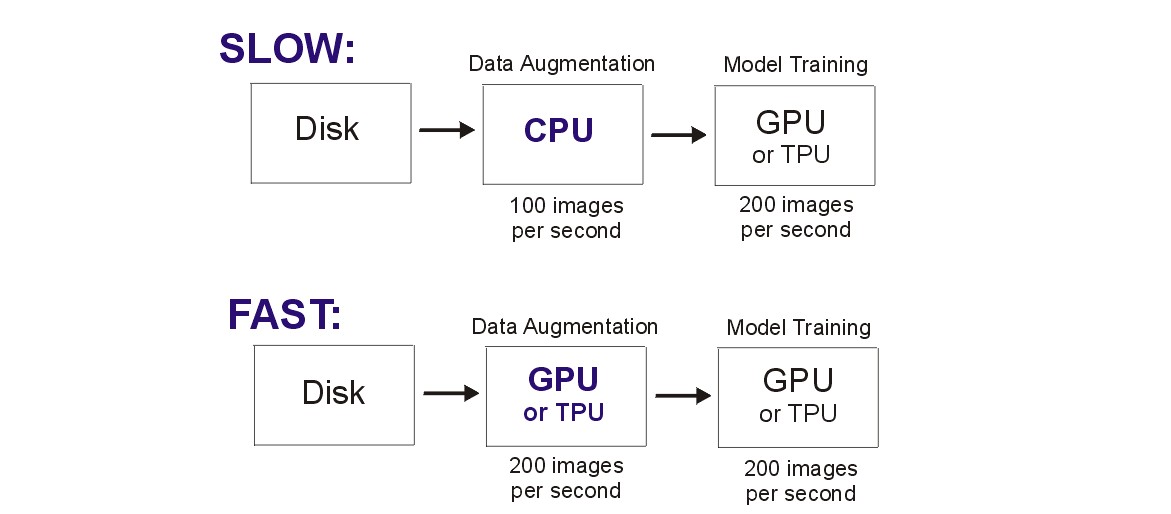\n \n# Preprocess on GPU/TPU\nThis is a great competition to appreciate the need to preprocess data on the GPU/TPU. If you wish to rotate a 512x512x3 image, that requires 5,000,000 multiplies and additions per image! \n \n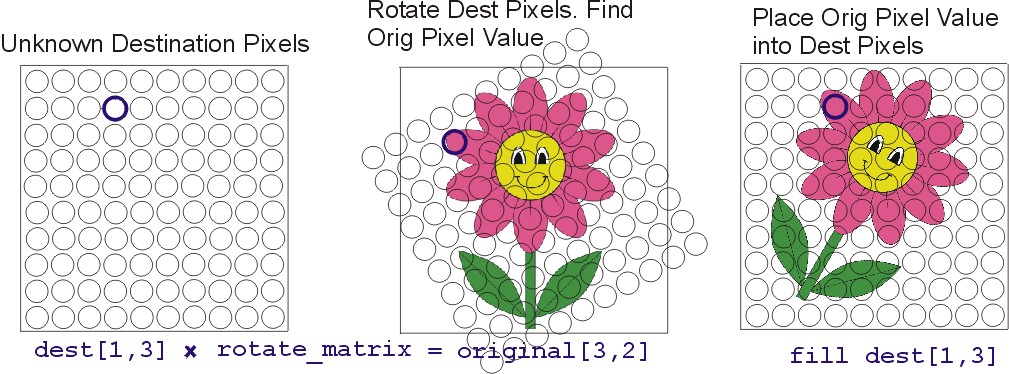\n \nFor each pixel in your augmented image, you must find which pixel value in the original image to use. In the example above, we wish to determine which pixel to place in location `(1,3)`. So we must multiply the coordinate `(1,3)` by a rotation matrix to determine that we want pixel `(3,2)` from the original image which is color pink. We then place a pink pixel in destination image's pixel `(1,3)`.\n\n# Code Does Not Use For-Loops\nWhen writing code for GPU/TPU (i.e. in TensorFlow, Numba, CuPy, CUDA, etc), we want to avoid using for-loops. With a 512x512 image, we must determine the pixel values for 262,144 = 512 x 512 pixels. We can either write a for-loop as `for i in range(262144):` or we can create a matrix `P` of size `(2,262144)` and multiply it by a `(2,2)` rotation matrix `R`. In the later method, this allows GPU/TPU to compute the 262,144 new coordinates in parallel since each GPU/TPU thread can multiply one column of matrix `P` by matrix `R` simultaneously. In the former method, the for-loop prevents us from parallelization (since each iteration must wait for previous iterations to complete).\n\nOnce we have the coordinates of the 262,144 pixels that we want, we use `tensorflow.gather_nd()` which divides the job of finding the pixels in the original image among thousands of different GPU/TPU threads. Once again, we did not write `for i in range(262144):` to locate the 262,144 original pixels which would have prevented parallelism.\n\n# Example Rotated Image\n\n\n\n[1]: https://www.kaggle.com/cdeotte/rotation-augmentation-gpu-tpu-0-96", "755524": "Thanks, great to have rotation! Yesterday, I just tried to find if `tf.image` has arbitrary rotation method, and it doesn't. And tensorflow addons `tfa.image.rotate` is not working ...", "755545": "Yes augmentation is difficult in this competition because no libraries work. Now you can do rotation, shear, zoom, and shift. Enjoy!", "755560": "You just shared a huge building block for many other augmentation methods that will need to be ported to tensorflow2 and TPU. Thank you!\n\nI am nominating you for the \"TPU Star\" Prize ;)", "755591": "Thanks Ilu", "755617": "Fantastic notebook. Thanks.\nCould you explain what the `tf.keras.mixed_precision.experimental.Policy `does and why it is needed ?", "755633": "It is not needed. Currently the boolean switches are set to `False`. If you turn it on then Nvidia GPU V100 goes 40% faster and fits twice as large batch sizes. And TPUv3 goes 40% faster and fits twice as large batch sizes. (GPU P100 doesn't speed up but it does fit larger batch sizes).\n\nWhen `MIXED_PRECISION = True`, TensorFlow uses `fp16` instead of `fp32` wherever it can safely.", "756235": "Such a good notebook, thanks for share! 💯", "756625": "About NVIDIA V100: does this setting enable the TensorCores on the V100 ?\n\nAbout the TPU v3: as you said, this setting is not needed for the TPU v3 to use mixed precision. But it does optimize memory usage because tensors are then stored in memory in bfloat16 format. I assume the 40% speed increase you mention is attributable solely to the memory optimization which allows bigger batches. Correct ?", "756653": "About NVIDIA V100: yes, `mixed_precision` on Nvidia V100 enables TensorCores.\n\nAbout the TPU v3: On the TPU, with batch size 128, one epoch (train and validate DenseNet201 with 512x512x3) is 70 seconds without `mixed_precision` enabled and 60 seconds with `mixed_precision` enabled. That's 20% increase. Then with `mixed_precision`, you can also double the batch size to 256 and do 50 second epochs gaining another 20%.\n\n4xGPU V100 (comparable hardware as TPUv3's 4 chips) with mixed precision at batch 192 (can't fit 256 with `tf.distribute.MirroredStrategy()`) does 60 second epochs. This is using TensorFlow. With Pytorch and Nvidia apex for mixed precision and distribution strategy, I believe 4xGPU V100 can do 50 second epochs or faster.", "756666": "Thank you for sharing. It is a really interesting notebook. \nWhen using the XLA_ACCELERATE flag you set the jit to True, what does this do? I have been unable to find any documentation on it other than the fact it exists.\nMy quick test causes me to run out of memory on my GPU.", "756674": "XLA_ACCELERATE is explained [here][1]. When training some CNN architectures, it can speed up training by optimizing the mathematics (but as you noticed it can also use more memory). When using GPU V100 and DenseNet201, it makes each epoch go 2% faster but uses more memory. (So it's not worth it here).\n\n[1]: https://www.tensorflow.org/xla", "756680": "Thanks I'll give that a read. \n\nI've tried switching MIXED_PRECISION to True on an Nvidia 2080 Ti and the first epoch predicted runtime went to over 5hrs. I might try running it when I go to work to see if it really ends up that slow, but I'm a bit surprised as I expected a speed up.", "756692": "If you use MIXED_PRECISION, you must force all softmax layers and the last layer to use `fp32`. So make sure you use this line (if you didn't copy my whole notebook). Mixed precision is explained by TensorFlow [here][1]\n\n tf.keras.layers.Dense(len(CLASSES), activation='softmax',dtype='float32')\n\nTensorFlow mixed precision is experimental, so perhaps it isn't working correctly. Alternatively you could use [Nvidia DALI][2] with PyTorch. That will definitely work.\n\n[1]: https://www.tensorflow.org/guide/keras/mixed_precision\n[2]: https://docs.nvidia.com/deeplearning/sdk/dali-developer-guide/docs/index.html", "756843": "Thanks I'll give it a go", "757195": "But even faster (and cheaper way, comparing to TPU usage cost) is to pre-create tons of augmented images and store them at fast SSD storage. \n\n", "757245": "What you describe is slower and costs more money. \n\nWhat I describe takes 70 seconds per epoch on TPU **without** augmentation and 70 seconds on TPU **with** augmentation. (TPU has cores that were previously not being used which now get used). In other words, adding fast TPU augmentation doesn't increase time nor money. \n\nIn your suggestion, you now must use CPU time and money to save augmented images to disk beforehand (and wait for it to finish) thus costing time and money.", "757405": "Yes, but I can do it in parallel, while my model is training. Also CPU time costs almost nothing (you can use up to 20 4-core CPU kernels on kaggle with no charge).\n\nAlthough I have to admit that there are some disadvantages, such as having the same dataset on every epoch, whilst with on-the-fly augmentation you have a new dataset on every epoch.", "757449": "How about loss scaling ? Isn't that something you need with fp16 on V100 ?", "757488": ">How about loss scaling ? Isn't that something you need with fp16 on V100 ?\n\nAfter setting `MIXED_PRECISION=True`, if you use `model.fit()` then TensorFlow automatically handles loss scaling for you. If you make your own training loop using `tf.GradientTape()`, then you need to explicitly deal with loss scaling yourself.", "757503": "After a bit of googling it looks like I might need to use a specific Nvidia docker image to use the TensorCores on the RTX. At some point I will try it. \n@cdeotte are you training locally? If so, are you using a Nvidia docker image? \n\nNvida documentation seems to imply I have met the per-requisites \nhttps://docs.nvidia.com/deeplearning/sdk/mixed-precision-training/index.html#prereqs\n\nDocker image with a test case\nhttps://github.com/NVIDIA/DeepLearningExamples/tree/master/TensorFlow/Classification/RN50v1.5\n\nI'm going to get my local improvement back on to the TPU so I can make submission and I'll revisit this later as I would quite like to crack this mixed precision training.", "757520": "Thanks for the links. I'm training on a Nvidia GPU V100. I'm not using a docker, I just installed TensorFlow 2.1 via pip, and use `tensorflow.keras.applications.DenseNet201()`. I assumed that the following two lines at the beginning of my code took care of everything:\n\n policy = tf.keras.mixed_precision.experimental.Policy('mixed_float16')\n mixed_precision.set_policy(policy)\n\nI observe a 20% speed increase with the same batch size. And then when I double batchsize I gain another 20% speed up. I have to admit, I'm new to this and after reading your links, perhaps I need to do more and perhaps I can achieve much greater speedups.", "757526": "That is my understanding is the same. I need dig into it more, something just doesn't seem right. It trains happily without the mixed precision.", "757694": "> Yes, but I can do it in parallel, while my model is training\n \nThat's the whole point of this discussion post. The CPU **cannot** do it in parallel. It is not fast enough. Let's say you're training 5 folds for 20 epochs each. That is a total of 100 epochs. Each epoch you need 12,000 flower images (512x512x3). In your scenario, you need many many hours to produce 1,200,000 rotated images and store those 943,718,400,000 bytes of data (943GB) to a 1TB SSD harddrive beforehand.\n\nBut what you suggest - preprocessing data and saving to disk before training is very helpful in certain situations where you do not need fresh data each epoch. Thanks for pointing out that technique.", "758482": "I created Augmentation Layer for keras + TF some times ago. But my TF knowledge was limited. Anyway in some cases it works better than CPU:\n\nhttps://github.com/ZFTurbo/Keras-augmentation-layer\n\nI believe your ideas could be implemented in similar Layer for easier re-usage.", "758493": "That's awesome. Nice job. My team did a similar thing in Kaggle Molecule Comp. We were given 3D information about atoms and needed to calculate distances and angles. We added input layers to our CNN to do that quickly. It was fast.", "758567": "I tried with a V100 on GCP ([Cloud AI Platform Notebooks](https://console.cloud.google.com/ai-platform/notebooks)) with their pre-installed version of TF 2.1\n\nMixed precision works fine there if I enable XLA with `set_jit(True)`. It gives a healthy speed boost to the V100. Without XLA however, enabling mixed precision seems to disable the GPU entirely. I'm back to CPU training speeds.", "759406": "cdeotte , I have a question mainly concering about the statement `Augmentation GPU/TPU`. What I understand from this statement is that you are saying the data augmentation is done on accelerators like GPU or TPU.\n\nHowever, when I read the [Better performance with the tf.data API](https://www.tensorflow.org/guide/data_performance), it looks like the operations done in `tf.data.Dataset API` are always on CPU. Only when we use the outputs from the `tf.data.Dataset` to do something, for example, using a batch to train the model, we can make the computations on GPU / TPU.\n\nIn your data augmentation kernel, you have\n\n def get_training_dataset(dataset,do_aug=True):\n \n dataset = dataset.map(data_augment, num_parallel_calls=AUTO)\n \n if do_aug: dataset = dataset.map(transform, num_parallel_calls=AUTO)\n \n dataset = dataset.repeat() # the training dataset must repeat for several epochs\n dataset = dataset.shuffle(2048)\n dataset = dataset.batch(BATCH_SIZE)\n dataset = dataset.prefetch(AUTO) # prefetch next batch while training (autotune prefetch buffer size)\n \n return dataset\n\nThe `transform` method is called inside a `tf.data.Dataset API`, which I think it won't run on GPU / TPU. I haven't try and verify by myself though.\n\nIn order to make your great data augumentation `transform` run on GPU / TPU, one way is not to do this in dataset API. Instead, after we get a batch, we call `transform` on that batch, and pass the result to model.\n\nHowever, I don't know how to do this when we use a sequential model + model.fit(). I can possibly make it work if we use subclassed model + custom training loop.\n\nIn your reply to @zfturbo comments, it seems that you have done somethings (in another competition) to make the processing actually running on GPU, right?", "759409": "A small implementation detail is that even though tf.data.Datset runs on the \"CPU\", it is not the CPU of your Kaggle VM. There is another VM with cycles to spare which has the TPU attached to it through a PCI link. If you use `tf.data.Dataset.prefetch(AUTO)`, you can get a lot of data transformations for \"free\" while the TPU is doing its forward and backward pass.", "759419": "mgornergoogle , if data processing runs on the CPU in another VM, then what the CPU in the main Kaggle VM is doing during the training?? Why not just using the CPU of the main Kaggle VM to do data processing and let TPU do training? It's not good enough?", "759950": "You are correct Yih-Dar SHIEH. Thanks for the clarification. My understanding of `TensorFlow.data.Dataset()` was incorrect. I will fix my posts and notebook soon.\n\n### When Using TensorFlow data Dataset\nWhen adding `transform()` to `TensorFlow.data.Dataset()`, the documentation says that preprocessing occurs on the CPU and not the GPU/TPU\n\n dataset = dataset.map(transform)\n\n### When Using TensorFlow Model Layers\nBelow is how you would preprocess on the GPU/TPU. You can add the rotation transformation directly into your model which occurs on GPU/TPU.\n\n input = tf.keras.layers.Input((512,512,3))\n x = tf.keras.layers.Lambda(transform)(input)\n x = DenseNet201(x)\n\n However I would need to update my transform function so that it takes an entire batch as input and outputs an entire batch. Also it wouldn't take labels as input nor output.", "759952": "mgornergoogle Thanks for the clarification Martin. Do you know what CPU, clock speed and core count gets used with TPUv3? (I'm curious to understand time trials from my experiments).", "760086": "` However I would need to update my transform function so that it takes an entire batch as input and outputs an entire batch. Also it wouldn't take labels as input nor output.`\n\nCompletely true. I am also working on it, but quite slow :). You can go ahead. Thanks for answering.", "761696": "> Do you know what CPU, clock speed and core count gets used with TPUv3?\n\nNot precisely but I know it's a lot. This has been dimensioned to make sure the data-hungry TPUv3 can always be fed with enough data.", "764814": "Are you considering upgrading the gpu too? V100 with 32 GB are 1.5 years old, and all we have on Kaggle notebooks are P100. Or is it a decision by Kaggle to not offer recent GPU and move people to tpu only for recent pretrained models?", "872963": "Quick pointers to other data augmentation techniques that work well on TPU/GPU:\n - [CutMix and MixUp on GPU/TPU](https://www.kaggle.com/c/flower-classification-with-tpus/discussion/132935)\n - [GridMask data augmentation on GPU/TPU](https://www.kaggle.com/c/flower-classification-with-tpus/discussion/132986)\n - [batch implementation of rotation/shear/zoom/shift](https://www.kaggle.com/c/flower-classification-with-tpus/discussion/133168)\n - [batch implementations of CutMix, MixUp, GridMask](https://www.kaggle.com/c/flower-classification-with-tpus/discussion/134264)\n - [perspective transformations](https://www.kaggle.com/c/flower-classification-with-tpus/discussion/134557)", "953514": "This is really helpful for beginners. Thank you for sharing your work. May I please ask how to decide which augmentation transformations to begin with (specially if beginners are attempting data augmentation)?", "953558": "The idea for augmentation is two fold. First you want to generate more data that looks like your train data. So for example, it is appropriate to rotate images any angle in Melanoma skin lesion detection. But it wouldn't be appropriate to rotate handwritten digits more than plus minus 15 degrees. Since the more the better, just do every type of augmentation that creates realistic additional images.\n\nThe second reason for augmentation is to make learning more difficult for your model. That forces your model to learn the underlying idea more generally. This is accomplished with augmentation like coarse dropout or cutout which removes parts of the image. You should only obscure an image to the point that a human can still identify the image more or less. When applying augmentation for this reason, you will need to train for more epochs because your model learns more slowly. But it will become more intelligent at the end.", "953568": "Thank you. Very well explained. Keeping the images still realistic is perhaps the key while augmenting.", "953570": "Yes. That is why it is always good to display your images after applying augmentation. \n\nLook at dozens of the augmented images yourself. Adjust the hyperparameters (like how much rotation, zoom, color contrast, etc) to the maximum you can while keeping the images realistic looking. Then apply the most different types of augmentation that you can.\n\nDeep learning needs lots of training data and augmentation makes it for us. Augmentation is one of the best ways to increase accuracy for deep learning." }, "source": "meta" }