
-o dfdc_train_all.zip\n8.1. (Optional) Add --progress-bar flag to view download progress.To download train files in a VM we can usually use the kaggle API where the credentials can be passed in. Here Kaggle API cannot be used for train files, but we need credentials - I can see how to download through the website; but not from VM... any ideas ?
", "messages": [ { "id": 692874, "postDate": "2019-12-11T20:08:13.557Z", "content": "I usually do some procedure as follow to manually download files:
\n\n-o dfdc_train_all.zip\n8.1. (Optional) Add --progress-bar flag to view download progress.I hope it helps.
", "rawMarkdown": "I usually do some procedure as follow to manually download files:\n\n1. Copy Kaggle download link (this one: https://www.kaggle.com/c/16880/datadownload/dfdc_train_all.zip)\n2. Open a new browser tab\n3. Activate Network Inspector (in Firefox it is Ctrl + Shift + E)\n4. Paste the download link in browser url and hit enter\n5. Cancel download\n6. In the network inspector, you will see the request that the browser made to download the file\n7. Right click, Copy > Copy as cURL (POSIX)\n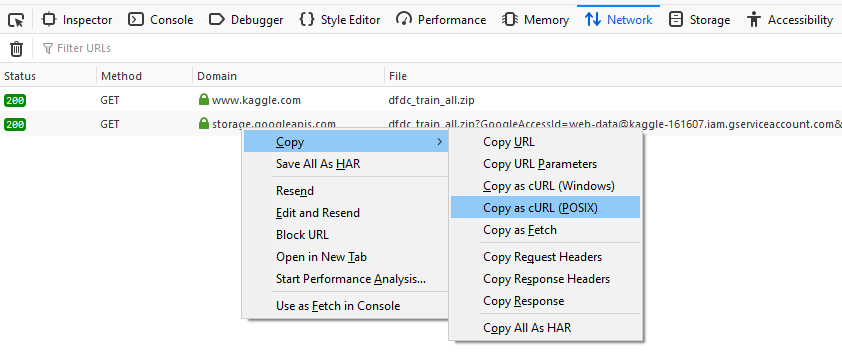\n8. Paste the copied command in a remote VM, AND **add the option to output to a file: `-o dfdc_train_all.zip`**\n8.1. (Optional) Add `--progress-bar` flag to view download progress.\n\nI hope it helps.", "votes": 50, "replies": [ { "id": 693821, "postDate": "2019-12-12T20:27:17.197Z", "content": "Very useful. Thanks for sharing this approach. Much easier than poking around myself.
", "rawMarkdown": "Very useful. Thanks for sharing this approach. Much easier than poking around myself. ", "votes": 1 }, { "id": 728388, "postDate": "2020-01-24T17:12:50.200Z", "content": "Great, saved me the time of writing a script, thank you!
", "rawMarkdown": "Great, saved me the time of writing a script, thank you!", "votes": 1 }, { "id": 742554, "postDate": "2020-02-11T11:23:31.680Z", "content": "Thanks! It's the only option that worked for me.
", "rawMarkdown": "Thanks! It's the only option that worked for me." }, { "id": 898078, "postDate": "2020-06-23T09:28:13.777Z", "content": "Thanks! it helps me a lot!
", "rawMarkdown": "Thanks! it helps me a lot!" } ] }, { "id": 692846, "postDate": "2019-12-11T19:33:57.060Z", "content": "To download train files in a VM we can usually use the kaggle API where the credentials can be passed in. Here Kaggle API cannot be used for train files, but we need credentials - I can see how to download through the website; but not from VM... any ideas ?
", "rawMarkdown": "To download train files in a VM we can usually use the kaggle API where the credentials can be passed in. Here Kaggle API cannot be used for train files, but we need credentials - I can see how to download through the website; but not from VM... any ideas ?", "votes": 38 }, { "id": 692878, "postDate": "2019-12-11T20:13:21.643Z", "content": "Download cookies using any extension and save as text file. There are many extensions available.\nThen
\n\n```\nsudo apt install aria2\naria2c -c -x 16 -s 16 --load-cookies cookies.txt -p https://www.kaggle.com/c/16880/datadownload/dfdc_train_all.zip
\n\n```
\n\nTested. Works well, quite fast.
", "rawMarkdown": "Download cookies using any extension and save as text file. There are many extensions available.\nThen\n\n```\nsudo apt install aria2\naria2c -c -x 16 -s 16 --load-cookies cookies.txt -p https://www.kaggle.com/c/16880/datadownload/dfdc_train_all.zip\n\n```\n\nTested. Works well, quite fast.", "votes": 17, "replies": [ { "id": 692892, "postDate": "2019-12-11T20:26:05.817Z", "content": "Thanks this works! yep, very fast, looks like it will be downloaded in under an hour.
", "rawMarkdown": "Thanks this works! yep, very fast, looks like it will be downloaded in under an hour.", "votes": 3 }, { "id": 693819, "postDate": "2019-12-12T20:26:42.870Z", "content": "Under an hour! Are you inside the data center? Mine took a while. Got all the files now and unzipping them. That is taking a while too.
", "rawMarkdown": "Under an hour! Are you inside the data center? Mine took a while. Got all the files now and unzipping them. That is taking a while too. ", "votes": 1 }, { "id": 696062, "postDate": "2019-12-16T04:31:47.903Z", "content": "Excuse me ! Would you please tell me how to download cookies?
", "rawMarkdown": "Excuse me ! Would you please tell me how to download cookies? ", "votes": 6 }, { "id": 742133, "postDate": "2020-02-11T04:59:25.550Z", "content": "AWS VM is yum and package cannot be found.
I use this approach and download the file without facing any problems.
", "rawMarkdown": "1. Add [CurlWget](https://chrome.google.com/webstore/detail/curlwget/jmocjfidanebdlinpbcdkcmgdifblncg) Chrome extension\n2. Click [all.zip (471.84 GB)](https://www.kaggle.com/c/16880/datadownload/dfdc_train_all.zip) in the dataset page. It will start downloading. In that time, if you click the CurlWget extension, you will get a wget download command.\n3. Copy that command and execute it in the command line.\n\nI use this approach and download the file without facing any problems.", "votes": 13, "replies": [ { "id": 701122, "postDate": "2019-12-23T05:41:32.130Z", "content": "Hello,
\n\nI am unable to download with wget or curlWget. I get the below
\n\ndfdc_train_all.zip 3%[=> ] 17.42G 71.0MB/s in 3m 13s
\n\nCannot write to ‘dfdc_train_all.zip’ (Success).
\n\nDoes anyone know why this happens?\nThank you
", "rawMarkdown": "Hello,\n\nI am unable to download with wget or curlWget. I get the below\n\ndfdc_train_all.zip 3%[=> ] 17.42G 71.0MB/s in 3m 13s \n\n\nCannot write to ‘dfdc_train_all.zip’ (Success).\n\nDoes anyone know why this happens?\nThank you", "votes": 2 }, { "id": 733929, "postDate": "2020-01-31T17:30:55.487Z", "content": "I hope you already solved the problem, but for any new users, I just want to point out that the above error shows if you did not specify the download destination to your drive location mounted from a persistent cloud disk. By default, wget will download to your local boot drive, and it will fill up soon throwing the error. This method WORKS.
", "rawMarkdown": "I hope you already solved the problem, but for any new users, I just want to point out that the above error shows if you did not specify the download destination to your drive location mounted from a persistent cloud disk. By default, wget will download to your local boot drive, and it will fill up soon throwing the error. This method WORKS." }, { "id": 742144, "postDate": "2020-02-11T05:11:28.023Z", "content": "I feel so happy that it starts downloading, then after downloaded 4.7GB, it stopped.
", "rawMarkdown": "I feel so happy that it starts downloading, then after downloaded 4.7GB, it stopped. ", "isDeleted": true } ] }, { "id": 695299, "postDate": "2019-12-14T22:59:49.580Z", "content": "I found a simple hack to use Kaggle API. You need to modify site-packages/kaggle/api/kaggle_api.py
\n\nreplace\n/competitions/data/download/{id}/{fileName}\nwith\n/c/{id}/datadownload/{fileName}
Now, you can download the file like this:\nkaggle competitions download deepfake-detection-challenge -f dfdc_train_part_00.zip
Is this a bug or intended by kaggle? If it's the former, i'd highly recommend reporting that to @kaggleteam; if it's the latter, then +1 ;)
", "rawMarkdown": "Is this a bug or intended by kaggle? If it's the former, i'd highly recommend reporting that to @kaggleteam; if it's the latter, then +1 ;)" }, { "id": 719869, "postDate": "2020-01-16T00:05:23.413Z", "content": "Thanks for the tip @sorokin, following your suggestion I have implemented a notebook that can download programmatically any file, which is very useful if you want to download them from Colab: https://www.kaggle.com/frsanchez/download-kaggle-files-from-notebook
", "rawMarkdown": "Thanks for the tip @sorokin, following your suggestion I have implemented a notebook that can download programmatically any file, which is very useful if you want to download them from Colab: https://www.kaggle.com/frsanchez/download-kaggle-files-from-notebook", "votes": 2 }, { "id": 722004, "postDate": "2020-01-18T01:32:05.100Z", "content": "You mainly work on Colab?
", "rawMarkdown": "You mainly work on Colab?", "isDeleted": true }, { "id": 722010, "postDate": "2020-01-18T01:46:21.680Z", "content": "Not mainly but it is good to be able to run two notebooks for free for 12 hours. Just one more option.
", "rawMarkdown": "Not mainly but it is good to be able to run two notebooks for free for 12 hours. Just one more option." }, { "id": 722014, "postDate": "2020-01-18T01:56:08.137Z", "content": "How you upload dataset? 1) from Google Drive or download directly from kaggle in colab? 2) Do you have to upload dataset everytime when you start new session in colab?
", "rawMarkdown": "How you upload dataset? 1) from Google Drive or download directly from kaggle in colab? 2) Do you have to upload dataset everytime when you start new session in colab? ", "isDeleted": true }, { "id": 722686, "postDate": "2020-01-18T23:24:36.487Z", "content": "It downloads directly from Kaggle.
", "rawMarkdown": "It downloads directly from Kaggle." }, { "id": 736889, "postDate": "2020-02-04T17:08:08.110Z", "content": "This worked for me previously but seems to not be working now as it's returning a 404 error. Any idea why?
", "rawMarkdown": "This worked for me previously but seems to not be working now as it's returning a 404 error. Any idea why?", "votes": 1 }, { "id": 738118, "postDate": "2020-02-06T06:43:57.197Z", "content": "The following approach using wget works for me.
\n\nhttps://www.kaggle.com/c/deepfake-detection-challenge/discussion/121695
\n\nwget --load-cookies cookies.txt https://www.kaggle.com/c/16880/datadownload/dfdc_train_part_00.zip
with wget:
\n\n\nwget -x --load-cookies cookies.txt ......\n
Thanks, this worked for me. I used: https://chrome.google.com/webstore/detail/cookiestxt/njabckikapfpffapmjgojcnbfjonfjfg
", "rawMarkdown": "Thanks, this worked for me. I used: https://chrome.google.com/webstore/detail/cookiestxt/njabckikapfpffapmjgojcnbfjonfjfg", "votes": 2 }, { "id": 738356, "postDate": "2020-02-06T12:30:23.863Z", "content": "It does work!!! Thanks a lot.
", "rawMarkdown": "It does work!!! Thanks a lot." } ] }, { "id": 693300, "postDate": "2019-12-12T08:23:11.613Z", "content": "how to get cookies.txt?
", "rawMarkdown": "how to get cookies.txt?", "votes": 1, "replies": [ { "id": 693307, "postDate": "2019-12-12T08:33:51.117Z", "content": "chrome extention \"cookies.txt\"
", "rawMarkdown": "chrome extention \"cookies.txt\"", "votes": 1 } ] }, { "id": 692869, "postDate": "2019-12-11T20:01:42.657Z", "content": "download the cookies. use aria2c or wget with cookies.
", "rawMarkdown": "download the cookies. use aria2c or wget with cookies. " }, { "id": 759951, "postDate": "2020-02-29T16:44:37.590Z", "content": "Great solution, one hour in and I have 330gb downloaded
\n\nEdit: Scratch that, looks like it was a preparatory stage, and its now looking like 30h.
", "rawMarkdown": "Great solution, one hour in and I have 330gb downloaded\n\nEdit: Scratch that, looks like it was a preparatory stage, and its now looking like 30h." }, { "id": 693769, "postDate": "2019-12-12T19:19:02.353Z", "content": "Note that the full dataset is a zip file that contains 50 smaller zip files. So you'll need to have quite a bit of space free to unzip everything.
", "rawMarkdown": "Note that the full dataset is a zip file that contains 50 smaller zip files. So you'll need to have quite a bit of space free to unzip everything.", "replies": [ { "id": 693803, "postDate": "2019-12-12T19:53:08.320Z", "content": "whats the total size after unzipping everything?
", "rawMarkdown": "whats the total size after unzipping everything?", "votes": -1 }, { "id": 693818, "postDate": "2019-12-12T20:26:03.157Z", "content": "Don't know yet... it's still unzipping!
", "rawMarkdown": "Don't know yet... it's still unzipping!" }, { "id": 693892, "postDate": "2019-12-12T22:32:07.593Z", "content": "very similar - video already compresed, so zip as only container
", "rawMarkdown": "very similar - video already compresed, so zip as only container" }, { "id": 693899, "postDate": "2019-12-12T22:43:48.010Z", "content": "Yes, it counts as 477GB for me (this includes the test set and the small training sample).
", "rawMarkdown": "Yes, it counts as 477GB for me (this includes the test set and the small training sample)." } ] }, { "id": 693176, "postDate": "2019-12-12T05:33:14.183Z", "content": "May i ask what is your estimated time of downloading the full dataset? \nMine is nearly 300 hours.
", "rawMarkdown": "May i ask what is your estimated time of downloading the full dataset? \nMine is nearly 300 hours. ", "replies": [ { "id": 1059090, "postDate": "2020-10-24T15:56:33.903Z", "content": "hi, Im trying out this competition and Im getting the same dowload time, did you try anyway to reduce the time
", "rawMarkdown": "hi, Im trying out this competition and Im getting the same dowload time, did you try anyway to reduce the time" } ] }, { "id": 728387, "postDate": "2020-01-24T17:11:56.363Z", "rawMarkdown": "", "isDeleted": true } ], "comments": [ { "id": 692874, "author_name": "Bruno G. do Amaral", "author_url": "", "post_date": "2019-12-11T20:08:13.557000", "content": "I usually do some procedure as follow to manually download files:
\n\n-o dfdc_train_all.zip\n8.1. (Optional) Add --progress-bar flag to view download progress.I hope it helps.
", "votes": 50, "replies": [ { "id": 693821, "author_name": "ryches", "author_url": "", "post_date": "2019-12-12T20:27:17.197000", "content": "Very useful. Thanks for sharing this approach. Much easier than poking around myself.
", "votes": 1, "replies": [] }, { "id": 728388, "author_name": "Yuval Nirkin", "author_url": "", "post_date": "2020-01-24T17:12:50.200000", "content": "Great, saved me the time of writing a script, thank you!
", "votes": 1, "replies": [] }, { "id": 742554, "author_name": "See--", "author_url": "", "post_date": "2020-02-11T11:23:31.680000", "content": "Thanks! It's the only option that worked for me.
", "votes": 0, "replies": [] }, { "id": 898078, "author_name": "JoeyOneWind", "author_url": "", "post_date": "2020-06-23T09:28:13.777000", "content": "Thanks! it helps me a lot!
", "votes": 0, "replies": [] } ] }, { "id": 692878, "author_name": "Abhishek Thakur", "author_url": "", "post_date": "2019-12-11T20:13:21.643000", "content": "Download cookies using any extension and save as text file. There are many extensions available.\nThen
\n\n```\nsudo apt install aria2\naria2c -c -x 16 -s 16 --load-cookies cookies.txt -p https://www.kaggle.com/c/16880/datadownload/dfdc_train_all.zip
\n\n```
\n\nTested. Works well, quite fast.
", "votes": 17, "replies": [ { "id": 692892, "author_name": "Darragh", "author_url": "", "post_date": "2019-12-11T20:26:05.817000", "content": "Thanks this works! yep, very fast, looks like it will be downloaded in under an hour.
", "votes": 3, "replies": [] }, { "id": 693819, "author_name": "ryches", "author_url": "", "post_date": "2019-12-12T20:26:42.870000", "content": "Under an hour! Are you inside the data center? Mine took a while. Got all the files now and unzipping them. That is taking a while too.
", "votes": 1, "replies": [] }, { "id": 696062, "author_name": "Jupanlee", "author_url": "", "post_date": "2019-12-16T04:31:47.903000", "content": "Excuse me ! Would you please tell me how to download cookies?
", "votes": 6, "replies": [] }, { "id": 742133, "author_name": "", "author_url": "", "post_date": "2020-02-11T04:59:25.550000", "content": "AWS VM is yum and package cannot be found.
I use this approach and download the file without facing any problems.
", "votes": 13, "replies": [ { "id": 701122, "author_name": "Sam K", "author_url": "", "post_date": "2019-12-23T05:41:32.130000", "content": "Hello,
\n\nI am unable to download with wget or curlWget. I get the below
\n\ndfdc_train_all.zip 3%[=> ] 17.42G 71.0MB/s in 3m 13s
\n\nCannot write to ‘dfdc_train_all.zip’ (Success).
\n\nDoes anyone know why this happens?\nThank you
", "votes": 2, "replies": [] }, { "id": 733929, "author_name": "Debanga Raj Neog", "author_url": "", "post_date": "2020-01-31T17:30:55.487000", "content": "I hope you already solved the problem, but for any new users, I just want to point out that the above error shows if you did not specify the download destination to your drive location mounted from a persistent cloud disk. By default, wget will download to your local boot drive, and it will fill up soon throwing the error. This method WORKS.
", "votes": 0, "replies": [] }, { "id": 742144, "author_name": "", "author_url": "", "post_date": "2020-02-11T05:11:28.023000", "content": "I feel so happy that it starts downloading, then after downloaded 4.7GB, it stopped.
", "votes": 0, "replies": [] } ] }, { "id": 695299, "author_name": "ivan", "author_url": "", "post_date": "2019-12-14T22:59:49.580000", "content": "I found a simple hack to use Kaggle API. You need to modify site-packages/kaggle/api/kaggle_api.py
\n\nreplace\n/competitions/data/download/{id}/{fileName}\nwith\n/c/{id}/datadownload/{fileName}
Now, you can download the file like this:\nkaggle competitions download deepfake-detection-challenge -f dfdc_train_part_00.zip
Is this a bug or intended by kaggle? If it's the former, i'd highly recommend reporting that to @kaggleteam; if it's the latter, then +1 ;)
", "votes": 0, "replies": [] }, { "id": 719869, "author_name": "F.J. Sanchez", "author_url": "", "post_date": "2020-01-16T00:05:23.413000", "content": "Thanks for the tip @sorokin, following your suggestion I have implemented a notebook that can download programmatically any file, which is very useful if you want to download them from Colab: https://www.kaggle.com/frsanchez/download-kaggle-files-from-notebook
", "votes": 2, "replies": [] }, { "id": 722004, "author_name": "", "author_url": "", "post_date": "2020-01-18T01:32:05.100000", "content": "You mainly work on Colab?
", "votes": 0, "replies": [] }, { "id": 722010, "author_name": "F.J. Sanchez", "author_url": "", "post_date": "2020-01-18T01:46:21.680000", "content": "Not mainly but it is good to be able to run two notebooks for free for 12 hours. Just one more option.
", "votes": 0, "replies": [] }, { "id": 722014, "author_name": "", "author_url": "", "post_date": "2020-01-18T01:56:08.137000", "content": "How you upload dataset? 1) from Google Drive or download directly from kaggle in colab? 2) Do you have to upload dataset everytime when you start new session in colab?
", "votes": 0, "replies": [] }, { "id": 722686, "author_name": "F.J. Sanchez", "author_url": "", "post_date": "2020-01-18T23:24:36.487000", "content": "It downloads directly from Kaggle.
", "votes": 0, "replies": [] }, { "id": 736889, "author_name": "NeilLiberman", "author_url": "", "post_date": "2020-02-04T17:08:08.110000", "content": "This worked for me previously but seems to not be working now as it's returning a 404 error. Any idea why?
", "votes": 1, "replies": [] }, { "id": 738118, "author_name": "Tony Y.", "author_url": "", "post_date": "2020-02-06T06:43:57.197000", "content": "The following approach using wget works for me.
\n\nhttps://www.kaggle.com/c/deepfake-detection-challenge/discussion/121695
\n\nwget --load-cookies cookies.txt https://www.kaggle.com/c/16880/datadownload/dfdc_train_part_00.zip
with wget:
\n\n\nwget -x --load-cookies cookies.txt ......\n
Thanks, this worked for me. I used: https://chrome.google.com/webstore/detail/cookiestxt/njabckikapfpffapmjgojcnbfjonfjfg
", "votes": 2, "replies": [] }, { "id": 738356, "author_name": "Shan Ren 7", "author_url": "", "post_date": "2020-02-06T12:30:23.863000", "content": "It does work!!! Thanks a lot.
", "votes": 0, "replies": [] } ] }, { "id": 693300, "author_name": "Miao Siam", "author_url": "", "post_date": "2019-12-12T08:23:11.613000", "content": "how to get cookies.txt?
", "votes": 1, "replies": [ { "id": 693307, "author_name": "Jin Liu", "author_url": "", "post_date": "2019-12-12T08:33:51.117000", "content": "chrome extention \"cookies.txt\"
", "votes": 1, "replies": [] } ] }, { "id": 692869, "author_name": "Abhishek Thakur", "author_url": "", "post_date": "2019-12-11T20:01:42.657000", "content": "download the cookies. use aria2c or wget with cookies.
", "votes": 0, "replies": [] }, { "id": 759951, "author_name": "anonemaus", "author_url": "", "post_date": "2020-02-29T16:44:37.590000", "content": "Great solution, one hour in and I have 330gb downloaded
\n\nEdit: Scratch that, looks like it was a preparatory stage, and its now looking like 30h.
", "votes": 0, "replies": [] }, { "id": 693769, "author_name": "Human Analog", "author_url": "", "post_date": "2019-12-12T19:19:02.353000", "content": "Note that the full dataset is a zip file that contains 50 smaller zip files. So you'll need to have quite a bit of space free to unzip everything.
", "votes": 0, "replies": [ { "id": 693803, "author_name": "Abhishek Thakur", "author_url": "", "post_date": "2019-12-12T19:53:08.320000", "content": "whats the total size after unzipping everything?
", "votes": -1, "replies": [] }, { "id": 693818, "author_name": "Human Analog", "author_url": "", "post_date": "2019-12-12T20:26:03.157000", "content": "Don't know yet... it's still unzipping!
", "votes": 0, "replies": [] }, { "id": 693892, "author_name": "Leigh", "author_url": "", "post_date": "2019-12-12T22:32:07.593000", "content": "very similar - video already compresed, so zip as only container
", "votes": 0, "replies": [] }, { "id": 693899, "author_name": "Human Analog", "author_url": "", "post_date": "2019-12-12T22:43:48.010000", "content": "Yes, it counts as 477GB for me (this includes the test set and the small training sample).
", "votes": 0, "replies": [] } ] }, { "id": 693176, "author_name": "Jin Liu", "author_url": "", "post_date": "2019-12-12T05:33:14.183000", "content": "May i ask what is your estimated time of downloading the full dataset? \nMine is nearly 300 hours.
", "votes": 0, "replies": [ { "id": 1059090, "author_name": "BismaAkram97", "author_url": "", "post_date": "2020-10-24T15:56:33.903000", "content": "hi, Im trying out this competition and Im getting the same dowload time, did you try anyway to reduce the time
", "votes": 0, "replies": [] } ] }, { "id": 728387, "author_name": "", "author_url": "", "post_date": "2020-01-24T17:11:56.363000", "content": "", "votes": 0, "replies": [] } ], "raw_markdown_by_id": { "692874": "I usually do some procedure as follow to manually download files:\n\n1. Copy Kaggle download link (this one: https://www.kaggle.com/c/16880/datadownload/dfdc_train_all.zip)\n2. Open a new browser tab\n3. Activate Network Inspector (in Firefox it is Ctrl + Shift + E)\n4. Paste the download link in browser url and hit enter\n5. Cancel download\n6. In the network inspector, you will see the request that the browser made to download the file\n7. Right click, Copy > Copy as cURL (POSIX)\n\n8. Paste the copied command in a remote VM, AND **add the option to output to a file: `-o dfdc_train_all.zip`**\n8.1. (Optional) Add `--progress-bar` flag to view download progress.\n\nI hope it helps.", "692846": "To download train files in a VM we can usually use the kaggle API where the credentials can be passed in. Here Kaggle API cannot be used for train files, but we need credentials - I can see how to download through the website; but not from VM... any ideas ?", "692878": "Download cookies using any extension and save as text file. There are many extensions available.\nThen\n\n```\nsudo apt install aria2\naria2c -c -x 16 -s 16 --load-cookies cookies.txt -p https://www.kaggle.com/c/16880/datadownload/dfdc_train_all.zip\n\n```\n\nTested. Works well, quite fast.", "693924": "1. Add [CurlWget](https://chrome.google.com/webstore/detail/curlwget/jmocjfidanebdlinpbcdkcmgdifblncg) Chrome extension\n2. Click [all.zip (471.84 GB)](https://www.kaggle.com/c/16880/datadownload/dfdc_train_all.zip) in the dataset page. It will start downloading. In that time, if you click the CurlWget extension, you will get a wget download command.\n3. Copy that command and execute it in the command line.\n\nI use this approach and download the file without facing any problems.", "695299": "I found a simple hack to use Kaggle API. You need to modify [site-packages/kaggle/api/kaggle_api.py](https://github.com/Kaggle/kaggle-api/blob/84895cea61af708a24f0e8ad8307d570e82d8097/kaggle/api/kaggle_api.py#L312)\n\nreplace\n`/competitions/data/download/{id}/{fileName}`\nwith\n`/c/{id}/datadownload/{fileName}`\n\nNow, you can download the file like this:\n`kaggle competitions download deepfake-detection-challenge -f dfdc_train_part_00.zip`\n", "692879": "with wget:\n\n```\nwget -x --load-cookies cookies.txt ......\n```", "693300": "how to get cookies.txt?", "692869": "download the cookies. use aria2c or wget with cookies. ", "759951": "Great solution, one hour in and I have 330gb downloaded\n\nEdit: Scratch that, looks like it was a preparatory stage, and its now looking like 30h.", "693769": "Note that the full dataset is a zip file that contains 50 smaller zip files. So you'll need to have quite a bit of space free to unzip everything.", "693176": "May i ask what is your estimated time of downloading the full dataset? \nMine is nearly 300 hours. ", "728387": "" } }