
just received my google cloud credit. will update with autoML results soon.
\n\nmeanwhile, here is the setup:\nhttps://www.youtube.com/watch?v=xP99eh6nQN0\nUsing Cloud AutoML in Kaggle Notebooks | Kaggle
\n\nhttps://www.youtube.com/watch?v=crXNFxMg5R4\nPractical Model Evaluation: Training models with automated machine learning | Kaggle
\n\nhttps://cloud.google.com/vision/automl/docs/tutorial\nhttps://cloud.google.com/vision/automl/docs/create-datasets\nAutoML Vision API Tutorial
\n\nIntroducing AutoML and Cloud Storage to Kaggle!\nhttps://www.kaggle.com/product-feedback/115754
\n\ncreate dataset on google cloud\nhttps://cloud.google.com/vision/automl/docs/create-datasets
\n\nkaggle air bus challenge and autoML\nhttps://medium.com/@amina.alsherif/training-a-model-in-less-than-a-day-a-beginners-guide-to-google-cloud-platform-automl-vision-ba35fc979400
", "messages": [ { "id": "720999", "postDate": "01/16/2020 23:29:30", "content": "just received my google cloud credit. will update with autoML results soon.
\n\nmeanwhile, here is the setup:\nhttps://www.youtube.com/watch?v=xP99eh6nQN0\nUsing Cloud AutoML in Kaggle Notebooks | Kaggle
\n\nhttps://www.youtube.com/watch?v=crXNFxMg5R4\nPractical Model Evaluation: Training models with automated machine learning | Kaggle
\n\nhttps://cloud.google.com/vision/automl/docs/tutorial\nhttps://cloud.google.com/vision/automl/docs/create-datasets\nAutoML Vision API Tutorial
\n\nIntroducing AutoML and Cloud Storage to Kaggle!\nhttps://www.kaggle.com/product-feedback/115754
\n\ncreate dataset on google cloud\nhttps://cloud.google.com/vision/automl/docs/create-datasets
\n\nkaggle air bus challenge and autoML\nhttps://medium.com/@amina.alsherif/training-a-model-in-less-than-a-day-a-beginners-guide-to-google-cloud-platform-automl-vision-ba35fc979400
", "rawMarkdown": "just received my google cloud credit. will update with autoML results soon.\n\nmeanwhile, here is the setup:\nhttps://www.youtube.com/watch?v=xP99eh6nQN0\nUsing Cloud AutoML in Kaggle Notebooks | Kaggle\n\nhttps://www.youtube.com/watch?v=crXNFxMg5R4\nPractical Model Evaluation: Training models with automated machine learning | Kaggle\n\nhttps://cloud.google.com/vision/automl/docs/tutorial\nhttps://cloud.google.com/vision/automl/docs/create-datasets\nAutoML Vision API Tutorial\n\n\nIntroducing AutoML and Cloud Storage to Kaggle!\nhttps://www.kaggle.com/product-feedback/115754\n\ncreate dataset on google cloud\nhttps://cloud.google.com/vision/automl/docs/create-datasets\n\nkaggle air bus challenge and autoML\nhttps://medium.com/@amina.alsherif/training-a-model-in-less-than-a-day-a-beginners-guide-to-google-cloud-platform-automl-vision-ba35fc979400", "votes": null }, { "id": "721277", "postDate": "01/17/2020 08:50:21", "content": "possible problem\nDefaultCredentialsError: Could not automatically determine credentials. Please set GOOGLE_APPLICATION_CREDENTIALS ...
\n\nhttps://www.kaggle.com/c/nlp-getting-started/discussion/123199\nhttps://www.kaggle.com/c/nlp-getting-started/discussion/123016
", "rawMarkdown": "possible problem\nDefaultCredentialsError: Could not automatically determine credentials. Please set GOOGLE\\_APPLICATION\\_CREDENTIALS ...\n\n\nhttps://www.kaggle.com/c/nlp-getting-started/discussion/123199\nhttps://www.kaggle.com/c/nlp-getting-started/discussion/123016", "votes": null }, { "id": "721927", "postDate": "01/17/2020 22:27:00", "content": "Were you able to follow the instructions at https://www.kaggle.com/product-feedback/115754 to try and resolve the cred errors?
", "rawMarkdown": "Were you able to follow the instructions at https://www.kaggle.com/product-feedback/115754 to try and resolve the cred errors?", "votes": null }, { "id": "722124", "postDate": "01/18/2020 06:15:52", "content": "@ devrishi
\n\nUnfortunately, it doesn't solved my problem. my temporary solution is to use credential JSON file
\n\n\n\n\nimport os\nos.environ[\"GOOGLE_APPLICATION_CREDENTIALS\"]=\"/path/to/file.json\"\n
Would love to help you get to the bottom of this. Would you be able to double check that both Google Cloud Storage and AutoML are authorized in Add-Ons > Google Cloud Services? You'll need both for this competition
", "rawMarkdown": "Would love to help you get to the bottom of this. Would you be able to double check that both Google Cloud Storage and AutoML are authorized in Add-Ons > Google Cloud Services? You'll need both for this competition", "votes": null }, { "id": "724552", "postDate": "01/21/2020 08:30:25", "content": "trained for grapheme root task only (168 classification problem)
\n\n
@ devrishi
\n\nBoth Google Cloud Storage and AutoML are authorized. But the error still occurs.\n 
Thanks @hengck23 . Since your configuration looks right, I'd want to see if can further diagnose the problem. Would you mind sharing your notebook with myself and mcollins42 so we could take a look at the code and see if we spot any errors?
", "rawMarkdown": "Thanks @hengck23 . Since your configuration looks right, I'd want to see if can further diagnose the problem. Would you mind sharing your notebook with myself and mcollins42 so we could take a look at the code and see if we spot any errors?", "votes": null }, { "id": "725604", "postDate": "01/22/2020 09:27:58", "content": "@ devrishi
\n\nI have made the kernel public at:
\n\nhttps://www.kaggle.com/hengck23/kernel5be4586b59
\n\nplease see:
\n\n```
\n\nautoml_client = automl.AutoMlClient()
\n\n```
\n\nnote that private_key_id,private_key values of set_credential_from_json_string() has been masked out.
", "rawMarkdown": "devrishi\n\nI have made the kernel public at:\n\nhttps://www.kaggle.com/hengck23/kernel5be4586b59\n\n\nplease see:\n\n```\n\n#this is ok\n#automl_client = automl.AutoMlClient(credentials=set_credential_from_json_string())\n\n#this fails\nautoml_client = automl.AutoMlClient()\n\n```\n\nnote that private\\_key\\_id,private\\_key values of set\\_credential\\_from\\_json\\_string() has been masked out.", "votes": null }, { "id": "725625", "postDate": "01/22/2020 10:01:09", "content": "How long does it take to train? @hengck23
", "rawMarkdown": "How long does it take to train? @hengck23", "votes": null }, { "id": "743022", "postDate": "02/11/2020 18:00:44", "content": "@hengck23 Looking at that notebook again, I just realized that you are importing automl and not automl_v1beta1. Our integration was originally written against the beta before v1 was released. I'll need to update our integration to make this work out of the box.
\n\nIn the meantime, you should be able to get this to work manually with this code:\nfrom kaggle_gcp import KaggleKernelCredentials\nautoml_client = automl.AutoMlClient(credentials=KaggleKernelCredentials())
possible problem\nDefaultCredentialsError: Could not automatically determine credentials. Please set GOOGLE_APPLICATION_CREDENTIALS ...
\n\nhttps://www.kaggle.com/c/nlp-getting-started/discussion/123199\nhttps://www.kaggle.com/c/nlp-getting-started/discussion/123016
", "votes": null, "replies": [ { "id": 721927, "author_name": "devvret", "author_url": "", "post_date": "01/17/2020 22:27:00", "content": "Were you able to follow the instructions at https://www.kaggle.com/product-feedback/115754 to try and resolve the cred errors?
", "votes": null, "replies": [] }, { "id": 722124, "author_name": "hengck23", "author_url": "", "post_date": "01/18/2020 06:15:52", "content": "@ devrishi
\n\nUnfortunately, it doesn't solved my problem. my temporary solution is to use credential JSON file
\n\n\n\n\nimport os\nos.environ[\"GOOGLE_APPLICATION_CREDENTIALS\"]=\"/path/to/file.json\"\n
Would love to help you get to the bottom of this. Would you be able to double check that both Google Cloud Storage and AutoML are authorized in Add-Ons > Google Cloud Services? You'll need both for this competition
", "votes": null, "replies": [] }, { "id": 724941, "author_name": "hengck23", "author_url": "", "post_date": "01/21/2020 16:27:54", "content": "@ devrishi
\n\nBoth Google Cloud Storage and AutoML are authorized. But the error still occurs.\n
Thanks @hengck23 . Since your configuration looks right, I'd want to see if can further diagnose the problem. Would you mind sharing your notebook with myself and mcollins42 so we could take a look at the code and see if we spot any errors?
", "votes": null, "replies": [] }, { "id": 725604, "author_name": "hengck23", "author_url": "", "post_date": "01/22/2020 09:27:58", "content": "@ devrishi
\n\nI have made the kernel public at:
\n\nhttps://www.kaggle.com/hengck23/kernel5be4586b59
\n\nplease see:
\n\n```
\n\nautoml_client = automl.AutoMlClient()
\n\n```
\n\nnote that private_key_id,private_key values of set_credential_from_json_string() has been masked out.
", "votes": null, "replies": [] }, { "id": 743022, "author_name": "mcollins42", "author_url": "", "post_date": "02/11/2020 18:00:44", "content": "@hengck23 Looking at that notebook again, I just realized that you are importing automl and not automl_v1beta1. Our integration was originally written against the beta before v1 was released. I'll need to update our integration to make this work out of the box.
\n\nIn the meantime, you should be able to get this to work manually with this code:\nfrom kaggle_gcp import KaggleKernelCredentials\nautoml_client = automl.AutoMlClient(credentials=KaggleKernelCredentials())
trained for grapheme root task only (168 classification problem)
\n\n
How long does it take to train? @hengck23
", "votes": null, "replies": [] } ], "raw_markdown_by_id": { "720999": "just received my google cloud credit. will update with autoML results soon.\n\nmeanwhile, here is the setup:\nhttps://www.youtube.com/watch?v=xP99eh6nQN0\nUsing Cloud AutoML in Kaggle Notebooks | Kaggle\n\nhttps://www.youtube.com/watch?v=crXNFxMg5R4\nPractical Model Evaluation: Training models with automated machine learning | Kaggle\n\nhttps://cloud.google.com/vision/automl/docs/tutorial\nhttps://cloud.google.com/vision/automl/docs/create-datasets\nAutoML Vision API Tutorial\n\n\nIntroducing AutoML and Cloud Storage to Kaggle!\nhttps://www.kaggle.com/product-feedback/115754\n\ncreate dataset on google cloud\nhttps://cloud.google.com/vision/automl/docs/create-datasets\n\nkaggle air bus challenge and autoML\nhttps://medium.com/@amina.alsherif/training-a-model-in-less-than-a-day-a-beginners-guide-to-google-cloud-platform-automl-vision-ba35fc979400", "721277": "possible problem\nDefaultCredentialsError: Could not automatically determine credentials. Please set GOOGLE\\_APPLICATION\\_CREDENTIALS ...\n\n\nhttps://www.kaggle.com/c/nlp-getting-started/discussion/123199\nhttps://www.kaggle.com/c/nlp-getting-started/discussion/123016", "721927": "Were you able to follow the instructions at https://www.kaggle.com/product-feedback/115754 to try and resolve the cred errors?", "722124": "devrishi\n \nUnfortunately, it doesn't solved my problem. my temporary solution is to use credential JSON file\n\nhttps://stackoverflow.com/questions/45501082/set-google-application-credentials-in-python-project-to-use-google-api\n\n```\nimport os\nos.environ[\"GOOGLE_APPLICATION_CREDENTIALS\"]=\"/path/to/file.json\"\n```", "724273": "Would love to help you get to the bottom of this. Would you be able to double check that both Google Cloud Storage and AutoML are authorized in Add-Ons > Google Cloud Services? You'll need both for this competition", "724552": "trained for grapheme root task only (168 classification problem)\n\n ", "724941": "devrishi\n\nBoth Google Cloud Storage and AutoML are authorized. But the error still occurs.\n 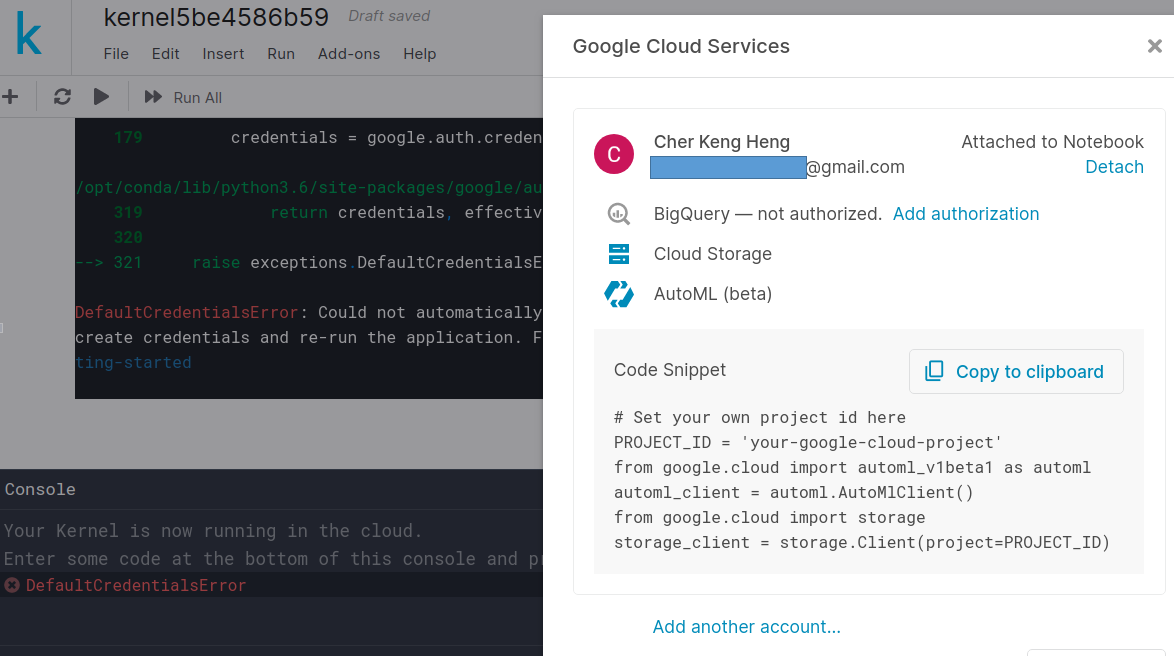", "725039": "Thanks @hengck23 . Since your configuration looks right, I'd want to see if can further diagnose the problem. Would you mind sharing your notebook with myself and mcollins42 so we could take a look at the code and see if we spot any errors?", "725604": "devrishi\n\nI have made the kernel public at:\n\nhttps://www.kaggle.com/hengck23/kernel5be4586b59\n\n\nplease see:\n\n```\n\n#this is ok\n#automl_client = automl.AutoMlClient(credentials=set_credential_from_json_string())\n\n#this fails\nautoml_client = automl.AutoMlClient()\n\n```\n\nnote that private\\_key\\_id,private\\_key values of set\\_credential\\_from\\_json\\_string() has been masked out.", "725625": "How long does it take to train? @hengck23", "743022": "hengck23 Looking at that notebook again, I just realized that you are importing automl and not automl_v1beta1. Our integration was originally written against the beta before v1 was released. I'll need to update our integration to make this work out of the box.\n\nIn the meantime, you should be able to get this to work manually with this code:\n`from kaggle_gcp import KaggleKernelCredentials`\n`automl_client = automl.AutoMlClient(credentials=KaggleKernelCredentials())`" }, "source": "meta" }