{"cells":[{"metadata":{},"cell_type":"markdown","source":"# Implementation of EfficientNetB3 for the APTOS 2019 competition with Keras"},{"metadata":{},"cell_type":"markdown","source":"The Inference Kernel of this notebook can be found here: https://www.kaggle.com/fanconic/efficientnetb3-regression-ensemble-inference?scriptVersionId=19196526\n\n- LB Score: 0.789\n- Private Score: 0.910"},{"metadata":{},"cell_type":"markdown","source":"In this kernel we will implement EfficientNet for medical images ([APTOS 2019](https://www.kaggle.com/c/aptos2019-blindness-detection) competition). EfficientNet was released this June (2019) by Google AI and is the new state-of-the-art on ImageNet. It introduces a systematic way to scale CNN (Convolutional Neural Networks) in a nearly optimal way. For this kernel we will use the B3 version, but feel free to play with the larger models. This kernel provides weights for EfficientNetB0 through B5. Weights for EfficientNetB6 and B7 can be found in [Google AI's repository for EfficientNet](https://github.com/tensorflow/tpu/tree/master/models/official/efficientnet). I highly recommend you to read [the EfficientNet paper](https://arxiv.org/pdf/1905.11946.pdf) as it signifies a fundamental shift in how the Deep Learning community will approach model scaling!\n\nAlso, check out this [video on EfficientNet by Henry AI Labs](https://youtu.be/3svIm5UC94I) for a clear explanation!\n\nIf you like this Kaggle kernel, feel free to give an upvote and leave a comment!"},{"metadata":{},"cell_type":"markdown","source":"Image: an overview of model architectures and their performance on [ImageNet](http://www.image-net.org/). We can see that EfficientNet achieves state-of-the-art and uses a lot less parameters than most modern CNN architectures.\n\n[Source: EfficientNet Paper](https://arxiv.org/pdf/1905.11946.pdf)\n\n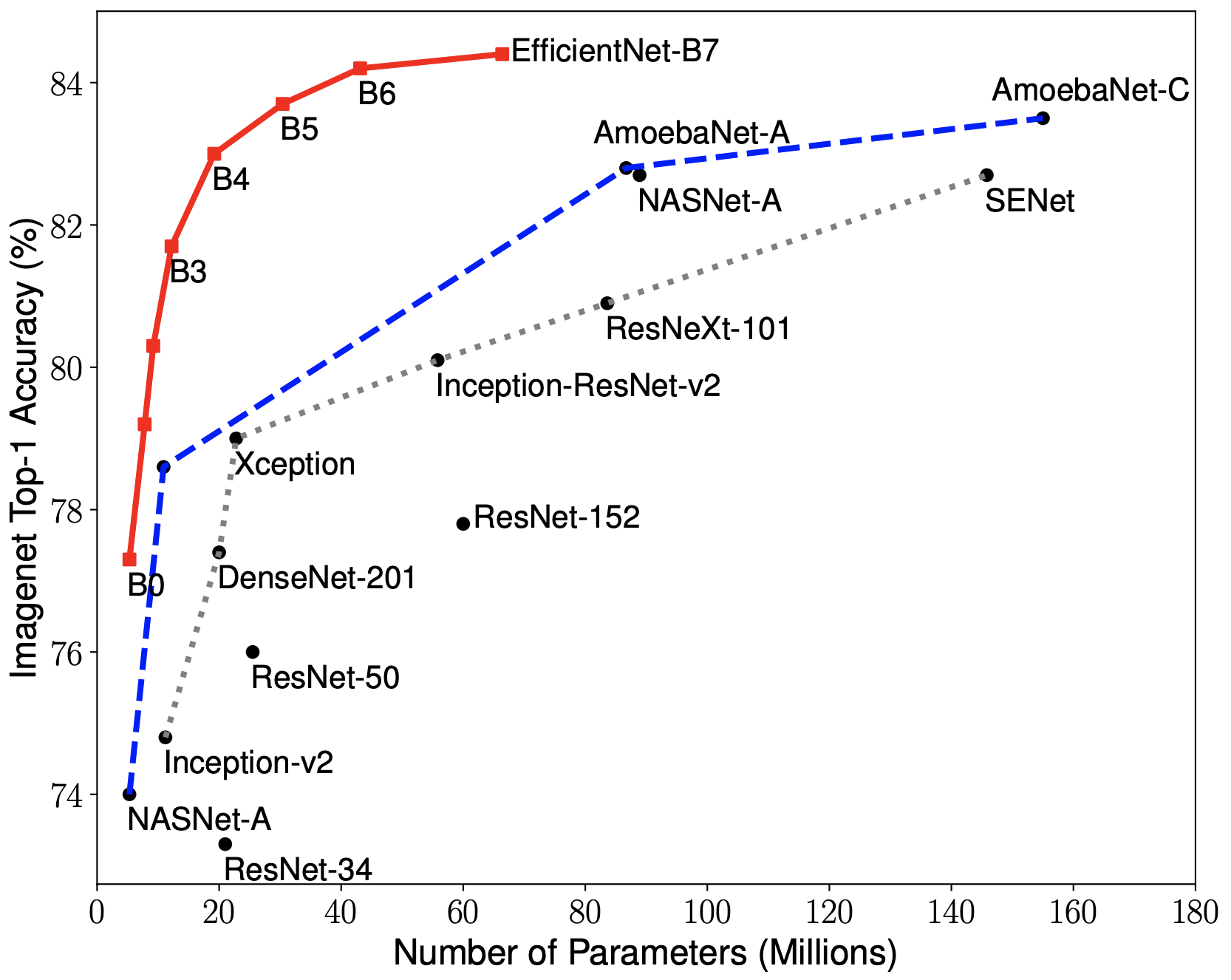"},{"metadata":{},"cell_type":"markdown","source":"## Dependencies "},{"metadata":{},"cell_type":"markdown","source":"Special thanks to [qubvel](https://github.com/qubvel/efficientnet) for sharing an amazing wrapper to get the EfficientNet architecture in one line of code!"},{"metadata":{"_uuid":"8f2839f25d086af736a60e9eeb907d3b93b6e0e5","_cell_guid":"b1076dfc-b9ad-4769-8c92-a6c4dae69d19","trusted":true},"cell_type":"code","source":"import os\nimport sys\n# Repository source: https://github.com/qubvel/efficientnet\nsys.path.append(os.path.abspath('../input/efficientnet/efficientnet-master/efficientnet-master/'))\nfrom efficientnet import EfficientNetB3\nimport gc","execution_count":null,"outputs":[]},{"metadata":{"_uuid":"d629ff2d2480ee46fbb7e2d37f6b5fab8052498a","_cell_guid":"79c7e3d0-c299-4dcb-8224-4455121ee9b0","trusted":true,"_kg_hide-input":true},"cell_type":"code","source":"# Standard dependencies\nimport cv2\nimport time\nimport scipy as sp\nimport numpy as np\nimport pandas as pd\nfrom tqdm import tqdm\nfrom PIL import Image\nfrom functools import partial\nimport matplotlib.pyplot as plt\n\n# Machine Learning\nimport tensorflow as tf\nfrom keras import backend as K\nfrom keras.activations import elu\nfrom keras.optimizers import Adam, Optimizer\nfrom keras.models import Sequential\nfrom keras.callbacks import EarlyStopping\nfrom keras.callbacks import Callback, ModelCheckpoint, ReduceLROnPlateau\nfrom keras.layers import Dense, Conv2D, Flatten, GlobalAveragePooling2D, Dropout\nfrom keras.preprocessing.image import ImageDataGenerator\nfrom sklearn.metrics import cohen_kappa_score\n\n# Path specifications\nKAGGLE_DIR = '../input/aptos2019-blindness-detection/'\nTRAIN_IMG_PATH = '../input/diabetic-retinopathy-resized/resized_train/resized_train/'\nTEST_DF_PATH = KAGGLE_DIR + 'test.csv'\nVAL_IMG_PATH = KAGGLE_DIR + \"train_images/\"\nTEST_IMG_PATH = KAGGLE_DIR + 'test_images/'\n\n# Specify title of our final model\nSAVED_MODEL_NAME = 'effnet_modelB3.h5'\n\n# Set seed for reproducability\nseed = 11\nnp.random.seed(seed)\ntf.set_random_seed(seed)\n\n# For keeping time. GPU limit for this competition is set to ± 9 hours.\nt_start = time.time()\n\n# File sizes and specifications\nprint('\\n# Files and file sizes')\nfor file in os.listdir(KAGGLE_DIR):\n print('{}| {} MB'.format(file.ljust(30), \n str(round(os.path.getsize(KAGGLE_DIR + file) / 1000000, 2))))","execution_count":null,"outputs":[]},{"metadata":{},"cell_type":"markdown","source":"## Preparation "},{"metadata":{},"cell_type":"markdown","source":"By examining the data we can readily see that we do not have that much data (± 700 samples per class). It is probably a good idea to use data augmentation to increase robustness of our model (See the modeling section).\n\nWe could also try to use additional data from previous competitions to increase performance. Although I do not implement this in the kernel, feel free to experiment with adding data. Additional data can be found in [this Kaggle dataset](https://www.kaggle.com/benjaminwarner/resized-2015-2019-blindness-detection-images) (± 35000 additional images)."},{"metadata":{"trusted":true},"cell_type":"code","source":"new_train = pd.read_csv('../input/aptos2019-blindness-detection/train.csv')\nold_train = pd.read_csv('../input/diabetic-retinopathy-resized/trainLabels_cropped.csv')\nduplicates = pd.read_csv('../input/aptos-trained-weights/inconsistent.csv')\nprint(new_train.shape)\nprint(old_train.shape)\nprint(duplicates.shape)\n\nfor img_name in duplicates['id_code'].values:\n new_train = new_train[new_train['id_code'] != img_name]\nprint(new_train.shape)","execution_count":null,"outputs":[]},{"metadata":{"trusted":true},"cell_type":"code","source":"old_train = old_train[['image','level']]\nold_train.columns = new_train.columns\nold_train.diagnosis.value_counts()\n\n'''\n# path columns\nnew_train['id_code'] = '../input/aptos2019-blindness-detection/train_images/' + new_train['id_code'].astype(str) + '.png'\nold_train['id_code'] = '../input/diabetic-retinopathy-resized/resized_train/resized_train/' + old_train['id_code'].astype(str) + '.jpeg'\n'''\n# path columns\nnew_train['id_code'] = new_train['id_code'].astype(str) + '.png'\nold_train['id_code'] = old_train['id_code'].astype(str) + '.jpeg'\n\n\ntrain_df = old_train.copy()\nval_df = new_train.copy()","execution_count":null,"outputs":[]},{"metadata":{"trusted":true},"cell_type":"code","source":"print(\"Image IDs (Train)\")\nprint(f\"Training Images: {train_df.shape[0]}\")\ndisplay(train_df.head())\n\nprint(\"Image IDs (Validation)\")\nprint(f\"Validation Images: {val_df.shape[0]}\")\ndisplay(val_df.head())\n\nprint(\"Image IDs (TEST)\")\ntest_df = pd.read_csv(TEST_DF_PATH)\n# Add extension to id_code\ntest_df['id_code'] = test_df['id_code'] + \".png\"\nprint(f\"Testing Images: {test_df.shape[0]}\")\ndisplay(test_df.head())","execution_count":null,"outputs":[]},{"metadata":{},"cell_type":"markdown","source":"We will use the original images size from the [EfficientNet paper](https://arxiv.org/pdf/1905.11946.pdf). For EfficientNetB3 this is 300x300x3. The original image sizes used for every version of EfficientNet are:\n\n- EfficientNetB0 - (224, 224, 3)\n- EfficientNetB1 - (240, 240, 3)\n- EfficientNetB2 - (260, 260, 3)\n- **EfficientNetB3 - (300, 300, 3)**\n- EfficientNetB4 - (380, 380, 3)\n- EfficientNetB5 - (456, 456, 3)\n- EfficientNetB6 - (528, 528, 3)\n- EfficientNetB7 - (600, 600, 3)\n"},{"metadata":{"trusted":true},"cell_type":"code","source":"# Specify image size\nIMG_WIDTH = 300\nIMG_HEIGHT = 300\nCHANNELS = 3","execution_count":null,"outputs":[]},{"metadata":{},"cell_type":"markdown","source":"## Metric (Quadratic Weighted Kappa) "},{"metadata":{},"cell_type":"markdown","source":"The metric that is used for this competition is Quadratic Weighted Kappa (QWK) ([Kaggle's Explanation](https://www.kaggle.com/c/aptos2019-blindness-detection/overview/evaluation)) \n\nThe formula for weighted kappa is:\n\n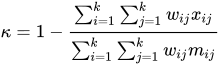\n\nIn this case we are going to optimize Mean Squared Error (MSE) (See Modeling section) since we are using regression and by optimizing MSE we are also optimizing QWK as long as we round predictions afterwards. Additionally we are going to same the model which achieves the best QWK score on the validation data through a custom Keras Callback.\n\nFor a more detailed and practical explanation of QWK I highly recommend [this Kaggle kernel](https://www.kaggle.com/aroraaman/quadratic-kappa-metric-explained-in-5-simple-steps)."},{"metadata":{"trusted":true},"cell_type":"code","source":"def get_preds_and_labels(model, generator):\n \"\"\"\n Get predictions and labels from the generator\n \"\"\"\n preds = []\n labels = []\n for _ in range(int(np.ceil(generator.samples / BATCH_SIZE))):\n x, y = next(generator)\n preds.append(model.predict(x))\n labels.append(y)\n # Flatten list of numpy arrays\n return np.concatenate(preds).ravel(), np.concatenate(labels).ravel()","execution_count":null,"outputs":[]},{"metadata":{"trusted":true},"cell_type":"code","source":"class Metrics(Callback):\n \"\"\"\n A custom Keras callback for saving the best model\n according to the Quadratic Weighted Kappa (QWK) metric\n \"\"\"\n def on_train_begin(self, logs={}):\n \"\"\"\n Initialize list of QWK scores on validation data\n \"\"\"\n self.val_kappas = []\n\n def on_epoch_end(self, epoch, logs={}):\n \"\"\"\n Gets QWK score on the validation data\n and saves the model if the score is better\n than previous epochs\n \"\"\"\n # Get predictions and convert to integers\n y_pred, labels = get_preds_and_labels(model, val_generator)\n y_pred = np.rint(y_pred).astype(np.uint8).clip(0, 4)\n # We can use sklearns implementation of QWK straight out of the box\n # as long as we specify weights as 'quadratic'\n _val_kappa = cohen_kappa_score(labels, y_pred, weights='quadratic')\n self.val_kappas.append(_val_kappa)\n print(f\"val_kappa: {_val_kappa:.4f}\")\n \n # Save best model\n if _val_kappa == max(self.val_kappas):\n print(\"Validation Kappa has improved. Saving model.\")\n self.model.save(SAVED_MODEL_NAME)\n return","execution_count":null,"outputs":[]},{"metadata":{},"cell_type":"markdown","source":"## EDA (Exploratory Data Analysis) "},{"metadata":{},"cell_type":"markdown","source":"For EDA on image datasets I think one should at least examine the label distribution, the images before preprocessing and the images after preprocessing. Through examining these three aspects we can get a good sense of the problem. Note that the distribution on the test set can still vary wildly from the training data."},{"metadata":{"trusted":true,"_kg_hide-input":true},"cell_type":"code","source":"# Label distribution\ntrain_df['diagnosis'].value_counts().sort_index().plot(kind=\"bar\", \n figsize=(12,5), \n rot=0)\nplt.title(\"Label Distribution (Training Set)\", \n weight='bold', \n fontsize=18)\nplt.xticks(fontsize=15)\nplt.yticks(fontsize=15)\nplt.xlabel(\"Label\", fontsize=17)\nplt.ylabel(\"Frequency\", fontsize=17);","execution_count":null,"outputs":[]},{"metadata":{},"cell_type":"markdown","source":"We will visualize a random image from every label to get a general sense of the distinctive features that seperate the classes. We will take this into account and try to enhance these features in our preprocessing. For these images there some to be increasingly more spots and stains on the retina as diabetic retinopathy worsens."},{"metadata":{"trusted":true,"_kg_hide-input":true},"cell_type":"code","source":"# Example from every label\nfig, ax = plt.subplots(1, 5, figsize=(15, 6))\nfor i in range(5):\n sample = train_df[train_df['diagnosis'] == i].sample(1)\n image_name = sample['id_code'].item()\n X = cv2.imread(f\"{TRAIN_IMG_PATH}{image_name}\")\n ax[i].set_title(f\"Image: {image_name}\\n Label = {sample['diagnosis'].item()}\", \n weight='bold', fontsize=10)\n ax[i].axis('off')\n ax[i].imshow(X);","execution_count":null,"outputs":[]},{"metadata":{"trusted":true},"cell_type":"code","source":"# Example from every label\nfig, ax = plt.subplots(1, 5, figsize=(15, 6))\nfor i in range(5):\n sample = val_df[val_df['diagnosis'] == i].sample(1)\n image_name = sample['id_code'].item()\n X = cv2.imread(f\"{VAL_IMG_PATH}{image_name}\")\n ax[i].set_title(f\"Image: {image_name}\\n Label = {sample['diagnosis'].item()}\", \n weight='bold', fontsize=10)\n ax[i].axis('off')\n ax[i].imshow(X);","execution_count":null,"outputs":[]},{"metadata":{},"cell_type":"markdown","source":"## Preprocessing "},{"metadata":{},"cell_type":"markdown","source":"Here we will use the auto-cropping method with Ben's preprocessing as explained in [this kernel](https://www.kaggle.com/ratthachat/aptos-updatedv14-preprocessing-ben-s-cropping)."},{"metadata":{"trusted":true},"cell_type":"code","source":"def crop_image_from_gray(img, tol=7):\n \"\"\"\n Applies masks to the orignal image and \n returns the a preprocessed image with \n 3 channels\n \"\"\"\n # If for some reason we only have two channels\n if img.ndim == 2:\n mask = img > tol\n return img[np.ix_(mask.any(1),mask.any(0))]\n # If we have a normal RGB images\n elif img.ndim == 3:\n gray_img = cv2.cvtColor(img, cv2.COLOR_RGB2GRAY)\n mask = gray_img > tol\n \n check_shape = img[:,:,0][np.ix_(mask.any(1),mask.any(0))].shape[0]\n if (check_shape == 0): # image is too dark so that we crop out everything,\n return img # return original image\n else:\n img1=img[:,:,0][np.ix_(mask.any(1),mask.any(0))]\n img2=img[:,:,1][np.ix_(mask.any(1),mask.any(0))]\n img3=img[:,:,2][np.ix_(mask.any(1),mask.any(0))]\n img = np.stack([img1,img2,img3],axis=-1)\n return img\n \n# Make all images circular (possible data loss)\ndef circle_crop(img): \n \"\"\"\n Create circular crop around image centre \n \"\"\" \n \n img = crop_image_from_gray(img) \n \n height, width, depth = img.shape \n \n x = int(width/2)\n y = int(height/2)\n r = np.amin((x,y))\n \n circle_img = np.zeros((height, width), np.uint8)\n cv2.circle(circle_img, (x,y), int(r), 1, thickness=-1)\n img = cv2.bitwise_and(img, img, mask=circle_img)\n img = crop_image_from_gray(img)\n \n return img \n\ndef preprocess_image_old(path, sigmaX=8):\n \"\"\"\n The whole preprocessing pipeline:\n 1. Read in image\n 2. Apply masks\n 3. Resize image to desired size\n 4. Add Gaussian noise to increase Robustness\n \"\"\"\n image = cv2.imread(path)\n image = cv2.cvtColor(image, cv2.COLOR_BGR2RGB)\n #image = crop_image_from_gray(image)\n image = cv2.resize(image, (IMG_WIDTH, IMG_HEIGHT))\n image = cv2.addWeighted (image,4, cv2.GaussianBlur(image, (0,0) ,sigmaX), -4, 128)\n return image\n\ndef preprocess_image_new(path, sigmaX=8):\n \"\"\"\n The whole preprocessing pipeline:\n 1. Read in image\n 2. Apply masks\n 3. Resize image to desired size\n 4. Add Gaussian noise to increase Robustness\n \"\"\"\n image = cv2.imread(path)\n image = cv2.cvtColor(image, cv2.COLOR_BGR2RGB)\n image = crop_image_from_gray(image)\n image = cv2.resize(image, (IMG_WIDTH, IMG_HEIGHT))\n image = cv2.addWeighted (image,4, cv2.GaussianBlur(image, (0,0) ,sigmaX), -4, 128)\n return image","execution_count":null,"outputs":[]},{"metadata":{},"cell_type":"markdown","source":"After preprocessing we have managed to enhance the distinctive features in the images. This will increase performance when we train our EfficientNet model."},{"metadata":{"trusted":true,"_kg_hide-input":true},"cell_type":"code","source":"# Example of preprocessed images from every label\nfig, ax = plt.subplots(1, 5, figsize=(15, 6))\nfor i in range(5):\n sample = train_df[train_df['diagnosis'] == i].sample(1)\n image_name = sample['id_code'].item()\n X = preprocess_image_new(f\"{TRAIN_IMG_PATH}{image_name}\")\n ax[i].set_title(f\"Image: {image_name}\\n Label = {sample['diagnosis'].item()}\", \n weight='bold', fontsize=10)\n ax[i].axis('off')\n ax[i].imshow(X);","execution_count":null,"outputs":[]},{"metadata":{},"cell_type":"markdown","source":"## Keras Generator "},{"metadata":{"trusted":true},"cell_type":"code","source":"BATCH_SIZE = 32\n\n# Add Image augmentation to our generator\ntrain_datagen = ImageDataGenerator(rotation_range=90,\n horizontal_flip=True,\n vertical_flip=True,\n zoom_range= 0.3,\n fill_mode= 'constant',\n brightness_range=(0.5,2),\n cval = 0,\n rescale=1./255)\n\n# Use the dataframe to define train and validation generators\ntrain_generator = train_datagen.flow_from_dataframe(train_df, \n x_col='id_code', \n y_col='diagnosis',\n directory = TRAIN_IMG_PATH,\n target_size=(IMG_WIDTH, IMG_HEIGHT),\n batch_size=BATCH_SIZE,\n class_mode='other',\n seed=seed)\n\nval_generator = train_datagen.flow_from_dataframe(val_df, \n x_col='id_code', \n y_col='diagnosis',\n directory = VAL_IMG_PATH,\n target_size=(IMG_WIDTH, IMG_HEIGHT),\n batch_size=BATCH_SIZE,\n class_mode='other',\n shuffle= False,\n seed=seed)","execution_count":null,"outputs":[]},{"metadata":{},"cell_type":"markdown","source":"## Modeling (EfficientNetB3) "},{"metadata":{"trusted":true},"cell_type":"code","source":"# Load in EfficientNetB3\neffnet = EfficientNetB3(weights=None,\n include_top=False,\n input_shape=(IMG_WIDTH, IMG_HEIGHT, CHANNELS))\n\neffnet.load_weights('../input/efficientnet-keras-weights-b0b5/efficientnet-b3_imagenet_1000_notop.h5')\n\ndef build_model():\n \"\"\"\n A custom implementation of EfficientNetB3\n for the APTOS 2019 competition\n (Regression with 5 classes)\n \"\"\"\n model = Sequential()\n model.add(effnet)\n model.add(GlobalAveragePooling2D())\n model.add(Dropout(0.5))\n model.add(Dense(5, activation=elu))\n model.add(Dense(1, activation=\"linear\"))\n\n return model\n\n# Initialize our model\nmodel = build_model()\nprint(model.summary())","execution_count":null,"outputs":[]},{"metadata":{},"cell_type":"markdown","source":"In the first training phase we only train the top layer and freeze the pre-trained model. This is the traditional transfer learning approach were we can optimize and model fast for almost any image content. Since the pre-trained model was trained on [ImageNet](http://www.image-net.org/) and not on medical images, there are some limitations to this approach for out challenge. We will try to counter those limitations by adding a second training phase.\n\nAfter each epoch we save the model if it is better than the previous one, according to the Quadratic Weighted Kappa score on the validation set. We also monitor the Mean Squared Error and stop training if it does not improve for 2 epochs. This way we can counter overfitting through monitoring Quadratic Weighted Kappa and Mean Squared Error.\n\nAnother option we could use is to directly use Quadratic Weighted Kappa as a loss function. Feel free to experiment with this. An implementation of a [QWK loss function for Tensorflow/Keras can be found in this Kaggle kernel](https://www.kaggle.com/christofhenkel/weighted-kappa-loss-for-keras-tensorflow)."},{"metadata":{"trusted":true},"cell_type":"code","source":"# For tracking Quadratic Weighted Kappa score and saving best weights\nkappa_metrics = Metrics()\n# Monitor MSE to avoid overfitting\nrlrop = ReduceLROnPlateau(monitor='val_loss', \n patience=10,\n verbose=1,\n factor=.5, \n min_lr=1e-7)\n\ncp = ModelCheckpoint('val_model.h5', monitor='val_loss', verbose=1, save_best_only=True, mode='min')\n","execution_count":null,"outputs":[]},{"metadata":{},"cell_type":"markdown","source":"\n### Warm Up Phase\n\nAs we are using ADAM optimizer, we initially train one epoch on the old image data with a very small learning rate. This prevents the model to get stuck in bad local optimum"},{"metadata":{"trusted":true},"cell_type":"code","source":"# Warm Up 1\nmodel.compile(loss='mse',\n optimizer=Adam(1e-6, decay=1e-6), \n metrics=['mse', 'acc'])\n\n\nprint(K.eval(model.optimizer.lr))","execution_count":null,"outputs":[]},{"metadata":{"trusted":true},"cell_type":"code","source":"model.fit_generator(train_generator,\n steps_per_epoch=train_generator.samples // BATCH_SIZE,\n epochs=1,\n validation_data=val_generator,\n validation_steps = val_generator.samples // BATCH_SIZE,\n callbacks=[kappa_metrics])","execution_count":null,"outputs":[]},{"metadata":{},"cell_type":"markdown","source":"### Pretrain¶\n\nNow we pretrain the model on the old competition images. There are roughly 35000 images, thus we only train for four epochs. Additionally, we adjust the learning rate to 0.0001\n"},{"metadata":{"trusted":true},"cell_type":"code","source":"K.set_value(model.optimizer.lr, 1e-4)\nprint(K.eval(model.optimizer.lr))","execution_count":null,"outputs":[]},{"metadata":{"trusted":true},"cell_type":"code","source":"model.fit_generator(train_generator,\n steps_per_epoch=train_generator.samples // BATCH_SIZE,\n epochs=5,\n validation_data=val_generator,\n validation_steps = val_generator.samples // BATCH_SIZE,\n callbacks=[kappa_metrics, cp])","execution_count":null,"outputs":[]},{"metadata":{"trusted":true,"_kg_hide-input":true},"cell_type":"code","source":"# Visualize mse for first training phase\nhistory_df = pd.DataFrame(model.history.history)\nhistory_df[['loss', 'val_loss']].plot(figsize=(12,5))\nplt.title(\"Loss (MSE) for first training phase\", fontsize=16, weight='bold')\nplt.xlabel(\"Epoch\")\nplt.ylabel(\"Loss (MSE)\")\nhistory_df[['acc', 'val_acc']].plot(figsize=(12,5))\nplt.title(\"Accuracy for first training phase\", fontsize=16, weight='bold')\nplt.xlabel(\"Epoch\")\nplt.ylabel(\"% Accuracy\");","execution_count":null,"outputs":[]},{"metadata":{},"cell_type":"markdown","source":"### Training\n\nIn the second training phase we unfreeze all layers a fine-tune all layers of the model with the new competition data. Therefore, we have to split the new data set into training and valuation set and create new flow generators.\n"},{"metadata":{"trusted":true},"cell_type":"code","source":"# Use the dataframe to define train and validation generators\n# Add Image augmentation to our generator\ntrain_datagen = ImageDataGenerator(rotation_range=90,\n validation_split=0.2,\n horizontal_flip=True,\n vertical_flip=True,\n zoom_range= 0.3,\n fill_mode= 'constant',\n brightness_range=(0.5,2),\n cval = 0,\n rescale=1./255)\n\ntrain_generator = train_datagen.flow_from_dataframe(val_df, \n x_col='id_code', \n y_col='diagnosis',\n directory = VAL_IMG_PATH,\n target_size=(IMG_WIDTH, IMG_HEIGHT),\n batch_size=BATCH_SIZE,\n class_mode='other',\n subset='training',\n seed=seed)\n\nval_generator = train_datagen.flow_from_dataframe(val_df, \n x_col='id_code', \n y_col='diagnosis',\n directory = VAL_IMG_PATH,\n target_size=(IMG_WIDTH, IMG_HEIGHT),\n batch_size=BATCH_SIZE,\n class_mode='other',\n shuffle= False,\n subset='validation',\n seed=seed)\n\ngc.collect()","execution_count":null,"outputs":[]},{"metadata":{"trusted":true},"cell_type":"code","source":"model.load_weights('val_model.h5')","execution_count":null,"outputs":[]},{"metadata":{"trusted":true,"_kg_hide-output":true},"cell_type":"code","source":"# Start second training phase (fine-tune all layers)\nmodel.fit_generator(train_generator,\n steps_per_epoch=train_generator.samples // BATCH_SIZE,\n epochs=20,\n validation_data=val_generator,\n validation_steps=val_generator.samples // BATCH_SIZE,\n callbacks=[kappa_metrics, rlrop, cp])","execution_count":null,"outputs":[]},{"metadata":{"trusted":true,"_kg_hide-input":true},"cell_type":"code","source":"# Visualize MSE for second training phase\nhistory_df = pd.DataFrame(model.history.history)\nhistory_df[['loss', 'val_loss']].plot(figsize=(12,5))\nplt.title(\"Loss (MSE) for second training phase\", fontsize=16, weight='bold')\nplt.xlabel(\"Epoch\")\nplt.ylabel(\"Loss (MSE)\")\nhistory_df[['acc', 'val_acc']].plot(figsize=(12,5))\nplt.title(\"Accuracy for second training phase\", fontsize=16, weight='bold')\nplt.xlabel(\"Epoch\")\nplt.ylabel(\"% Accuracy\");","execution_count":null,"outputs":[]},{"metadata":{},"cell_type":"markdown","source":"## Evaluation "},{"metadata":{"trusted":true},"cell_type":"code","source":"# Load best weights according to validation kappa score\n#model.load_weights(SAVED_MODEL_NAME)","execution_count":null,"outputs":[]},{"metadata":{"trusted":true},"cell_type":"code","source":"# Load best weights according to validation mse score\nmodel.load_weights('val_model.h5')","execution_count":null,"outputs":[]},{"metadata":{},"cell_type":"markdown","source":"To evaluate our performance we predict values from the generator and round them of to the nearest integer to get valid predictions. After that we calculate the Quadratic Weighted Kappa score on the training set and the validation set."},{"metadata":{"trusted":true,"_kg_hide-input":true},"cell_type":"code","source":"# Calculate QWK on train set\ny_train_preds, train_labels = get_preds_and_labels(model, train_generator)\ny_train_preds = np.rint(y_train_preds).astype(np.uint8).clip(0, 4)\n\n# Calculate score\ntrain_score = cohen_kappa_score(train_labels, y_train_preds, weights=\"quadratic\")\n\n# Calculate QWK on validation set\ny_val_preds, val_labels = get_preds_and_labels(model, val_generator)\ny_val_preds = np.rint(y_val_preds).astype(np.uint8).clip(0, 4)\n\n# Calculate score\nval_score = cohen_kappa_score(val_labels, y_val_preds, weights=\"quadratic\")","execution_count":null,"outputs":[]},{"metadata":{"_kg_hide-input":true,"trusted":true},"cell_type":"code","source":"print(f\"The Training Cohen Kappa Score is: {round(train_score, 5)}\")\nprint(f\"The Validation Cohen Kappa Score is: {round(val_score, 5)}\")","execution_count":null,"outputs":[]},{"metadata":{},"cell_type":"markdown","source":"We can optimize the validation score by doing a [Grid Search](https://scikit-learn.org/stable/modules/generated/sklearn.model_selection.GridSearchCV.html) over rounding thresholds instead of doing \"normal\" rounding. The \"OptimizedRounder\" class by [Abhishek Thakur](https://www.kaggle.com/abhishek) is a great way to do this. The original class can be found in [this Kaggle kernel](https://www.kaggle.com/abhishek/optimizer-for-quadratic-weighted-kappa)."},{"metadata":{"trusted":true},"cell_type":"code","source":"class OptimizedRounder(object):\n \"\"\"\n An optimizer for rounding thresholds\n to maximize Quadratic Weighted Kappa score\n \"\"\"\n def __init__(self):\n self.coef_ = 0\n\n def _kappa_loss(self, coef, X, y):\n \"\"\"\n Get loss according to\n using current coefficients\n \"\"\"\n X_p = np.copy(X)\n for i, pred in enumerate(X_p):\n if pred < coef[0]:\n X_p[i] = 0\n elif pred >= coef[0] and pred < coef[1]:\n X_p[i] = 1\n elif pred >= coef[1] and pred < coef[2]:\n X_p[i] = 2\n elif pred >= coef[2] and pred < coef[3]:\n X_p[i] = 3\n else:\n X_p[i] = 4\n\n ll = cohen_kappa_score(y, X_p, weights='quadratic')\n return -ll\n\n def fit(self, X, y):\n \"\"\"\n Optimize rounding thresholds\n \"\"\"\n loss_partial = partial(self._kappa_loss, X=X, y=y)\n initial_coef = [0.5, 1.5, 2.5, 3.5]\n self.coef_ = sp.optimize.minimize(loss_partial, initial_coef, method='nelder-mead')\n\n def predict(self, X, coef):\n \"\"\"\n Make predictions with specified thresholds\n \"\"\"\n X_p = np.copy(X)\n for i, pred in enumerate(X_p):\n if pred < coef[0]:\n X_p[i] = 0\n elif pred >= coef[0] and pred < coef[1]:\n X_p[i] = 1\n elif pred >= coef[1] and pred < coef[2]:\n X_p[i] = 2\n elif pred >= coef[2] and pred < coef[3]:\n X_p[i] = 3\n else:\n X_p[i] = 4\n return X_p\n\n def coefficients(self):\n return self.coef_['x']","execution_count":null,"outputs":[]},{"metadata":{"trusted":true},"cell_type":"code","source":"# Optimize on validation data and evaluate again\ny_val_preds, val_labels = get_preds_and_labels(model, val_generator)\noptR = OptimizedRounder()\noptR.fit(y_val_preds, val_labels)\ncoefficients = optR.coefficients()\nopt_val_predictions = optR.predict(y_val_preds, coefficients)\nnew_val_score = cohen_kappa_score(val_labels, opt_val_predictions, weights=\"quadratic\")","execution_count":null,"outputs":[]},{"metadata":{"_kg_hide-input":true,"trusted":true},"cell_type":"code","source":"print(f\"Optimized Thresholds:\\n{coefficients}\\n\")\nprint(f\"The Validation Quadratic Weighted Kappa (QWK)\\n\\\nwith optimized rounding thresholds is: {round(new_val_score, 5)}\\n\")\nprint(f\"This is an improvement of {round(new_val_score - val_score, 5)}\\n\\\nover the unoptimized rounding\")","execution_count":null,"outputs":[]},{"metadata":{"trusted":true,"_kg_hide-input":true},"cell_type":"code","source":"# Check kernels run-time. GPU limit for this competition is set to ± 9 hours.\nt_finish = time.time()\ntotal_time = round((t_finish-t_start) / 3600, 4)\nprint('Kernel runtime = {} hours ({} minutes)'.format(total_time, \n int(total_time*60)))","execution_count":null,"outputs":[]}],"metadata":{"kernelspec":{"language":"python","display_name":"Python 3","name":"python3"},"language_info":{"pygments_lexer":"ipython3","nbconvert_exporter":"python","version":"3.6.4","file_extension":".py","codemirror_mode":{"name":"ipython","version":3},"name":"python","mimetype":"text/x-python"}},"nbformat":4,"nbformat_minor":1}